Best Automation Tools for Small Businesses in 2026: Options Compared
The best automation tools for small businesses compared: Zapier, Make, n8n, Power Automate, IFTTT, Activepieces and startbuddi, with prices and limits.


Photo: Kelly Sikkema / Unsplash
The best automation tools for small businesses in 2026 are Zapier for the widest choice of apps, Make for complex flows on a small budget, and startbuddi Automations if your bookings, invoices and client messages already live in one place. Microsoft 365 users should look at Power Automate first, and technical teams at n8n or Activepieces.
startbuddi is our product. We’ve kept it in the list because it fits one kind of reader, and we say where it doesn’t.
Key takeaways
- There are two kinds of tool here. Connectors (Zapier, Make, n8n, Activepieces, IFTTT, Power Automate) pass data between apps you already pay for. Built-in automation (startbuddi) runs inside one workspace, so there’s nothing to connect.
- Free plans are real but small: Zapier’s free plan runs two-step Zaps only, and Make’s free plan allows two active scenarios.
- Pricing is counted in tasks, credits, executions or runs. Read what one “unit” means before you compare prices.
- Start with the one job that costs you the most time each week, usually a reply to a new enquiry, a booking reminder or an invoice chaser.
- If a tool needs a developer to keep it running, it isn’t cheap, whatever the price says.
The best automation tools for small businesses at a glance
Prices are the vendors’ own published US prices, checked on 1 October 2026. “Annual” means the monthly price when you pay for a year.
| Tool | Best for | Starting paid price | Free plan | Standout feature |
|---|---|---|---|---|
| Zapier | Connecting the most apps with the least setup | Professional from $19.99 a month (annual) | Yes, 100 tasks a month, two-step Zaps | The largest app directory of the group |
| Make | Visual, multi-step flows on a budget | Core $9 a month (monthly), 10,000 credits | Yes, 1,000 credits, 2 active scenarios | A canvas that shows branches and loops |
| n8n | Technical teams who want control | Starter €20 a month (annual) | Free self-hosted Community Edition | Self-host it and pay nothing for software |
| Microsoft Power Automate | Businesses on Microsoft 365 | Premium $15 per user a month (annual) | Free licence for standard connectors | Included use rights with many Microsoft 365 plans |
| IFTTT | Very simple personal and smart-device tasks | Pro $2.99 a month | Yes, 2 applets | Cheapest paid tier in the list |
| Activepieces | Open-source, flat pricing | Plus $20 a month | Yes, 1,000 credits a month | Flat team price and a self-hosted edition |
| startbuddi Automations | Service businesses running clients, bookings and invoices in one workspace | See pricing (Automations is on paid plans from Starter) | Free plan available, Automations locked on it | Triggers from bookings, forms, invoices and inbox messages, with no connecting |
How we chose
We looked for tools a small business owner can set up and keep running without hiring someone. Each one had to meet five tests:
- A published price. Every price above comes from the vendor’s own pricing page, checked on 1 October 2026. Prices change, so check again before you buy.
- A free plan or trial you can test with your own work.
- No code needed for common jobs, even if code is an option.
- Coverage of everyday small-business jobs: form replies, booking reminders, invoice follow-ups, copying data into a spreadsheet, alerting the team.
- Honest limits. We list what each tool can’t do or where its pricing bites.
We haven’t run hands-on tests of the other tools for this page. Everything we say about them comes from their public pricing and documentation, linked in each section.
1. Zapier
What it is. Zapier connects web apps with “Zaps”: when something happens in one app (the trigger), Zapier does something in another (the action). It’s the tool most people mean when they say “automation”.
Best for. Owners who use a mix of popular apps and want them to talk to each other quickly.
Key features. A huge app directory, multi-step Zaps on paid plans, filters and paths, and add-on products such as Tables, Forms and AI agents.
Pricing. According to Zapier’s pricing page, the Free plan includes 100 tasks a month and two-step Zaps only. Professional starts at $19.99 a month billed annually ($29.99 billed monthly) for 750 tasks, and Team starts at $69 a month billed annually. A task is counted each time Zapier successfully completes an action step; triggers and failed steps don’t count.
Pros.
- Almost any app you use will have a Zapier connection.
- Setup is quick for simple “when this, then that” jobs.
- Clear task counting.
Cons.
- Costs climb fast as tasks grow, because every action step counts.
- Multi-step workflows need a paid plan.
- Your data passes through one more company, so you have one more account to secure.
Who should skip it. Anyone whose whole business already runs in one app with its own automation. Paying per task to move data you don’t need to move is waste.
2. Make
What it is. Make (formerly Integromat) builds automations on a visual canvas. You drag modules into “scenarios” and can see branches, filters and loops as a diagram.
Best for. Owners or assistants who are comfortable thinking in flowcharts and want complex flows without paying Zapier-level prices.
Key features. Visual scenario builder, routers for branching, data mapping between steps, scheduling and error handling.
Pricing. Make’s pricing page lists a Free plan with up to 1,000 credits a month, two active scenarios and a 15-minute minimum interval between runs. Paid plans start with Core at $9 a month for 10,000 credits when paid monthly, then Pro at $16 and Teams at $29. Make says annual billing saves 15% or more.
Pros.
- More operations for the money than most rivals.
- The canvas makes it easier to see what a flow does.
- Good for multi-step jobs like “new form, check a value, create a contact, send two different emails”.
Cons.
- The learning curve is steeper than Zapier’s.
- Credits are used by each module run, so a busy scenario can burn through them.
- Free scenarios run at 15-minute intervals, not instantly.
Who should skip it. Anyone who wants to set something up in ten minutes and never look at it again.
3. n8n
What it is. n8n is a workflow automation tool you can self-host or use as a cloud service. It mixes drag-and-drop nodes with the option to write code inside a step.
Best for. Teams with a technical person who wants full control over data and costs.
Key features. Self-hosting, code steps, AI agent nodes and unlimited steps per workflow.
Pricing. n8n’s pricing page lists the Starter cloud plan at €20 a month billed annually for 2,500 workflow executions, and Pro at €50 a month billed annually for 10,000 executions. One execution is a whole workflow run, however many steps it has. The self-hosted Community Edition is free.
Pros.
- Counting whole runs instead of steps is kinder to long workflows.
- Self-hosting keeps data on your own server.
- Very flexible for developers.
Cons.
- Self-hosting means you’re responsible for updates, backups and security.
- Not the friendliest choice for a non-technical owner.
- Cloud prices are in euros, so non-euro businesses pay currency conversion.
Who should skip it. A solo owner with no technical help. The free software isn’t free if you spend Saturdays fixing a server.
4. Microsoft Power Automate
What it is. Microsoft’s automation tool, built into the Microsoft 365 world: Outlook, Teams, SharePoint, Excel and OneDrive.
Best for. Businesses that already run on Microsoft 365 and want to automate approvals, file handling and email.
Key features. Cloud flows, approval flows, desktop flows that copy what a person does on screen (robotic process automation), and templates for Microsoft apps.
Pricing. Microsoft’s Power Automate licensing guide says work or school accounts get a Free licence for cloud flows with standard connectors, and many Microsoft 365 plans include limited use rights. Premium connectors and wider desktop automation need a paid licence. The Power Automate pricing page lists Premium at $15 per user a month, paid yearly.
Pros.
- You may already be licensed for the basics.
- Deep links with Outlook, Teams and Excel.
- Approvals are easy to build.
Cons.
- Licensing is confusing: which connectors are “standard” or “premium” decides what you pay.
- Weaker for apps outside the Microsoft world.
- The editor feels built for IT teams.
Who should skip it. Google Workspace users, and anyone whose main tools aren’t Microsoft.
5. IFTTT
What it is. “If This Then That” runs small automations called applets, popular for smart-home devices, social posting and personal tasks.
Best for. Simple, single-purpose jobs such as saving social posts to a sheet or getting a phone alert.
Key features. A large library of ready-made applets and phone and device integrations.
Pricing. IFTTT’s plans page lists Free with 2 applets, Pro at $2.99 a month (20 applets and multi-action applets) and Pro+ at $8.99 a month (unlimited applets, queries and filter code).
Pros.
- The cheapest paid plan here.
- Very easy to start.
Cons.
- Thin on business apps such as CRMs, invoicing and booking tools.
- Limited logic for anything beyond one trigger and a few actions.
Who should skip it. Anyone automating client work. It’s a personal productivity tool more than a business one.
6. Activepieces
What it is. An open-source automation tool with a hosted cloud version and a self-hosted community edition.
Best for. Small teams that like Zapier’s simplicity but want open source and flat pricing.
Key features. Unlimited flows on every plan, a visual builder and AI steps.
Pricing. Activepieces’ pricing page lists a Free plan with 1,000 credits a month and unlimited flows, Plus at $20 a month with 10,000 credits for up to 5 users, and Team at $200 a month with 50,000 credits for 25 users.
Pros.
- Flat pricing for a small team.
- A self-hosted option if you outgrow the cloud.
Cons.
- A smaller app library than Zapier or Make.
- A younger product, so expect gaps in less common apps.
Who should skip it. Businesses that rely on niche apps; check the app list first.
7. startbuddi Automations
startbuddi is our product.
What it is. startbuddi is a workspace for service businesses: customers and an inbox, bookings, invoices and payments, projects, marketing and more. Automations is the “when this happens, do that” engine that runs across all of it. Because the data is already in one place, you don’t connect anything.
Best for. Service businesses (salons, cleaners, consultants, agencies, trades) that want their booking reminders, form replies, invoice follow-ups and nurture emails in the same place as the clients they’re about.
Key features.
- Triggers from inside the workspace: form submitted, new contact, tag added, new booking, booking cancelled or no-show, payment succeeded, invoice paid or overdue, email clicks, and messages received on WhatsApp, Facebook, Instagram or Telegram.
- Steps such as send email, send SMS, send a WhatsApp message (an approved WhatsApp template is needed to message people who haven’t written to you recently), send a payment link, wait, branch on a condition, create a task, add a tag, notify the team and send the event to a webhook. Text and WhatsApp steps need an SMS connection or a connected WhatsApp number first.
- Six ready-made templates, including a booking reminder flow, overdue invoice recovery and a cancellation win-back.
- Tell Chip what you want. Type something like “When someone books, send a confirmation and remind me”, and Chip, startbuddi’s AI assistant, drafts the flow and the messages. It saves as an inactive draft, so nothing runs until you switch it on.
- A test mode and a review screen that shows who can be reached before you activate.
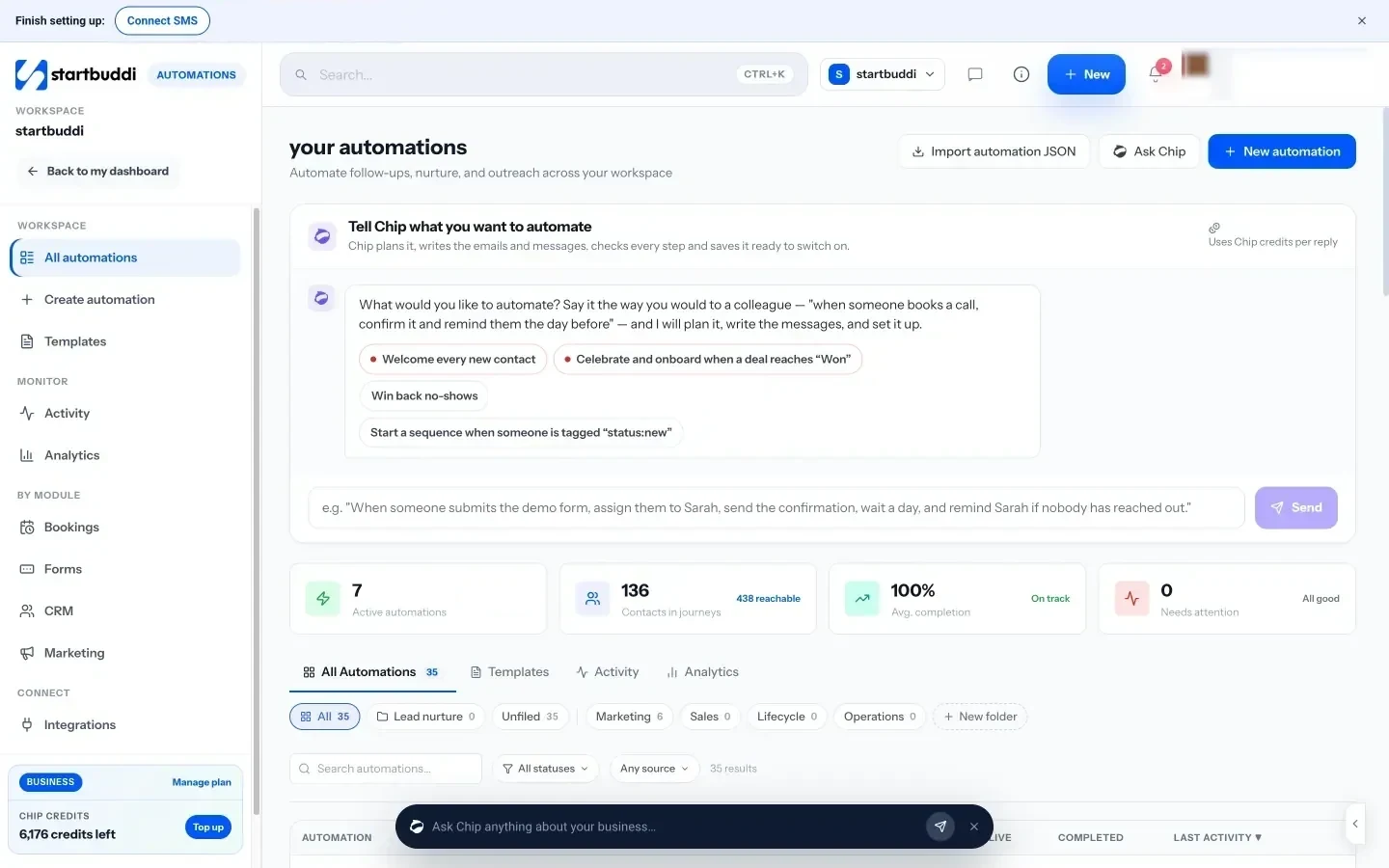
Pricing. Automations is included on paid plans from Starter, with a monthly allowance of runs that grows with the plan. The Free plan doesn’t include Automations. See pricing for current plans.
Pros.
- No connecting, no per-step tasks to count between apps.
- Triggers come from real business events: a booking, a paid invoice, a WhatsApp message.
- Chip can draft the whole flow from one sentence.
Cons.
- It automates what happens inside startbuddi. It isn’t a general connector for hundreds of outside apps; use the webhook step or a connector tool for those.
- It doesn’t connect to Slack, so it can’t post alerts to a Slack channel.
- Date-based triggers (such as birthdays) and some project triggers aren’t live yet.
- Runs are capped per month on every plan.
- The Free plan doesn’t include it.
Who should skip it. Businesses happy with their current apps that only need to pass data between them. A connector tool is the better fit there.
Which type of automation tool do you need?
Before comparing prices, decide which kind of tool you’re buying.
| Your situation | Type to look at | Example tools |
|---|---|---|
| You use 4 to 8 separate apps and want them to share data | Connector | Zapier, Make, Activepieces |
| You have a developer or a technical partner | Self-hostable connector | n8n, Activepieces |
| Everything runs on Microsoft 365 | Platform automation | Power Automate |
| Clients, bookings and invoices live in one workspace | Built-in automation | startbuddi Automations |
| You want one phone or smart-device shortcut | Personal automation | IFTTT |
Many businesses end up with both kinds: built-in automation for core client work and a connector for the odd outside app.
A worked example: what the same job costs to run
Here is an illustration, not a quote. A cleaning company in Abuja gets 120 enquiries a month through its website form. For each one, it wants to (1) add the person to its contact list, (2) send a reply email and (3) alert the owner on her phone.
- On a connector tool that counts each action step as a task, that’s 3 actions × 120 enquiries = 360 tasks a month, plus extra tasks for any follow-up email two days later (another 120). That’s 480 tasks, which is beyond Zapier’s 100-task free plan, so it needs a paid tier.
- On a tool that counts whole runs, the same job is 120 executions a month, or 240 with the follow-up as a separate workflow.
- In a built-in tool, the form, contact list and email are already in one place, so there is nothing to connect. The flow uses one run per enquiry from the plan’s monthly allowance.
The lesson: count how many times a month the trigger fires, then multiply by the number of steps, and compare that number against each tool’s unit.
How to choose an automation tool for your small business
- Write down your top three time-wasters. Be specific: “copying form entries into a spreadsheet”, “reminding clients about tomorrow’s appointment”, “chasing invoices after 7 days”.
- List where each job’s data lives. If it’s all in one tool already, check that tool’s own automation before buying another.
- Count your volume. Triggers per month × steps per run. Compare against tasks, credits or executions.
- Test the free plan with one real job, not a demo. Run it for two weeks.
- Check who will fix it when it breaks. Every automation fails sometimes; someone needs to see the error and act.
- Check privacy and consent. Automated marketing emails and texts still need permission. The UK’s Information Commissioner’s Office guidance on electronic marketing is a good primer, and Nigerian businesses should follow the Nigeria Data Protection Act.
Our guide on how to automate your small business walks through picking the first job, and our post on business workflow automation examples has ideas by department. If Zapier’s pricing is the problem, see our list of Zapier alternatives.
Common mistakes when automating a small business
- Automating a messy process. If you can’t write the steps on paper, the automation will only make the mess faster.
- Sending too many messages. Three reminders for one appointment annoys people. One clear reminder at the right time works better.
- Forgetting the exit. A follow-up sequence should stop when the person replies or pays.
- No owner. Nobody notices a broken flow for weeks, and leads go unanswered.
- Ignoring the unit cost. A cheap plan with a small task allowance can cost more than a pricier plan once you scale.
Automate your client work in one place
If your bookings, forms, invoices and client messages are in startbuddi, Automations runs the follow-ups for you, and Chip can draft the first flow from a sentence. Start free, no card needed, then compare plans on our pricing page or read how startbuddi handles CRM automation workflows. New to the idea? Our workflow automation and CRM automation explainers cover the basics.
Frequently asked questions
What is the best free automation tool for a small business?
Zapier, Make and Activepieces all have free plans you can use for real work. Zapier's free plan is limited to two-step Zaps and 100 tasks a month, Make's to two active scenarios and 1,000 credits, and Activepieces' to 1,000 credits. If you have a technical person, n8n's self-hosted Community Edition is free software.
What should a small business automate first?
Automate the job that happens most often and costs you replies or money when it's late. For most service businesses that's answering new enquiries, sending booking reminders or following up unpaid invoices. Start with one, measure it for two weeks, then add the next.
Is Zapier worth it for a small business?
Zapier is worth it when you rely on several separate apps that need to share data, because it connects more apps than most rivals. It's less worth it when most of your work already sits in one tool with built-in automation, since you pay per task for moves you may not need.
What is the difference between Zapier and Make?
Both connect apps. Zapier is quicker to set up for simple jobs and counts tasks per successful action. Make uses a visual canvas suited to complex, branching flows and usually gives more operations for the price, at the cost of a steeper learning curve.
Do I need to code to use automation tools?
No. Every tool in this list can handle common jobs without code. n8n and Activepieces let you add code steps if you want them, and Power Automate's desktop flows suit IT-minded users, but none of them require it for everyday tasks.
Are automation tools safe for customer data?
They can be, if you choose reputable vendors, use strong passwords and two-factor sign-in, and only pass the data each step needs. Each connector you add is another account with access to your data, which is one reason some businesses prefer built-in automation in the tool where the data already lives.
Tiwalade Joanna Okedara-Kalu is the founder, CEO and CTO of startbuddi, the business system that brings clients, bookings, invoices, projects, marketing and the Chip AI assistant into one place. Tiwalade builds software around how service businesses really work day to day, and writes about client management, getting paid on time and why small businesses outgrow the tools they start with.
Founded startbuddi and leads its product and engineering