Best CRM for Contractors: 11 Options Compared for 2026
The best CRM for contractors compared: 11 tools for general, roofing, electrical and remodeling work, with prices and free plans checked 14 October 2026.


Photo: Kelly Sikkema / Unsplash
The best CRM for contractors depends on the work. Jobber is the best all-round pick for service contractors (electrical, plumbing, painting) who quote, schedule and invoice small jobs. Contractor Foreman suits general and remodeling contractors that need estimates, schedules and job costing for projects. JobNimbus suits roofing and exterior contractors that run jobs through boards.
startbuddi is our product. It’s on this list for a specific kind of contractor, and we’ve listed its limits plainly. Prices below come from each vendor’s own website, checked on 14 October 2026.
Key takeaways
- Contractors need more than a contact list. A useful contractor CRM tracks the lead, the site visit, the estimate, the job and the final invoice in one record.
- Field service tools and project tools are different. Jobber, Housecall Pro and ServiceTitan suit many small service jobs a week; Contractor Foreman, Knowify and JobNimbus suit fewer, longer projects.
- Pricing transparency varies a lot. Jobber, Housecall Pro, Contractor Foreman and Knowify publish prices. ServiceTitan, AccuLynx and JobNimbus quote on request.
- Only three tools here have a free plan: HubSpot, Zoho Bigin and startbuddi. None of them is built for job scheduling and costing.
- General CRMs like HubSpot and Pipedrive are strong at sales follow-up but have no scheduling, estimating or job costing for trades work.
The best CRM for contractors: comparison table
| Tool | Best for | Starting price (checked 14 Oct 2026) | Free plan | Standout feature |
|---|---|---|---|---|
| Jobber | Service contractors with many small jobs | $29/month billed annually (Core, 1 user) | No (14-day trial) | Quote, schedule and invoice from one app |
| Housecall Pro | US home service crews that dispatch | $59/month billed annually (Basic, 1 user) | No (14-day trial) | 5 users on Essentials |
| Contractor Foreman | General and remodeling contractors on a budget | $49/month billed annually (Basic, 1 user) | No (30-day trial) | Project management and job costing at a low price |
| Knowify | Commercial and specialty subcontractors | $99/month billed yearly (Core, 1 user) | No (free trial) | Job costing and progress billing |
| JobNimbus | Roofing and exterior contractors | Pricing on request | No (14-day trial) | Job boards and automations by plan |
| ServiceTitan | Established HVAC, plumbing and electrical companies | Pricing on request (per technician) | No (demo) | Payroll, memberships and call booking |
| AccuLynx | Roofing companies | Pricing on request | No | Roofing-specific workflow |
| HubSpot | Contractors with a marketing-led sales process | Free; Starter Customer Platform $20 per seat/month list | Yes | Free CRM for 2 users |
| Pipedrive | Contractors with a sales team chasing bids | $14 per seat/month billed annually (Lite) | No (14-day trial) | Visual deal pipeline |
| Zoho Bigin | Very small contractors who just need a pipeline | $7 per user/month billed annually (Express) | Yes (1 user) | Low price, simple pipelines |
| startbuddi | Small contractors whose customers message on WhatsApp | See pricing | Yes | Inbox, bookings, estimates and invoices on one record |
All prices are in US dollars per month, before tax, as shown on each vendor’s site.
How we chose
We looked at tools a contractor with 1 to 20 people could run, and judged them on:
- Lead to job: can a lead become an estimate, then a job, then an invoice without retyping?
- Scheduling: can you put jobs and crews on a calendar?
- Job costing: can you see whether a job made money?
- Field use: is there a mobile app crews can use on site?
- True cost: published prices, users included, contracts and setup fees.
Every fact comes from the vendor’s own pricing or product pages, checked on 14 October 2026. We didn’t run hands-on tests or use review scores. We left out Buildertrend and Houzz Pro because we couldn’t confirm their current prices on their own sites when we checked.
1. Jobber
Jobber is field service software that covers the full job: requests, quotes, scheduling, invoicing and a client hub.
Best for: electrical, plumbing, painting, handyman and other service contractors doing many jobs a week.
Key features
- Requests, quotes, jobs and invoices linked on one client record.
- Scheduling and dispatch, with automated reminders from Connect.
- Job costing and two-way texting from Grow.
- QuickBooks Online and Xero sync from Connect.
Pricing: Jobber’s pricing page lists Core at $29 a month billed annually ($49 with no commitment) for 1 user, Connect from $99, Grow from $149 and Plus from $399 for 5 users, billed annually. Extra users are $29 a month. The 14-day trial gives Grow features with no card.
Pros
- Published prices for teams of 1, 5, 10 and 15.
- Quick to set up for an owner-operator.
Cons
- Not built for long construction projects with budgets and change orders.
- Annual plans are prepaid and the first payment is non-refundable.
Skip it if you’re a general contractor running a few large builds a year. Our Jobber alternatives list covers nine rivals, and for head-to-heads see Jobber vs ServiceTitan and Jobber vs Housecall Pro.
2. Housecall Pro
Housecall Pro is a field service platform for US home service contractors.
Best for: US crews of 2 to 8 that dispatch jobs and want online booking.
Key features
- Scheduling, dispatch, estimates and invoices.
- Employee GPS tracking from Essentials.
- Route optimisation and recurring service plans on Max.
Pricing: Housecall Pro’s pricing page lists Basic at $59 a month billed annually for 1 user, Essentials at $149 for 5 users and Max at $299 for 8 users, with a 14-day trial.
Pros
- Five users on Essentials.
- Strong for residential service work.
Cons
- Route optimisation and service plans only on Max.
- Aimed at the US.
Skip it if you work alone and mostly need quotes and invoices.
3. Contractor Foreman
Contractor Foreman is construction management software that combines a CRM with estimates, scheduling, project management and job costing.
Best for: general and remodeling contractors who want project tools at a small-business price.
Key features
- CRM and leads manager, estimates and bids.
- Crew scheduling and service tickets.
- Project management with job costing.
Pricing: Contractor Foreman’s plans page lists Basic at $49 a month on an annual plan for 1 user, Standard at $105 annually ($139 monthly) for up to 3 users, Plus at $166 ($199) for up to 8, Pro at $221 ($279) for up to 15 and Unlimited at $332 ($399). There’s a 30-day free trial, and annual Plus plans and above carry a 100-day money-back guarantee.
Pros
- A lot of construction features for the price.
- Clear user limits on each plan.
Cons
- Basic is annual-only and single-user.
- Construction-heavy screens can feel like a lot for a small service business.
Skip it if you do short service calls rather than projects.
4. Knowify
Knowify is job management software for contractors, with CRM, estimates, scheduling, job costing and billing.
Best for: commercial and specialty subcontractors who bill in stages and track costs closely.
Key features
- CRM, estimates and proposals.
- Drag-and-drop scheduling.
- Job costing, with a Service Pro add-on for dispatching and one-time, recurring or multi-day service jobs.
Pricing: Knowify’s pricing page lists Core at $99 a month billed yearly ($149 monthly) for 1 user and Advanced at $329 ($399) for 10 users. Each additional user is $29 a month. Enterprise is priced on request.
Pros
- Built around contractor billing and costing.
- Ten users on Advanced.
Cons
- Dispatching is an add-on.
- A high starting price for one person.
Skip it if you mostly do small residential call-outs.
5. JobNimbus
JobNimbus is a CRM and project management tool built for roofing and exterior contractors.
Best for: roofing, siding and exterior contractors who manage jobs on boards.
Key features
- Contacts, estimates, invoices and payments on every plan.
- Job boards and automations, with more on higher plans.
- A mobile app on every plan.
Pricing: JobNimbus’s pricing page lists Essentials (up to 3 users, 3 boards, 10 automations), Pro (up to 10 users, 5 boards, 30 automations), Premium (up to 19 users, unlimited boards, 100 automations) and Enterprise (20 or more users), with prices on request. There’s a 14-day trial with no card.
Pros
- Unlimited contacts on every plan.
- Board-based workflow suits multi-stage roofing jobs.
Cons
- Prices aren’t published.
- Texting and marketing are add-on bundles.
Skip it if you want to know the price before a sales call.
6. ServiceTitan
ServiceTitan is a field service platform for established trade companies.
Best for: HVAC, plumbing and electrical contractors with several technicians and an office team.
Key features
- Dispatching, scheduling, call booking, invoicing and a pricebook on every plan.
- Mobile estimates and payroll from Essentials.
- Commission tracking and memberships on The Works.
Pricing: ServiceTitan’s pricing page lists Starter, Essentials and The Works with “Request Pricing” on each, priced per technician. It offers a demo rather than a trial.
Pros
- The deepest tool here for large service contractors.
- Payroll and memberships built in.
Cons
- No published prices.
- More setup than a small contractor usually needs.
Skip it if you have fewer than five technicians.
7. AccuLynx
AccuLynx is software built specifically for roofing contractors.
Best for: roofing companies that want a roofing-only system.
Key features
- Roofing job management from lead to completion.
- Two plans, Pro and Elite.
Pricing: AccuLynx’s plan options say it offers two plans and will provide a custom price quote, with a monthly subscription option.
Pros
- Designed around roofing work.
Cons
- No published prices.
- Of little use outside roofing.
Skip it if you’re not a roofer.
8. HubSpot
HubSpot is a general CRM platform with marketing, sales and service hubs.
Best for: contractors with a marketing-led sales process, such as remodelers who generate leads from a website and email.
Key features
- Free CRM with contacts, deals, forms and marketing email.
- Paid hubs for marketing automation, sales and service.
Pricing: HubSpot’s product catalogue says free tools cover up to 2 users and 1,000 contacts. The Starter Customer Platform lists at $20 per seat a month.
Pros
- A genuinely free starting point.
- Strong forms and email for lead generation.
Cons
- No scheduling, estimating or job costing for trades work.
- You’ll spend time shaping pipelines to fit contracting.
Skip it if you need to run jobs, not just win them.
9. Pipedrive
Pipedrive is a sales CRM built around a visual deal pipeline.
Best for: contractors with someone whose job is chasing bids and tenders.
Key features
- Drag-and-drop pipeline with activity reminders.
- Automations from Growth.
- Mobile apps.
Pricing: Pipedrive’s pricing page lists Lite at $14, Growth at $39, Premium at $59 and Ultimate at $79 per seat a month billed annually, with a 14-day trial and no free plan. Its usage limits page shows no automations on Lite.
Pros
- Very clear view of which bids need chasing.
- Easy for a sales team to adopt.
Cons
- No scheduling, estimating or invoicing for jobs.
- Automation needs Growth.
Skip it if you don’t have a dedicated sales role. See Pipedrive alternatives for similar tools.
10. Zoho Bigin
Bigin is Zoho’s simple pipeline CRM for small businesses.
Best for: one or two-person contractors who just need to stop losing leads.
Key features
- Pipelines, contacts and simple automations.
- More records and pipelines on higher plans.
Pricing: Bigin’s pricing page lists a Free plan for a single user with 500 records, 1 pipeline and 3 automations, then Express at $7, Premier at $12 and Bigin 360 at $18 per user a month billed annually. There’s a 15-day trial.
Pros
- Very cheap.
- A free plan to start.
Cons
- No estimates, scheduling or job costing.
- The free plan is for one user.
Skip it if you want quotes and invoices in the same tool. Our best free CRM list compares more free options.
11. startbuddi
startbuddi is our product: a workspace for service businesses with contacts and deals, an inbox for WhatsApp, email, SMS and website chat, booking pages, estimates, invoices, payments and projects.
Best for: small contractors and installers, especially in Nigeria and across Africa, whose customers message on WhatsApp and who want every enquiry, site visit, estimate and payment on one record.
Key features
- An inbox for WhatsApp, email, SMS, Instagram and website chat, next to each customer’s history, so leads don’t get lost in a phone.
- Booking pages for site visits, with deposits and automatic reminders.
- Estimates that become invoices, and payment links. Customers pay by card through Stripe, or by card, bank transfer, USSD or mobile money through Paystack.
- Projects and tasks for multi-day jobs, and client portals for approvals on paid plans.
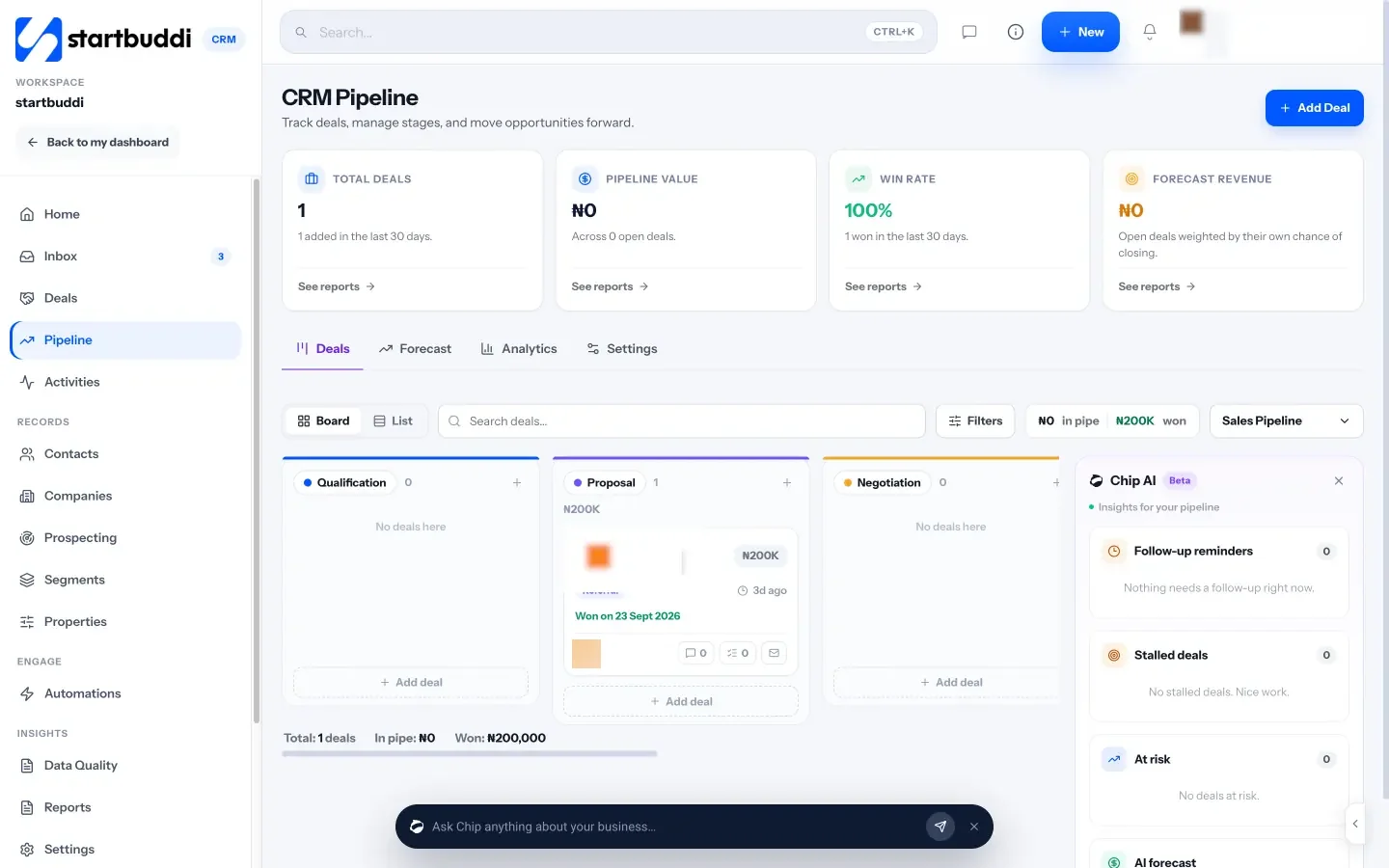
Pricing: a free plan is available; see pricing.
Pros
- WhatsApp enquiries, estimates and invoices on one customer record.
- Local payment methods for customers in Nigeria, Ghana and Kenya.
Cons
- Not field service or construction software: no dispatch, route planning, GPS tracking, job costing or change orders.
- No native mobile app; it runs in a phone browser, with most management done on a computer or tablet.
- No QuickBooks or Xero sync, and it isn’t accounting software.
Skip it if you run crews in vans every day or manage large builds. See how it fits plumbing businesses and solar companies.
What a contractor CRM costs: a worked example
Here’s an illustrative year for a 4-person remodeling firm (the owner, an estimator and two lead carpenters), billed annually, using each vendor’s published prices on 14 October 2026:
| Tool and plan | Sum | Year |
|---|---|---|
| Jobber Connect, 5 users | $149 × 12 | $1,788 |
| Contractor Foreman Plus, up to 8 users | $166 × 12 | $1,992 |
| Knowify Core plus 3 extra users | ($99 + 3 × $29) × 12 | $2,232 |
| Housecall Pro Essentials, 5 users | $149 × 12 | $1,788 |
The totals are illustrative and exclude tax, payment processing and add-ons. Contractor Foreman’s Standard plan would be cheaper at $105 a month, but it stops at 3 users, which is exactly the kind of limit that catches a growing team out. ServiceTitan, JobNimbus and AccuLynx would need a quote for the same comparison.
The cheapest option isn’t automatically the right one. If the firm’s profit depends on knowing which jobs overran, job costing (Contractor Foreman, Knowify, Jobber Grow) is worth paying for. If the problem is leads going cold after the first call, a tool with good follow-up reminders matters more than costing.
Mistakes contractors make with a CRM
- Buying for features you’ll never set up. A board with 14 job stages helps nobody if the crew only updates it on Fridays.
- Leaving the phone out. Most contractor leads still start as a call or a message. If calls and WhatsApp messages don’t end up in the CRM, it won’t have the full picture.
- Skipping the price list. Load your standard items and rates before the first estimate, or every quote will be typed from scratch.
- Forgetting who pays per seat. Count the estimator, the office manager and part-time helpers before you pick a plan.
- No owner. Pick one person to set up stages and check the team keeps them current for the first month.
How to choose the best CRM for your contracting business
Start with your trade and the shape of your jobs.
| Your work | Look at first |
|---|---|
| Electrical contractors (service calls) | Jobber, Housecall Pro, ServiceTitan as you grow |
| General contractors | Contractor Foreman, Knowify |
| Remodeling contractors | Contractor Foreman, HubSpot for lead generation |
| Painting contractors | Jobber, Housecall Pro |
| Roofing and exterior | JobNimbus, AccuLynx |
| Contractors with a bid-chasing sales role | Pipedrive, HubSpot |
| Small contractors on WhatsApp | startbuddi |
Electrical contractors weighing their billing set-up should also read our guide to invoicing software for electrical contractors.
Then use this checklist on every trial:
A lead management system only works if everyone uses it, so let the person who answers the phone run the trial, not just the owner. If you’re starting out in a trade, our guide on how to start a plumbing business covers the admin around the work. For general-purpose CRMs, see our best CRM software list.
Try startbuddi for your enquiries and estimates
If your customers reach you on WhatsApp and you lose jobs to slow follow-up, start startbuddi free, connect your inbox and send your first estimate. If you dispatch crews every day, start with Jobber or Housecall Pro instead.
Frequently asked questions
What is the best CRM for contractors?
For most small service contractors, Jobber is the best all-round CRM because it links requests, quotes, scheduling and invoices, with published prices from $29 a month billed annually. General and remodeling contractors are often better served by Contractor Foreman, and roofing contractors by JobNimbus. The right choice depends on whether you run many small jobs or a few large projects.
What is the best CRM for electrical contractors?
Small electrical contractors doing service calls usually do best with Jobber or Housecall Pro, which cover quotes, scheduling and invoices. Larger electrical companies with several technicians and an office often move to ServiceTitan for payroll and memberships. Electrical contractors doing commercial projects may prefer Knowify for job costing.
What is the best CRM for general contractors?
Contractor Foreman and Knowify suit general contractors because they combine the CRM with estimates, scheduling, project management and job costing. Contractor Foreman starts at $49 a month on an annual plan for one user, as checked on 14 October 2026. Field service tools like Jobber are better for short service jobs than for long builds.
Is there a free CRM for contractors?
Yes, but with limits. HubSpot's free tools cover 2 users and 1,000 contacts, Zoho Bigin's free plan covers one user and 500 records, and startbuddi has a free plan. None of them includes job scheduling and costing built for construction.
Do contractors need a CRM or field service software?
Most small contractors need both jobs done: tracking leads and running the work. Field service tools such as Jobber and Housecall Pro include a CRM, so one tool is usually enough. A separate general CRM only makes sense if you have a dedicated sales process, such as chasing commercial bids.
What CRM do roofing contractors use?
Roofing contractors often use roofing-focused tools like JobNimbus or AccuLynx, which organise jobs into stages from inspection to completion. Both quote prices on request. Smaller roofers sometimes start with a general field service tool such as Jobber.
Tiwalade Joanna Okedara-Kalu is the founder, CEO and CTO of startbuddi, the business system that brings clients, bookings, invoices, projects, marketing and the Chip AI assistant into one place. Tiwalade builds software around how service businesses really work day to day, and writes about client management, getting paid on time and why small businesses outgrow the tools they start with.
Founded startbuddi and leads its product and engineering