9 ActiveCampaign Alternatives for Small Businesses
ActiveCampaign alternatives for small businesses: 9 email tools compared on published prices, free plans, automation limits and contact billing in 2026.


The best ActiveCampaign alternatives for a small business are Brevo, for cheap sending with automation from $18 a month; MailerLite, for simple automation on a small list; and startbuddi, for email next to your contacts, bookings and invoices. People leave over prices that climb with the list, billing for every contact and a paid CRM add-on.
startbuddi is our product. It’s on this list because it fits one kind of reader, and its limits are listed as plainly as everyone else’s. Every price below comes from the vendor’s own website, checked on 14 October 2026.
Key takeaways
- ActiveCampaign has no free plan. At 1,000 contacts its pricing runs from Starter at $19 a month ($15 billed yearly) to Enterprise at $179 ($145 yearly), and the price climbs with every contact tier.
- Accounts opened on or after 3 November 2025 pay for all contacts, unsubscribed and bounced ones included. Older accounts still pay for active contacts only.
- Starter caps automations at “5 actions per automation”, and deal pipelines are a paid add-on that only starts on Plus.
- Genuine free plans exist: Brevo, MailerLite, Mailchimp, Kit, EmailOctopus, HubSpot and Systeme.io all have one, each with a different catch.
- If ActiveCampaign was doing your follow-ups and nothing else, a cheaper email tool will do. If it was half your CRM, look at what else you’re paying for before you move.
Why look for an ActiveCampaign alternative?
ActiveCampaign is good software. Its automation builder is one of the most flexible in this price range, and the pricing page lists email, WhatsApp and combined plans, with a 14-day trial that needs no card. The reasons small businesses look elsewhere are specific and mostly about money.
The bill grows faster than the list
ActiveCampaign prices by contact count. Its pricing data, checked on 14 October 2026, puts Starter at $19 a month for 1,000 contacts on monthly billing, $49 for 2,500 contacts and $99 for 5,000. Plus goes from $59 at 1,000 contacts to $179 at 5,000. Here’s what that means for a small business whose list grows over a year:
| Contacts | Starter (monthly billing) | Plus (monthly billing) |
|---|---|---|
| 1,000 | $19 | $59 |
| 2,500 | $49 | $119 |
| 5,000 | $99 | $179 |
| 10,000 | $189 | $239 |
Prices are in US dollars from ActiveCampaign’s own pricing data, checked 14 October 2026. Yearly billing is cheaper.
Unsubscribed contacts now count
ActiveCampaign’s help article on contact limits says that for accounts created on or after 3 November 2025, “All contacts, regardless of their list status, count towards your contact limit.” If you collect a lot of sign-ups that later unsubscribe, you’ll need to clean the list regularly or pay for people you can’t email.
The cheap plan is small
Starter allows one user, limited segmentation and “5 actions per automation”. Landing pages are listed from Plus. A welcome sequence with a wait, a tag, two emails and a condition already uses most of that.
The CRM costs extra
Deal pipelines, lead scoring and sales automation sit in the Pipelines add-ons, which ActiveCampaign lists only for Plus and above. SMS and WhatsApp are add-ons too. If you’re paying for email, a CRM add-on and a separate booking or invoicing tool, the total is worth adding up.
ActiveCampaign alternatives compared
| Tool | Best for | Starting price (checked 14 Oct 2026) | Free plan | Standout feature |
|---|---|---|---|---|
| Brevo | Low-cost sending with automation | $9/month (Starter, 5,000 emails); automation from $18 (Standard) | Yes, 300 emails a day | Priced by emails sent, not contacts |
| MailerLite | Simple automation for small lists | From $12/month (Comfort) | Yes, 250 subscribers | Free plan includes basic automations |
| startbuddi | Service businesses that want email next to their contacts, inbox and bookings | See pricing | Yes (Marketing needs a paid plan) | Email, SMS and WhatsApp automations in one workspace |
| Mailchimp | Beginners who want templates and a familiar name | From $13/month (Essentials, 500 contacts) | Yes, 250 contacts | Large template library |
| Kit | Creators and newsletters | $390/year for 1,000 subscribers (Creator) | Yes, up to 10,000 subscribers | Big free plan for newsletters |
| GetResponse | Email plus webinars and courses | €16/month for 1,000 contacts (Starter) | Yes | Webinars on the Creator plan |
| HubSpot | A CRM you can grow into | Starter normally $20 per seat/month | Yes | Free CRM with marketing tools |
| EmailOctopus | Plain newsletters on a budget | $9/month billed yearly (Pro) | Yes, 2,500 subscribers | 10,000 free emails a month |
| Systeme.io | Funnels, courses and email in one cheap plan | $17/month (Startup) | Yes, 2,000 contacts | Unlimited emails on every plan |
How we chose
We looked for tools a small business could switch to without a sales call: published prices, a free plan or a trial, and real automation. We read each vendor’s own pricing page on 14 October 2026 and left out anything we couldn’t confirm there. We didn’t use review sites or affiliate rankings. Where a page showed a promotion, we say so.
1. Brevo
Brevo is an email, SMS and WhatsApp marketing platform with a light sales CRM.
Best for: businesses that send often to a large list and don’t want to pay per contact.
Key features
- Email campaigns, forms and a drag-and-drop editor on every plan.
- Marketing automation with unlimited multi-step workflows from Standard.
- SMS campaigns paid by volume; WhatsApp campaigns on Professional.
Pricing: Brevo’s pricing lists a free plan with up to 300 emails a day, Starter at $9 a month for 5,000 emails ($8.08 billed yearly), Standard at $18 ($16 yearly) and Professional at $499. Prices rise with the emails you buy, not with contacts.
Pros
- Contacts don’t drive the price, so a big list of occasional readers is cheap.
- A real free plan for testing.
Cons
- Automation isn’t on Starter, so the ActiveCampaign-like plan is Standard.
- Standard includes one landing page; WhatsApp sits on the $499 plan.
Skip it if you need deep CRM pipelines in the same price.
2. MailerLite
MailerLite is an email marketing tool with automations, landing pages and a simple website builder.
Best for: a small business with a list under a few thousand that wants welcome and follow-up sequences without a steep learning curve.
Key features
- Visual automation builder, even on the free plan.
- Landing pages and websites.
- Plain, quick editor.
Pricing: MailerLite’s pricing shows Free for up to 250 subscribers and 2,500 emails a month, with 3 active automations of up to 5 steps. Comfort starts at $12 a month and Power at $25, with 10% off for yearly billing.
Pros
- The free plan has automation, which most don’t.
- Easy to learn.
Cons
- The free plan’s 250-subscriber cap is low.
- Comfort limits you to 50 active automations and 10 landing pages.
Skip it if you need a CRM with deals and pipelines.
3. startbuddi
startbuddi is an all-in-one workspace for service businesses: contacts and deals, a shared inbox, bookings, invoices, email marketing and automations, with an AI assistant, Chip, on every screen.
Best for: a service business, such as a consultant, clinic, salon or agency, whose emails are mostly about clients it already talks to on WhatsApp, by email and through bookings.
Key features
- A 4-step email flow (who, what, a check, when), with Chip writing the subject, preview and copy if you want it to.
- Segments built from what people did: filled in a form, booked, missed a booking, paid or didn’t pay an invoice.
- A/B tests on the subject, content or sender name, and sending from your own domain.
- Automations that send email, SMS and WhatsApp (WhatsApp needs a connected number and a Meta-approved template).
- Replies to campaigns land in the shared inbox, next to the client’s history.
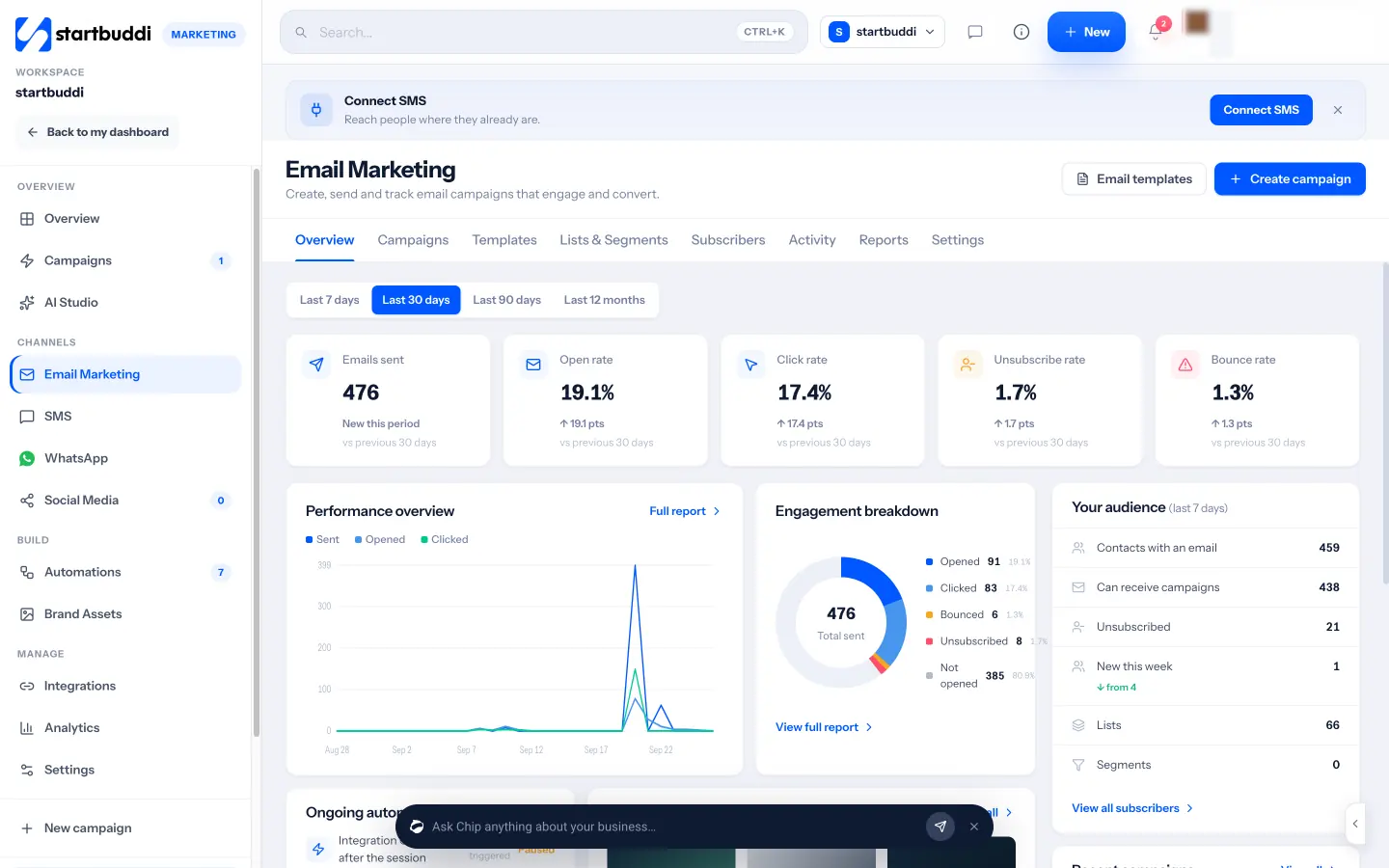
Pricing: a free plan is available, but the Marketing module needs a paid plan. See pricing.
Pros
- Contacts, bookings and invoices feed your segments without a sync.
- Paystack payments and WhatsApp suit businesses in Nigeria and across Africa.
Cons
- No email campaigns on the free plan.
- Fewer integrations than ActiveCampaign, and no public API yet.
- It’s a whole workspace; if you only want an email tool, it’s more than you need.
Skip it if you run a large ecommerce list and need deep store integrations. Our startbuddi vs ActiveCampaign comparison shows where ActiveCampaign is stronger.
4. Mailchimp
Mailchimp is one of the best-known email marketing platforms, owned by Intuit.
Best for: beginners who want a large template library and a tool most freelancers already know.
Key features
- Templates, a drag-and-drop editor and audience segments.
- Automation flows: up to 4 steps on Essentials, up to 200 flows on Standard.
- A/B and multivariate testing on Standard and Premium.
Pricing: Mailchimp’s pricing lists Free for 250 contacts and 500 sends a month (250 a day), then Essentials from $13 a month, Standard from $20 and Premium from $350, all at the smallest contact tier. When we checked, the page also advertised 50% off for 12 months, so check what you’d pay after year one.
Pros
- Easy to start, with plenty of tutorials.
- Essentials is cheap at small list sizes.
Cons
- Mailchimp counts subscribed, unsubscribed and non-subscribed contacts in your bill, and charges overages above your tier.
- Four-step flows on Essentials are short.
Skip it if automation is the main reason you used ActiveCampaign. Our Mailchimp alternatives page covers the wider field.
5. Kit
Kit (formerly ConvertKit) is email marketing built for creators: newsletters, sequences and selling digital products.
Best for: coaches, writers and creators whose list is the business.
Key features
- Free newsletter plan with unlimited landing pages and forms.
- Visual automations and email sequences on paid plans.
- Selling digital products and paid newsletters.
Pricing: Kit’s pricing shows a free plan for up to 10,000 subscribers with one user, no automations and no sequences. Creator is $390 a year at 1,000 subscribers (about $33 a month), and Pro is $66 a month at that size, shown at $50 for the first year when we checked.
Pros
- The biggest free plan here for a plain newsletter.
- Built around how creators sell.
Cons
- Automation needs a paid plan.
- No CRM pipeline for client work.
Skip it if you sell services to clients rather than content to an audience.
6. GetResponse
GetResponse is an email marketing platform with landing pages, webinars and a course builder.
Best for: businesses that want email and webinars in one tool.
Key features
- Unlimited landing pages on every paid plan.
- Live webinars for up to 100 attendees on Creator.
- Unlimited automation workflows from Marketer.
Pricing: GetResponse’s pricing shows prices in euros: Starter at €16 a month for 1,000 contacts (€13.12 billed yearly), Marketer at €54 and Creator at €62. There’s a free plan and a 14-day trial.
Pros
- Webinars and courses without another tool.
- Clear plan ladder.
Cons
- Starter includes only one custom automation workflow.
- SMS is listed only on Enterprise.
Skip it if you need more than one automation but don’t want to pay Marketer prices.
7. HubSpot
HubSpot is a CRM platform with marketing, sales and service hubs.
Best for: a business that expects to hire a sales team and wants one CRM for years.
Key features
- Free CRM with contacts and deals.
- Marketing email, forms and landing pages.
- A very large app marketplace.
Pricing: HubSpot’s Starter page says “Starter is normally priced at $20/month per seat”, with a limited-time offer for new customers of $7 a month per seat on an annual commitment or $10 month to month. The free tools allow 2,000 email sends a month with HubSpot branding and one automated action. Marketing Hub Professional starts at $800 a month.
Pros
- The free CRM is genuinely useful.
- Room to grow into sales and service tools.
Cons
- Starter’s email automation stops at 10 actions.
- The jump to Professional is steep.
Skip it if you want ActiveCampaign-style automation without Professional pricing.
8. EmailOctopus
EmailOctopus is a low-cost email tool for newsletters and simple campaigns.
Best for: small businesses that send a regular newsletter and want to spend as little as possible.
Key features
- Free plan with 2,500 subscribers and 10,000 emails a month.
- Landing pages and forms.
- A clean, quick editor.
Pricing: EmailOctopus’s pricing lists the free Starter plan (EmailOctopus branding on emails, 1 user, 1 landing page and 1 form) and Pro from $9 a month billed yearly, with unlimited users, landing pages and forms.
Pros
- A generous free allowance for sends.
- Simple to run.
Cons
- Much less automation depth than ActiveCampaign.
- No CRM.
Skip it if your business runs on multi-step automations.
9. Systeme.io
Systeme.io bundles funnels, email, courses and a simple store.
Best for: coaches and info-product sellers who used ActiveCampaign alongside a funnel builder.
Key features
- Unlimited emails on every plan.
- Sales funnels, a course builder and a blog.
- Automation rules and workflows.
Pricing: Systeme.io’s pricing lists a Free plan with 2,000 contacts, 3 sales funnels and 1 course that “never expires”, then Startup at $17 a month, Webinar at $47 and Unlimited at $97.
Pros
- Replaces several tools for very little.
- Real free plan.
Cons
- The free plan allows one automation rule.
- Thin on client service: quotes, bookings and team inbox.
Skip it if you’re a service business rather than an online seller. See startbuddi vs Systeme.io for the difference.
What you give up when you leave ActiveCampaign
Be honest with yourself about this before you switch, because some of it is hard to replace at a lower price.
- Branching automations on every plan. Even Starter lets you build a multi-step automation with conditions. Most cheaper tools either cap the steps (Mailchimp Essentials at 4, MailerLite Free at 5) or keep automation off the entry plan (Brevo Starter, Kit’s free plan).
- Goals. ActiveCampaign automations can move a contact forward when they reach a goal, such as booking a call. Few tools on this list have an exact equivalent, so you’ll often rebuild that logic with tags or conditions.
- Integrations. If a plugin or app pushes data into ActiveCampaign today, check that the same app connects to your new tool before you cancel, or plan to bridge it with Zapier.
- Your history. Campaign reports and automation history stay behind. Export the reports you care about as files first.
If your account relies on two or three of these, a move to Brevo Standard, GetResponse Marketer or HubSpot keeps most of the depth. If it relies on none, almost any tool here will do the job for less.
How to choose your ActiveCampaign alternative
Start with what ActiveCampaign was actually doing for you.
| If you mostly used ActiveCampaign for… | Look at |
|---|---|
| A newsletter and a welcome email | EmailOctopus, Kit, MailerLite |
| Long automated sequences | Brevo Standard, MailerLite, GetResponse Marketer |
| Email plus a sales pipeline | HubSpot, startbuddi |
| Email plus funnels or courses | Systeme.io, GetResponse Creator |
| Following up clients after bookings, quotes and invoices | startbuddi |
Then check three numbers before you commit:
- Your real list size. Export it and count. If the new tool bills on all contacts, remove unsubscribes and bounces first.
- Your longest automation. Count the steps. Mailchimp Essentials stops at 4, MailerLite’s free plan at 5, HubSpot Starter at 10.
- Your monthly sends. Brevo prices by sends, so a big list you email rarely is cheap there and expensive elsewhere.
If you’re not sure how much marketing automation you need, our guide to email marketing for service businesses walks through the few sequences that earn their keep, and the follow-up email template covers the one most businesses should write first. For a wider shortlist, see the best email marketing software.
Migrating from ActiveCampaign
Plan a week, not an afternoon, mainly so you can rebuild automations calmly.
- List your live automations. Note each trigger, wait and condition. Most small accounts have three or four that matter.
- Export contacts from ActiveCampaign as a CSV with tags, list membership and custom fields. Keep unsubscribes in a separate file so you don’t email them again.
- Import into the new tool. In startbuddi, go to Customers, then Contacts, then Import: up to 10,000 contacts at a time, mapped column by column. It imports contacts only, not deals.
- Rebuild your groups as tags or segments in the new tool.
- Verify your sending domain in the new tool before your first campaign, so mail lands in inboxes.
- Rebuild the welcome sequence first, then the others. Point your website forms at the new tool.
- Cancel ActiveCampaign once nothing new arrives there for a full billing cycle.
If you want the sequences rebuilt as one system with your bookings and invoices, our email automation sequences page and email marketing for service businesses page show how that works in startbuddi.
Try startbuddi
If your emails are mostly follow-ups to people who enquired, booked or owe you money, start free with startbuddi, import your contacts and see whether one workspace covers it. Marketing campaigns need a paid plan; pricing shows what each includes. If you only want a cheaper email tool, Brevo or MailerLite is the simpler move. And if Brevo is on your list, startbuddi vs Brevo compares the two.
Frequently asked questions
What is the best alternative to ActiveCampaign for a small business?
For automation at a lower price, Brevo Standard and MailerLite are the closest swaps. For a service business that wants email alongside contacts, bookings and invoices, startbuddi fits better. For a CRM you can grow into, HubSpot.
Is there a free ActiveCampaign alternative?
Yes. Brevo (300 emails a day), MailerLite (250 subscribers), Kit (up to 10,000 subscribers, no automations), EmailOctopus (2,500 subscribers), Mailchimp (250 contacts), HubSpot and Systeme.io (2,000 contacts) all have free plans. ActiveCampaign itself offers only a 14-day trial.
Why is ActiveCampaign so expensive?
It prices every plan by contact count, so the bill rises as your list grows: Starter goes from $19 a month at 1,000 contacts to $99 at 5,000 on monthly billing. Since 3 November 2025, new accounts also pay for unsubscribed and bounced contacts, and the CRM pipelines are a paid add-on.
Is Mailchimp cheaper than ActiveCampaign?
At small list sizes, usually yes: Mailchimp Essentials starts from $13 a month at 500 contacts against ActiveCampaign Starter at $19 at 1,000. But Mailchimp's Essentials flows stop at 4 steps, so compare the plan you'd actually need for your automations.
Can I move my automations from ActiveCampaign to another tool?
Not directly. Contacts move by CSV export and import, but automations, tags and goals need to be rebuilt by hand in the new tool. Write down each automation's trigger, waits and conditions before you cancel.
Do unsubscribed contacts count in ActiveCampaign?
For accounts created on or after 3 November 2025, yes: all contacts count towards the limit whatever their status. Accounts created on or before 2 November 2025 count active contacts only, according to ActiveCampaign's help centre.
Olabimpe Salami is the email and outreach specialist at startbuddi. Olabimpe writes about the messages that bring customers in and back: email, WhatsApp and SMS campaigns, follow-ups, and turning enquiries into paying clients.
Runs email and outreach at startbuddi