
Live chat for small business: set it up, staff it and let AI help
A four-part guide to live chat for small business: when it pays, how to set up website chat, where a chatbot helps, and how to run chat day to day.


This guide covers live chat for small business from start to finish: whether it is worth it for you, how to set up website chat that people actually use, where a chatbot helps and where it hurts, and how to run chat day to day without it taking over your life. It is for owners and small teams who get questions from website visitors and want to answer them faster, without hiring a support department.
Each chapter starts with the thinking, with examples, templates and worked numbers, and ends with how to do it in startbuddi. By the end you will have a chat widget on your site, clear hours and replies, an AI assistant answering routine questions from your own information, and a simple routine for turning chats into customers.
Live chat for small business: is it worth it?
- How a website chat conversation flows
- Chat usually pays off when
- Chat may not be worth it yet when
- Worked numbers: what a few extra conversations are worth
- Signs your visitors want chat
Most small business websites have a contact form and an email address, and most visitors use neither. They have a quick question, such as "Do you deliver to Abuja?", "Can I book for Saturday?" or "Is VAT included?", and when there is no quick way to ask, they leave and try the next business in the search results. Live chat gives them that quick way.
Here is the short answer. Live chat for small business is a small chat window on your website where visitors can message you and get a reply while they are still on the page. It works best for businesses that sell something people need to ask about before buying: services, bookings, custom orders, anything with options. It works when replies are fast and honest about hours, and when chats are saved to your customer records so the conversation can turn into a sale. A chatbot or AI assistant can cover routine questions and after-hours messages, but a person should always be one step away.
Live chat for small business: what it is and how it works
Three things often get called "live chat", and they are worth separating:
| Type | What it is | Good for |
|---|---|---|
| Website chat with people | A chat window on your site; your team replies in real time | Questions before buying, bookings, quotes |
| Chatbot or AI assistant | Software replies automatically, from rules or your approved information | Routine questions, after-hours cover, collecting details |
| Messaging apps | WhatsApp, Instagram or Facebook messages, often linked from your site | Customers who prefer their own app and want to continue later |
In practice, the best setups blend all three: a widget on your website that a person or an assistant can answer, with the option to continue on WhatsApp or email, and every conversation landing in one inbox. Our post on AI chatbots for small business websites looks at the chatbot side in more depth.
How a website chat conversation flows
- A visitor lands on a page and sees a small chat button, usually in the bottom corner.
- They click it and type a question, or pick from a few suggested options.
- If a person is available, they reply within a minute or two. If not, an assistant answers what it can, or the widget asks for an email or phone number so you can reply later.
- The conversation is saved against the visitor's contact record, so anyone on the team can pick it up.
- After the chat, a follow-up email, booking link or quote keeps things moving.
Why speed matters so much
People expect fast replies. HubSpot's research found that 90 per cent of customers rate an "immediate" response as important or very important when they have a customer service question, and 82 per cent when they have a sales or marketing question, with "immediate" meaning ten minutes or less for most people. A contact form that is answered tomorrow morning feels slow by that standard. A chat answered in two minutes feels like a real business that cares.
Speed matters most at the moment of decision. Someone comparing three plumbers, three caterers or three accountants is likely to go with the first one who gives a clear, helpful answer. Live chat puts you in that conversation while they are still deciding.
Live chat compared with other ways to get in touch
Chat does not replace your other channels; it fills a gap between them. Here is how they compare for a small business:
| Channel | Speed for the customer | Effort for you | Best for |
|---|---|---|---|
| Phone | Instant, if you answer | High: you must stop what you are doing | Urgent or complex questions, older customers |
| Hours or days | Low to medium | Detailed requests, documents, formal quotes | |
| Contact form | Hours or days | Low | Structured enquiries such as quote requests |
| WhatsApp and social messages | Minutes to hours | Medium | Customers who prefer their own app |
| Website chat | Minutes, while they are on the page | Medium, lower with an assistant | Quick questions at the moment of decision |
The strength of website chat is timing. It catches people while they are looking at your prices or your booking page, which is exactly when a quick answer turns interest into action.
Businesses where chat tends to help most
- Service businesses with options: cleaners, tutors, photographers, clinics. People want to check what fits before they book.
- Custom or high-value orders: cakes, furniture, events, printing. Every order starts with questions.
- B2B services: agencies, accountants, IT support. Buyers want to know if you have done this before.
- Online shops with sizing or delivery questions: "Will it arrive by Friday?" is a sale waiting to happen.
- Software and subscriptions: "Does it do X?" questions before a trial.
If your customers mostly buy on impulse at low prices, chat matters less than a fast checkout. If they need reassurance before paying, chat matters a lot.
Is live chat worth it for your business?
Chat usually pays off when
- Customers need to ask something before they buy or book: prices, availability, options, delivery.
- Each sale is worth enough that winning a few extra a month matters.
- Your website gets steady traffic, even if it is modest.
- You or someone on the team can reply quickly during set hours.
Chat may not be worth it yet when
- Your site gets very few visitors; fix how people find you first.
- Every question is already answered clearly on the page.
- Nobody can watch it, and you do not want an assistant replying. An unanswered chat window is worse than none.
Worked numbers: what a few extra conversations are worth
Say your website gets 1,500 visitors a month. With chat on the pages that matter, perhaps 2 per cent start a conversation, which is 30 chats. If a third of those are real buyers and you win half of them, that is five extra customers a month. At an average sale of $300, that is $1,500 a month, or $18,000 a year, from conversations that would otherwise have been a closed browser tab.
These percentages are illustrative, not benchmarks: your own numbers will differ by industry and by how well you answer. The point is the structure. Work out your own visitors, a cautious chat rate, a cautious win rate and your average sale, then compare it with the time and cost chat takes. For a caterer in Nairobi selling KES 60,000 events or a London tutor selling £45 lessons, the maths looks different, but the same four numbers decide it.
What live chat costs
There are two costs: the tool and the time. Many chat tools have a free tier for a single person and charge per seat or by AI usage beyond that. The larger cost is usually time. A useful way to estimate it: if you expect 30 chats a month and each takes about six minutes including follow-up, that is three hours a month. If an assistant answers half of them without help, it drops to about an hour and a half. Compare that with the value of the extra customers from the worked example above, and you will know quickly whether chat makes sense.
Watch for hidden time costs too: checking an app that nobody uses, notifications at dinner, and chats that go nowhere because nobody follows up. Setting hours and a clear process, which we cover in chapter 4, keeps these under control.
Signs your visitors want chat
- You get lots of short emails or messages asking the same questions.
- People call to ask things that are already on your website, because they could not find them.
- Visitors spend time on your pricing or booking pages but do not book.
- Customers often say "I wasn't sure if you did..." when they finally get in touch.
Each of these points to people with questions and no quick way to ask them.
A simple test before you commit: for two weeks, count every question that reaches you by phone, email, form and messages, and note how many were quick questions that could have been answered in a minute. If it is more than a handful a week, chat is likely to help. If almost every enquiry is a detailed brief, a good form may serve you better.
Decide your hours and your promise
Before you install anything, decide when chat is staffed and what you promise outside those hours. Customers do not expect a small business to answer at 3am. They do expect honesty. A clear promise sounds like this:
We are online Monday to Friday, 9am to 6pm. Outside those hours, leave your question and email address and we will reply first thing, or our assistant can answer common questions right now.
Pick hours you can actually cover. Two reliable hours a day beat "24/7" with nobody there. If you are a solo owner, you might cover chat during your admin blocks and let an assistant or an away message cover the rest.
Chat and your other channels should share one inbox
Adding chat means adding another place where customers talk to you. If it lives in its own app, you now have one more thing to check, and conversations will slip between the gaps: the customer who started on chat, then emailed, then sent a WhatsApp message, and got three different answers from three different people. Before you choose a tool, decide where chats will be answered. The ideal is one shared inbox where website chat, email and messaging apps sit side by side, each conversation tied to the customer's record, so whoever replies can see everything that has been said.
This matters even for a solo owner. You will not remember every conversation, and a customer who has to repeat themselves feels like a stranger. One inbox and one customer record make a small business feel attentive, even when it is busy.
Common mistakes
- Pop-ups that jump out after two seconds. They annoy more than they help. Let people open chat when they are ready, or open it gently after they have spent time on a key page.
- "We're online!" when nobody is. Show real availability and a clear away message.
- Asking for too much before the first message. Name, email, phone, company and reason before they can ask one question will stop most people.
- Chats that vanish. If conversations are not saved to your customer records, you lose the chance to follow up.
- A bot with no way out. Always offer a person, even if that means leaving a message for tomorrow.
- No owner. If chat is everyone's job, it becomes nobody's. Name who answers it and when.
Live chat in startbuddi: the overview
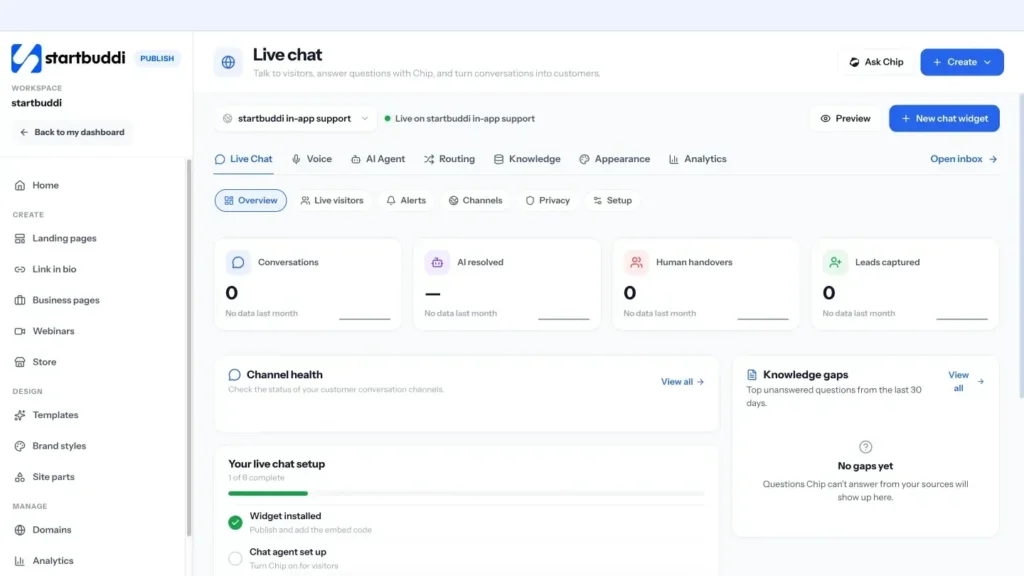
In startbuddi, website live chat is set up under Publish, in Live chat, and every conversation lands in the shared Inbox in Customers, next to your email, WhatsApp, SMS, Instagram and Facebook messages. That means a chat can become a contact, a deal, a booking or an invoice without copying anything between apps.
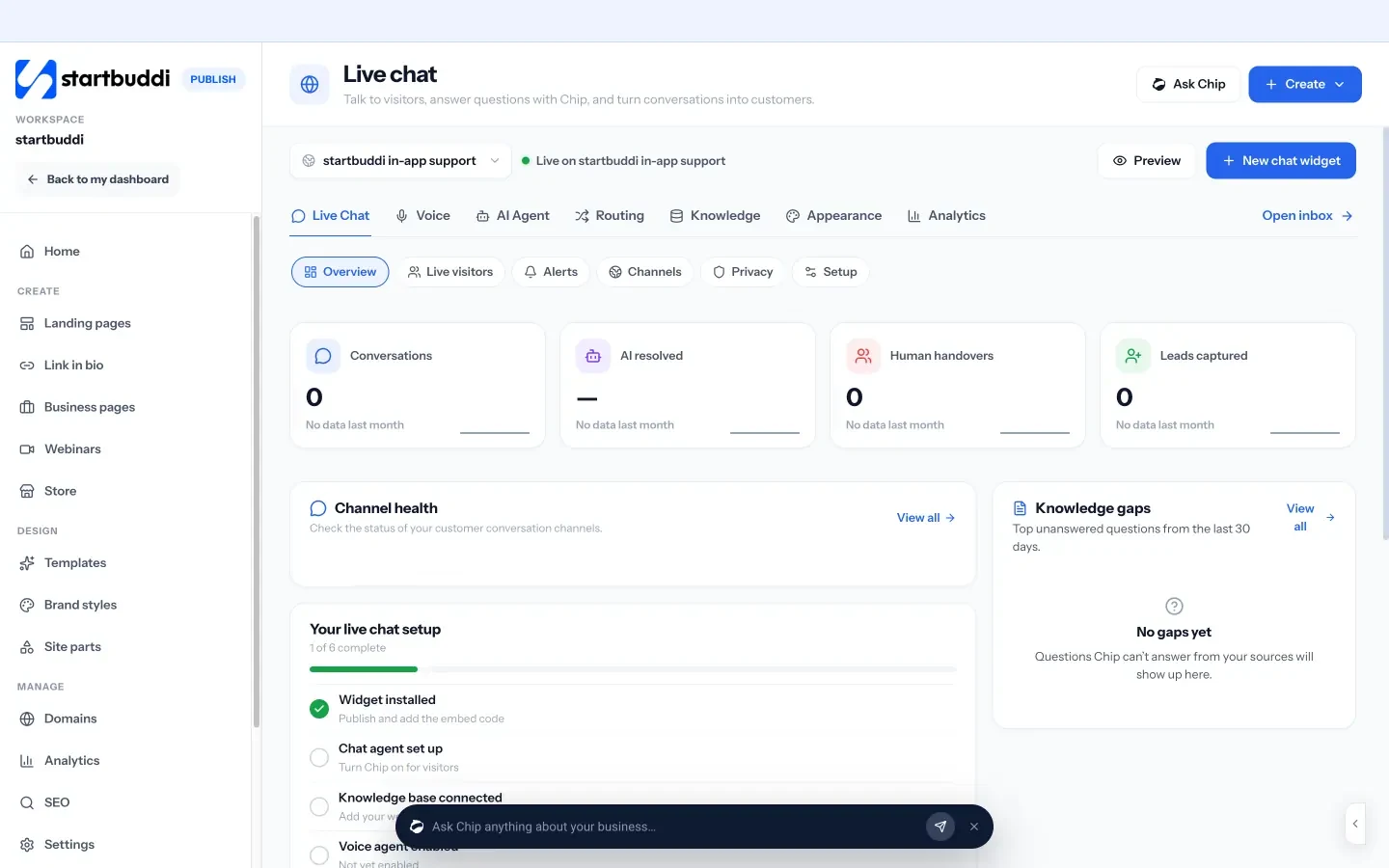
1. Open Live chat. The Live chat page shows your setup checklist, recent conversations and headline numbers: conversations, questions resolved by the assistant, handovers to people and leads captured. If you have not added chat yet, click Set up live chat to start.
2. Decide who answers. Your team can answer every chat themselves. If you want Chip, startbuddi's AI assistant, to answer first and hand over to a person when needed, that needs the Growth plan or above, and Chip's replies use Chip credits. We cover how to set this up safely in chapter 3.
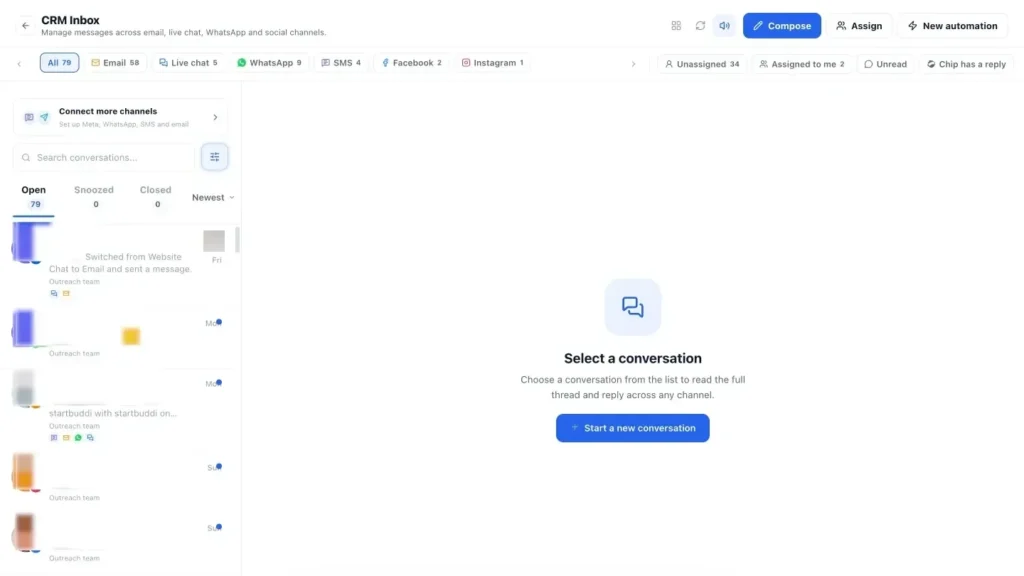
3. See where chats will land. Open Customers and then Inbox. Website chats appear under Website Chat, with the page the visitor was on, so you and your team reply from one place. You can compare what is included on the website chat page and the Inbox page.
In the next chapter we set up the widget itself: where it goes, what it says and what it asks.
Set up website chat people actually use
- Away messages that keep the lead
- Should chat open on its own?
- Show a name and a face
- More than one website or brand
- Write for the way people type in chat
A chat widget is a small piece of your website, but it speaks for your whole business. The words in the greeting, the moment it asks for an email and the pages it appears on all decide whether visitors use it or ignore it. This chapter covers how to set up website chat so it helps visitors, respects their privacy and works on a phone.
Where to put website chat
You do not need chat on every page. Put it where people make decisions or get stuck:
- Pricing and plans pages: the most common place for "does it include...?" questions.
- Service pages: "Can you do this for my situation?"
- Booking and checkout pages: "Is Saturday available?", "Can I pay by transfer?"
- Contact page: the obvious one.
Pages such as blog posts or your privacy policy rarely need chat, and a widget there can distract from the content. If your website builder allows it, limit the widget to the pages that matter.
Write a greeting that invites a question
"Hi! How can we help?" is fine, but a greeting that matches the page works better. It shows you know what the visitor is looking at and makes the first question easier to type. Some examples:
| Page | Greeting |
|---|---|
| Pricing | Questions about which package fits? Ask me, I usually reply in a couple of minutes. |
| Wedding cakes | Planning a wedding? Tell me your date and guest numbers and I will check availability. |
| Booking page | Not sure which service to book? I can help you pick. |
| Contact | Faster than email: ask here and a real person will reply during opening hours. |
Add two or three suggested questions as buttons if your tool supports it, such as "Prices", "Book a time" and "Talk to a person". Many visitors click rather than type.
Away messages that keep the lead
Outside your hours, the widget should still be useful. Say when you will be back, offer an answer to common questions if you have an assistant, and ask for an email or phone number so you can follow up.
We are offline right now and back at 9am tomorrow. Leave your question and your email, and we will reply first thing. For opening hours, prices and delivery areas, you can also ask our assistant now.
Should chat open on its own?
Proactive messages, where the chat window opens or a message pops up without the visitor clicking, can help or annoy. Used gently, they work well: a small message after someone has spent 40 seconds on your pricing page, or when they return to a booking page for the second time. Used badly, a pop-up that covers the page within two seconds on every visit, they drive people away. Start with no automatic opening, then test a gentle prompt on one key page and watch whether chats and bookings rise or visitors leave faster.
Show a name and a face
People write more openly to a person than to "Support". If you are a small team, show the first names and photos of whoever answers chat, or a friendly logo and a line such as "You're chatting with the team at Ada's Kitchen". If an assistant answers first, give it a name that makes clear it is an assistant, not a fake person.
When to ask for contact details
This is the biggest setup decision. Ask too early and people leave. Ask too late and you cannot follow up if they disappear. The options, from least to most friction:
- Never: anonymous chat. Easy to start, but you cannot follow up.
- Before a person takes over: the assistant answers freely; you ask for details when the chat moves to your team.
- After the first message: they ask their question, then you ask for an email "so we can reply if you step away".
- Before they can chat: a short form first. Only worth it when every chat needs details, such as account questions.
For most small businesses, asking after the first message or before a person takes over strikes the right balance. Ask for the minimum: a name and an email or phone number. You can get the rest in conversation.
More than one website or brand
If you run two brands, say a salon and a product line, or several websites for different services, give each its own widget with its own greeting, colours and hours, but route every conversation to the same place. Customers see a chat that fits the site they are on; your team sees one list of conversations, labelled by where they came from.
Write for the way people type in chat
Chat is informal and fast. Replies should be short, a few lines at most, split into separate messages if there is a lot to say. Avoid long paragraphs, formal letter openings and jargon. Use the visitor's name once, not in every message. If the answer is long, such as a full price breakdown, offer to send it by email and give a one-line summary in chat. And always end with a question or a next step, so the visitor knows what to do.
Privacy and consent
A chat widget collects personal data: names, emails, messages and often technical details such as the pages someone visited. Treat it like any other data you hold.
- Say what you collect and why in your privacy policy, and link to it from the widget.
- Cookies and similar technologies: in the UK and EU, rules on cookies apply to many chat tools. The ICO's guidance on cookies and similar technologies explains when you need consent.
- Do not ask for sensitive data in chat: card numbers, passwords or medical details belong in secure systems, not a chat thread.
- Keep data only as long as you need it, and be ready to export or delete a person's conversations if they ask.
- Marketing is separate: someone who chats with you has not agreed to your newsletter. Ask separately.
Other countries have their own laws, such as Nigeria's data protection rules and South Africa's POPIA. Check your national data protection authority's guidance.
Make it work on phones and for everyone
Many of your visitors will be on a phone. Test the widget on a small screen: the button should not cover your "Book now" or "Add to cart" buttons, the chat window should be easy to close, and typing should not be hidden behind the keyboard. Also check accessibility: the widget should work with a keyboard, have readable text and colour contrast, and be usable with a screen reader. The W3C's Web Content Accessibility Guidelines are the reference standard.
Offer other channels too
Some visitors do not want to chat in a browser window that disappears when they close the tab. Offering WhatsApp, Instagram or email as alternatives lets them continue the conversation in their own app, on their own time. In countries where WhatsApp is the default way to talk to businesses, such as Nigeria, Kenya, India and Brazil, a WhatsApp option can matter more than the web chat itself. If you use WhatsApp for business messages, remember that Meta allows free-form replies only within the 24-hour customer service window after the customer's last message; after that, you need an approved template.
Give your chat good answers to start with
Before you go live, write down the 15 questions you are asked most often and a clear, short answer to each. This list is useful whether a person or an assistant answers: it keeps replies consistent and fast. Include:
- Prices, or how prices are worked out.
- Opening hours, service areas and delivery times.
- How to book, order or pay.
- Cancellation, refund and returns policies.
- What happens after someone gets in touch.
Keep it somewhere the whole team can see and update. When a new question comes up twice, add it.
Link chat to your booking page
For service businesses, the most useful thing a chat can do is get someone booked. Make sure your chat can send your booking link in one click, and consider adding a "Book a time" button to the widget itself. When a visitor asks "Are you free on Thursday?", the best reply is a link where they can see every free slot and book straight away. Our Bookings page explains how startbuddi's booking links work.
A launch checklist
- Widget installed on the live site, on the pages you chose.
- Greeting and away message written in your voice.
- Hours set, including time zone and upcoming holidays.
- Details asked at the right moment, with a reason given.
- Privacy policy updated and linked.
- Tested on a phone and with a keyboard.
- Notifications going to the right person.
- Your list of 15 common questions and answers ready.
- A test chat sent and answered end to end.
Tick these off and you are ready to announce it: mention chat on your contact page and in your email signature so people know it is there.
Set expectations inside the widget
Show the typical reply time in the widget, such as "Usually replies in a few minutes" during hours and "Back at 9am" outside them. Say whether an assistant or a person is answering. If you cannot help with certain things in chat, such as account changes or refunds, say where to go instead. Visitors are patient when they know what to expect, and impatient when they are left guessing.
Setup mistakes to avoid
- Installing the widget on a test site and forgetting to add it to the live one.
- Default greetings that say nothing about your business.
- No away message, so chats outside hours go unanswered.
- A widget colour that clashes with your site or hides your main button.
- Nobody receiving notifications when a chat arrives.
- Asking for a phone number when you only ever reply by email, which feels like collecting data for its own sake.
- Forgetting to update hours for public holidays, so the widget promises a reply nobody is there to give.
Setting up website chat in startbuddi
1. Create your widget. In Publish, open Live chat and click Set up live chat, or New chat widget if you run chat on more than one website or brand. Widget types include all-in-one chat, live chat and WhatsApp chat. Conversations from every widget still arrive in one Inbox.
2. Set the look and the words. The setup has four steps: Basics, Appearance, Behaviour and Install. Add your welcome and away messages and your business hours, pick your brand colour and where the launcher sits, choose whether it shows on desktop, mobile or both, and set an auto-open timer if you want one. Launcher options can include starting a chat, asking Chip, booking a meeting through your booking page and continuing on WhatsApp.
3. Choose when to ask for details. The pre-chat form can ask for name, email, phone and company, and you choose when: before they can chat, after their first message, only before a person takes over, only before booking a meeting, or never.
4. Set privacy options. The Privacy settings include AI disclosure, redaction of passwords, card numbers and codes in messages, controls on what data is collected, data retention, and options to export or delete conversation data.
5. Install it. Under Install, click Copy embed code and paste it once before the closing body tag on your website. Use Allowed websites to limit where the widget can load. If your pages are built with startbuddi's Publish tools, you can turn live chat on for them in Publish settings instead of pasting code.
6. Test it from a phone. Open your site on a phone, start a chat and check it arrives in Customers, then Inbox, under Website Chat. The conversation shows the page the visitor was on.

Your widget is live. Next, we look at when to let an assistant answer, and how to keep it honest.
Chatbots and AI: what to automate and what to keep human
- Rule-based chatbots
- AI assistants
- Good jobs for an assistant
- Keep these with people
- Set the tone
A chatbot can answer a question at midnight, reply to ten visitors at once and never get tired of "what are your opening hours?". It can also give wrong prices with total confidence, trap people in loops and make a small business feel like a call centre. The difference is in how you set it up. This chapter covers what to hand to a chatbot or AI assistant, what to keep human, the rules on telling people they are talking to AI, and what to look for in customer service tools for small business.
Chatbots and AI assistants: the two kinds
Rule-based chatbots
These follow a script: buttons and fixed answers, like a menu. "Prices", "Opening hours", "Book a time". They are predictable and cannot invent anything, but they break as soon as someone asks something the script did not expect, and they feel mechanical.
AI assistants
These understand questions in the visitor's own words and write replies. The good ones are grounded: they answer only from information you have approved, such as your FAQs, price list and policies, and say "I don't know, let me get a person" when the answer is not there. The risky ones answer from general knowledge and can make things up, which for a business means wrong prices, promises you never made and policies you do not have.
| Rule-based | Grounded AI | Ungrounded AI | |
|---|---|---|---|
| Understands free text | Poorly | Well | Well |
| Can invent answers | No | Rarely, if set up well | Yes |
| Setup effort | Writing every path | Adding your knowledge | Low, but risky |
| Best for | Very simple menus | Most small businesses | Not customer-facing use |
What to automate and what to keep human
Good jobs for an assistant
- Opening hours, locations, delivery areas and times.
- Standard prices and what each package includes.
- How to book, order, pay or cancel.
- Collecting the details your team needs before they reply: what, where, when, budget.
- After-hours cover: answering what it can and taking a message for the rest.
- Pointing people to the right page or booking link.
Keep these with people
- Complaints, refunds and anything where the customer is upset.
- Custom quotes and discounts.
- Anything involving health, legal or financial advice.
- Questions about a specific person's account, unless their identity is checked.
- Any time the customer asks for a person.
Tell people they are talking to AI
Being open about AI is good manners and, increasingly, the law. In the EU, Article 50 of the AI Act requires that people are informed when they are interacting with an AI system such as a chatbot, unless it is obvious, and the European Commission's guidance says this obligation applies from 2 August 2026. The rule reaches businesses outside the EU whose chatbots are used by people in the EU. Other countries are moving in the same direction, and consumer protection laws almost everywhere forbid misleading customers.
In practice: give your assistant a name that does not pretend to be a person, say "I'm an AI assistant" in the first message, and make it easy to reach a human.
What a good assistant conversation looks like
Here is an example of an assistant for a cleaning company, set up well:
Visitor: How much for a deep clean of a 3 bed house?
Assistant: Hi, I'm the Sparkle Cleaning assistant, an AI. A deep clean for a 3-bedroom house starts at $260 and usually takes a team of two about five hours. The final price depends on the number of bathrooms and any extras such as the oven or inside windows. Would you like to see available dates, or shall I ask someone from the team to give you an exact quote?
Visitor: Can you do it for $200?
Assistant: I can't change prices myself, but I can pass your request to Grace on our team, who handles quotes. She's online now. Could I have your email in case you step away?
Notice what it does: says it is an AI, gives a real price from its approved information, explains what changes the price, offers a next step, and hands over when asked for something it is not allowed to decide.
Design the handover to a person
The handover is where most chatbots fail. The visitor explains their problem to the bot, gets passed to a person, and has to explain it all again. Good handover rules:
- Hand over when: the visitor asks for a person, the assistant cannot answer from its knowledge, the visitor seems upset, or the question is about money owed, refunds or complaints.
- Pass the context: the person picking up should see the whole conversation, what the visitor wants and what the assistant already said.
- Set expectations: "I'm passing you to Ada from our team. She's online now and usually replies in a few minutes." Or, out of hours: "Our team is back at 9am. I've saved your question and your email, and Ada will reply first thing."
- Step back: once a person replies, the assistant should stay quiet in that conversation unless asked.
Give the assistant good knowledge
An assistant is only as good as what you give it. Start with the list of 15 common questions from chapter 2, then add:
- Your price list or how prices are worked out.
- Service descriptions and what is not included.
- Policies: cancellations, refunds, deposits, delivery.
- Hours, locations, service areas.
- What happens after someone books or buys.
Write in plain words, keep each answer short and remove anything out of date. Review what the assistant could not answer each week and add the missing answers. Within a month or two, most routine questions will be covered.
Set the tone
Tell the assistant how to sound: friendly and brief, formal, or warm and chatty. Match how you would talk to a customer at your counter. Give it examples of good answers. And tell it what to say when it does not know: "I'm not sure about that one. Let me get someone from the team to check."
Questions about a customer's own account
"Where is my order?", "When is my appointment?", "Have you received my payment?" These are among the most common chat questions, and an assistant could answer them from your records. The risk is privacy: anyone could type someone else's name. Only let an assistant discuss a person's own bookings, orders or invoices after checking who they are, for example with a one-time code sent to their email. Without that check, send those questions to a person.
Measure the assistant, not just the chats
Once an assistant is live, watch three things each week:
- How many questions it resolved without help. Rising over time means your knowledge is filling out.
- What it could not answer. Each gap is an answer to write.
- Whether its answers were right. Read a sample. One wrong price repeated to 50 visitors is a real cost.
Also keep an eye on cost. Most AI assistants charge by usage in some form, so check your usage each month and make sure the time saved is worth more than you spend.
Customer service tools for small business: what to look for
If you are choosing a live chat or customer service tool, check these points:
- One inbox: website chat, email and messaging apps together, so nothing is missed.
- Connected to your customer records: chats saved to contacts, with history, so you can follow up and see past orders or bookings.
- Grounded AI with a review trail: answers from your approved information, with a record of what it said.
- Clear handover: rules for when a person takes over, and context passed with it.
- Team features: assignment, internal notes, saved replies, and a way to stop two people answering the same chat.
- Privacy controls: AI disclosure, data retention, export and deletion.
- Fair pricing: check how AI replies are charged, and what happens when you reach a limit.
Our list of CRM software for small business covers tools that include chat, and the glossary explains what a CRM is if you are new to the idea.
Rules for your assistant, in writing
Write a short rulebook for your assistant, the way you would brief a new receptionist. It keeps its behaviour consistent and helps you check it later. For example:
- Always say you are an AI assistant in the first message.
- Only answer from the approved information; if unsure, offer a person.
- Never offer discounts, custom prices or dates not in the information.
- Hand over straight away if the visitor asks for a person, mentions a complaint or refund, or seems upset.
- Ask for an email before handing over outside business hours.
- Keep replies under 60 words and end with a question or a next step.
Most AI chat tools let you give instructions like these. Review them whenever you change prices or policies.
Start small with an assistant
You do not have to switch an assistant on everywhere at once. A sensible order: first let it cover after-hours chats only, where any answer beats silence. Review a week of conversations. Then let it answer first during quiet daytime hours too, with your team stepping in when needed. Only when its answers are reliably right should it answer first at your busiest times. Each step gives you evidence before you trust it with more.
Chatbot mistakes to avoid
- Launching with no knowledge. The assistant falls back on vague answers or guesses.
- No way to reach a person. Always offer one.
- Pretending to be human. It erodes trust and, in some places, breaks the law.
- Never reviewing conversations. Read a sample every week.
- Letting it make offers. Discounts and custom prices stay with people.
- Old information. When prices, hours or policies change, update the assistant's knowledge the same day, or it will keep giving the old answer.
Chip on your website in startbuddi
In startbuddi, Chip can answer website visitors first and hand over to your team. Chip answering automatically needs the Growth plan or above, and each reply uses Chip credits. Here is how it is set up to stay honest.
1. Add your knowledge. In Live chat, open Knowledge and click Add your first source. Sources can be a page from your website, an uploaded document (PDF, Word, Excel, text or CSV, up to 50MB), a page from Documents, an answer you write yourself, or answers learned from past conversations once you approve them. Each source has a visibility level, and only sources marked Public ever reach a website visitor.
2. Tell Chip what to help with. In the AI Agent tab, describe what Chip should help with and pick a tone. Chip replies only from your approved sources, always says it is an AI, and does not invent prices or promises. Every reply is checked before it is shown.
3. Set routing and handover. In Routing, create rules based on what the message contains, which page the visitor is on, the channel, what they are asking about (such as pricing, booking or billing) and whether it is within business hours. Set a fallback team, a maximum wait and what happens when you are offline, including a follow-up by email, WhatsApp or SMS. When a person takes over, they get a handover packet with a summary, the transcript and the sources Chip used, so the visitor does not repeat themselves. Use Test routing before you rely on it.
4. Choose what Chip may do. You decide whether the assistant may quote prices, create contacts or deals, book appointments or send messages, and it can always hand off to a person.
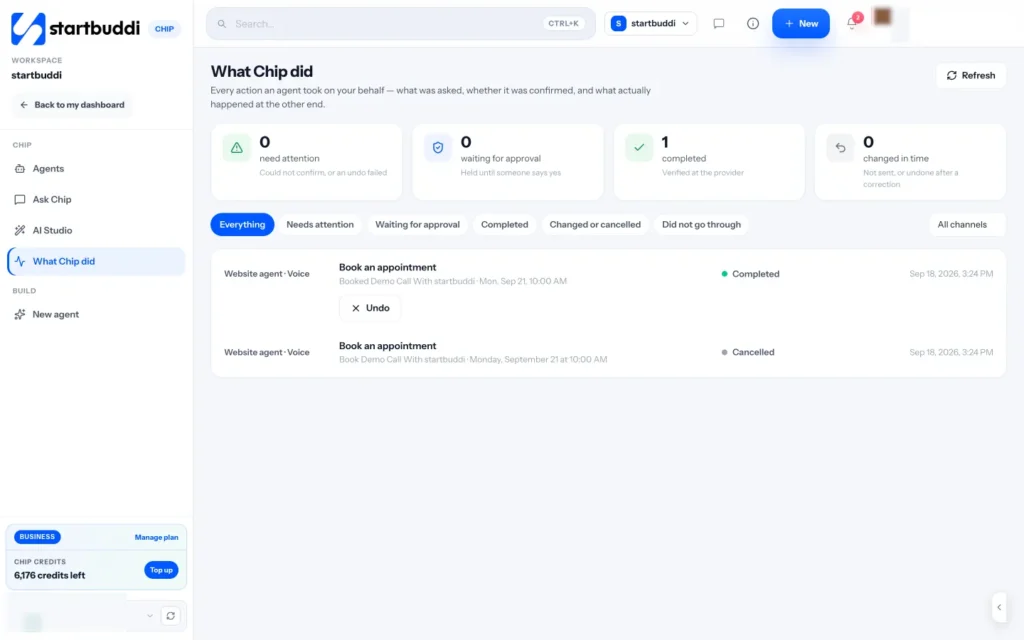
5. Review what it did. The Overview shows knowledge gaps, which are questions Chip could not answer, so you can add answers. What Chip did records actions taken on your behalf and whether they were confirmed. You can read more about Chip on the Chip and AI agents page.
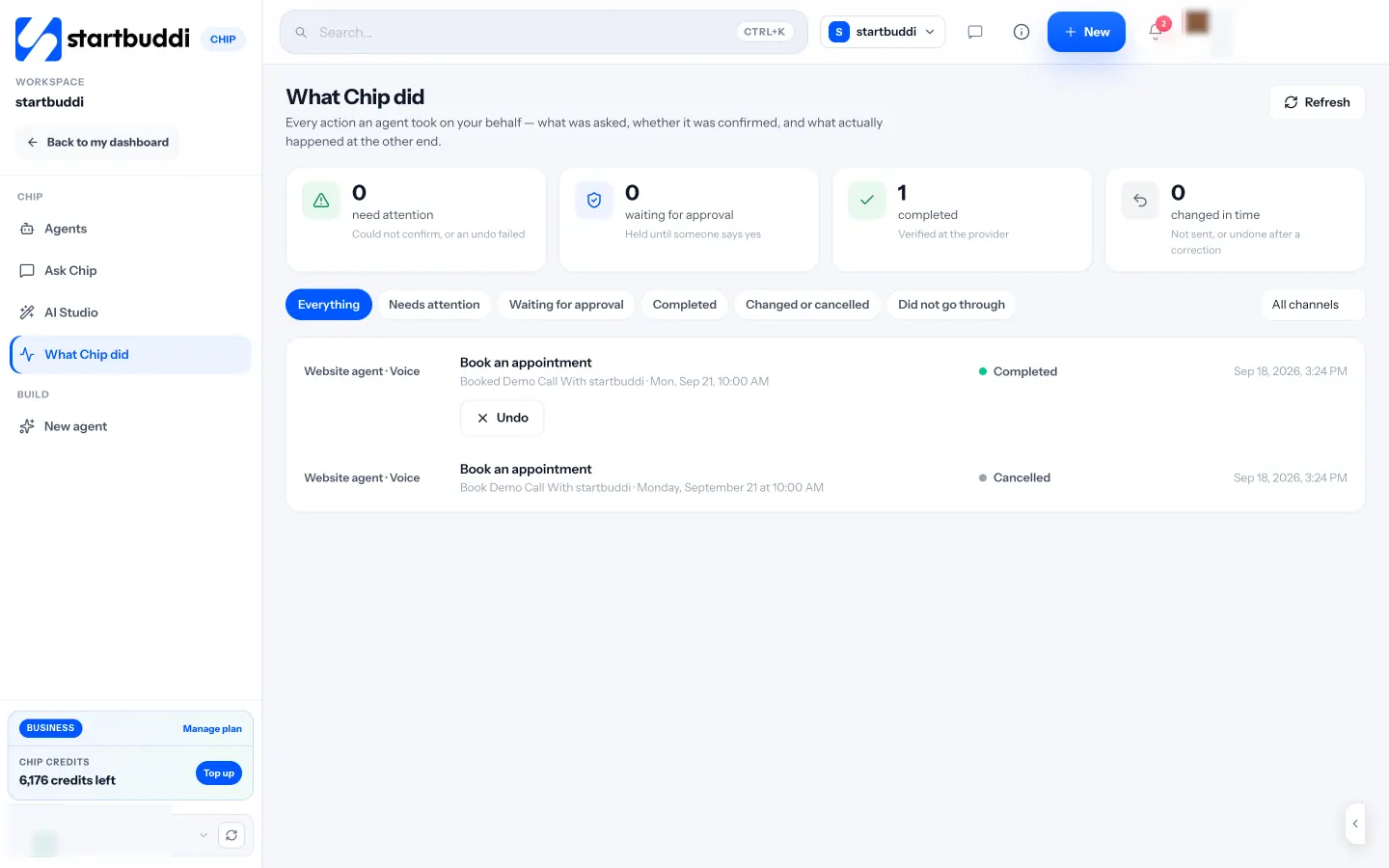
With the assistant set up, the last step is the daily routine: replying, following up and measuring what chat is worth.
Run chat day to day and turn chats into customers
- Set a response time you can keep
- Worked example: a small bakery
A chat widget is not a project you finish. It is a new front door, and someone has to answer it. This chapter covers how to run live chat day to day in a small team: response times, saved replies, turning conversations into customers, and the few numbers that tell you whether chat is paying off.
Who answers, and when
In a small business, chat is usually one more job for people who already have plenty. Make it manageable by being clear about who owns it:
- Solo: check chat at set times, for example at the start and end of each admin block, and let an assistant or away message cover the rest. Turn on phone notifications only during your chat hours.
- Two to five people: set a rota. One person is "on chat" each morning or afternoon, with a named backup. Everyone else can ignore chat until it is assigned to them.
- Specialist questions: route them. Billing questions to whoever handles money, technical questions to the person who knows the product.
Set a response time you can keep
Pick a target and share it: "We reply within 5 minutes during opening hours." Then measure it. If you often miss it, either staff chat better at busy times or change the promise. A realistic promise kept beats an ambitious one broken.
Saved replies that still sound human
Most chats are variations on the same ten questions. Saved replies, sometimes called quick replies or canned responses, let you answer them in seconds. Write them in your own voice and edit them to fit each chat before you send.
| Situation | Saved reply |
|---|---|
| Price question | Good question. Our standard [service] is [price], which includes [what]. If you tell me a bit about what you need, I can check whether that fits or whether something else suits you better. |
| Availability | Let me check. What date and time were you thinking of? You can also see every free slot and book straight away here: [booking link]. |
| Need to check with someone | I want to give you the right answer, so I'm checking with [name]. Can I have your email in case you need to step away? I'll reply within the hour. |
| Out of scope | That's not something we do, I'm afraid. For that, you might try [type of business]. If you ever need [what you do], we'd be glad to help. |
| Closing the chat | Glad I could help. I've sent a summary to your email. If anything else comes up, just reply to it or start a new chat here. |
Turn chats into customers
A helpful chat is nice. A helpful chat that leads to a booking, a quote or a sale is what makes chat worth the effort. Build a habit of ending every sales chat with a clear next step:
- Ready to buy or book: send the booking link or payment link in the chat.
- Needs a quote: collect the details and say when the quote will arrive; then send it.
- Not ready yet: ask if they would like you to email the information or check back in a week.
- Left mid-chat: if you have their email, send the answer anyway, with a friendly note.
Record each chat against the person's contact record, and create a deal or task when there is a real opportunity. A chat that is not written down is a lead you will forget. Our post on managing a client pipeline covers how to keep those opportunities moving, and the glossary explains the sales pipeline.
Worked example: a small bakery
Imagine a bakery that takes custom cake orders online. A visitor on the wedding cakes page asks whether the bakery can do a three-tier cake for 120 guests on 14 June. The person on chat checks the calendar, confirms the date is free, asks two questions about flavours and budget, and sends the booking link for a tasting. They save the contact, create a deal worth the estimated order and set a task to follow up after the tasting. Two weeks later, the order is confirmed with a deposit. Without chat, that visitor might have emailed three bakeries and gone with whoever replied first.
Follow up after the chat
Many chats end without a decision. A short follow-up email, sent the same day, keeps you in mind while they decide. Keep it simple:
Hi Tunde, thanks for chatting with us today about office cleaning for your new space in Ikeja. As promised, here is a summary: weekly cleaning for about 200 square metres, evenings after 6pm, with a first deep clean before you move in. I'll send the full quote by tomorrow at noon. If anything changes, just reply to this email. Best, Grace
Then do what you said, when you said. That alone puts you ahead of most competitors.
Handle difficult chats well
Some chats will be complaints, some will be rude and a few will be spam. A few simple rules:
- Complaints: acknowledge first, fix second. "I'm sorry that happened. Let me look into it now." Move to email or a call if it needs more than a few messages, and note what you promised.
- Rude messages: stay polite, set a boundary once, and end the chat if it continues.
- Spam and sales pitches: close them without replying.
- Questions you cannot answer: say so and say when you will find out. Never guess.
Use chat to improve your website
Your chat history is a free list of what visitors could not find. If five people a week ask whether you deliver on Sundays, put the answer on your delivery page. If people keep asking what is included in a package, rewrite the package description. Every month, look at the most common questions and fix the page that should have answered them. Over time you will get fewer repetitive chats and more meaningful ones, and your pages will convert better even for visitors who never open chat.
Train anyone new on chat
When a new teammate starts answering chats, give them your list of common questions and answers, your saved replies and three or four good past chats as examples. Let them draft replies for a day while you check them, then answer on their own with you reviewing a sample each evening for the first week. Chat is often a customer's first conversation with your business, so it is worth getting right.
Measure whether chat is working
You only need a handful of numbers, checked monthly:
| Number | What it tells you |
|---|---|
| Chats started | Whether visitors use it, and on which pages |
| First response time | Whether you keep your promise |
| Chats answered by the assistant without help | How much time it saves you |
| Handovers to people | Where the assistant needs more knowledge |
| Leads captured | How many chats became a contact you can follow up |
| Chats that became bookings, deals or sales | Whether chat earns its keep |
Compare the last number with the cost of running chat, in both time and money. If chat brings in more than it costs, widen the hours or add it to more pages. If it does not, look at the pages it is on, the speed of replies and whether you ask for details at the right moment before giving up on it.
Chat outside office hours
Many questions arrive in the evening and at weekends, when people finally have time to look for a supplier. You have three honest options: an away message that collects contact details, an assistant that answers routine questions and takes messages for the rest, or a rota for evening cover if the value justifies it. Whatever you choose, reply to overnight chats first thing the next working day, before new ones. The person who asked at 10pm is often still deciding at 9am, and a prompt, helpful answer can win the job.
Keep a record of what chat taught you
Once a quarter, look back over your chats and write down three things: the questions that came up most, the objections that stopped people buying, and the requests for things you do not offer yet. These are useful for more than chat. They tell you what to put on your website, what to say in your marketing and, sometimes, what new service customers are asking you to create.
A daily chat routine for a small team
- Start of day: answer overnight chats and messages first, oldest to newest.
- During hours: the person on chat keeps the inbox open and replies within your promised time; others pick up only what is assigned to them.
- After each sales chat: update the contact, create a deal or task if there is an opportunity, and send any promised follow-up.
- End of day: check nothing is left unanswered, snooze anything that needs a later reply, and hand over open conversations if someone else starts tomorrow.
It takes a few minutes each time, and it means no customer waits overnight because everyone assumed someone else had replied.
Improve a little every week
- Read five random chats. Would you be happy if your best customer read them?
- Add an answer for every question the assistant could not handle.
- Update a saved reply that you edited heavily more than twice.
- Check that away messages and hours are right, especially around holidays.
Fifteen minutes a week keeps chat sharp. Put it in the calendar on the same day each week, so it happens even when things are busy, and share anything you learn with the rest of the team.
Running chat day to day in startbuddi
1. Reply from one inbox. In Customers, open Inbox and filter to Website Chat, or see every channel together. Visitors waiting for a reply are marked. Use Quick replies for your saved answers, add Internal notes the visitor never sees, and send with Send now, Send & close or Send & snooze. Generate a reply with Chip drafts an answer you can edit before sending.
2. Share the work. Assign conversations to a person or a team inbox, and set up team inboxes that share new conversations in turn or give them to whoever has the fewest open. When two teammates see the same live chat, only one can claim it, so visitors do not get two replies.
3. Turn chats into work. From the contact panel beside the conversation, use Create deal, Add task or Schedule meeting, and the chat stays on the contact's record with their bookings, forms and invoices. If a visitor leaves before you reply, startbuddi can email them the reply or the transcript.
4. See who is on your site. The Live visitors view shows who is on your site now, updated every 20 seconds, with badges such as returning customer or waiting for a person, and a button to claim the chat. Alerts can tell you when someone visits your pricing page or a qualified lead appears.
Also: continue on WhatsApp. If you connect WhatsApp (Starter and above), visitors can choose to carry on the conversation there, and those messages land in the same Inbox. The help article on connecting WhatsApp covers the steps, and every chat keeps its place on the contact's record in Contacts.
5. Check the numbers. Live chat analytics show resolution rate, handovers and a funnel from chat started to goal completed, and the Overview lists the questions Chip could not answer. Add those answers to Knowledge each week.
You can see what is included on the website chat page and compare plans on the pricing page. Chip answering automatically needs Growth, and every paid plan has a 30-day trial. Put chat on your three most important pages this week, and read your first ten conversations closely.
Tiwalade Joanna Okedara-Kalu is the founder, CEO and CTO of startbuddi, the business system that brings clients, bookings, invoices, projects, marketing and the Chip AI assistant into one place. Tiwalade builds software around how service businesses really work day to day, and writes about client management, getting paid on time and why small businesses outgrow the tools they start with.
Founded startbuddi and leads its product and engineering