
HR for small business: a simple people system for your first 1 to 50 employees
A four-part guide to HR for small business: what HR covers at each size, records and policies, leave and requests, and how to choose HR tools.

This guide explains HR for small business owners who have no HR department and no plans to hire one soon. It is for founders and managers with anywhere from one employee to about fifty, whether you run a salon, an agency, a shop, a cleaning company or a start-up.
The short answer: HR for a small business is a handful of jobs done consistently. Keep accurate records for every person, give everyone a written contract and clear policies, handle time off and requests fairly, pay people correctly (usually through a payroll provider or accountant), help people get better at their work, and handle arrivals and departures properly. You do not need expensive software to start, but you do need one place where all of it lives.
There are four chapters. First, what HR covers and what a small business needs at each size, with the legal basics in several countries. Second, records, contracts and policies. Third, time off, attendance and everyday requests. Fourth, HR tools for small business: what categories exist, how to choose, and where startbuddi fits and where it does not. Employment law differs by country and changes over time, so treat this guide as general information, not legal advice, and check the official sources we link.
HR for small business: what it covers and what you need at each size
- The eight jobs of HR
- What HR looks like at each size
- Just you, or you plus freelancers
- Your first one to five employees
- Six to fifteen people
- Fifteen to fifty people
- Who should do HR in a small business?
- Signs you need outside HR help
- Employee or contractor?
- The legal basics: a quick tour
- A simple HR calendar
- Common HR mistakes in small businesses
- Set up People in startbuddi
Ask ten small business owners what HR means and you will get ten answers: hiring, payroll, contracts, "dealing with problems", or "something I will sort out later". HR for small business is simpler than it sounds and more important than it looks. It is the set of routines that make sure people are hired fairly, paid correctly, treated consistently and able to do good work, and that protect the business when something goes wrong.
This chapter breaks HR into the jobs it actually involves, shows what you need at each stage of growth, covers who should do HR in a small team, and gives an overview of the legal basics in a few countries. At the end you will set up People in startbuddi.
The eight jobs of HR
Every business with employees does these jobs, whether or not anyone calls them HR. The question is whether they are done on purpose or by accident.
| Job | What it means in a small business |
|---|---|
| 1. Hiring | Deciding what help you need, finding people, interviewing fairly and making an offer. |
| 2. Contracts and records | A written contract or statement of terms for each person, and an up-to-date file with their details. |
| 3. Pay and benefits | Paying the right amount on time, deducting and paying taxes and pensions, and managing any benefits. |
| 4. Policies | The written rules on leave, hours, expenses, conduct and so on, so decisions are consistent. |
| 5. Time off and attendance | Holidays, sick days, other leave, working hours and public holidays. |
| 6. Onboarding and offboarding | Getting new people set up well, and handling departures cleanly and safely. |
| 7. Performance and development | Goals, feedback, reviews, training, and handling problems fairly. |
| 8. Engagement and wellbeing | Knowing how people feel, keeping good people, and dealing with conflict. |
You do not need to do all eight perfectly on day one. But you should know who is responsible for each, and have at least a basic routine for the ones the law requires: contracts, pay, records and time off.
What HR looks like at each size
HR needs grow in steps. Here is a practical view of what matters at each stage. The headcounts are rough; the point is to do the right things at the right time, not everything at once.
Just you, or you plus freelancers
- Written agreements with every freelancer: scope, rate, payment terms and who owns the work.
- A simple list of who works with you, on what, and until when.
- An understanding of the difference between an employee and a contractor (see below).
Your first one to five employees
- Register as an employer and set up payroll, usually with an accountant or payroll provider.
- A written contract or statement of terms for each person.
- A short handbook covering hours, leave, sickness, expenses, conduct and how to raise a concern.
- A record for each person: contact details, emergency contact, start date, role, pay, leave taken.
- A simple leave process with one approver.
- A first-week onboarding checklist.
Six to fifteen people
- Managers other than the owner, with clear reporting lines.
- Regular 1:1s and a review twice a year.
- More complete policies, including remote work, equipment and data protection.
- A leave calendar so you can see who is off before approving more.
- Offboarding checklists that close access and recover equipment.
Fifteen to fifty people
- A named person who owns HR, even part time.
- Training for managers on reviews, difficult conversations and fair process.
- Regular engagement surveys and reports on headcount, turnover and leave.
- More legal obligations may apply as you cross size thresholds in some countries (see the legal section below).
- This is often the stage where dedicated HR software, or an HR adviser, starts to pay for itself.
Whatever your size, the test is the same: if you were ill for a month, could someone else find every contract, see who is on leave, pay people correctly and welcome a new starter? If the answer is no, that is where to start.
Who should do HR in a small business?
In most small businesses, the owner does HR at first, often late at night. That works for a while, but it has two risks: the owner becomes a bottleneck for every leave request and question, and decisions depend on mood rather than policy. A better pattern as you grow:
- Owner: sets policies, makes final decisions on hiring, pay and dismissals.
- An operations or office manager: keeps records up to date, runs onboarding and offboarding, answers everyday questions.
- Each manager: approves leave for their team, holds 1:1s and reviews.
- Outside help: an accountant or payroll provider for pay and tax; an employment lawyer or HR adviser for contracts, disputes and dismissals.
- Everyone: updates their own details and requests their own leave, instead of emailing the owner.
That last point matters more than it seems. Self-service, where people can see their own leave balance, request time off and read policies without asking anyone, removes a surprising amount of work from a small team's week.
Signs you need outside HR help
You can run most everyday HR yourself. Get qualified advice, from an employment lawyer, an HR consultant or your employers' association, when any of these come up:
- You are thinking of dismissing someone, or making a role redundant.
- Someone raises a formal complaint about discrimination, harassment or pay.
- You are hiring in a new country for the first time.
- An employee is on long-term sick leave or asks for changes because of a disability.
- You receive a letter from a tax authority, labour inspector or a lawyer.
An hour of advice at the start costs far less than a claim later, and many advisers offer fixed-fee packages for small businesses.
Employee or contractor?
Before any legal duty applies, you need to know whether someone is an employee. The label in the contract does not decide it; how the work happens does. In the US, the IRS looks at behavioural control, financial control and the type of relationship (IRS Topic 762). In the UK, HMRC has a free Check employment status for tax tool. Getting this wrong can mean back taxes, penalties and claims for holiday pay, so check early for anyone who works for you regularly and full time.
The legal basics: a quick tour
Every country has its own rules, and they change. Here are a few examples to show the kind of duties that apply, not a complete list.
- United Kingdom: GOV.UK's guide to employing staff for the first time covers checking employment status, paying at least the minimum wage, registering with HMRC for PAYE, workplace pensions and employers' liability insurance. Employers must give a principal written statement of employment on the first day, and the wider written statement within two months (GOV.UK, written statement of employment particulars).
- United States: the SBA's guide to hiring and managing employees covers employment forms, tax withholding, new hire reporting and employment law. Many federal anti-discrimination laws apply from 15 employees, although state and local laws can apply to smaller employers (EEOC, small business requirements).
- Nigeria: the Labour Act requires an employer to give a worker a written statement of the terms of employment within three months of starting (Labour Act, section 7).
- South Africa: the Basic Conditions of Employment Act requires written particulars of employment when an employee starts, with some exceptions for very small employers (BCEA, Department of Employment and Labour).
- Kenya: the Employment Act requires contracts of three months or more to be in writing (Employment Act 2007, Kenya Law).
- Canada: employers generally need a payroll account with the Canada Revenue Agency before their first payroll remittance is due (CRA, open a payroll account).
A simple HR calendar
Much of HR is routine, which makes it easy to forget until something goes wrong. A calendar turns it into a habit. Here is one that suits most small businesses; adjust the months to your own year.
| When | HR task |
|---|---|
| Every week | Approve leave and requests; check who is away next week; welcome anyone new. |
| Every month | Check records are up to date for joiners and leavers; send payroll changes to your provider; review sickness and overtime. |
| Every quarter | Review who has access to which systems; check leave balances so nobody hoards days for December; run a short pulse survey. |
| Twice a year | Performance reviews and goal-setting; review the handbook for anything out of date. |
| Every year | Pay review; publish next year's public holidays; check legal changes such as minimum wage rates where your people work; renew any required insurance. |
Put these as recurring tasks in whatever tool you use to plan work, with an owner for each. The monthly records check takes fifteen minutes and saves hours of confusion later. The yearly legal check is especially important: minimum wage rates, pension contributions and leave rules change regularly in many countries, and the change usually applies whether or not you noticed it.
Common HR mistakes in small businesses
- No written contract. A handshake feels friendly until there is a disagreement about pay, notice or hours.
- Different rules for different people. Letting one person carry over leave and refusing another creates resentment and, in some countries, legal risk.
- Records in five places. Contact details in a phone, contracts in email, leave in a notebook. Nobody can find anything when it matters.
- Waiting for a problem before writing policies. It is much harder to introduce a rule in the middle of a dispute.
- No exit process. Former staff who still have access to email, files and customer data are a real risk.
Set up People in startbuddi
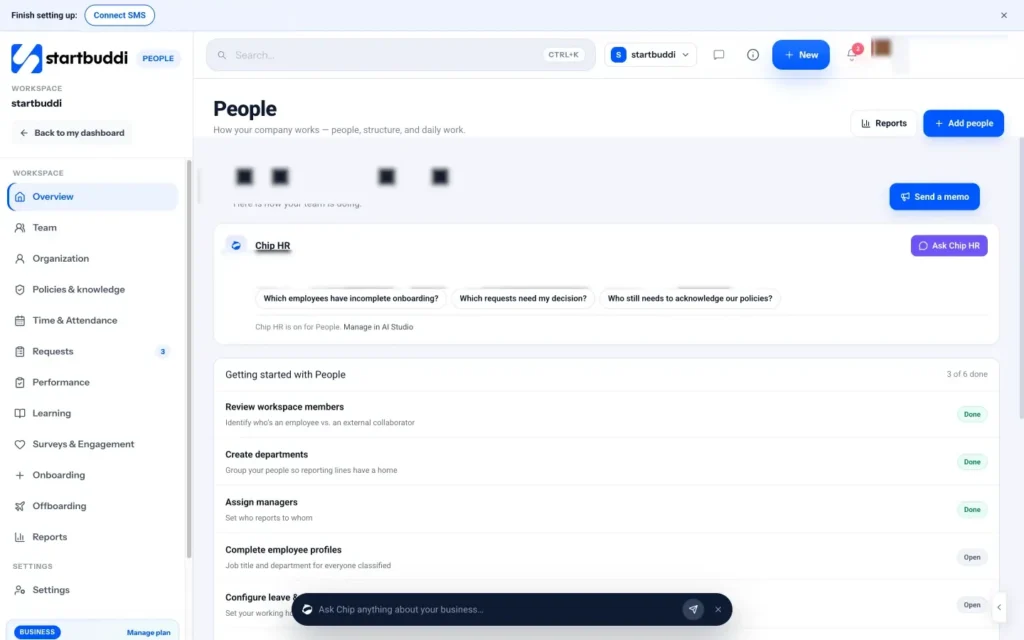
People is the HR area of startbuddi, built for teams that do not have an HR department yet. When you open it, the overview shows a Getting started with People checklist: review workspace members, create departments, assign managers, complete employee profiles, configure leave and attendance, and add company policies. Work through it once and your basic HR system is in place.
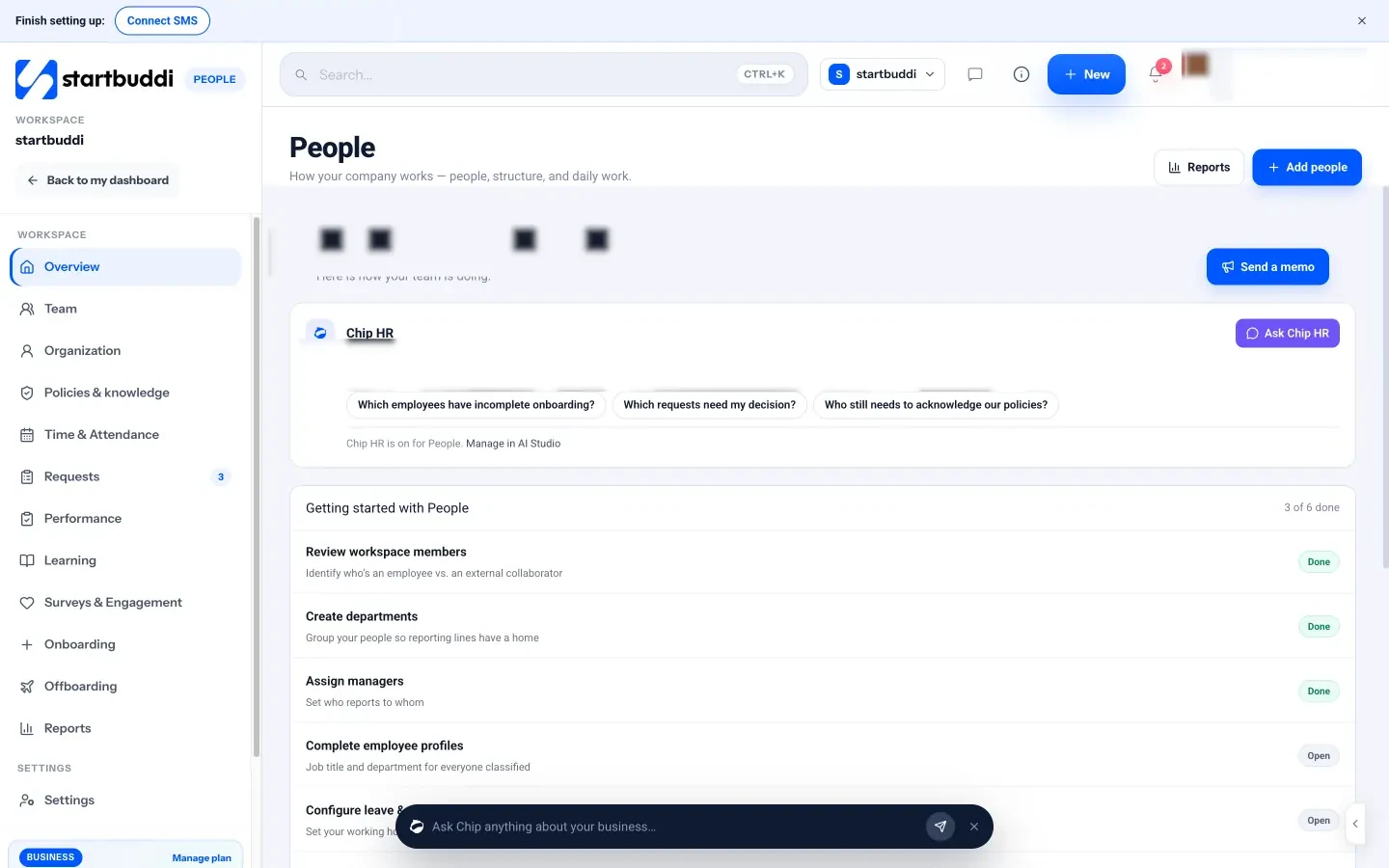
The first step is classifying who is who. For each workspace member, People asks how you work together: Yes, they're part of our team (full-time, part-time, intern or contractor), or an external collaborator such as a freelancer, consultant or agency. You add a job title, department and who they report to, and each person gets a People access level: HR admin, Team member or No access. Managers automatically see their own reports and nobody else, which keeps private details private.
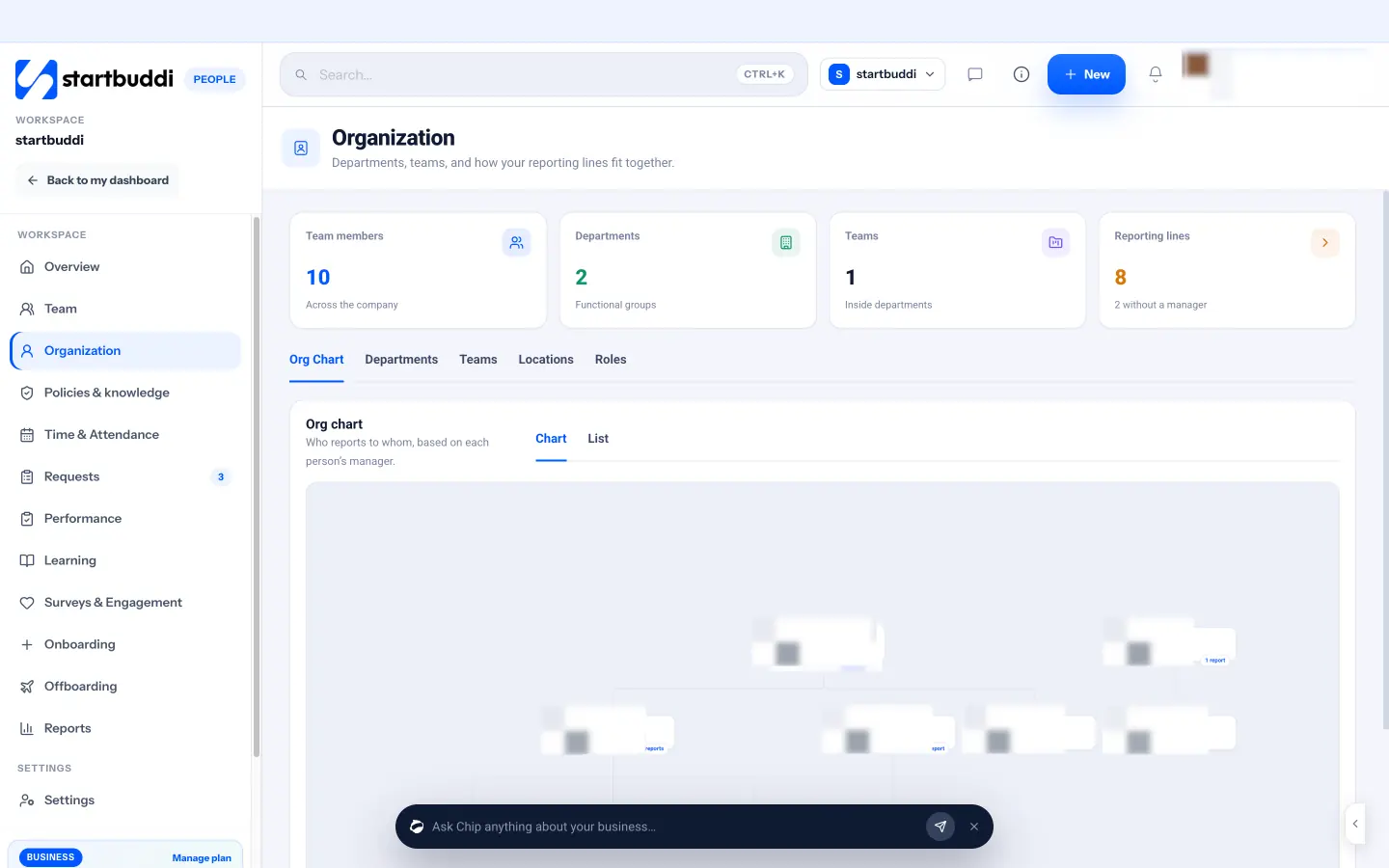
Next, open Organization and add departments and teams. The org chart builds itself from each person's manager, and the Reporting lines card shows when everyone has one. Departments are used throughout People: for policies, surveys, memos and onboarding templates.
The overview also has a Chip HR card. Chip HR answers questions from your own published policies and handbook, and it names the page it used. It can suggest prompts such as "Which employees have incomplete onboarding?" and "Which requests need my decision?", and every change it proposes is shown to you first for confirmation. There is no plan gate on People itself; the limit is seats. The Free plan includes only the owner seat, so inviting teammates needs a paid plan: Starter includes 2 seats, Growth 5 and Scale 15 (see pricing). See pricing for details.
Sources for this chapter
- GOV.UK: Employing staff for the first time
- GOV.UK: Written statement of employment particulars
- SBA: Hire and manage employees
- EEOC: Small business requirements
- IRS: Topic 762, independent contractor vs employee
- Nigeria Labour Act, section 7
- South Africa: Basic Conditions of Employment Act
- Kenya: Employment Act 2007
- Canada Revenue Agency: Open or manage a payroll account
Records, contracts and policies: the paperwork that protects you
- What to keep in each employee record
- Contracts: what to put in writing
- The policies a small business needs first
- How to write a policy people will actually read
- Probation periods
- Changing someone's terms
- A new starter records checklist
- What not to keep
- Make sure people have read them
- Grievance and disciplinary basics
- Keep a knowledge base for everything else
- Common mistakes with records and policies
- Records, policies and a handbook in startbuddi
Paperwork is the least exciting part of HR and the part that protects you most. When there is a dispute about pay, a question about someone's notice period, or an inspection from a tax authority, good records and clear written policies are what you rely on. This chapter covers what to keep for each person, how to handle contracts, which policies a small business needs first, how to write and share them, and how to make sure people have actually read them. Then it shows how to do all of this in startbuddi.
What to keep in each employee record
Every person who works for you should have one record, in one place, that you keep up to date. A good record includes:
- Personal details: full legal name, address, phone, personal email, date of birth, emergency contact.
- Job details: job title, department, manager, employment type (full-time, part-time, contractor, intern), start date, work location.
- Contract and documents: signed contract or statement of terms, offer letter, right-to-work or identity checks where required, any changes to terms.
- Pay: salary or rate, pay frequency, tax and pension details (often held by your payroll provider).
- Time off: leave entitlement, leave taken and remaining, sickness records.
- Performance: goals, review notes, training completed.
- Equipment and access: laptop, phone, keys, and which systems they can log in to.
- Leaving: last day, reason, exit notes, equipment returned.
Keep records for as long as the law requires, and no longer. For example, the IRS says employment tax records should be kept for at least four years after the tax is due or paid, whichever is later (IRS, how long should I keep records). Other countries have their own periods.
Contracts: what to put in writing
A written contract or statement of terms protects both sides. The exact required content varies by country, but most cover:
- The names of employer and employee, and the start date.
- Job title and a short description of the work.
- Place of work, including whether remote or hybrid work is allowed.
- Hours of work and any flexibility.
- Pay, how often it is paid, and any overtime rules.
- Holiday entitlement and how public holidays work.
- Sick pay and sickness reporting.
- Notice periods on both sides, and any probation period.
- Pension or benefits, where relevant.
- Confidentiality and who owns work created.
- Where to find the disciplinary and grievance rules.
Start from a template, then have a local employment adviser review it once. After that, you can reuse it for every hire and only change the details. The free offer letter template is a good first step before the full contract. Our guide on how to build your first team covers hiring, offers and contracts in more depth.
The policies a small business needs first
Policies turn "it depends who you ask" into "here is how we do it". You do not need a 60-page manual. Start with the policies people ask about most, and add others as the team grows.
| Priority | Policy | What it answers |
|---|---|---|
| First | Leave and holidays | How much leave, how to request it, how far ahead, carry-over rules |
| First | Sickness | Who to tell, by when, sick pay, evidence needed |
| First | Working hours | Normal hours, breaks, overtime, flexibility |
| First | Conduct and grievances | Expected behaviour, how to raise a concern, what happens if rules are broken |
| Soon | Expenses | What can be claimed, limits, receipts, how fast it is repaid |
| Soon | Remote work | Who can work remotely, core hours, equipment, security |
| Soon | Equipment and data | Looking after company devices, passwords, customer data |
| Later | Performance and reviews | How often reviews happen and how problems are handled |
| Later | Learning and training | Training budgets, time for learning, how to request courses |
Together these make up your employee handbook. Our post on how to write an employee handbook walks through each section, and the free employee handbook template gives you a starting structure.
How to write a policy people will actually read
- Plain words. Write as you would explain it to a new starter over coffee. "You get 20 days' paid holiday a year, plus public holidays" beats "Employees shall be entitled to annual leave in accordance with...".
- Short. One page per policy where possible. Put the rule first, then any detail.
- Examples. "If you are sick, message your manager before 09:00. For example: 'Hi Ada, I have a fever and won't be in today. I'll update you tomorrow morning.'"
- The why. A rule with a reason gets followed more willingly.
- A date and a version. So everyone knows which version applies.
- An owner. Someone who answers questions and keeps it current.
Probation periods
Many small businesses use a probation period of three to six months at the start of employment. It gives both sides a chance to check the fit, and in some countries shorter notice periods apply during probation. If you use one, say so in the contract, agree clear goals for the period, check in regularly (at 30, 60 and 90 days is common), and make a decision at the end: confirm, extend with a reason, or end the employment fairly. Do not let probation quietly lapse. A written confirmation that someone has passed probation is good for them and gives you a clean record. Check the rules where the person works, because probation does not remove legal rights in every country.
Changing someone's terms
Roles change as a business grows. Someone moves from part-time to full-time, gets a pay rise, becomes a manager or starts working remotely. Each change should be written down and shared with the person, and many countries require written notice of changes to key terms within a set time; in the UK, for example, employers must tell employees about changes to their written statement within one month (GOV.UK). Keep the old version on file with a date, so the record shows what applied when.
A new starter records checklist
Use this checklist for every new person so nothing is missed. It takes ten minutes once you have the documents.
- Signed contract or statement of terms, dated.
- Identity and right-to-work checks where the law requires them, stored securely.
- Tax and pension forms sent to your payroll provider.
- Bank details for pay, entered directly into payroll, not kept in email.
- Emergency contact.
- Job title, department, manager, start date and location recorded.
- Leave entitlement for this year worked out (see the pro rata example in chapter three).
- Equipment issued, with serial numbers.
- System access granted, with a list of what they can log in to.
- Handbook and key policies shared and acknowledged.
Store the finished checklist in the person's record, so anyone covering for you can see at a glance what has been done and what is still missing. It is also the first thing an adviser or inspector will ask for if a question ever arises about someone's employment.
What not to keep
Keeping too much is also a risk. Do not keep information you have no reason to hold, such as copies of documents you only needed to see once (check the rules where you are, since some countries require copies of right-to-work documents), medical details beyond what is needed to manage sickness, or old CVs from candidates you did not hire long after the process ended. Delete records you no longer need once the legal retention period is over. Less data means less to protect and less to go wrong.
Make sure people have read them
A policy nobody has read cannot guide anyone. For the policies that matter most (conduct, data, health and safety, leave), ask each person to confirm they have read and understood them, and keep a record of when. When a policy changes, ask again, because agreeing to the old version does not mean someone has read the new one. This also protects you: if a problem arises, you can show the person knew the rule.
Grievance and disciplinary basics
Every business needs a written, fair way to handle two situations: an employee raising a complaint (a grievance), and the business dealing with misconduct or poor performance (discipline). The principles are similar in most countries: tell the person what the concern is, give them a chance to respond, let them bring someone with them where the law allows, make a decision based on the facts, and allow an appeal. Write these steps into your handbook before you need them. When a problem does arise, follow your own process exactly, and write down each step. The UK's Acas publishes a clear code of practice that many small businesses elsewhere also find useful as a model.
Keep a knowledge base for everything else
Not everything is a policy. Teams also need to look up how things work: how to book a meeting room, where the brand files are, how to submit an expense, who to ask about IT. A simple internal wiki or knowledge base, organised by department or topic, answers these questions and saves the owner from answering them one by one. Write down anything people ask about more than twice.
Common mistakes with records and policies
- Copying another company's handbook word for word. It will not match your country, your size or how you actually work.
- Policies nobody follows, including the owner. If the owner ignores the expense policy, so will everyone else.
- Old versions floating around. Keep one current version and archive the rest with dates.
- Private details visible to everyone. Salary, health and ID information should be visible only to people who need them.
Records, policies and a handbook in startbuddi
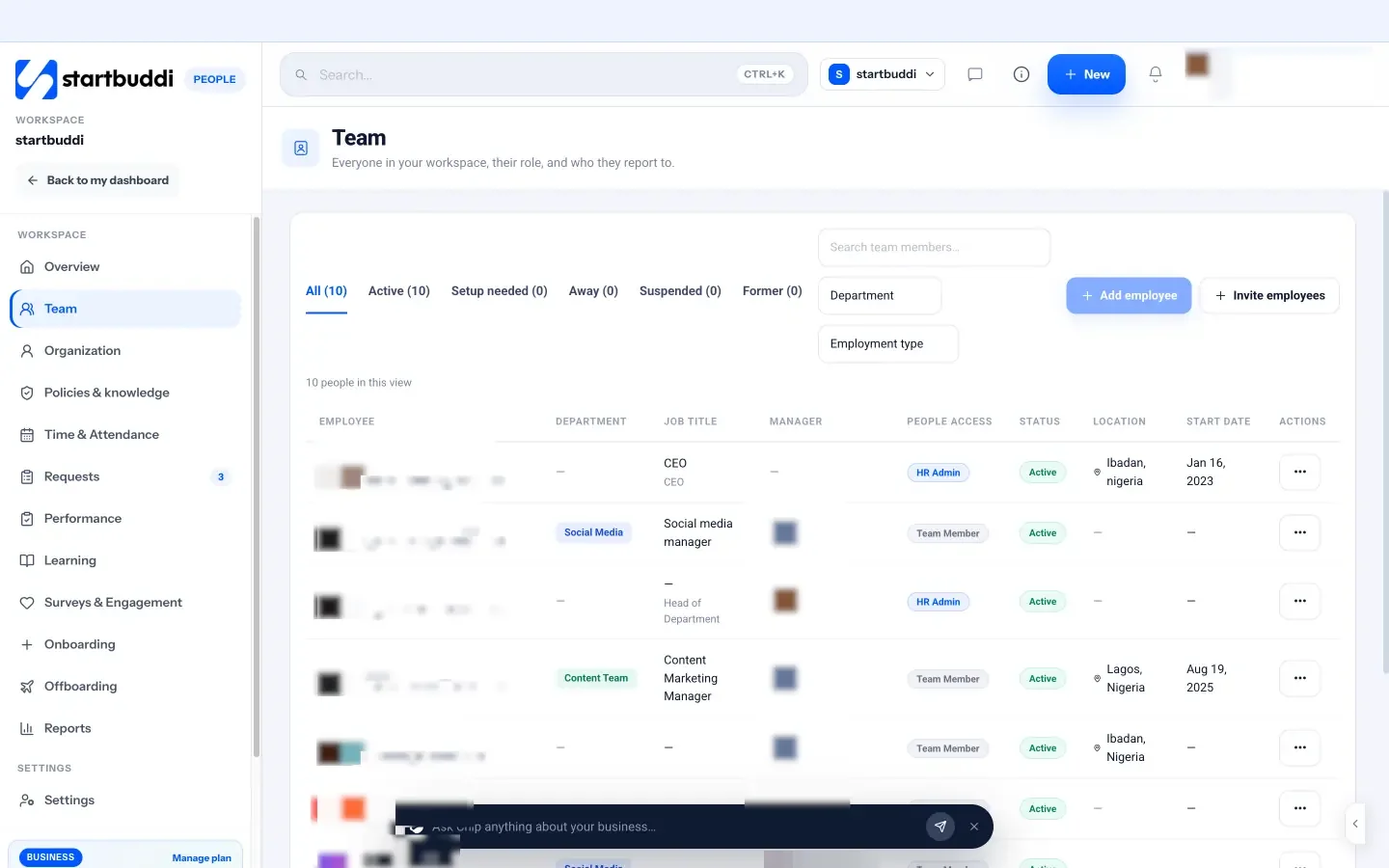
Each person in People has a profile with tabs for Overview, Job, Time & Attendance, Leave, Performance, Learning, Documents, Equipment and Activity. The Overview holds contact information, birthday, emergency contact, today's status and leave balance; the Job tab holds title, employment type, department, start date and location. The tabs after Job are visible only to people allowed to see private details. The Documents tab lists employee documents such as offer letters and contracts, which come from Documents, where you can also send a contract for e-signature.
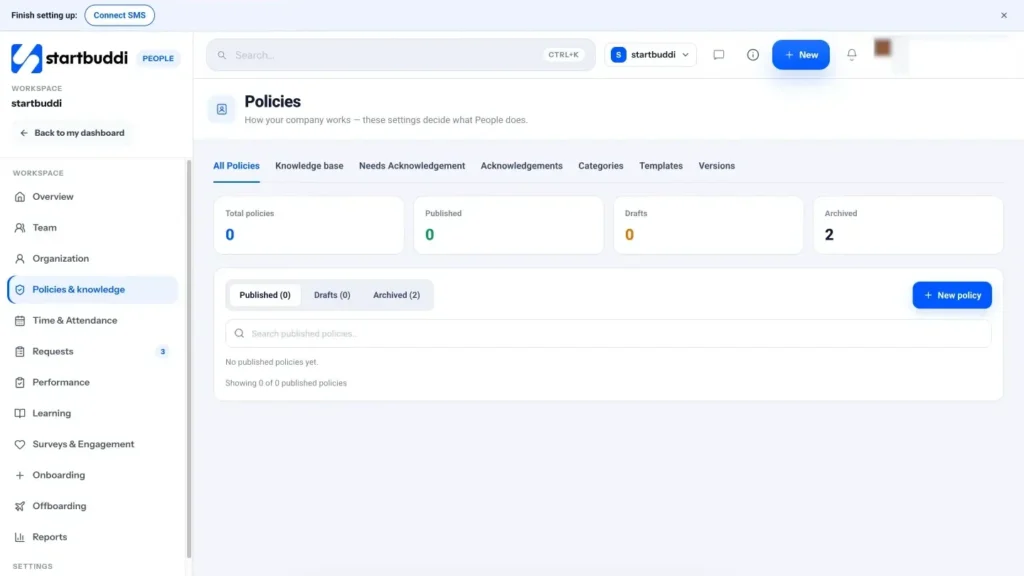
Policies & knowledge is where your handbook lives. There are 15 built-in policy categories, including Organization, Employment, Working hours, Attendance, Leave, Remote work, Expenses, Performance, Learning, Benefits, Onboarding and Offboarding, plus a Custom category for anything else. The New policy wizard walks through the policy type, a set of questions, rules and approvals, who it applies to (everyone, team members, contractors or specific departments) and a final review before Publish policy. Chip can suggest answers to the questions if you describe how your company handles something. Templates give you a structured starting point for each policy.
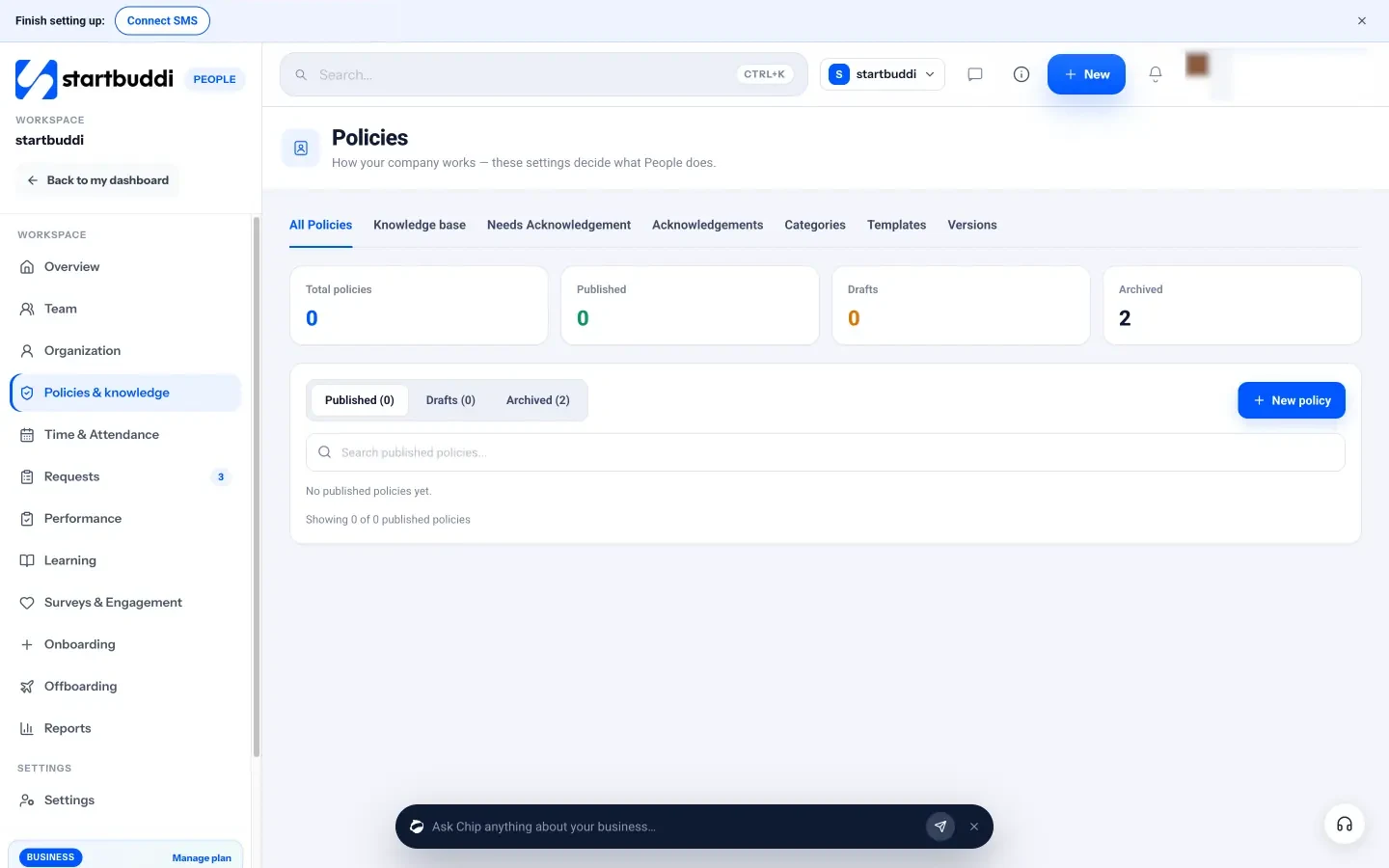
Some policies do more than sit on a page. Publishing a Leave, Working hours or Attendance policy changes how requests and approvals behave in People, so the rules you write are the rules the system applies. Every change creates a new version, and older requests keep the rule version they were made under. Employees see a banner when a policy needs their acknowledgement and click I acknowledge this; the Needs Acknowledgement and Acknowledgements tabs show who has and has not signed, with a Remind button. A changed policy asks everyone to acknowledge again. The knowledge base organises other pages into spaces for the company, a department, a team or a topic, and any page can be turned into a policy that needs sign-off.
Sources for this chapter
- IRS: How long should I keep records?
- Information Commissioner's Office (UK)
- Nigeria Data Protection Commission
Time off, attendance and requests without the spreadsheet
- Know the legal minimum where your people work
- Design your leave types
- A fair request and approval process
- Sickness: be clear and kind
- Do you need attendance tracking?
- Other everyday requests
- Worked example: a salon's leave setup
- Return-to-work conversations
- Pro rata leave: a worked example
- Avoid the end-of-year rush
- How to decline a leave request well
- Common mistakes with leave and requests
- Leave, attendance and requests in startbuddi
Time off is where most small business HR friction happens. Someone books a holiday in a WhatsApp message the owner never saw. Two people in a three-person team are off in the same week. Nobody is quite sure how many days anyone has left. This chapter covers how to set leave entitlements, build a fair request and approval process, handle sickness and public holidays, decide whether you need attendance tracking at all, and manage the other everyday requests people make. Then it shows how startbuddi handles each one.
Know the legal minimum where your people work
Annual leave rules differ hugely between countries. A few examples show how wide the range is:
- United Kingdom: most workers on a five-day week must get at least 28 days' paid annual leave a year, which can include bank holidays (GOV.UK, holiday entitlement).
- United States: federal law does not require paid vacation; it is a matter of agreement between employer and employee, though some states and cities have their own rules on paid leave (US Department of Labor, vacation leave).
- Nigeria: the Labour Act gives workers at least six working days' paid holiday after twelve months of continuous service (Labour Act, section 18), and many employers offer more.
- South Africa: the Basic Conditions of Employment Act sets at least 21 consecutive days' annual leave per leave cycle (BCEA).
The legal minimum is a floor, not a target. Many small businesses offer more than the minimum because it helps them hire and keep good people when they cannot match big-company salaries.
Design your leave types
Most small businesses need four to six leave types. Keep the list short, and write down for each one how much is allowed, whether it is paid, and who approves it.
| Leave type | Typical approach in a small business |
|---|---|
| Annual leave | A set number of days per year, requested in advance, approved by the manager |
| Sick leave | Reported on the day, with evidence needed after a set number of days |
| Compassionate or bereavement leave | A few days for a death or serious illness in the family, approved quickly and kindly |
| Parental leave | Follows the law where the person works; many small businesses top it up |
| Unpaid leave | By agreement, for longer breaks or personal needs |
| Study or training leave | Optional; useful if you support qualifications |
A fair request and approval process
The best leave process is boring and predictable. Everyone knows how to ask, who decides and how quickly. A simple version:
- The employee checks their balance and the team calendar.
- They submit a request with dates and leave type, with the notice your policy requires (for example two weeks for annual leave).
- Their manager approves or declines within two working days. A decline always comes with a reason and, ideally, an alternative.
- Approved leave appears on the shared calendar and the balance updates.
Two practical rules prevent most conflicts. First, set a coverage rule, such as "no more than one person from each team off at the same time" or "at least two people on the shop floor". Second, decide how you handle busy periods: many retail and hospitality businesses restrict annual leave in their peak weeks, and say so in advance.
As you grow, you may want approvals to go through more than one person, for example sick leave straight to the manager but a three-week holiday to both the manager and the owner. Write that down so it is consistent.
Finally, write down who covers approvals when the usual approver is away. A leave request that sits unanswered for two weeks because the manager is on holiday is one of the most common and most avoidable frustrations in a small team.
Sickness: be clear and kind
Sickness policies should be simple: who to tell (usually the manager), how (a call or message), by when (before the start of the working day), and when evidence is needed. Keep track of sickness patterns quietly, because repeated short absences can be a sign of a health problem, stress or a problem at work that needs a supportive conversation. Never discuss someone's health details with the rest of the team.
Do you need attendance tracking?
Many small businesses do not need clock-in at all. If people are paid a salary and judged on results, knowing who is working today, remote or on leave is usually enough. Attendance tracking makes more sense when:
- People are paid by the hour, so you need accurate hours for pay.
- Shifts must be covered, as in shops, salons, restaurants or care work.
- The law or a client contract requires records of hours worked.
If you do track attendance, make corrections easy and fair. People forget to clock out; the fix should be a quick request to the manager, with a record of the change, not a pay deduction and an argument.
Other everyday requests
Leave is only one kind of request. People also ask for equipment, expense approvals, training, a change to their hours, permission to work remotely, or simply want to ask HR a private question. If these all arrive by message and email, they get lost. A single place for requests, with a clear owner for each type and a status everyone can see, solves this. It also gives you a record: when someone asks "did I ever get approval for that course?", the answer is there.
Worked example: a salon's leave setup
A salon in Accra with six stylists and a receptionist sets up leave like this:
- 18 days' annual leave a year, plus public holidays, requested at least three weeks ahead.
- No more than two stylists off on the same day, and no annual leave in the two weeks before Christmas.
- Sick leave reported to the salon manager by 08:00, with a doctor's note after two days.
- Three days' compassionate leave, approved the same day.
- All requests go to the salon manager; requests over ten days also go to the owner.
It fits on one page, the stylists know exactly what to expect, and the owner no longer spends Saturday evenings working out who can take which week off.
Return-to-work conversations
After any sickness absence, a short, friendly conversation on the first day back helps. Ask how they are, whether they need anything to settle back in, and whether work played any part in the illness. Keep it supportive, not suspicious. Record that the conversation happened and any agreed adjustments, but keep health details private. These chats often surface problems early, such as stress from workload or a difficult relationship with a colleague, while they are still easy to fix.
Pro rata leave: a worked example
People rarely start on 1 January, so you need a fair way to work out leave for part of a year. The usual approach is pro rata: a share of the full entitlement based on how much of the year they work.
- Full entitlement: 20 days a year, leave year January to December.
- New hire starts on 1 April, so they work 9 of the 12 months.
- Their entitlement for the first year: 20 multiplied by 9, divided by 12, which is 15 days.
- A part-time employee working 3 days a week gets 3/5 of the full-time entitlement: 12 days a year instead of 20.
Decide how you round (many businesses round up to the nearest half day), write it in the leave policy, and apply it the same way to everyone. Check any legal minimums where the person works, because the pro rata figure must not fall below them.
Avoid the end-of-year rush
If leave cannot be carried over, many people save it up and take it all in November and December, which leaves small teams short-staffed at the busiest time of year for many businesses. Three simple fixes: allow a small carry-over (for example five days, to be used by March), ask everyone to book at least half their leave by the end of June, and look at balances every quarter so you can nudge anyone who has not taken time off. Rest is also a wellbeing issue. People who never take leave are more likely to burn out.
How to decline a leave request well
Sometimes you have to say no. How you do it matters for trust. Reply quickly, explain the reason, and offer an alternative. For example:
"Hi Kemi, thanks for asking early. I can't approve 14 to 18 December because Tunde and Ada are already off that week and we'd have nobody on the shop floor. Could you do 21 to 24 December instead, or the week of 7 December? Happy to talk it through."
A decline with a reason and an option is usually accepted. A silent decline, or one that feels arbitrary, is remembered for a long time.
Whatever system you use, make balances visible to the person themselves. When people can see "12 days left" without asking, most leave questions disappear, and planning becomes a shared job rather than something the owner does alone.
Common mistakes with leave and requests
- Leave booked in chat. Messages get missed and balances drift. Use one request process.
- No coverage rule. Approving requests first come, first served can leave a small team empty.
- Balances in a spreadsheet only the owner can see. People should see their own balance at any time.
- Different treatment for favourites. Consistency is fairness, and in some countries it is also the law.
Leave, attendance and requests in startbuddi
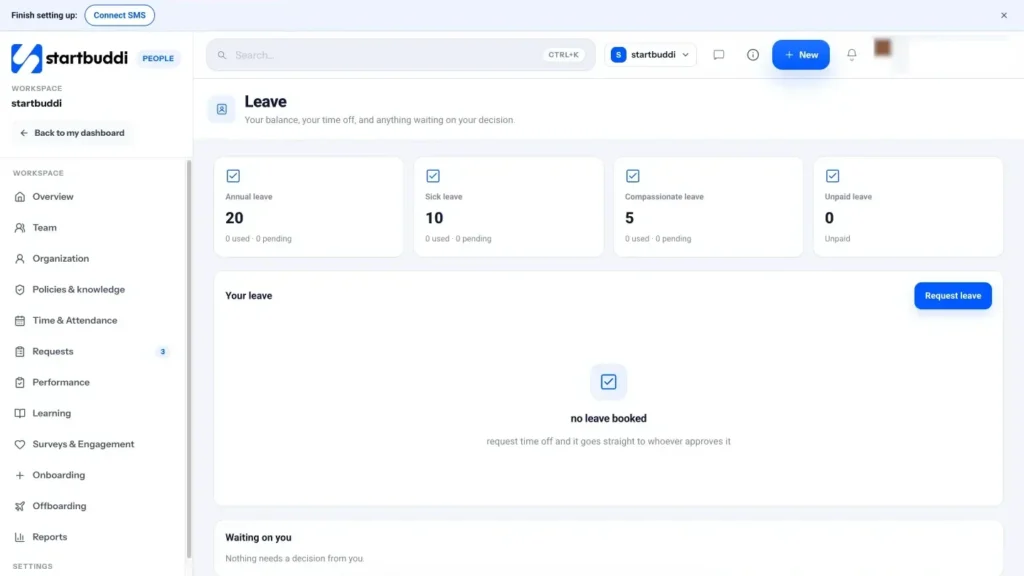
Leave in People shows each person their balance for each leave type, their upcoming time off and a Request leave button. The default leave types are Annual leave, Sick leave, Compassionate leave and Unpaid leave, and you can add your own. When someone requests leave, they pick the type and dates, and startbuddi works out the working days and checks the request before it is sent: not enough leave left, not enough notice, team coverage, a restricted period or a policy conflict. A blocking conflict stops the request until it is fixed.
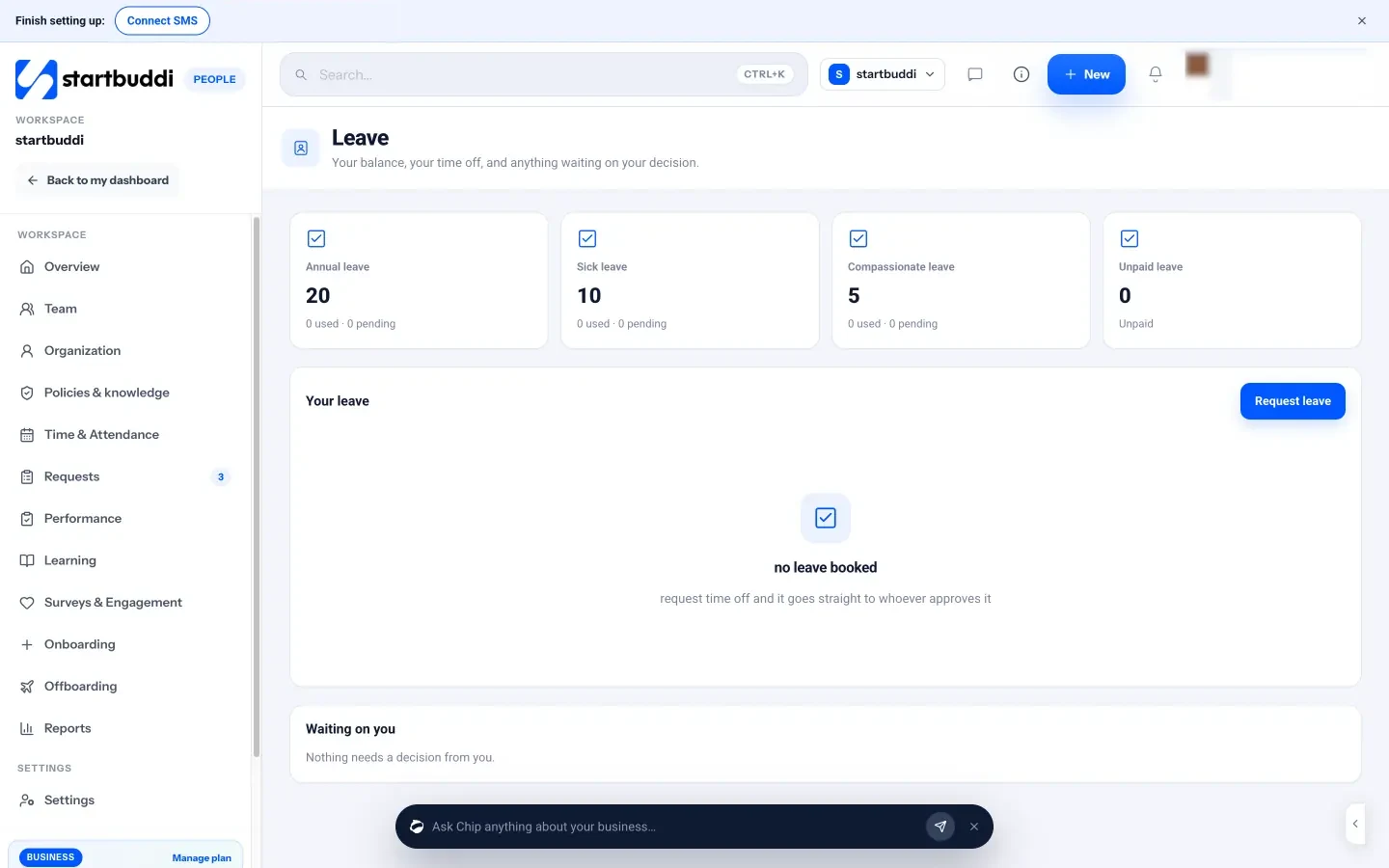
The leave policy decides who approves. You can set a chain that runs in order, where the next person is asked only once the one before approves, and approvers can be the person's manager, their department head, a People admin, a finance admin or the workspace owner. Each leave type can have its own chain, so sick leave can go straight to the manager while longer leave goes further. Rules include notice required, carry-over, self-approval and a team coverage guard. Public holidays are not charged as leave, and approved time off shows on the overview, the person's profile and "Who's away today".
Requests is one queue for every kind of ask. Request types come from the policies you publish: leave, expense or purchase, remote or workspace, learning or training, contract or employment, attendance correction, benefit or equipment, and other requests. There is also Ask HR for a private question to your HR team. Approvers see a Needs My Approval tab, and a decline needs a reason, chosen from a list such as missing information or conflicts with policy.
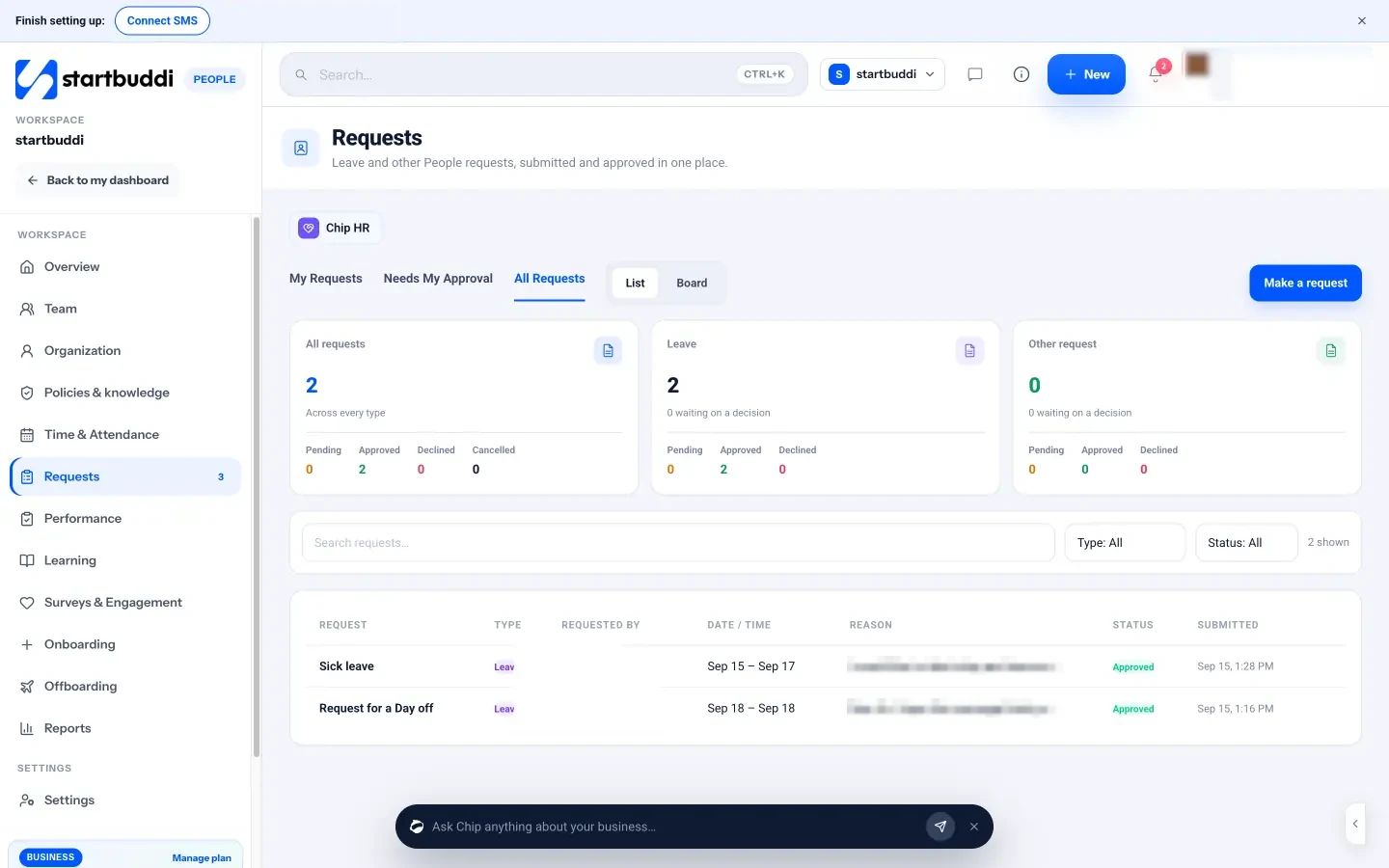
Time & Attendance is optional. When it is off, nobody is asked to clock in, and leave, schedules and holidays still work normally. When it is on, people can clock in and out, managers see who is present, remote or absent, and mistakes are fixed with a correction request that a manager approves, so records stay auditable. The Schedule and Holidays tabs hold your working days, hours, time zone and the dates the business is closed. There is no geo-fencing or biometric clock-in, and overtime is submitted through Requests rather than tracked as its own type.
Sources for this chapter
- GOV.UK: Holiday entitlement
- US Department of Labor: Vacation leave
- Nigeria Labour Act, section 18
- South Africa: Basic Conditions of Employment Act
HR tools for small business: what to use, and how to choose
- The categories of HR tools
- What to look for in HR tools for small business
- Best HR apps for small business: how to decide
- HR growth tools: onboarding that works
- Offboarding: the process most small businesses forget
- What HR tools cost: a worked example
- Common mistakes when choosing HR tools
- Questions to ask before you buy
- Move from spreadsheets to an HR tool in one week
- Where startbuddi fits, and where it does not
- Onboarding, offboarding and reports in startbuddi
Sooner or later every growing business asks which HR tools it should use. The market is crowded, the terms are confusing (HRIS, HCM, ATS, LMS) and the pricing is often per employee per month, which adds up fast. This chapter is a buyer's guide to HR tools for small business: the categories that exist, which ones you need at each stage, what to look for, and how to decide. It also covers onboarding and offboarding, the two HR processes where a tool saves the most time, and is honest about where startbuddi fits and where you will need something else.
The categories of HR tools
| Category | What it does | When a small business needs it |
|---|---|---|
| Core HR (often called an HRIS) | Employee records, org chart, documents, leave, policies, self-service | From your first employee; a spreadsheet stops working at around five people |
| Payroll | Calculates pay, tax and pension deductions, produces payslips and files with the tax authority | From your first employee, usually through an accountant or payroll provider |
| Hiring (applicant tracking) | Job posts, candidate pipeline, interviews, offers | When you hire several people a year |
| Onboarding and offboarding | Checklists and tasks for new starters and leavers | From your second or third hire |
| Performance | Goals, reviews, feedback | Once you have managers other than the owner |
| Learning | Training content, assignments, completion tracking | When training is regular or required |
| Engagement | Pulse surveys, eNPS, recognition | From about ten people, or earlier for remote teams |
| Time and attendance | Clock-in, timesheets, shift schedules | For hourly or shift-based teams |
Some products cover one category deeply; others cover several at a simpler level. For a small business, the usual sweet spot is one tool for core HR and the everyday processes, plus a dedicated payroll provider.
What to look for in HR tools for small business
- Self-service. Can people see their own details, request leave and read policies without asking you? This is where most time is saved.
- Permissions. Can you keep salaries, health notes and ID documents private to the right people, and let managers see only their own team?
- Your country's rules. Does it handle your leave types, public holidays and approval chains? Can you set different rules for different countries?
- Payroll connection. If it does not run payroll, how easily can you get the information your payroll provider needs?
- Mobile use. Can staff request leave or check the rota on a phone?
- Price model. Per employee per month, per seat, or a flat fee. Work out the cost at your size today and at double your size.
- Getting data out. Can you export records and reports if you ever switch?
- Connected to the rest of the business. If HR sits next to your projects, tasks and documents, onboarding tasks and equipment requests do not need to be copied between tools.
Best HR apps for small business: how to decide
Rather than chasing a single "best" app, match the tool to your stage and your biggest pain.
- One to five employees, main pain is admin: a simple core HR tool with records, leave and policies, plus your accountant for payroll.
- Five to twenty, main pain is inconsistency: add approval chains, onboarding checklists and reviews, and give managers their own views.
- Hiring often: add a dedicated applicant tracking system.
- Hourly or shift teams: prioritise scheduling and time tracking, and check it connects to payroll.
- Remote or spread across countries: check multi-country leave and holidays, time zones and, for payroll, whether you need a provider that employs people on your behalf in other countries.
Try any tool with real data for two weeks: add five people, publish your leave policy, request and approve leave, and run one onboarding. You will learn more than from any demo. Our guide to managing a remote team covers the extra things to check for distributed teams.
HR growth tools: onboarding that works
Good onboarding is one of the best HR growth tools a small business has, because it decides how quickly a new hire becomes useful and whether they stay. A simple plan covers four stages:
- Before day one: contract signed, equipment and accounts ready, a welcome message with the first-day plan.
- Day one: a warm welcome, introductions, the handbook and key policies, and a small first task.
- First two weeks: training on the main tools and processes, meetings with key people, a buddy for questions.
- First 90 days: clear goals for 30, 60 and 90 days, and check-ins at each point. Many businesses end probation here.
The trick is that onboarding involves several people: the new hire, their manager, whoever sets up equipment and accounts, and whoever handles contracts. A checklist with a named owner for each step, and reminders when steps are late, stops things falling through the gaps. Our post on how to onboard a new employee has a full 90-day plan.
Offboarding: the process most small businesses forget
When someone leaves, a few things must happen in the right order: agree the last day, hand over their work and clients, get equipment back, settle final pay and expenses, hold an exit conversation, and remove their access to systems and data. Missing the last step is a real security risk: former staff with access to email, customer lists or bank logins. A default exit checklist, used every time, makes departures calm and safe.
What HR tools cost: a worked example
HR software is often priced per employee per month. The figures below are round numbers for illustration, not any specific product's prices. Imagine a business with 12 employees:
- A core HR tool at an assumed $6 per employee per month costs $72 a month, or $864 a year.
- A separate performance tool at an assumed $5 per employee adds $60 a month.
- A payroll provider might charge a base fee plus a fee per employee on top.
Add those together and a small business can easily spend several hundred dollars a month on people tools, before counting the time to keep them in sync. That does not mean you should avoid tools. It means you should know the total cost, compare it with the hours saved, and prefer fewer, connected tools where they do the job. Always check a provider's own pricing page for current prices.
Common mistakes when choosing HR tools
- Buying for features you will not use for years. You pay for complexity every month.
- Forgetting payroll. Many HR tools do not run payroll in every country. Check before you buy.
- Not involving managers. If managers will approve leave and run reviews, they must find the tool easy.
- Running two systems in parallel for months. Pick a switch-over date and move everything at once.
Questions to ask before you buy
- How is it priced: per employee, per user who logs in, or a flat fee? What will it cost at double our size?
- Does it support the leave rules, public holidays and currencies for every country where we have people?
- Can managers approve leave and see their team without seeing everyone's private details?
- Does it run payroll where we are? If not, how do we get the data to our payroll provider?
- Can staff use it on a phone?
- How do we export our data if we leave?
- Where is our data stored, and who can access it?
- What does setup involve, and how long before the team can use it?
Move from spreadsheets to an HR tool in one week
- Day 1: gather what you have: contracts, a staff list, leave records, the current handbook or policies.
- Day 2: add everyone to the tool with job title, department, manager and start date.
- Day 3: set up leave types and opening balances for this year.
- Day 4: publish your key policies and ask everyone to acknowledge them.
- Day 5: tell the team how to request leave from now on, and stop accepting requests by message.
Keep the old spreadsheet read-only for a few months in case you need to check history, then archive it.
Finally, remember that software does not replace judgement. A tool can route a leave request, remind a manager about a review and show who has not signed a policy. It cannot decide whether to allow a special request from someone going through a hard time, or how to handle a conflict between two colleagues. Keep those decisions human, and use tools to free up the time to make them well.
Where startbuddi fits, and where it does not
People in startbuddi covers core HR and the everyday processes for small teams: the team directory and profiles, org chart, policies and knowledge base with acknowledgements, leave with approval chains, optional attendance, requests, onboarding and offboarding checklists, performance reviews and feedback, learning assignments, surveys, reports and Chip HR. Because it sits in the same account as Work, Documents and Chat, onboarding steps become tasks, offer letters and contracts live in Documents, and memos can go out by email or Chat.
It is not a payroll system. It does not calculate pay, tax or pensions, produce payslips or file with tax authorities, so use your accountant or a payroll provider for that. Learning is a library of links (videos, documents, courses hosted elsewhere) with assignment and completion tracking, not a course platform with quizzes or certificates. People reports cover headcount, joiners and leavers, attendance, leave, policy acknowledgements and requests, but they cannot be exported yet.
Onboarding, offboarding and reports in startbuddi
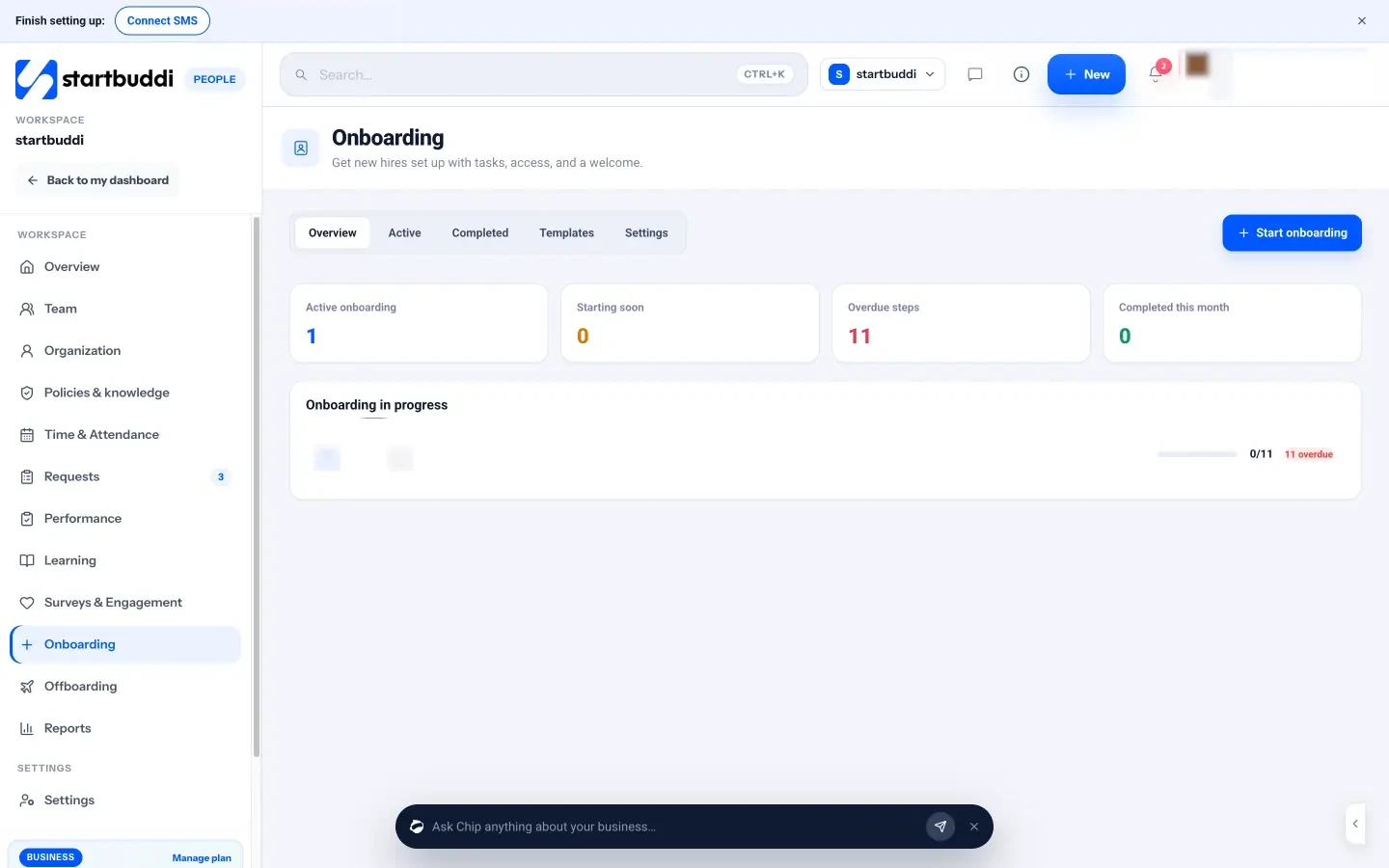
Onboarding has a Start onboarding wizard with four steps: who (a brand-new hire, who gets an invite, or someone already here), employment details (job title, department, manager, employment type, start date and location), the checklist, and review. The built-in "Company onboarding" template covers the standard first two weeks: account and equipment before day one, introductions on day one, and training and goals in the first fortnight. Each step has an owner (the new hire, their manager, HR or IT/admin), who is notified when it is assigned. You can send reminders for overdue steps, and settings can automatically assign required learning, policy acknowledgements and a welcome memo. Chip HR can draft a 30/60/90 plan for a new hire into Documents.
Offboarding works the same way in reverse. Pick the person, their last working day and the reason, and a default exit checklist appears: confirm the last day and notice, notify the team and clients, write a handover note, archive files and transfer ownership, hold the exit interview, return equipment, settle final pay and expenses, and remove access. Their access stays until you complete the checklist, so nothing is removed by accident, and you can hand their projects to someone else while their history stays attributed to them. "Settle final pay and expenses" is a manual step: startbuddi reminds you, and your payroll provider does the calculation.
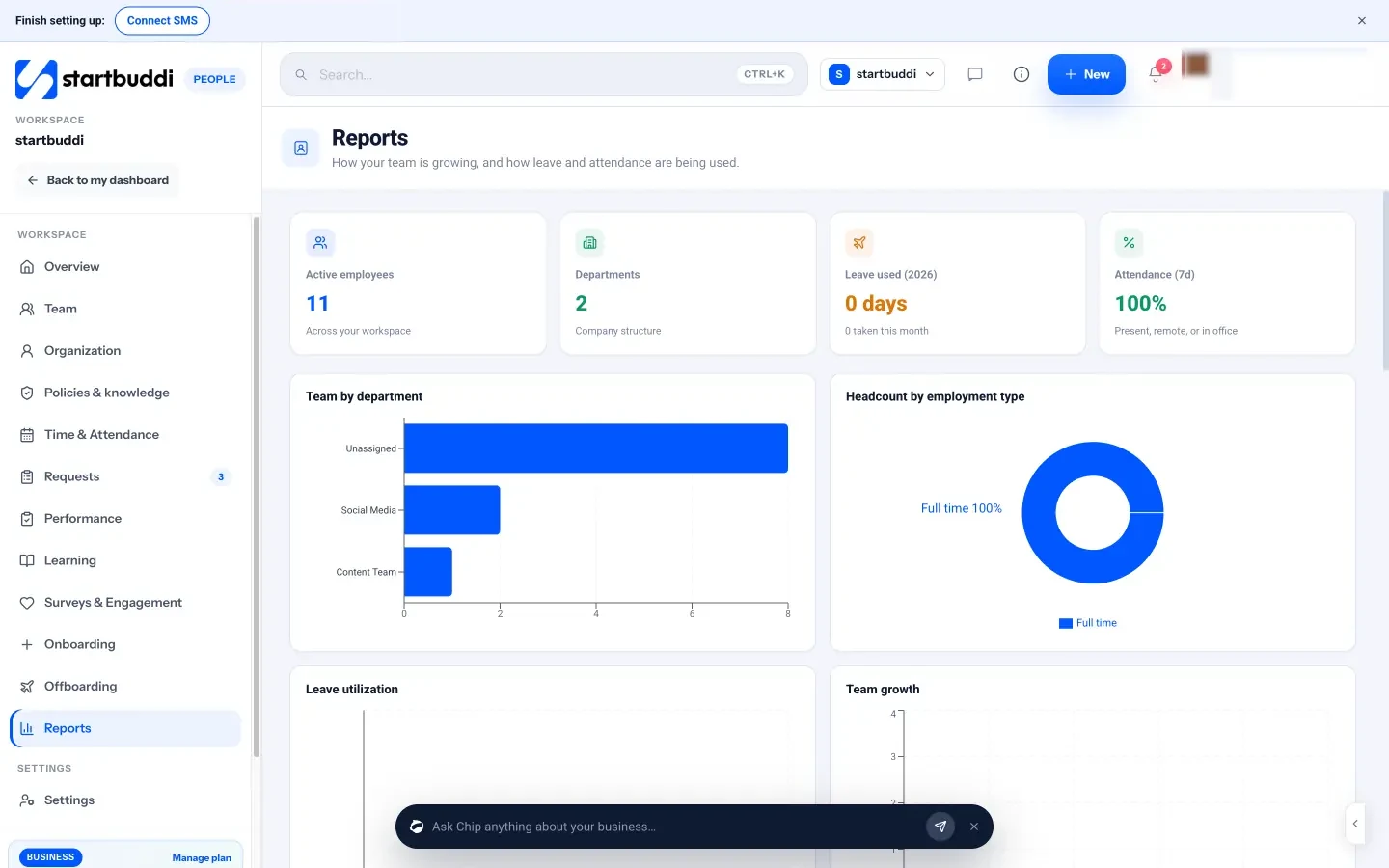
Reports in People shows active employees, new starters, leavers, attendance, leave days and open requests, with charts for team by department, headcount by type, team growth, joining and leaving, and policy acknowledgements. Everything in People is available on every plan; the limit is seats, since the Free plan includes only the owner. Starter includes 2 seats, Growth 5 seats and Scale 15 seats, with a 30-day trial on every paid plan (see pricing).
Your next step: list the people who work with you today, check each has a written contract, and write your leave policy in five lines. Then put it all in one place. You can explore People in startbuddi and see what Chip HR can answer from your own handbook, or compare plans on the pricing page.
Chinedu Kalu is the co-founder and chief operating officer of startbuddi, responsible for how the company runs day to day. Chinedu writes about the operational side of a small business: registering and running the company, money, hiring and the routines that keep a team on track.
Co-founded startbuddi and runs its operations