
Best Employee Scheduling App for Small Business: Shifts Without the Chaos
The best employee scheduling app for small business depends on your shifts. Build a fair rota first, then compare free and paid apps on price and features.

The best employee scheduling app for small business is the one that fits how your shifts work. Under 10 staff, a free plan from Connecteam or Homebase is often enough; When I Work and Deputy charge a few dollars per user. Either way, build a fair rota template first. The app only publishes it.
startbuddi is our product. It isn’t a shift-rota app, and this guide says where it helps and where it doesn’t.
Key takeaways
- Most scheduling chaos comes from missing rules, not missing software: who covers what, how far ahead the rota goes out, and how swaps work.
- Build a template week from your busy hours and minimum cover, then adjust it, rather than starting from a blank grid every Sunday night.
- Publish the rota at least a week ahead, and two if you can. Last-minute rotas are the most common complaint from shift staff.
- Rotate the unpopular shifts (Saturdays, closing, public holidays) on a written cycle so nobody feels picked on.
- Free plans from Connecteam (up to 10 users) and Homebase (one location, up to 10 employees) cover many small teams, according to their pricing pages.
Who this guide is for
- Owners of salons, cafés, clinics, cleaning companies, shops and studios with two to twenty staff on shifts.
- Founders who’ve just hired and are still planning the week on WhatsApp.
- Anyone deciding whether they need a scheduling app at all.
How to build a fair staff rota, step by step
1. Map when you’re busy
Take two or three normal weeks and note how many customers, bookings or jobs you have in each part of the day. A Lagos salon might be quiet on Monday mornings and packed from Friday afternoon to Saturday evening. A cleaning company might need everyone from 6am to 10am before offices open.
Write it as a simple grid: day across the top, two-hour blocks down the side, and the number of staff you need in each block.
2. Set minimum cover for each role
Decide the smallest team you can open with, by role. “At least one senior stylist and one junior at all times” is a rule. “Enough people” isn’t. If only certain people can do certain jobs (a qualified physio, someone who can open the till), note it next to their name.
3. Collect availability and fixed time off
Ask each person for the days and hours they can’t work, and record approved leave and public holidays before you start. Building the rota and then finding out someone is on paid time off is how Sundays get ruined.
4. Build a template week
Using the cover grid, draw one standard week of shifts that works most of the time. Most small teams end up with three or four shift patterns, such as an opening shift, a middle shift and a closing shift. Reuse the template and change only what’s different that week.
5. Rotate the unpopular shifts
Write down which shifts are unpopular and rotate them on a cycle. A four-person team can share Saturdays one in two, or closing one night in four. Put the cycle in the rota itself so anyone can check whose turn it is.
6. Check rest and hours rules
Follow your local law. In the UK, gov.uk’s rest breaks guidance says workers get 11 hours’ rest between working days and either 24 hours off a week or 48 hours every two weeks (checked on 1 October 2026). So a closing shift ending at 22:00 shouldn’t be followed by an 08:00 opening the next day. In Nigeria, the Labour Act says normal hours are set by agreement and work beyond them is overtime, so keep normal hours in the contract and the rota in line with each other.
7. Publish ahead, and set a swap rule
Share the rota at the same time every week, at least seven days ahead. Then write one rule for swaps: staff can swap with someone who does the same role, and tell the manager before the shift. That one sentence ends most last-minute scrambles.
8. Compare the rota with actual hours
Once a week, check the planned shifts against clock-in times. Repeated early finishes or long overtime on the same day tell you the template is wrong, not the people. Our guide on how to track employee hours fairly covers the time-tracking side.
What to do when someone calls in sick
Every rota breaks sooner or later. Decide the process before it happens, so the person on shift isn’t phoning round at 7am:
- Who they tell, and by when. For example, the manager, by phone, at least two hours before the shift. A WhatsApp message at 8:55 for a 9:00 start isn’t notice.
- Who gets asked first. Keep a short cover list per role, in the order you’ll ask: part-timers who want extra hours first, then anyone not already near their weekly limit.
- What you do if nobody can cover. Move bookings, close a chair or shorten opening hours. Tell customers early rather than run short and late all day.
- How it’s recorded. Log the absence the same day as sick leave, not as a missing clock-in, so the hours and the pay line up at the end of the month.
Run through this once with the team when you introduce the rota. It takes ten minutes and saves the first bad morning.
A rota template you can copy
Fill in names and times. The “Cover” row is your minimum from step 2.
| Shift | Mon | Tue | Wed | Thu | Fri | Sat | Sun |
|---|---|---|---|---|---|---|---|
| Open (08:00 to 16:00) | Closed | ||||||
| Middle (11:00 to 19:00) | Closed | ||||||
| Close (13:00 to 21:00) | Closed | ||||||
| Cover needed | 2 | 2 | 2 | 2 | 3 | 3 | 0 |
| Weekend on duty | |||||||
| On leave |
Add a line underneath for the rotation cycle, for example: “Saturday close: A, B, C, D, then repeat.”
Worked example: a four-stylist salon in Accra
The numbers are illustrative. A salon is open Tuesday to Saturday, 9:00 to 19:00, with four stylists (Ama, Kojo, Esi and Yaw). Each shift is 9 hours with a one-hour unpaid break, so 8 working hours. Cover rules: two stylists Tuesday to Thursday, three on Friday and four on Saturday.
| Day | Cover | Stylists on |
|---|---|---|
| Tuesday | 2 | Ama, Kojo |
| Wednesday | 2 | Esi, Yaw |
| Thursday | 2 | Ama, Esi |
| Friday | 3 | Kojo, Esi, Yaw |
| Saturday | 4 | Ama, Kojo, Esi, Yaw |
Shifts per person this week: Ama 3, Kojo 3, Esi 4, Yaw 3. That’s 13 shifts in total, matching the cover (2 + 2 + 2 + 3 + 4 = 13). Esi works 4 × 8 = 32 hours; the others work 3 × 8 = 24 hours each. To keep it fair, next week someone else takes the fourth shift, so over four weeks each stylist does one heavy week. Writing that cycle down stops the “why am I always on four days?” conversation.
How to choose the best employee scheduling app for small business
Do you need an app at all?
Not always. A team of three with fixed hours can run on a shared spreadsheet and a WhatsApp message every Thursday. You probably need an app when:
- you have more than five people or more than one location;
- shifts change week to week;
- swaps happen often and you lose track of who agreed what;
- you need clock-ins tied to the rota.
Apps compared
Prices are from each vendor’s own pricing page, checked on 1 October 2026, in US dollars and before tax.
| App | Free plan | Starting paid price | Good for |
|---|---|---|---|
| Connecteam | Yes, all features free for up to 10 users | Operations Basic $29 a month for the first 30 users, billed yearly ($35 monthly) | Field and deskless teams wanting scheduling, time clock and forms together |
| Homebase | Yes, Basic for 1 location and up to 10 employees | Essentials $30 a location a month | Single-location shops and cafés |
| When I Work | No (14-day trial) | Essentials $2.50 a user a month for single-location teams | Teams that want simple per-person pricing |
| Deputy | No (free trial) | Lite $5 a user a month, with a $30 minimum monthly spend | Teams needing labour law rules and auto-scheduling on higher plans |
| Spreadsheet and WhatsApp | Free | None | Two to four people on fixed hours |
| startbuddi | Free plan available | See the pricing page | Appointment businesses that need each person’s bookable hours, leave and clock-ins in one place, not a shift rota |
What to check before you pick
- How it charges. Per user, per location or per block of users. Work out the cost for your real team size for a year.
- The free plan’s limits. Look at the user cap and which features are missing, such as shift swaps or time clock.
- Phone app quality for staff. Your team will use it on their own phones, often on mobile data.
- Swaps and open shifts. Can staff offer a shift and have a colleague pick it up, with a manager approving?
- Time clock and payroll. If you want planned shifts and actual hours in one place, check the time clock is included, not an add-on.
- Where you are. Check currency, support hours and whether the payroll features apply in your country before you rely on them.
How to do this in startbuddi
startbuddi doesn’t have a drag-and-drop shift rota, open-shift marketplace or auto-scheduling. If you run a café or shop on rotating shifts, a dedicated scheduling app will serve you better. Where startbuddi helps is appointment-based teams (salons, clinics, consultancies, cleaning companies) where “the schedule” is really each person’s bookable hours, plus the leave and attendance around it.
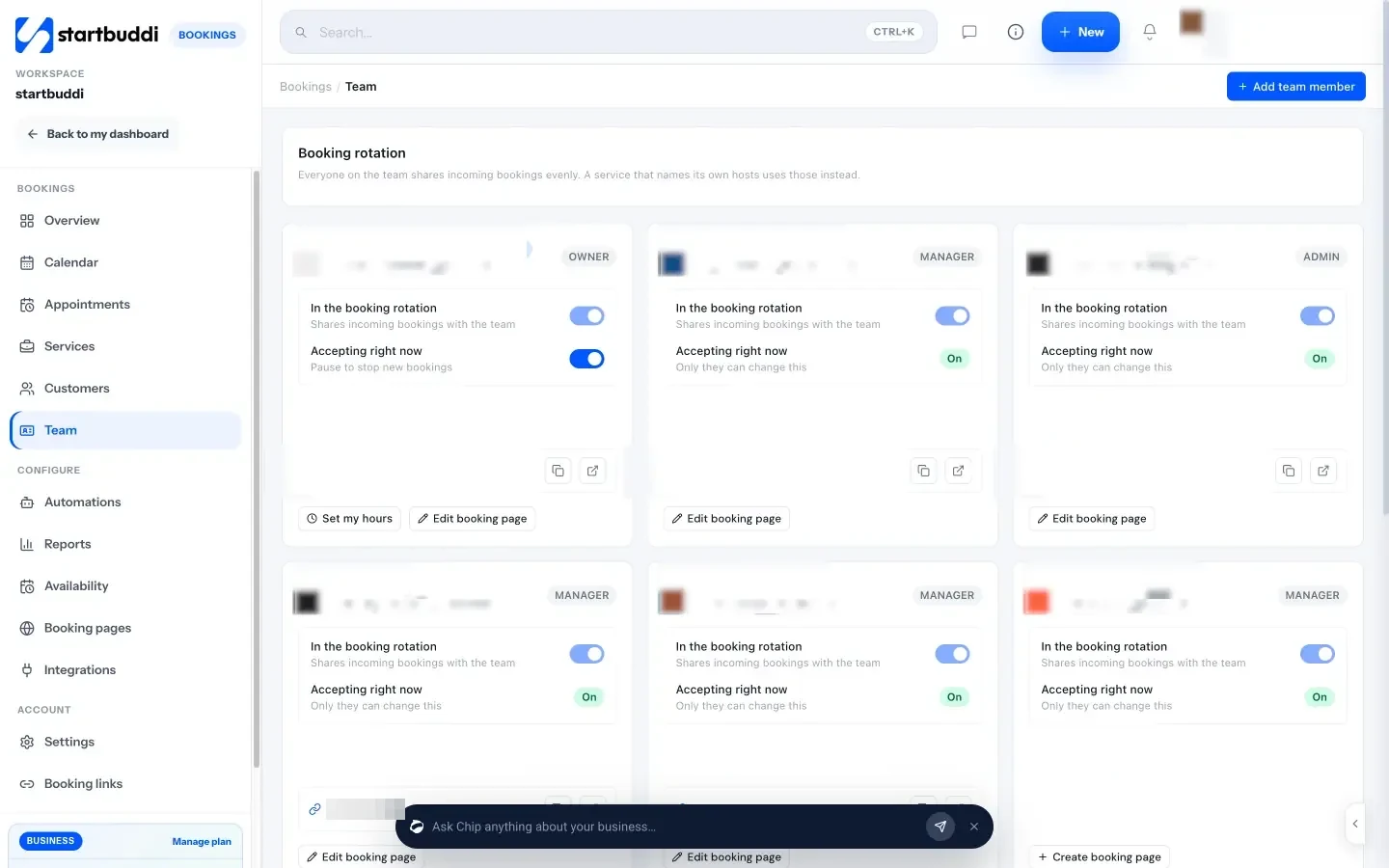
- Set each person’s hours for bookings. In Bookings, open Team. Each member uses Set my hours for their weekly working hours. Anyone with no hours set counts as always available, so set hours for everyone.
- Share bookings across the team. Members are in the Booking rotation by default, so incoming bookings are shared out by round robin scheduling. Take someone out of the rotation if they shouldn’t get new bookings.
- Block breaks and holidays. In the Calendar, use Block time for a lunch break, team meeting, training or a holiday, for one person or everyone.
- Handle leave properly. Staff request time off in People, and it goes through your approval chain. See leave management in startbuddi.
- Record the working pattern. In People, Time & Attendance, the Schedule tab holds the default working days, hours and time zone, and the Holidays tab holds the dates the business is closed.
- Clock in if you want it. Turn on time tracking and staff can clock in and out, with corrections approved by a manager.
Be clear on the limits: there are no recurring bookings, calendar sync is one way (bookings go to Google Calendar, but Google events don’t block slots), and there are no date-specific overrides, so you use Block time instead. For more on how bookings are shared out, see round robin scheduling software, and for what goes wrong when bookings are kept by hand, read about manual scheduling.
Common mistakes
- Building from scratch every week. A template plus edits takes minutes; a blank grid takes an evening.
- Rotas that arrive on Sunday night. People need time to arrange childcare and transport.
- Ignoring rest between shifts. A close followed by an open is legal in some places and still bad for the team.
- Letting swaps happen by private message. If the manager doesn’t know, cover can drop below minimum without anyone noticing.
- Paying for features you won’t use. Auto-scheduling and demand forecasting are worth it at 30 staff, rarely at 5.
Related reading
- Hiring your first people? Our guide to building your first team covers roles, contracts and the first month.
- Scheduling rooms, chairs or equipment as well as people is resource scheduling.
- Running a salon? How to run a salon business covers bookings, clients and payments together.
- Taking bookings online for the first time? Here’s how to create a booking page in an afternoon.
FAQs
What is the best free employee scheduling app for small business?
It depends on your team size and how many locations you have. Connecteam’s pricing page lists all features free for up to 10 users, and Homebase’s Basic plan is free for one location with up to 10 employees (both checked on 1 October 2026). Check which features each free plan leaves out before you commit.
How far in advance should I publish a staff rota?
Publish it at least one week ahead, and two weeks if your shifts allow. Staff need time to arrange transport, childcare and other jobs. Publishing on the same day each week also cuts down on questions.
How do I make a shift schedule fair?
Write down which shifts are unpopular and rotate them on a fixed cycle, share hours evenly over a few weeks rather than every week, and apply the same swap and leave rules to everyone. Put the cycle on the rota so staff can see whose turn it is.
Can I use a spreadsheet instead of a scheduling app?
Yes, for a small team on fixed hours. A shared spreadsheet and a weekly message work for two to four people. Move to an app when shifts change often, swaps get lost or you need clock-ins tied to the rota.
Does startbuddi do employee shift scheduling?
Not as a shift rota. startbuddi sets each team member’s bookable hours in Bookings, shares bookings by round robin, blocks time for breaks and holidays, and handles leave and clock-ins in People. Businesses that run rotating shifts should use a dedicated scheduling app.
How many hours of rest should staff get between shifts?
It depends on the country. In the UK, gov.uk says workers are entitled to 11 hours’ rest between working days. Check your own country’s labour law and your employment contracts.
Plan your team’s week in one place
Start with the rota template above. If your team books appointments, start startbuddi free and set each person’s hours, leave and booking rotation in one workspace; compare plans on the pricing page.
Chinedu Kalu is the co-founder and chief operating officer of startbuddi, responsible for how the company runs day to day. Chinedu writes about the operational side of a small business: registering and running the company, money, hiring and the routines that keep a team on track.
Co-founded startbuddi and runs its operations