Scheduling Software for Landscaping: 12 Best Options in 2026
Scheduling software for landscaping businesses compared: 12 tools, prices checked 14 October 2026, recurring visits, route planning, crew apps, free plans.


The best scheduling software for landscaping depends on your size. Jobber suits most small crews, with repeating visits, quotes and invoices and a 14-day trial. Yardbook is the genuinely free option for a solo lawn care operator. Service Autopilot and LMN suit growing companies that need route planning, job costing and a proper crew app.
startbuddi is our product. It’s on this list for a narrow kind of landscaping business, and we say plainly where it falls short. Prices below come from each vendor’s own website, checked on 14 October 2026.
Key takeaways
- Recurring visits and routes are what make landscaping different. A weekly mow for 60 customers is a route, not 60 appointments. Check that a tool repeats visits and orders stops before you look at anything else.
- Only one tool here has a genuine free plan with no visit cap: Yardbook, which is paid for by ads. Zoho FSM has a free plan capped at 30 appointments a month.
- Route optimisation is often on a higher plan. On Housecall Pro it’s on Max; on Service Autopilot it starts at Pro ($199 a month); on SingleOps it’s on Premier.
- Landscape-specific tools cost more but go deeper: LMN starts at $297 a month after an onboarding fee, and Aspire and Real Green quote on request.
- startbuddi doesn’t do recurring bookings or route planning, so it isn’t the right pick for a mowing round. It can suit design and install firms that win work on WhatsApp.
Scheduling software for landscaping compared
| Tool | Best for | Starting price (checked 14 Oct 2026) | Free plan | Standout feature |
|---|---|---|---|---|
| Jobber | Most small landscaping and lawn care crews | $29/month billed annually (Core, 1 user) | No (14-day trial) | Repeating visits, quotes and a client hub |
| Yardbook | Solo lawn care operators on no budget | Free (ad-supported); premium prices not listed | Yes | Scheduling, routing and invoicing at no cost |
| Service Autopilot | Lawn care companies scaling up | $49/month on an annual subscription, plus a sign-up fee | No (free trial) | Route optimisation and automations on higher plans |
| LMN | Landscape companies that want budgeting and estimating | $297/month after a one-time onboarding fee | No | Crew app with route optimisation and GPS verification |
| GorillaDesk | Route-based lawn, pest and pool work | $49/month (Basic, 1 route) | No | Priced per route, unlimited admin users |
| Housecall Pro | US crews that also do other home services | $59/month billed annually (Basic, 1 user) | No (14-day trial) | Route optimisation and service plans on Max |
| Arborgold | Tree care and landscape firms wanting routing on the entry plan | $129/month paid annually ($149 monthly) | No | Route optimisation on Starter |
| SingleOps | Tree care companies with large crews | $200/month billed annually (Essential) | No | Crew users are free |
| Zoho FSM | Small teams already on Zoho | From $25/month billed yearly (60 appointments) | Yes (30 appointments a month) | Priced by appointments, not users |
| Aspire | Large commercial landscape companies | Pricing on request | No | No limit on users |
| Real Green | Lawn care companies with 3 or more crews | Pricing on request | No | Dynamic routing and online measuring |
| startbuddi | Design and install firms that sell on WhatsApp | See pricing | Yes | Inbox, bookings, estimates and invoices in one place |
All prices are in US dollars per month before tax, as shown on each vendor’s site.
How we chose
We looked at tools a landscaping or lawn care business could run its week on, and judged them on:
- Recurring work: can you set a weekly or fortnightly visit once and have it repeat?
- Routes: can the tool order the day’s stops, and on which plan?
- Crew access: is there a mobile app crews can use on site, and do crew logins cost extra?
- Quotes to invoices: can an estimate become a job and then an invoice without retyping?
- True cost: subscription, onboarding fees, per-user charges and contract terms.
Every fact comes from the vendor’s own pricing, product or help pages, checked on 14 October 2026. We didn’t run hands-on tests, and we don’t quote review scores. Where a vendor doesn’t publish a price, we say so.
1. Jobber
Jobber is field service software for home service businesses, with a dedicated landscaping page describing quoting, scheduling, route optimisation, repeating visits, a crew app and a client hub.
Best for: owner-operators and crews of up to about 15 doing maintenance, mowing and small installs.
Key features
- Repeating visit schedules, with future visits you can edit one at a time.
- Quotes with optional line items and automatic quote follow-ups.
- Route optimisation and quick rescheduling for rain days.
- A client hub where customers approve quotes and pay invoices.
Pricing: Jobber’s pricing page lists Core at $29 a month billed annually ($49 with no commitment) for 1 user, Connect from $99 and Grow from $149 for 1 user billed annually, with team prices for 5, 10 and 15 users. Extra users are $29 a month. Automated reminders and QuickBooks sync start on Connect. The trial is 14 days on Grow with no card.
Pros
- Built for recurring residential work.
- You can price your exact team on the website.
Cons
- Most automation is on Connect and above, so Core is mainly for one person.
- Annual plans are prepaid and the first payment is non-refundable.
Skip it if you run a large commercial maintenance operation that needs estimating by labour hours and budgets. Our Jobber alternatives list compares nine more options.
2. Yardbook
Yardbook is a free, web-based application for landscaping and lawn care businesses, supported by advertising.
Best for: a solo operator or a two-person crew starting out with almost no budget.
Key features
- Job scheduling, one-off or repeating, with automatic customer notifications.
- One-click route optimisation and GPS tracking, according to its scheduling and routing pages.
- Estimates, invoices, payments, timesheets, expenses and chemical tracking.
Pricing: Yardbook’s site says it is “a FREE web-based application designed to help manage landscaping businesses”, paid for by a “sponsored ad business model”. It also offers optional premium features for larger companies, but premium prices aren’t listed on the site.
Pros
- A real free plan, not a trial.
- Covers scheduling, routing and invoicing in one place.
Cons
- Ad-supported, and premium pricing isn’t published.
- Its terms are written for the US (California law, US dollars), so check it suits your country.
Skip it if you want a polished crew app and support you pay for.
3. Service Autopilot
Service Autopilot is software for lawn care and landscaping companies, with a strong focus on automation as you grow.
Best for: lawn care companies moving from one crew to several.
Key features
- Scheduling, dispatch, invoicing and customer management on every plan.
- Route optimisation, multi-day jobs, job costing and custom reports from Pro.
- Automations from Pro Plus.
Pricing: Service Autopilot’s pricing page says “All pricing is based on annual subscription rates”. Startup is $49 a month with 1 business user and 1 mobile licence, Pro $199 with 2 mobile licences, and Pro Plus $499 with 5 mobile licences. Every plan carries a sign-up fee, and the amount isn’t stated. Elite is priced on request.
Pros
- Built around lawn care routes and recurring work.
- Room to grow into automations.
Cons
- Route optimisation isn’t on the entry plan.
- Annual subscription plus an unstated sign-up fee; two-way texting and QuickBooks are priced on request.
Skip it if you want month-to-month terms.
4. LMN
LMN is landscape business software covering budgeting, estimating, scheduling, a crew app and invoicing. It now sits under Granum.
Best for: established landscape companies with fewer than 10 employees that want to price jobs from a budget.
Key features
- Budgeting and estimating built for landscape work.
- A crew app with schedules, a whiteboard, route optimisation, punch-ins, offline access and GPS verification.
- A landscaper-designed CRM with SMS and a customer portal.
Pricing: LMN’s pricing page lists Starter at $297 a month billed monthly, with 1 office or crew lead licence and 5 crew member licences, and Professional at $648 with 3 and 15. Both are “After a one-time onboarding fee”, with the amount not stated. Enterprise is priced on request.
Pros
- Deep estimating and job costing for landscape work.
- Crew licences included in the price.
Cons
- A high starting price for a small crew.
- An onboarding fee on top, and no trial mentioned.
Skip it if you’re a one-person mowing business.
5. GorillaDesk
GorillaDesk is field service software for route-based businesses, including lawn care, pest control and pools.
Best for: lawn care companies with fixed weekly routes.
Key features
- Scheduling, estimates, work orders and invoices.
- Routing up to 25 stops on Basic; real-time street routing from Pro.
- GPS device tracking and QuickBooks Online sync from Pro.
Pricing: GorillaDesk’s pricing page lists Basic at $49 a month for 1 route ($539 a year), Pro at $99 and Growth at $149 for 1 route, with extra routes charged on top. Admin users are unlimited. Texting is bought separately in credit packs.
Pros
- Priced by route, so office staff don’t add cost.
- No contracts on monthly plans.
Cons
- Texting is extra.
- Designed for repeat routes rather than installs and projects.
Skip it if most of your work is design and build.
6. Housecall Pro
Housecall Pro is a field service platform for US home service businesses, including lawn care.
Best for: US crews that do landscaping alongside other services, such as irrigation or pressure washing.
Key features
- Scheduling, dispatch, estimates, invoices and online booking.
- Employee GPS tracking from Essentials.
- Route optimisation and recurring service plans on Max.
Pricing: Housecall Pro’s pricing page lists Basic at $59 a month billed annually for 1 user, Essentials at $149 for 5 users and Max at $299 for 8 users. The 14-day trial gives full access to Max.
Pros
- Five users on Essentials.
- Online booking built in.
Cons
- Route optimisation and recurring service plans are only on Max.
- Aimed at the US market.
Skip it if you need route planning but can’t justify the top plan. Our Housecall Pro alternatives page lists other options.
7. Arborgold
Arborgold is software for tree care and landscape companies, from CRM and estimating to scheduling and invoicing.
Best for: tree care and landscape firms that want route optimisation on the entry plan.
Key features
- CRM, estimating, drag-and-drop scheduling and route optimisation on Starter.
- Job costing and renewals on Professional.
- Tree inventory mapping and sales automation on Enterprise.
Pricing: Arborgold’s pricing page lists Starter at $129 a month paid annually or $149 paid monthly, Professional at $299 ($343) and Enterprise at $499 ($573). An annual contract is required. Office and mobile users are priced on request.
Pros
- Routing on the cheapest plan.
- Unlimited contact storage.
Cons
- A 12-month contract, even if you pay monthly.
- User licences aren’t priced on the page.
Skip it if you want to stay month to month.
8. SingleOps
SingleOps is software for tree care and landscape companies, also part of Granum.
Best for: tree care companies with big field crews and a small office.
Key features
- Estimating, scheduling, client management, invoicing, payments, email and texting.
- Map-based scheduling and Google Calendar integration on Plus.
- Route optimisation, automations and follow-ups on Premier.
Pricing: SingleOps’ pricing page lists Essential at $200 a month billed annually ($220 monthly), Plus at $350 ($385) and Premier at $500 ($550). Extra office or sales users cost more; crew users are free.
Pros
- Free crew logins.
- Published prices.
Cons
- Route optimisation only on Premier.
- No free plan or trial mentioned; it starts with a demo.
Skip it if you’re a small mowing business.
9. Zoho FSM
Zoho FSM is Zoho’s field service app, priced by the number of appointments each month.
Best for: small lawn care teams already using Zoho CRM or Zoho Books.
Key features
- Requests, estimates, work orders, a dispatch console and service reports.
- A mobile app on the free plan.
- Maps and location tracking on paid editions.
Pricing: Zoho FSM’s pricing page lists a Free plan for up to 30 appointments a month and up to 20 users. Paid editions are priced by appointments; at 60 a month, Standard is $30 a month or $25 billed yearly. Unused appointments don’t carry over.
Pros
- A free plan for very small teams.
- Many users at no extra cost.
Cons
- Weekly mowing eats appointments fast: 15 weekly customers is about 65 visits a month.
- Route optimisation isn’t mentioned on the pricing page.
Skip it if you have a large weekly round.
10. Aspire
Aspire is landscape business software for large commercial companies. It’s owned by ServiceTitan.
Best for: commercial landscape companies with several million in revenue.
Key features
- Estimating, scheduling, job costing and contract management.
- Payments, payroll and GPS fleet management, quoted separately.
Pricing: Aspire’s plans page says pricing “varies based on company size, complexity, and what solution best fits your business”, with a single monthly licence fee and “no limit to the number of users”.
Pros
- Unlimited users.
- Built for complex commercial contracts.
Cons
- No published prices.
- Designed for enterprise-level companies; Aspire points smaller businesses to a sister product, Crew Control.
Skip it if you have fewer than three crews.
11. Real Green
Real Green, from WorkWave, is software for lawn care and landscape companies.
Best for: lawn care businesses running three or more crews.
Key features
- CRM, online measuring, scheduling and work orders.
- Dynamic routing, a mobile app and a customer portal.
- Email marketing and payments.
Pricing: Real Green’s pricing page asks you to contact it for a custom quote, with “both usage and user-based” pricing. Its Small Business tier is described as “Ideal for 3 crews or more”.
Pros
- Online measuring helps you quote lawns without a site visit.
- Routing on the small business tier.
Cons
- No published prices.
- Aimed at companies past the one-crew stage.
Skip it if you’re just starting.
12. startbuddi
startbuddi is our product: a workspace for service businesses with booking pages, a customer inbox, estimates, invoices, projects and payments.
Best for: garden design and install firms, especially in Nigeria and across Africa, whose customers message on WhatsApp and book a site visit before a quote.
Key features
- A booking page for site visits and consultations, with deposits, staff availability, round robin across team members and automatic reminders.
- One inbox for WhatsApp, email, SMS, Instagram and website chat.
- Estimates that become invoices, payment links and recurring invoice drafts for maintenance contracts. Customers pay by card through Stripe, or by card, bank transfer, USSD or mobile money through Paystack.
- Projects and tasks for multi-day installs.
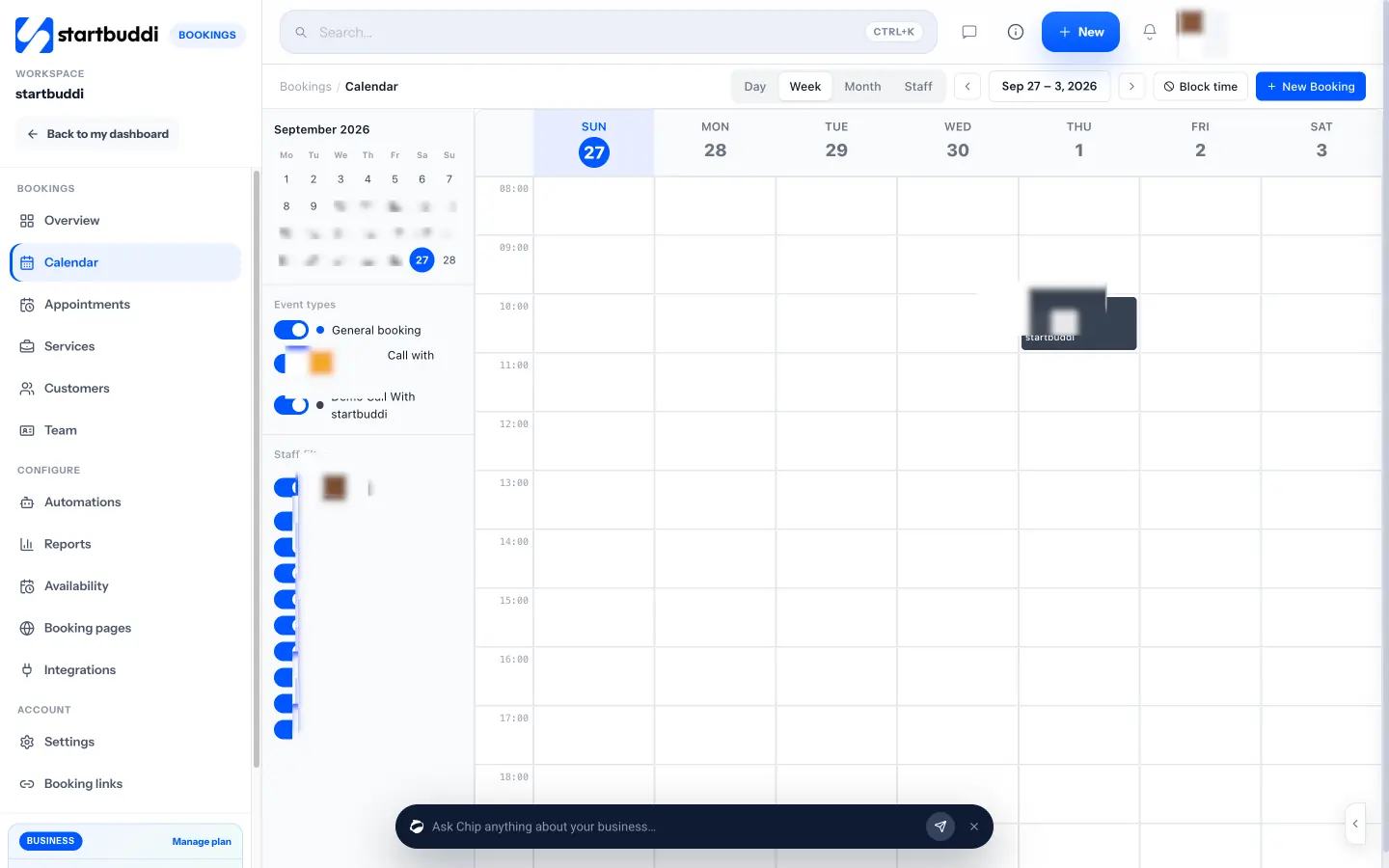
Pricing: a free plan is available; see pricing. The free plan allows one live bookable service.
Pros
- The customer’s messages, site visit, estimate and invoice sit on one record.
- Local payment methods for customers in Nigeria, Ghana and Kenya.
Cons
- No recurring bookings, so you can’t set a weekly mow once and have it repeat.
- No route optimisation, GPS tracking or crew app. On a phone you get the overview and booking links; managing the calendar is done on a computer or tablet.
- Calendar sync pushes bookings to Google Calendar but doesn’t read your busy times.
Skip it if your business is a weekly maintenance round. Use Jobber, Yardbook or GorillaDesk instead. See startbuddi Bookings for what it does do.
How to choose scheduling software for a landscaping business
Start with what your week looks like.
| Your business | Look at |
|---|---|
| Solo lawn care, tight budget | Yardbook, Zoho FSM |
| 1 to 3 crews, residential maintenance | Jobber, GorillaDesk, Service Autopilot |
| Growing crews, need job costing | Service Autopilot Pro, LMN, Arborgold |
| Tree care | Arborgold, SingleOps |
| Large commercial maintenance | Aspire, Real Green |
| Design and install, customers on WhatsApp | startbuddi |
Then work through these checks on the trial or demo:
- Set up one real weekly route. Add 10 customers on a weekly schedule and see how the tool orders the stops.
- Move a rain day. Push Tuesday’s jobs to Wednesday and check how many clicks it takes, and whether customers get told.
- Try the crew app on a crew phone. Clock in, mark a job done and add a photo, outside, with gloves off.
- Send one estimate and turn it into an invoice. Count how much you retype.
- Price the whole year. Add onboarding or sign-up fees, extra users and any contract minimum.
Here’s a worked example with illustrative numbers. A lawn care business with 2 crews of 2, plus the owner in the office, needs 5 logins. On Jobber that’s Connect for 5 users at $149 a month billed annually, or $1,788 a year. On GorillaDesk, Basic for 2 routes is $99 a month, $1,188 a year, with office users free but texting credits on top. Neither figure includes payment processing. Run the same sum for your own team before you decide.
Our guide to running a home service business covers the routines any of these tools needs to support, and if you mainly need online appointments, see our best booking software list.
Try startbuddi for site visits and quotes
If you run a design and install business and your customers message you on WhatsApp, start startbuddi free, set up a site-visit booking page and send your first estimate. If you run a weekly mowing round, start with Jobber or Yardbook instead.
Frequently asked questions
What is the best scheduling software for a landscaping business?
For most small landscaping businesses, Jobber is the safest pick: it handles repeating visits, quotes, invoices and a client hub, with published prices and a 14-day trial. Yardbook is the best free option for a solo operator. Larger companies should look at Service Autopilot, LMN or Aspire.
Is there free scheduling software for lawn care?
Yes. Yardbook is free and supported by ads, with scheduling, routing and invoicing. Zoho FSM has a free plan capped at 30 appointments a month, which a weekly mowing round can outgrow quickly.
Do I need route optimisation for a lawn care business?
Route optimisation matters more the more stops you make: with five stops a day you can order them yourself, but with twenty, a tool that orders them by drive time saves real fuel and hours. Check which plan includes it: on Housecall Pro it's on Max, on Service Autopilot it starts at Pro, and on Arborgold it's on the entry plan.
Can I schedule recurring lawn care visits?
Most landscaping tools on this list can repeat visits, including Jobber, Yardbook, Service Autopilot and GorillaDesk. Housecall Pro's recurring service plans are on its Max plan. startbuddi doesn't support recurring bookings, so it isn't a good fit for a weekly mowing round.
How much does landscaping scheduling software cost?
It ranges from free (Yardbook) to $49 a month for entry plans from Service Autopilot and GorillaDesk, to $297 a month or more for LMN, as checked on 14 October 2026. Aspire and Real Green quote on request. Add onboarding fees, extra users and contract terms when you compare.
Can landscaping customers book online?
Yes, with several of these tools. Jobber and Housecall Pro take online requests and bookings, and startbuddi has booking pages with deposits, which suit site visits and design consultations rather than weekly maintenance.
Tiwalade Joanna Okedara-Kalu is the founder, CEO and CTO of startbuddi, the business system that brings clients, bookings, invoices, projects, marketing and the Chip AI assistant into one place. Tiwalade builds software around how service businesses really work day to day, and writes about client management, getting paid on time and why small businesses outgrow the tools they start with.
Founded startbuddi and leads its product and engineering