8 Housecall Pro Alternatives for Trades
Housecall Pro alternatives for trades compared: Jobber, ServiceM8, Workiz, GorillaDesk, Tradify and more, with real prices, free plans and honest limits.



The best Housecall Pro alternatives depend on what’s pushing you away. Jobber is the closest like-for-like swap for US and Canadian crews. ServiceM8 suits trades that would rather pay by job than by user. startbuddi suits trades whose customers message on WhatsApp and who want bookings, quotes, invoices and messages in one place. GorillaDesk, Tradify and Workiz are worth a look too.
startbuddi is our product. We’ve listed its limits alongside everyone else’s, and every price on this page comes from the vendor’s own pricing page, checked on 1 October 2026.
Key takeaways
- Most people looking for Housecall Pro alternatives hit one of three walls: the jump from Basic to Essentials, features they need sitting on the Max plan, or a business that doesn’t look like a US dispatch operation.
- If you need GPS tracking, route optimisation and a dispatch board, stay with a field service tool: Jobber, GorillaDesk, Workiz or Service Fusion.
- If you pay per user and the team is growing, ServiceM8, Service Fusion and Kickserv price differently and can work out cheaper.
- If your customers book and pay by WhatsApp, bank transfer or USSD, a tool built around messages and local payments fits better than a US field service platform.
- Run a two-week trial with real jobs before you move your customer list.
Housecall Pro alternatives compared
Prices are the lowest paid plan per month, in US dollars, as each vendor showed them on 1 October 2026.
| Tool | Best for | Lowest paid plan | Free plan | Standout feature |
|---|---|---|---|---|
| startbuddi | Trades whose customers message on WhatsApp and pay locally | See pricing | Yes | Inbox, bookings, quotes and invoices on one customer record |
| Jobber | US and Canadian crews that want a close Housecall Pro swap | $29 a month, prepaid yearly (Core, 1 user) | No, 14-day trial | Plans that scale by user count |
| ServiceM8 | Trades that want to pay by job, not by user | $29 (Starter, 50 jobs) | Yes, 1 user, 30 jobs a month | Unlimited users on paid plans |
| Workiz | Teams that live on the phone | Price on request | No, 7-day trial | Phone system built in |
| GorillaDesk | Route-based work: pest control, pool, lawn | $49 per route (Basic) | No, free trial | Routing on every plan |
| Tradify | Trades whose books are in Xero or QuickBooks | $47 per user (Lite) | No, 14-day trial | Accounting sync on the entry plan |
| Service Fusion | Larger teams that want unlimited users | $208, billed yearly (Starter) | No, demo | Unlimited users on every plan |
| Kickserv | Small crews that want several users cheaply | $60 (Start, 5 users) | No, 30-day trial | 5 users on the entry plan |
Why look for a Housecall Pro alternative?
Housecall Pro is a capable tool for US home service businesses. People still switch, usually for reasons you can see on its own pricing page (checked on 1 October 2026).
The jump between plans is steep. Basic is $59 a month billed yearly ($79 monthly) for 1 user. Essentials is $149 yearly ($189 monthly) for 5 users, and Max is $299 yearly ($329 monthly) for 8 users. A solo plumber who hires one helper and needs more than one login moves from $59 to $149 a month.
Key features sit on higher plans. Routes, employee GPS tracking, checklist automations and QuickBooks Online sync start on Essentials. Recurring service plans, route optimisation and API access are on Max. If you sell maintenance agreements, that’s the plan you’re looking at.
Add-ons are priced separately. The pricing page lists add-ons such as Pipeline, Voice, Campaigns, Payroll and Websites without prices, so the monthly bill can grow beyond the plan price. Ask for a full quote before you commit.
It’s built for one kind of business. Housecall Pro prices in US dollars and is designed around crews driving to jobs, dispatch and card payments in the field. A cleaner in Lagos whose customers send voice notes on WhatsApp and pay by transfer, or a two-person electrical business in Accra, will pay for features they never open.
None of this makes Housecall Pro a bad choice. If you run several vans in Texas and need dispatch, it may still be the right one. The alternatives below are for the cases where it isn’t.
How we chose these alternatives
Each tool had to:
- handle the core trades workflow: booking or scheduling, quotes or estimates, invoices and customer records;
- publish its plans on its own website, so we could check them;
- offer a free plan, a free trial or a demo;
- suit a business with 1 to 20 people.
We read every vendor’s pricing page on 1 October 2026. We haven’t tested these tools hands-on, so we describe what each plan includes, not how it feels to use. Prices change, and some vendors show different prices by country, so check before you buy.
1. startbuddi
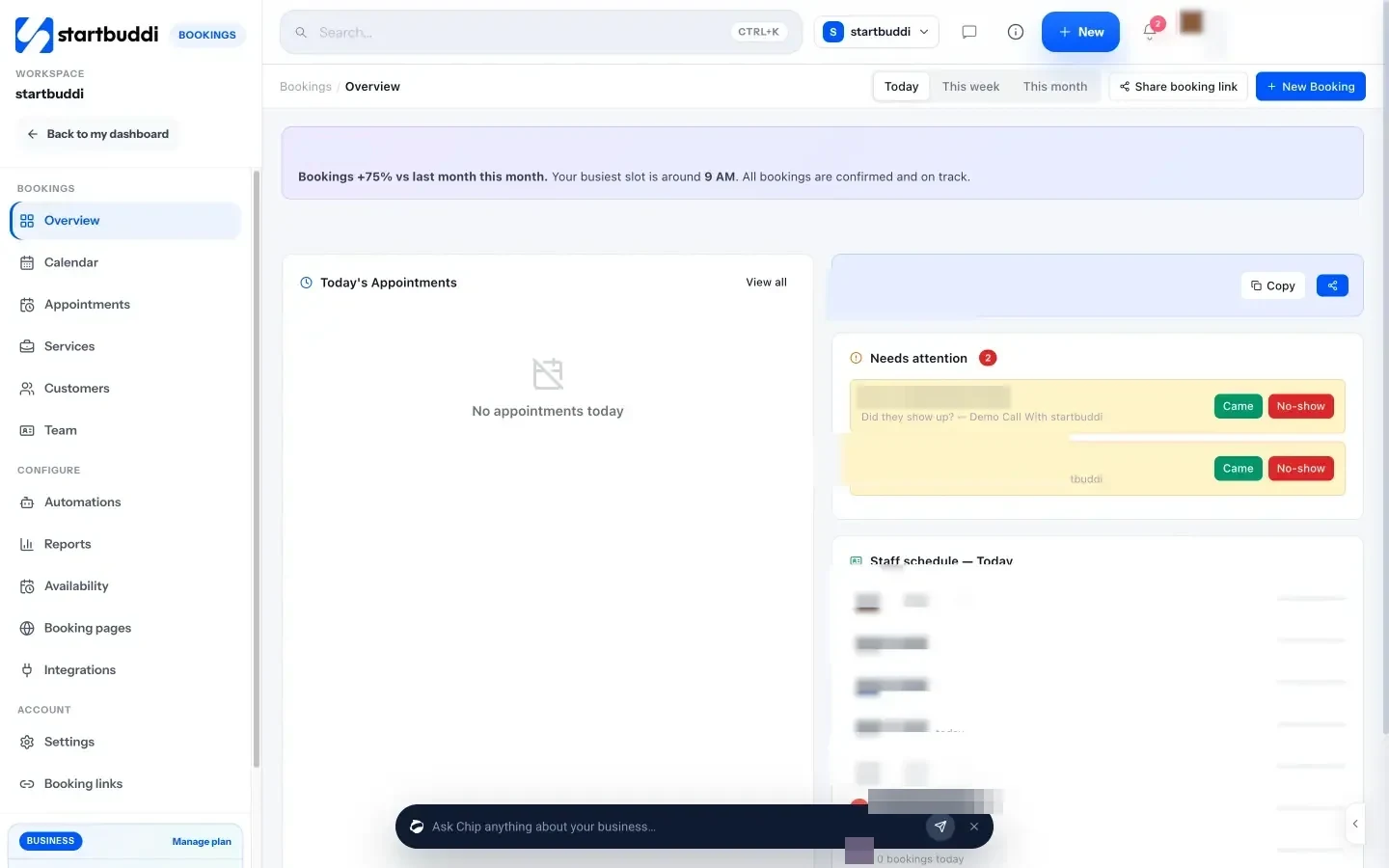
startbuddi is an all-in-one workspace for service businesses: customers, an inbox for every channel, bookings, quotes, invoices, projects and payments, with an AI assistant called Chip. It isn’t a dispatch tool. It’s built for trades and home services that win and run jobs through conversations.
Best for: small trades and home service businesses whose customers message on WhatsApp, Instagram or email, and who want bookings, quotes and invoices next to those messages.
Key features
- Inbox: WhatsApp, email, SMS, website chat, Instagram and Facebook messages in one shared inbox, with assignment, internal notes and quick replies. WhatsApp and SMS need the Starter plan or above.
- Chip: drafts replies you can edit before sending. On Growth, Chip can answer WhatsApp, website chat and inbox messages for you, straight away, after a set time or outside business hours, and hands the thread to a person when the customer asks.
- Bookings: booking software with a booking page per service, staff availability, deposits at booking and an automatic reminder at the time you choose (1 to 48 hours before). See Bookings.
- Quotes and invoices: estimates in Get Paid that you mark accepted and convert to an invoice, then card payments through Stripe, or card, bank transfer, USSD and mobile money through Paystack.
- Job checklists: save a visit checklist as a task with subtasks in Work, and repeat it for regular customers.
Pricing: a free plan is available. See startbuddi pricing for what each plan includes.
Pros
- Customer messages, bookings, quotes and invoices sit on one customer record.
- Local payment methods through Paystack, which matters if your customers pay by transfer or USSD.
- Chip can answer customers while you’re up a ladder.
Cons
- No GPS tracking, route optimisation or dispatch map.
- No card terminal or tap to pay.
- No QuickBooks or Xero sync, and it isn’t accounting software.
- Calendar sync is one way: bookings go to Google Calendar, but Google events don’t block booking slots. No recurring bookings.
Who should skip it: crews that dispatch several vans a day and need live locations and routes.
2. Jobber
Jobber is field service software for home service businesses in the US and Canada, and the most common like-for-like move from Housecall Pro.
Best for: crews that want quotes, scheduling, invoicing and payments with a similar shape to Housecall Pro, but more pricing steps.
Key features: online booking, quotes, invoicing and payments, and a simple website on Core. Connect adds automated client reminders, automatic payment collection, job checklists, QuickBooks Online sync and time tracking. Grow adds two-way SMS, job costing and custom workflow automations.
Pricing: Core is $29 a month prepaid yearly, $39 with a one-year commitment paid monthly, or $49 with no commitment, for 1 user. Connect is $99, $119 or $139. Grow runs from $149 to $229 a month prepaid yearly, depending on users (1 to 10). Extra users are $29 a month each. There’s a 14-day trial with no card needed.
Pros
- A low entry price for a solo tradesperson.
- More steps between plans than Housecall Pro, so you can grow in smaller jumps.
- QuickBooks Online sync from Connect.
Cons
- Automated reminders aren’t on the cheapest plan.
- $29 per extra user adds up for a growing crew.
- Priced in US dollars, with the cheapest rate only if you prepay a year.
Who should skip it: businesses outside North America, and anyone whose main gripe with Housecall Pro is per-user cost. Our Jobber alternatives list covers the other direction.
3. ServiceM8
ServiceM8 is job management software for trades that charges by the number of jobs a month rather than by user.
Best for: trades with a growing team but a steady number of jobs.
Key features: scheduling, quoting, invoicing, job photos and forms, with free SMS on paid plans. Higher plans add asset management, proposals and job costing.
Pricing: Free covers 1 user and 30 jobs a month. Starter is $29 a month for 50 jobs, Growing $79 for 150 jobs, Premium $149 for 500 jobs and Premium Plus $349 for 1,500 jobs. Every paid plan includes unlimited users. There’s a 14-day trial with no card needed.
Pros
- Adding staff doesn’t raise the bill.
- A genuine free plan for a solo trade starting out.
- SMS included on paid plans (10 cents each on Free).
Cons
- A busy month can push you into the next plan.
- Free plan support is self-serve only; paid plans get 24/7 email and chat.
Who should skip it: high-volume, low-value work, such as many short visits a day, where the job count climbs fast.
4. Workiz
Workiz is field service software with a phone system built in.
Best for: businesses where most jobs start with a phone call.
Key features: scheduling, estimates, invoices, online booking, online payments and a mobile app, with an integrated phone system on every plan. Pro adds AI scheduling and lead tools; Ultimate adds service plans, inventory and franchise management. Paid add-ons include answering and marketing services.
Pricing: Workiz doesn’t publish prices. Its pricing page asks you to request pricing or book a demo. There’s a 7-day free trial with no card needed.
Pros
- Calls, jobs and invoices in one system.
- QuickBooks Online sync.
Cons
- No published prices, so you can’t compare without a sales call.
- A 7-day trial is short for testing a full job cycle.
Who should skip it: owners who want to see the price before they talk to anyone.
5. GorillaDesk
GorillaDesk is built for route-based services: pest control, lawn care, pool maintenance, cleaning and similar work.
Best for: businesses that run the same routes every week.
Key features: invoicing, estimates, work orders and basic routing on Basic. Pro adds a customer portal, online booking, subscription billing, GPS tracking and review requests. Growth adds a sales pipeline and multi-branch support.
Pricing: priced per route. Basic is $49 a month ($539 a year), Pro $99 ($1,089 a year) and Growth $149 ($1,639 a year). Admin users and mobile devices are unlimited. SMS costs $5 a month plus credits. There’s a free trial with no card needed.
Pros
- Routing on every plan, unlike Housecall Pro.
- Unlimited users per route.
Cons
- Basic routing is limited to 25 stops.
- Text messaging is a paid extra.
Who should skip it: one-off repair work with no regular routes.
6. Tradify
Tradify is job management software for contractors, with accounting sync on every plan.
Best for: trades whose bookkeeper lives in Xero or QuickBooks.
Key features: job management, scheduling, quotes, invoices and Xero or QuickBooks sync on Lite. Pro adds recurring jobs, appointment reminders, progress invoicing and timesheets. Plus adds AI tools for reading bills and writing quotes, and service reminders.
Pricing: Lite is $47 per user a month, Pro $51 and Plus $61. There’s a 14-day trial with full features.
Pros
- Accounting sync on the cheapest plan.
- Recurring jobs and reminders from Pro.
Cons
- Per-user pricing, so a five-person team pays five times.
- No free plan.
Who should skip it: solo trades who don’t use accounting software yet.
7. Service Fusion
Service Fusion is field service software with unlimited users on every plan.
Best for: teams of ten or more where per-user pricing hurts.
Key features: customer management, estimates, scheduling and dispatch, payments, invoicing and QuickBooks integration on every plan. Plus adds job photos, inventory and integrated voice and text. Pro adds an open API and e-signatures.
Pricing: Starter is $208 a month billed yearly ($245 monthly), Plus $325 ($382) and Pro $533 ($627). No contracts. The pricing page offers a demo rather than a free trial.
Pros
- Unlimited users, so cost doesn’t grow with headcount.
- Onboarding and support included.
Cons
- A high starting price for a small crew.
- No self-serve trial listed.
Who should skip it: anyone with fewer than five people.
8. Kickserv
Kickserv is field service software for small crews.
Best for: teams of three to five who want more than one login without a big bill.
Key features: an embeddable contact form, automated reminders, reports, time and expense tracking and QuickBooks Online on Start. Run adds dispatch mapping and GPS check-ins.
Pricing: Start is $60 a month for 5 users, Run $119 for 10 users and Scale $199 for 20 users, with 20% off for paying yearly. Every plan has a 30-day trial.
Pros
- Five users on the entry plan.
- A 30-day trial, long enough to test real jobs.
Cons
- Dispatch mapping only from Run.
- The yearly discount needs you to pay for the year up front.
Who should skip it: large teams that need route optimisation.
How to choose a Housecall Pro alternative
Start with the reason you’re leaving, then match it.
| If your main reason is… | Look at |
|---|---|
| Price jumps as you add people | ServiceM8, Kickserv, Service Fusion, GorillaDesk |
| You want the same kind of tool, priced in smaller steps | Jobber |
| Your jobs start on the phone | Workiz |
| Routes and repeat visits | GorillaDesk, Jobber |
| Your books are in Xero or QuickBooks | Tradify, Jobber (Connect) |
| Customers message on WhatsApp and pay by transfer or USSD | startbuddi |
Then check four things in the trial:
- Book, quote, do and invoice one real job from start to finish. If any step needs a workaround, it’ll need one every day.
- Test the phone app in the van, on the mobile data you actually have.
- Count the true monthly cost for your team size, add-ons and SMS included.
- Check how payments reach you. A booking deposit or invoice payment should land in your account in the currency your customers use.
If you’re still setting up how jobs flow through the business, our guide to running a home service business covers bookings, pricing and repeat work, and the home service checklist gives you a visit routine to load into whichever tool you pick.
Migrating from Housecall Pro: step by step
- Export your customers as a CSV from Housecall Pro (check its help centre for the current steps, or ask its support). Keep names, phone numbers, emails, addresses and notes.
- Write down what’s open. List unpaid invoices, accepted estimates not yet done and every booked job for the next eight weeks. Finish or collect what you can in the old system.
- Set up your services and prices first in the new tool, so new bookings and quotes use the right numbers from day one.
- Import customers. In startbuddi, go to Customers, then Contacts, then Import, and upload a CSV of up to 10,000 contacts at a time. Contacts move; jobs, invoices and payment history don’t, so keep your export.
- Recreate recurring work as repeating tasks or scheduled bookings, and set your reminder time.
- Connect payments (Stripe or Paystack in startbuddi) and send yourself a test invoice before any customer sees one.
- Tell customers about any new booking link or payment page, and run both systems side by side for two weeks before you cancel.
Run your next job from one place
If your customers book on WhatsApp and pay by transfer, try startbuddi with a real job before you decide. The free plan is available with no card, and you can see what each plan adds on pricing. Plumbers can see how it fits their week on startbuddi for plumbing businesses.
Frequently asked questions
What is the best alternative to Housecall Pro?
It depends on why you're leaving. Jobber is the closest like-for-like option for US and Canadian crews. ServiceM8 suits trades that want to pay by job rather than by user. startbuddi suits trades whose customers message on WhatsApp and pay by transfer or USSD.
Is there a cheaper alternative to Housecall Pro?
Yes, depending on team size. Jobber's Core plan was $29 a month prepaid yearly on 1 October 2026, ServiceM8 has a free plan for 30 jobs a month, and Kickserv includes 5 users for $60. Compare the total for your whole team, including add-ons and SMS, not the headline price.
Is there a free alternative to Housecall Pro?
ServiceM8 has a free plan for 1 user and 30 jobs a month, and startbuddi has a free plan. Free plans are limited, so check the job, user and messaging limits against a normal month before relying on one.
Which Housecall Pro alternative is best for a small team?
For a small team, per-user cost matters most. ServiceM8 includes unlimited users on paid plans and Kickserv includes 5 users on its entry plan. If most of your work comes through messages rather than dispatch, startbuddi keeps the conversation, booking and invoice together.
Does startbuddi have GPS tracking or route planning?
No. startbuddi has bookings, staff availability, reminders, quotes, invoices and a shared inbox, but no GPS tracking, route optimisation or dispatch map. If routes are central to your work, GorillaDesk or Jobber is a better fit.
Can I move my customers from Housecall Pro?
Yes. Export your customer list from Housecall Pro as a CSV and import it into the new tool. In startbuddi you import contacts from Customers, then Contacts, then Import, up to 10,000 at a time. Job and invoice history doesn't move, so keep your export.
Omolola Akiyode is the operations and project manager at startbuddi, leading cross-functional projects and the content that helps founders get set up. Omolola writes about projects, websites and getting found online, and turns complex ideas into clear, practical steps.
Runs operations and projects at startbuddi