Salon client management: how to keep clients coming back
Salon client management made simple: what to keep on each client record, how to manage expectations, the rebooking habit and follow-ups that bring clients back.



- Keep a short, useful record for every client, set clear expectations at each consultation, rebook before they leave and send personal follow-ups only to people who agreed to hear from you. Software helps once you have more regulars or more stylists than you can remember.
Salon client management means knowing every client well enough that they never want to go anywhere else. In practice it comes down to four habits: keep a useful record for each client, set clear expectations at the consultation, rebook before they leave the chair, and follow up in a way that feels personal. Get those right and most of your diary fills itself from people who already love you.
This guide covers what to record, how to manage client expectations in a salon, the rebooking habit, follow-up messages you can copy, how to handle an unhappy client, and what to look for in salon client management software. It works for hair, nail, lash, brow and beauty salons of any size, anywhere.
Why salon client management matters more than new clients
Winning a new client costs money: ads, discounts, marketplace fees, your time on social media. Keeping one mostly costs attention. In a Harvard Business Review article, Amy Gallo notes that acquiring a new customer is five to 25 times more expensive than keeping an existing one, and cites Bain & Company research by Frederick Reichheld finding that a 5% rise in customer retention can lift profits by 25% to 95%. Those figures come from across industries, not salons specifically, but the logic fits a salon perfectly.
A regular who comes every six weeks is worth far more over a year than their single ticket suggests. They also refer friends and leave reviews. Salon client management is simply the system that makes sure those regulars keep coming back.
What to keep on every client record
A good record answers one question: what does the stylist need to know before this client sits down? Keep it short enough to read in 30 seconds.
| What to record | Why it matters |
|---|---|
| Name, phone, email | For reminders and rebooking. Note their preferred channel. |
| Marketing permission | Whether they agreed to hear about offers, and when. |
| Service history | What they had, when and with whom. |
| Formulas and products | Colour mix, developer, lash curl and length, nail products used. |
| Patch test and allergies | Date of the last test and any reactions. |
| Preferences | Favourite stylist, quiet appointment or chatty, drink order. |
| Next visit due | When they should be back, based on the service. |
| Notes from the last visit | “Wants to grow out the fringe”, “wedding on 12 June”. |
Only keep what you actually use. Data protection rules apply to salons too. The US Federal Trade Commission’s guide for businesses puts it simply: know what you hold, keep only what you need, protect it and delete what you no longer need. Health details such as allergies deserve extra care. The UK’s ICO and Nigeria’s Data Protection Commission publish guidance too. Check the rules where you are; this is general information, not legal advice.
How to manage client expectations in a salon
Most unhappy clients are not unhappy with the work. They are unhappy because they expected something different. Managing expectations is mostly a good consultation, done every time.
1. Ask, then show
Ask what they want in their own words, then ask for a photo. “A bit lighter” means ten different things to ten people. Look at the photo together and say what is realistic for their hair, skin or nails today.
2. Be honest about what is possible in one visit
Going from dark brown to platinum, or repairing damaged nails, can take several appointments. Say so before you start, not halfway through. Clients respect honesty far more than a promise you cannot keep.
3. Agree time and price before you begin
Say the price range and how long it will take, out loud. If the service might cost more once you see the hair, say that too and get a clear yes. Surprise bills are the fastest way to lose a client.
4. Check safety steps
Confirm patch tests and allergies before colour, lash or brow treatments. The NHS, for example, advises testing hair dye at least 48 hours before use. Ask about it at booking so nobody arrives for a service you cannot safely do that day.
5. Explain aftercare and the next visit
Tell them how to look after the result and when it will need a refresh. This sets up the rebooking conversation naturally.
6. Write the key points down
Two lines in the client’s record: what they asked for, what you agreed. Next time, whoever does the service starts from the same page.
Rebooking: the habit that keeps the chair full
The easiest time to book the next appointment is while the client is looking in the mirror, happy. Make rebooking a standard step at the end of every visit, not a sales pitch.
- Use the aftercare conversation. “Your roots will show in about six weeks. Shall I pop you in for the 14th?”
- Offer two times, not an open question. “Saturday at 10 or Tuesday at 4?” is easier to answer than “When suits you?”
- Send the link if they are not sure. Some people need to check their diary. Send your booking link before they leave so rebooking takes one tap later.
- Track a rebooking rate. Count how many clients leave with a next appointment. Watch whether it rises when you make it a habit.
Every salon’s timings are different, so agree “next visit due” guidance as a team for your main services, such as colour, cuts, gel sets and lash infills, and note it on each record.
Follow-ups that feel personal, not spammy
Follow-ups keep you in mind between visits. Keep them short, useful and sent only to people who agreed to hear from you.
The rules on consent
Service messages, such as confirmations and reminders, are expected. Marketing messages need more care. In the UK, the ICO says you must not send marketing emails or texts to individuals unless they consented or are existing customers who were given a simple way to opt out. WhatsApp’s Business Messaging Policy says you may only contact people who gave you their number and opted in to hear from you. Other countries have their own rules, so check yours.
Four follow-ups worth sending
- After a first visit (next day): “Hi Amara, thank you for coming in yesterday. How is the colour settling? If anything feels off, reply here and we will sort it.”
- When a visit is due: “Hi Jess, it is about six weeks since your last cut with Tom. Want to book your next one? Here is the link.”
- After a missed appointment: “We missed you today, Priya. No problem, these things happen. Here is the link to pick a new time.” Our guide on reducing no-shows covers this in more depth.
- After three months or more without a visit: a friendly note, with a reason to return if you have one. For more ideas, see how to win back customers who stopped buying.
When a client is not happy
Even with a great consultation, sometimes a result disappoints. How you handle it decides whether you lose the client or keep them for life.
- Listen first. Let them finish. Do not defend the work straight away.
- Offer a fix. A free adjustment within a set number of days is common and fair. Put the timeframe in your policy.
- Record it. Note what happened and what you agreed on their record.
- Reply to reviews calmly. BrightLocal’s 2026 Local Consumer Review Survey of US consumers found 80% are likely to use a business that responds to all of its reviews. A polite, specific reply to a bad review reassures the next reader.
A 20-minute weekly client routine
Client management works best as a small weekly habit rather than a big clean-up twice a year. Pick a quiet slot, such as Monday morning, and run through this list:
- Check last week’s new clients. Did each one get a thank-you message and a note on their record?
- Check no-shows and cancellations. Has everyone been offered a new time?
- Look at who is due. Filter clients whose next visit is due in the next two weeks and have no booking. Send them your link.
- Read new reviews and reply to every one, good or bad.
- Fix one gap. A missing phone number, an out-of-date formula, a duplicate record.
Who owns the client when a stylist leaves?
This is a hard conversation in many salons. Stylists build relationships; the salon pays for the booking system, the chair and often the marketing that brought the client in. Agree in writing, when someone joins, how client records are kept and what happens if they move on. Keeping records in a shared salon system rather than on personal phones protects both sides and, above all, the client, who can keep booking without losing their history. Employment rules differ by country, so take local advice before you write anything into a contract.
What to look for in salon client management software
Paper cards and a phone contact list work for a while. Once you have more than a hundred or so regulars, or more than one stylist, salon client management software starts to pay for itself. Look for:
- Automatic records. Every online booking should create or update the client’s record, so nobody retypes names.
- Notes and history on one screen, reachable in seconds on the salon tablet.
- Tags and groups, such as “colour clients” or “due this month”, so you can message the right people.
- Follow-ups you can automate, with a real person able to step in.
- One inbox for WhatsApp, Instagram, email and text, so no message gets lost in a stylist’s personal phone.
- Export. Your client list is your business. Make sure you can download it.
If you are new to the idea, our explainer on what a CRM is covers the basics in plain words. If your clients currently live in WhatsApp chats, start with turning those chats into a customer database.
How startbuddi helps
In one workspace, startbuddi keeps clients, bookings, messages and payments in one place. It is built for service businesses in general rather than salons only, so here is exactly what it covers.
A client list that fills itself. In Contacts, every person who books through Bookings is added or updated automatically. You can also add clients by hand or import a CSV of up to 10,000 contacts at a time. Each contact has notes, tags, files, tasks and an activity timeline, and you can filter by tag or by when you last contacted them, then save that filter as a segment.
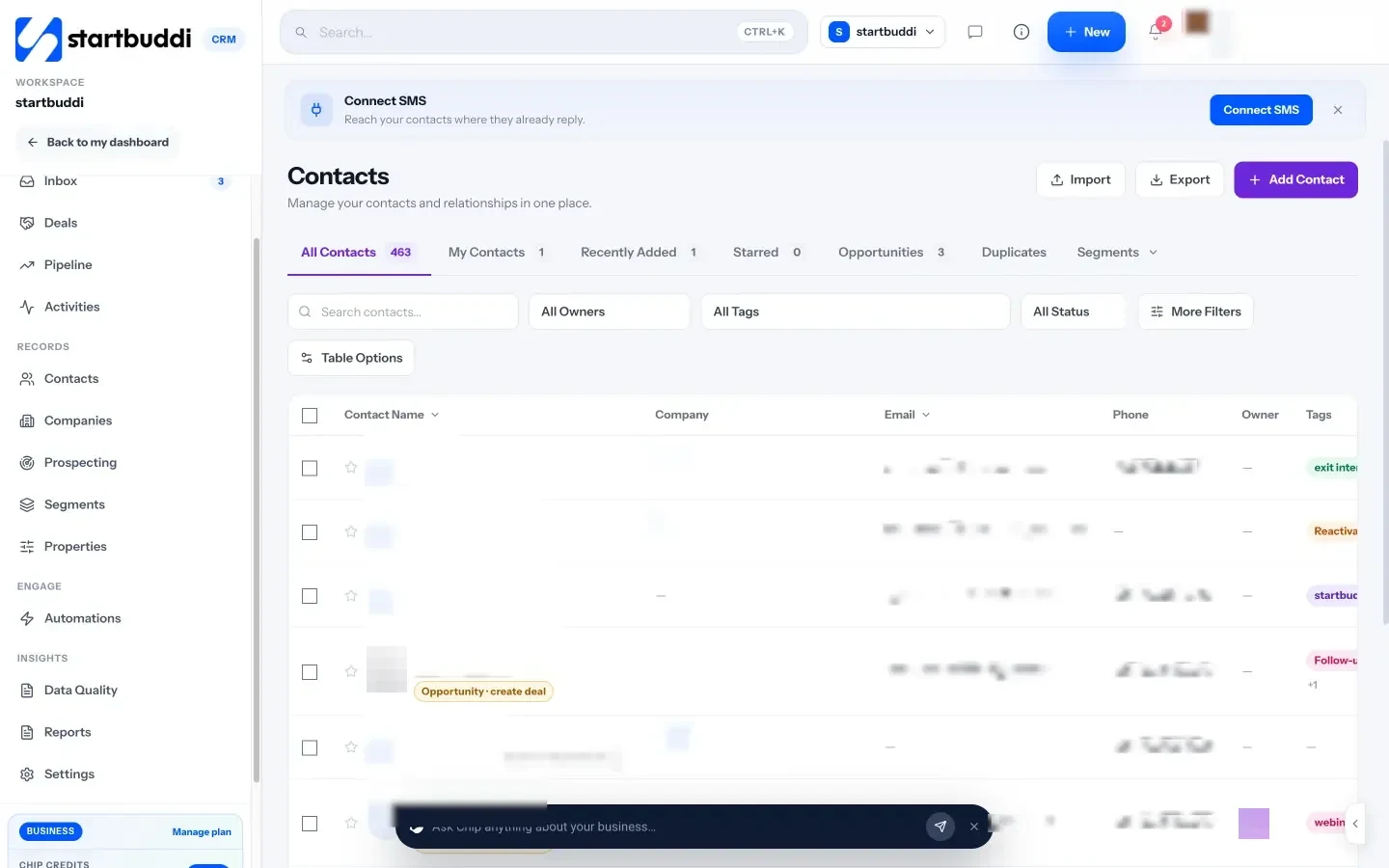
Booking answers on the record. Booking questions, such as hair type or last patch test, can save the answer straight to a contact property, so it is there next visit. The Customers tab in Bookings also tags clients as VIP, Active, At risk or New based on their booking history.
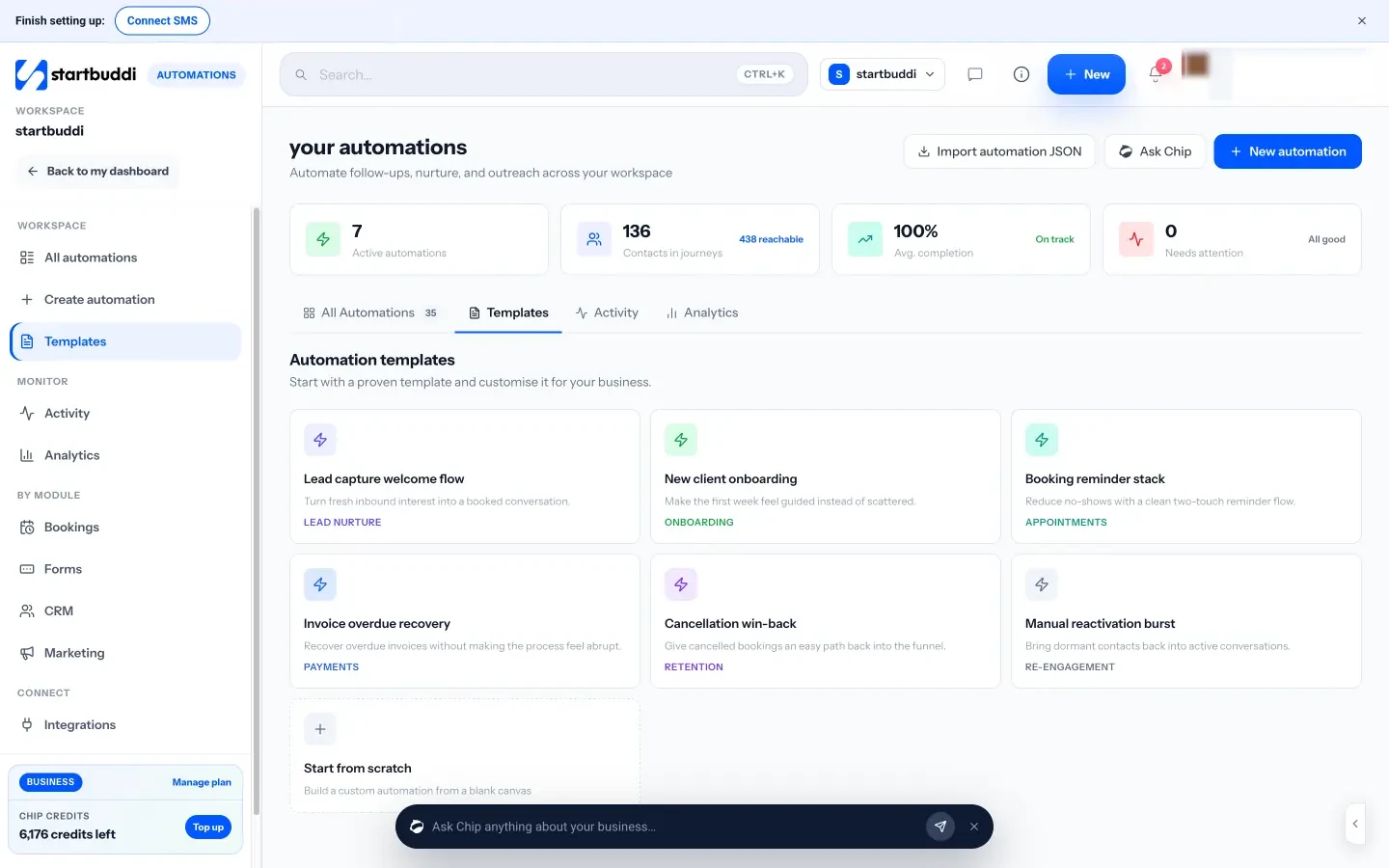
Follow-ups on autopilot. Automations can start when a booking is created, completed, cancelled or marked as a no-show, then send an email, WhatsApp or SMS, wait, and add a task for a team member. Templates include a booking reminder stack, cancellation win-back and a reactivation burst for clients who have gone quiet. WhatsApp and SMS need the Starter plan or above, and Free includes 2 active automations against 10 on Starter.
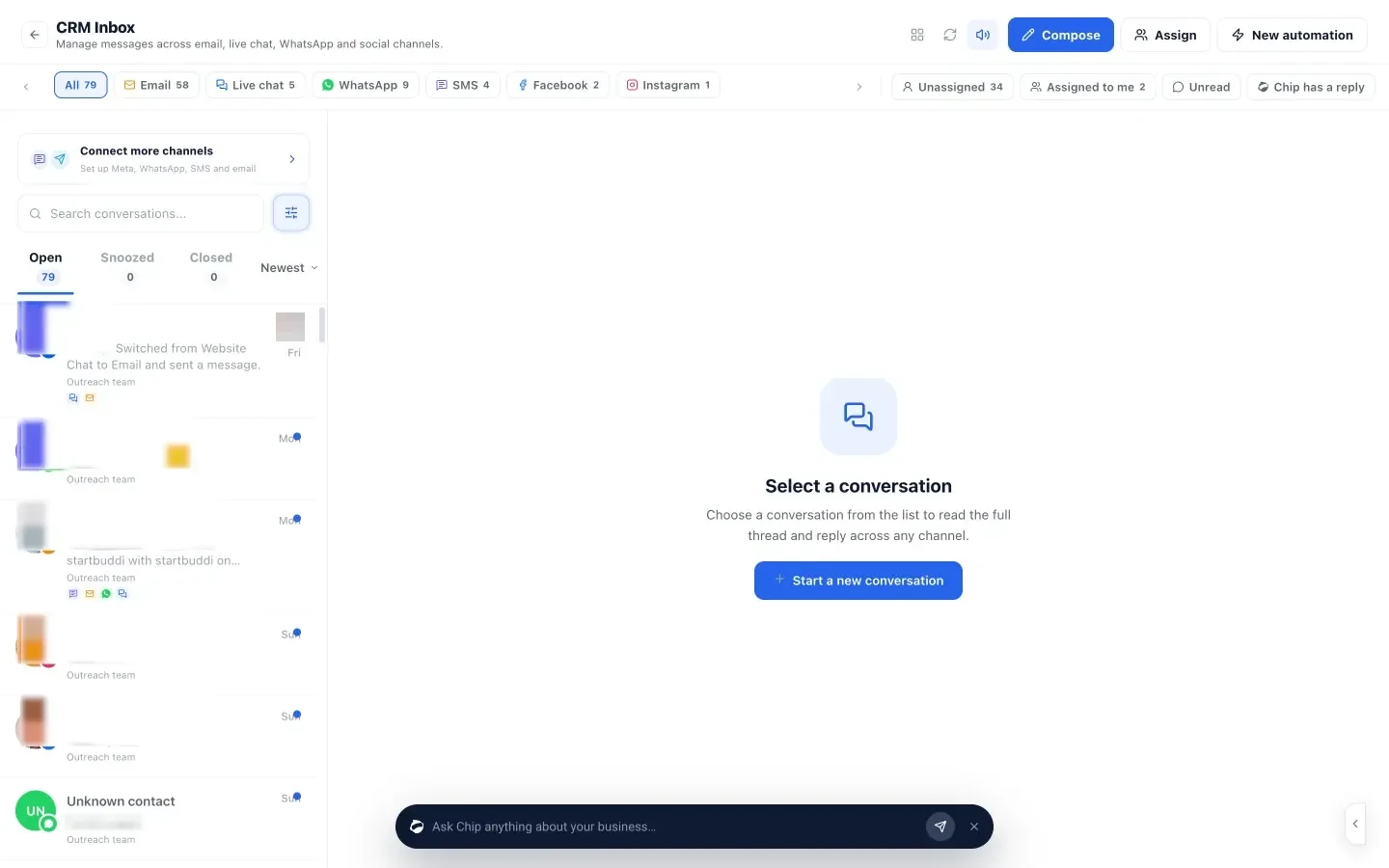
One inbox. The Inbox brings email, live chat, WhatsApp, SMS, Facebook and Instagram messages into one list you can assign to a teammate. Chip can suggest a reply for you to check, and on Growth and above it can answer messages by itself on the channels you choose.
What it does not do. Automations cannot yet start on a date, so birthday or anniversary messages have to be sent from a saved segment by hand. There is no loyalty points scheme or gift card system, and no built-in before-and-after photo gallery, though you can attach files to a contact. It is also not a point of sale, so retail product sales at the till are not tracked unless you sell through its payment links or store.
The Free plan covers up to 250 contacts. Starter covers 2,500 and adds more automations, WhatsApp and SMS (see pricing). See pricing for the rest.
Your next step
Pick your 20 most loyal clients and check their records today. Is the formula there? The patch-test date? The next visit due? Fill the gaps, then make rebooking the last step of every appointment this week. For the wider setup, see our guide on how to run a salon business.
Sources
- Harvard Business Review: The value of keeping the right customers
- FTC: Protecting personal information, a guide for business
- ICO: advice for small organisations
- Nigeria Data Protection Commission
- NHS: hair dye reactions
- ICO: electronic mail marketing
- WhatsApp Business Messaging Policy
- BrightLocal: Local Consumer Review Survey 2026
Frequently asked questions
What is salon client management software?
It is a client database built for appointments. It keeps each client's details, visit history and notes, and helps you send reminders and follow-ups. Many booking tools include a basic version.
How do you manage client expectations in a beauty salon?
Ask what they want and look at a photo together, say honestly what is possible in one visit, agree price and time before you start, check patch tests, and write down what you agreed.
How often should I contact salon clients?
Reminders before each visit, a thank-you after a first visit, a nudge when their next visit is due and an occasional offer are plenty. More than that and people start to mute you.
Can I send marketing messages to every client in my list?
Only to those who agreed to receive them, or where your local law allows it. Keep a note of each client's marketing permission and always include an easy way to opt out.
Omolola Akiyode is the operations and project manager at startbuddi, leading cross-functional projects and the content that helps founders get set up. Omolola writes about projects, websites and getting found online, and turns complex ideas into clear, practical steps.
Runs operations and projects at startbuddi