Project Brief Template for Client Work (Copy and Fill In)
A project brief template for client work: goal, audience, scope, deliverables, budget, timeline and sign-off, plus a filled example. Copy it and send it.



A project brief template is a one-page outline you and your client fill in before work starts: the goal, who it’s for, what you’ll deliver, what’s out of scope, budget, deadlines, who approves and how you’ll judge success. Copy the template below, fill it in with your client on the kickoff call, and get a written yes before you begin.
Key takeaways
- A brief answers “what are we making, for whom, and how will we know it’s done?” before anyone opens a design file or writes a line of code.
- The most useful line is “out of scope”. It’s what you point to when a small extra request turns up in week three.
- Keep it to one page. If it needs more, the detail belongs in a statement of work or a project plan.
- Write it with the client, not for them. A brief they helped write is a brief they’ll stand by.
- Get sign-off in writing, even if it’s a reply to an email saying “approved”.
What is a project brief?
The UK’s Association for Project Management defines a brief as “the output of the concept phase” of a project in its glossary of project terms. For a small service business, that means the short document where the client’s idea becomes something you can price, plan and deliver.
It sits between the first conversation and the paperwork. A client intake form collects the facts. The brief turns them into an agreed goal and scope. The proposal or statement of work then adds price, terms and payment.
The project brief template
Copy this into your own document and replace the guidance in brackets.
PROJECT BRIEF

Project name:        [Short name both sides will use]
Client:              [Business name, main contact, email, phone]
Prepared by:         [Your business, your name]
Date and version:    [Date, v1]

1. BACKGROUND
   [Two or three sentences: who the client is and why this
   project is happening now.]

2. THE PROBLEM OR GOAL
   [One sentence. What should be different when this is done?]

3. AUDIENCE
   [Who will use or see the result? Where are they, and what
   do they care about?]

4. DELIVERABLES
   [Numbered list of what you will hand over, with format
   and quantity. e.g. "1 logo in SVG and PNG, 3 colour versions"]

5. OUT OF SCOPE
   [What you will NOT do in this project. Be specific.]

6. REQUIREMENTS AND CONSTRAINTS
   [Brand rules, must-use content, technical limits, legal
   wording, languages.]

7. WHAT THE CLIENT PROVIDES, AND BY WHEN
   [Logins, photos, copy, approvals, a named decision-maker.]

8. TIMELINE AND MILESTONES
   [Kickoff date, review points, final delivery date.]

9. BUDGET
   [Agreed figure or range, and what happens if scope changes.]

10. REVIEWS AND APPROVAL
    [Who approves, how many rounds of changes are included,
    how long the client has to give feedback.]

11. HOW WE'LL MEASURE SUCCESS
    [Two or three checks, e.g. "Booking page live and taking
    bookings by 30 November".]

12. SIGN-OFF
    Client name, date:     ____________________
Your name, date: ____________________How to fill in each section
- Background: write it in the client’s words from your first call. If you can’t write it in three sentences, you don’t understand the job yet; ask more questions.
- Problem or goal: one sentence, about an outcome, not a task. “Get more bookings from Instagram” beats “redesign the Instagram grid”. The UK Government Service Manual’s guide to discovery makes the same point: reframe a requested solution as a problem to be solved.
- Audience: name a real type of person. “Busy mums in Lekki booking weekend braids” helps a designer more than “women 25 to 45”.
- Deliverables: list each deliverable with a number and a format. Vague deliverables (“social media content”) start most arguments.
- Out of scope: list the three things the client is most likely to ask for that aren’t included. Printing, extra pages, ongoing posting and stock photo costs are common ones.
- Requirements: anything fixed. A brand colour that can’t change, a regulator’s wording, a site that must work on low-bandwidth phones.
- Client inputs: put a date next to each one. Most late projects are waiting on the client, and this line makes that visible without blame.
- Timeline: a few milestones are enough: kickoff, first draft, review, final.
- Budget: if the price is set in your proposal, refer to it. Add the rule for changes: “New requests are quoted separately before work starts.”
- Reviews: set the number of revision rounds and the feedback window, such as 2 rounds, 3 working days each.
- Success: checks both sides can see, with a date.
- Sign-off: a signature, a tick in a shared document or an email reply. What matters is that it’s in writing and dated.
A filled example: website refresh for a Nairobi physiotherapy clinic
This example is illustrative. The business and numbers are made up.
| Section | Filled in |
|---|---|
| Project name | Clinic site refresh |
| Client | Physiotherapy clinic in Westlands, Nairobi; owner as main contact |
| Background | The clinic’s site is four years old and patients phone to book. Reception spends most mornings on calls. |
| Goal | Patients can see services and prices and book online, so phone bookings drop. |
| Audience | Office workers with back and neck pain, and runners, mostly booking from phones at lunchtime. |
| Deliverables | 1. Five-page site (Home, Services, Prices, About, Contact). 2. Online booking page for 4 services. 3. Ten photos edited for web. 4. A one-page guide for staff on updating prices. |
| Out of scope | Writing blog posts; Google Ads; logo redesign; any photography shoot. |
| Requirements | Keep the existing green brand colour; works well on mobile data. |
| Client provides | Service list and prices by 10 Nov; 10 photos by 12 Nov; one person to approve. |
| Timeline | Kickoff 6 Nov; first draft 17 Nov; review 17 to 20 Nov; live 28 Nov. |
| Budget | KSh 180,000 as per proposal; 50% deposit before kickoff, 50% at go-live. New requests quoted separately. |
| Reviews | 2 rounds of changes, 3 working days each. |
| Success | Site live by 28 Nov; first online booking by 5 Dec. |
| Sign-off | Owner and designer, dated. |
The deposit split works out as KSh 90,000 before kickoff and KSh 90,000 at go-live.
Mistakes to avoid
- Writing the brief alone. You’ll fill gaps with assumptions. Fill it in together on the call, sharing your screen.
- Leaving “out of scope” blank. Empty means “everything” to some clients.
- No dates on client inputs. Your timeline then depends on things nobody promised.
- Treating it as a contract. A brief records shared understanding. Price, payment and legal terms belong in your proposal, statement of work or contract. Our free statement of work template picks up where the brief stops.
- Never looking at it again. Bring it to each review. “Is this in the brief?” settles most disagreements in a minute.
How to do this in startbuddi
You can keep the brief next to the project it describes, so nobody hunts for it in email.
- Create the brief in Documents. Choose New, then startbuddi Doc, paste the template, and set the document type to Project brief so it’s easy to filter later.
- Fill it in with the client. Share it from the Share button with comment access, and they can comment on the exact line they mean. Every save is kept as a version.
- Link it to the work. In Work, create the project (only a name is needed), then use Link document on the project so the brief appears under References.
- Turn deliverables into tasks. Add each deliverable as a task with an owner and date, and add milestones for the review points.
- Show the client progress. Create a client portal for the project so the client sees agreed items without a chain of emails.
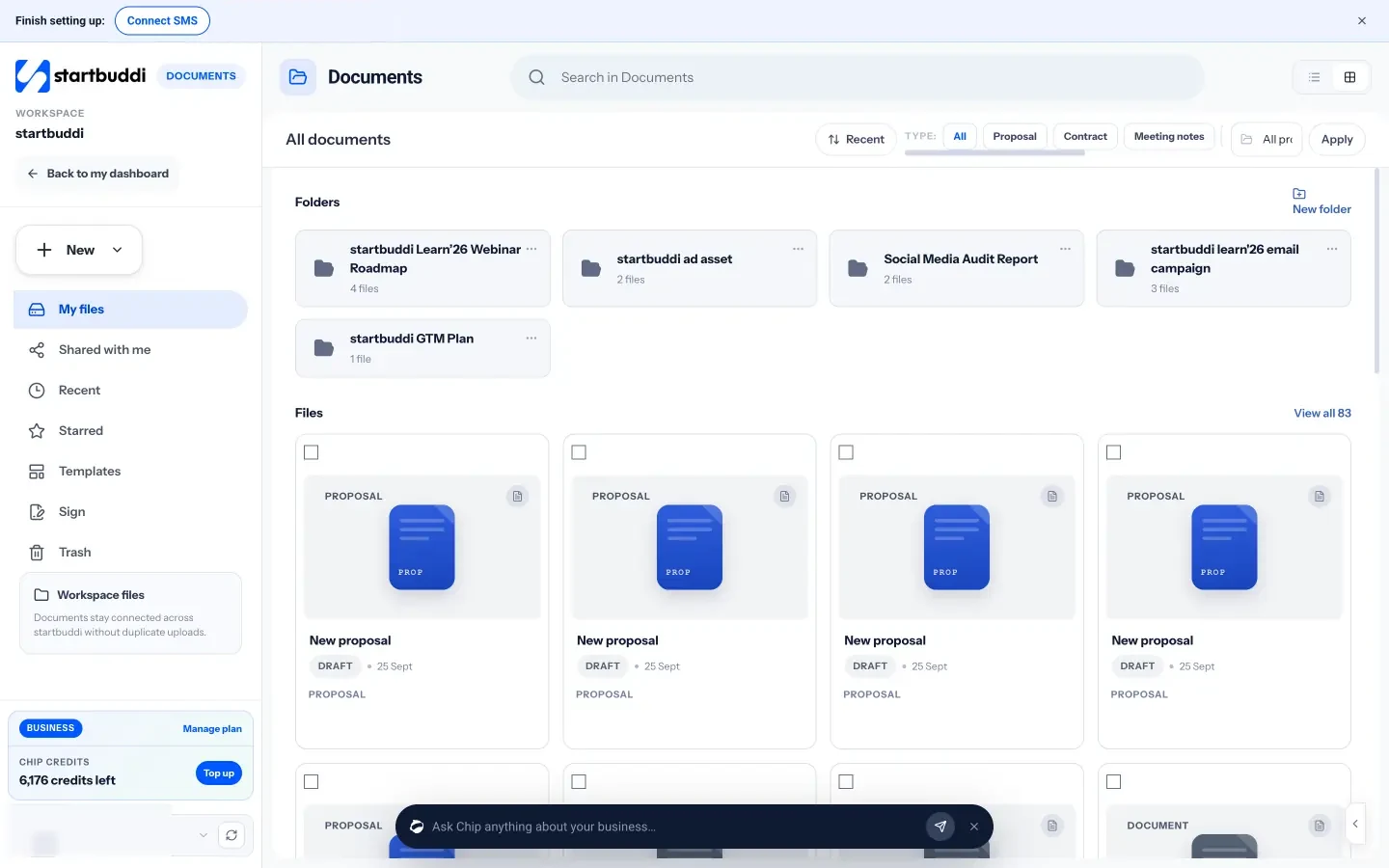
On the Free plan you can keep 3 documents; paid plans remove that limit. See the pricing page for details. For running the project once the brief is signed, our guide to project management for beginners covers plans, tasks and weekly check-ins, and project management for agencies shows how it works for client teams.
Write your next brief in startbuddi
Copy the template above for your next client job. When you want the brief, the tasks and the client portal in one place, start startbuddi free and create the brief in Documents, or read how a new client onboarding flows from signed brief to first deliverable.
Frequently asked questions
What should a project brief include?
A project brief should include the background, the goal, the audience, the deliverables, what's out of scope, requirements, what the client provides, the timeline, the budget, how reviews work and how success is measured. End it with a sign-off from both sides.
How long should a project brief be?
One page is enough for most small client projects. If the brief grows beyond two pages, move the detail into a project plan or statement of work and keep the brief as the summary everyone reads.
Who writes the project brief, the client or the agency?
Both, ideally. The client brings the goal and the facts; the agency or freelancer shapes it into scope and deliverables. Filling it in together on a call is faster than sending drafts back and forth.
What is the difference between a project brief and a statement of work?
A project brief agrees what the project is for and what it includes. A statement of work adds the commercial detail: price, payment terms, acceptance and responsibilities. Many small businesses send the brief first, then the statement of work or proposal for signing.
Is a creative brief the same as a project brief?
They overlap. A creative brief focuses on the message, audience, tone and look of creative work, while a project brief also covers scope, budget, timeline and approvals. For a small design or marketing job, one document covering both is usually enough.
Omolola Akiyode is the operations and project manager at startbuddi, leading cross-functional projects and the content that helps founders get set up. Omolola writes about projects, websites and getting found online, and turns complex ideas into clear, practical steps.
Runs operations and projects at startbuddi