Agency email marketing: what actually works
What actually works in agency email marketing: a useful list of your own, clean client setups, sender rules, consent and reports built on clicks and results.


Photo: Serena Tyrrell / Unsplash
- Treat agency email as two jobs: a short, useful newsletter and follow-ups for your own list, and a clean, compliant setup for each client. Send from each client's own verified domain, keep lists separate, and report on clicks, replies and outcomes rather than opens.
Agency email marketing works when you treat it as two separate jobs. The first is your own list: a useful, regular email that keeps past clients, prospects and referrers thinking of you when they need help. The second is the email you run for clients, where the wins come from clean setup, clear consent, sending from each client’s own domain, and reports built on clicks and results rather than opens.
Most agencies do the second job well and neglect the first, or run both from a tangle of shared logins. This guide covers what actually works for each, the sender rules that changed in 2024, the legal points agencies share responsibility for, a monthly workflow, and the mistakes that quietly cost small agencies clients.
Two jobs: your own list and your clients’ lists
An agency’s own email marketing is a sales tool. Your readers are founders, marketing leads and past clients who might need you again in six months. What they want from you is proof that you think clearly about their problems.
Client email is a delivery job. You are responsible for sending the right message to someone else’s customers, on time, without hurting their sender reputation or breaking the law in their market. The skills overlap, but the setup does not, and mixing them causes most of the problems we see:
- Client subscribers accidentally imported into the agency newsletter.
- Every client sending from one shared account and one domain, so one bad list damages everyone’s delivery.
- No written record of who collected consent, or how.
- Reports that show a big open rate and nothing about enquiries, bookings or sales.
Keep the two apart from day one: separate lists, separate sending domains, and a written note of who owns each audience. If a client leaves, their list leaves with them.
Agency email marketing for your own list: what actually works
You do not need a big list. A few hundred of the right people, emailed well, will send more work than a few thousand strangers. Three kinds of email do most of the work.
A short, useful newsletter
Send one email every two to four weeks that teaches one thing. Good formats for agencies:
- A teardown: what you would change on a real (anonymised or public) landing page, ad or email, and why.
- A result with the working shown: “We cut a client’s form from 11 questions to 5. Here is what happened to enquiries.” Only share numbers the client has agreed to.
- A checklist: “Seven things to check before your Black Friday email goes out.”
- A plain opinion: what you think about a platform change, and what a small business should do about it this week.
Keep it to one idea, one link and a signature from a real person. Portfolio blasts (“look at our latest work”) get ignored because they are about you, not the reader.
A short follow-up after someone enquires
When a prospect fills in your contact form or books a discovery call, a three-email follow-up does more than any newsletter. For example:
- Straight away: confirm you received their message, say when you will reply, and link one relevant case study.
- Two days later: answer the question most prospects ask at this stage, such as how pricing works or what the first month looks like.
- A week later, if they have not replied: a short, human check-in with an easy way to book a call.
This is an email drip sequence, and it should stop the moment the person replies or books. Nothing annoys a prospect faster than an automated nudge the day after they signed.
Staying in touch with past clients
Past clients are the cheapest new work an agency will ever find. Put them in their own segment and send them something a few times a year that only makes sense for them: a note when a platform they use changes, an invitation to a quarterly review, or a short “we now also do X” when you add a service. Personal beats polished here.
Running email marketing for clients: the setup that prevents problems
Most client email problems are setup problems, not writing problems. Get these right before the first send.
Send from the client’s own domain
Since February 2024, Gmail has required every sender to authenticate their mail, and bulk senders (5,000 or more messages a day to Gmail addresses) to set up SPF, DKIM and DMARC, keep reported spam below 0.3% and support one-click unsubscribe. The details are on Google’s email sender guidelines. Even if a client sends far less than that, the same setup is what gets email into inboxes.
In practice, that means each client gets their own verified sending domain, added with DNS records at their domain registrar. Ask for access to their DNS early, because waiting for “the IT person” is the most common reason a launch slips.
Agree who owns the list
Write it into your contract: the client owns their subscribers, you process them on the client’s behalf, and the list is handed over (or deleted) when the work ends. Our agency retainer agreement template is a starting point for that clause.
Set the brand once
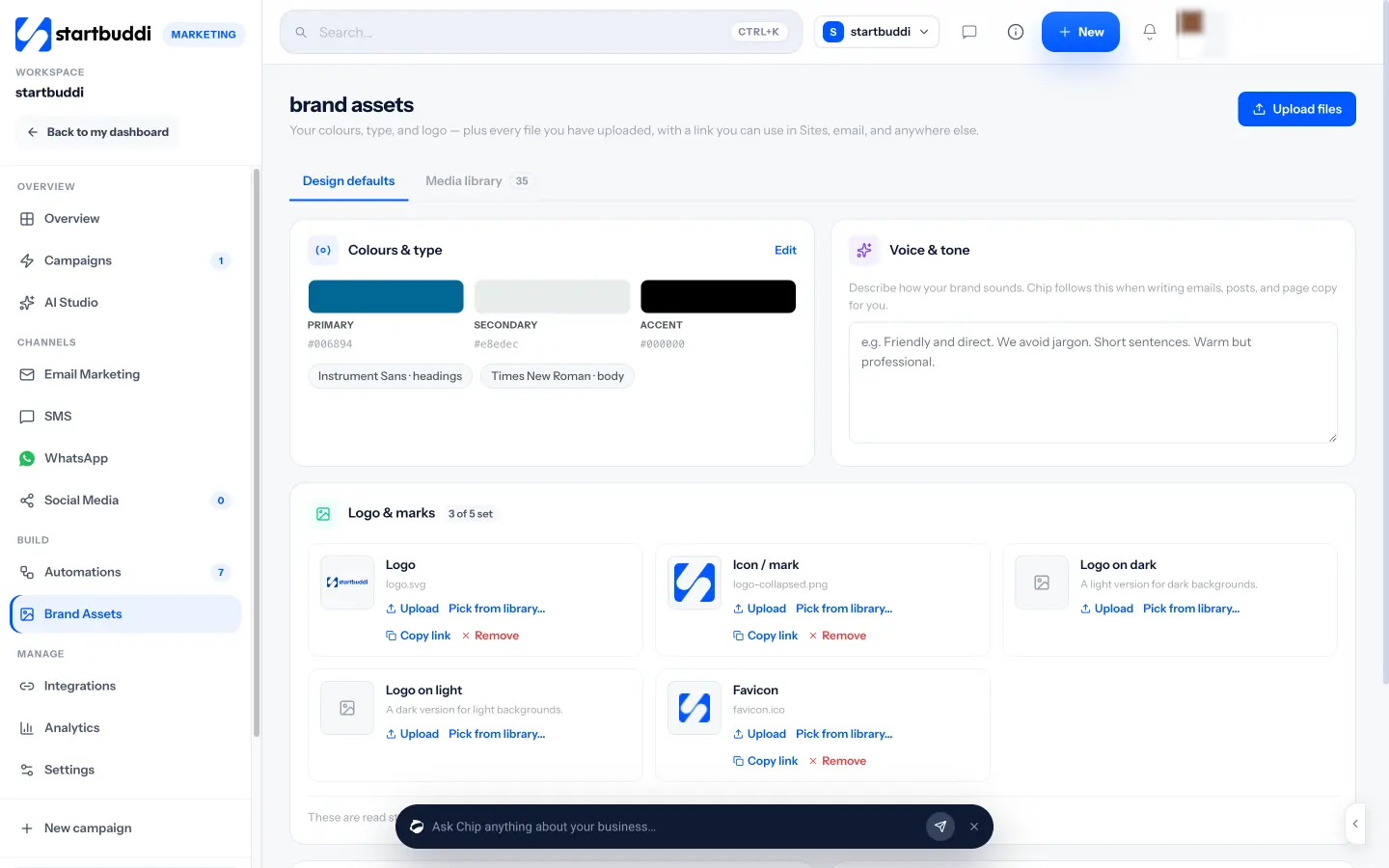
Store each client’s logo, colours, fonts and tone of voice in one place before you write a word. It saves a round of feedback on every campaign and stops the “that is not our blue” email at 11pm.
Check consent before you import
Ask every new client where their list came from. A list of customers who bought and were given a chance to opt out is very different from a spreadsheet of contacts someone collected at a conference. If the answer is vague, start with a re-permission email rather than a sale.
The rules agencies share responsibility for
Email law differs by country, and an agency can be on the hook alongside its client. This is general information, not legal advice. Check the rules where you and your clients’ customers are.
- United States: the FTC’s CAN-SPAM compliance guide says commercial email must include a valid postal address and a working opt-out, opt-outs must be honoured within 10 business days, and both the company promoted and the company that sends the email can be held responsible. Penalties run up to $53,088 per email.
- United Kingdom: the ICO’s guidance on electronic mail marketing says you generally need specific consent to email individuals, with a “soft opt-in” for existing customers who were given a clear chance to opt out. Sole traders count as individuals.
- Nigeria: the Nigeria Data Protection Commission oversees the Nigeria Data Protection Act 2023, which covers how personal data such as email addresses is collected and used.
The safe habits are the same everywhere: collect clear opt-in, include a real address and an unsubscribe link in every marketing email, act on opt-outs straight away, and keep a record of where each contact came from.
Reporting to clients: clicks and outcomes, not opens
Open rates used to be the headline number in every agency report. They are now unreliable. Apple’s Mail Privacy Protection downloads remote content in the background when a message arrives, which hides whether the person actually opened it, so opens are counted that never happened.
A report that holds up in a client meeting looks more like this:
| Measure | Why it matters | What to say in the report |
|---|---|---|
| Click rate | A click is a person taking action | “4.1% clicked, mostly on the booking link” |
| Replies | Replies are often the best leads | “12 replies, 3 asked for a quote” |
| Outcomes | What the client actually cares about | “7 bookings and 2 paid invoices from contacts who clicked” |
| Unsubscribes and bounces | Early warning for list health | “Unsubscribes steady at 0.3%, bounces cleaned” |
| Opens | Useful only as a rough trend | “Opens are inflated by privacy features, so we do not use them to judge success” |
Link every email to a specific page, form or booking link so you can connect clicks to results. If you cannot show outcomes yet, say so and explain what you are setting up to measure them.
A monthly email workflow for a small agency
A simple rhythm keeps client email on time and leaves room for your own newsletter. Adjust the weeks to fit your retainers.
| Week | Client work | Your own list |
|---|---|---|
| 1 | Agree the month’s plan and offers with each client. Check list health and bounces. | Pick the one idea for your newsletter. |
| 2 | Write and design campaigns. Send tests to the client and a colleague. | Draft the newsletter. |
| 3 | Send, then resend to non-openers with a new subject where it makes sense. | Send the newsletter. Reply personally to anyone who answers. |
| 4 | Report on clicks, replies and outcomes. Suggest one test for next month. | Review your enquiry follow-up emails. Update anything out of date. |
If you plan campaigns across email, social and landing pages together, a shared calendar helps. One calendar for client and agency plans stops two launches landing in the same week.
Mistakes that cost small agencies clients
- Testing too many things at once. Change one thing per test (subject line, offer or sender name), or you will not know what worked.
- Treating every subscriber the same. New leads, active customers and people who have not clicked in a year need different emails.
- Letting automations run unchecked. Review every live sequence each quarter. Prices, links and team names go out of date.
- Sending from a personal inbox. Bulk email from a Gmail or Outlook account is a fast way to get that account flagged.
- Reporting activity instead of results. “We sent four emails” is not a result. “Four emails brought in nine bookings” is.
If you want the automation side in more depth, our guide to email marketing automation for service businesses covers the sequences worth building first.
How startbuddi helps agencies with email marketing
startbuddi keeps contacts, email campaigns, automations, forms and invoices in one workspace, so an email click, a booking and a paid invoice sit on the same contact record. Here is what that means for agency email work, and where the limits are.
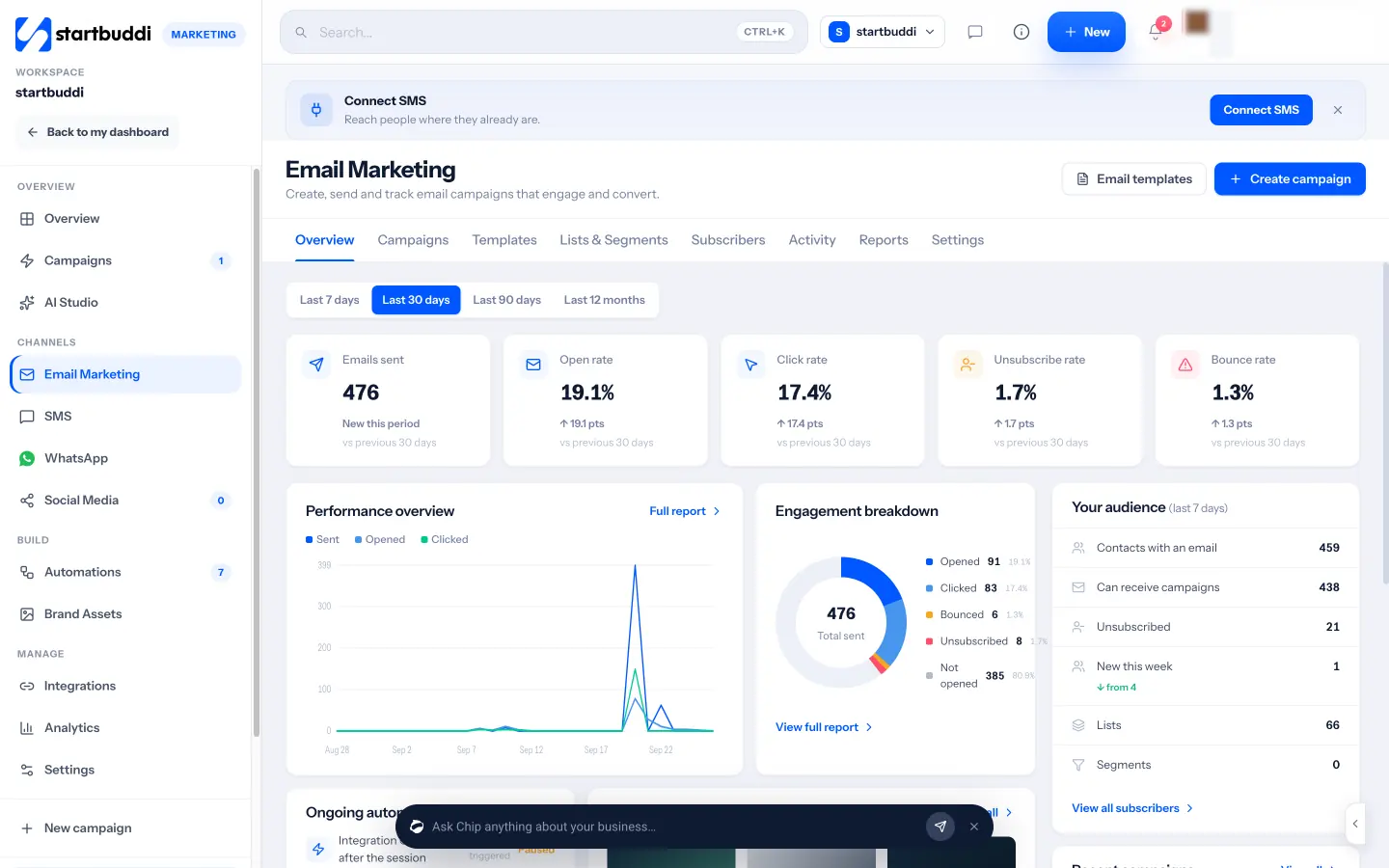
- A four-step send: in Email Marketing you pick an audience, write the message, review it and choose when to send. The review step checks for a missing subject, broken links and images without alt text, and you can send a test to a teammate first.
- Chip helps write: Chip, the built-in AI assistant, can draft the subject, preview text and copy, suggest a version B for an A/B test, or turn a plain description of who you want to reach into segment rules.
- Clicks win A/B tests: you can pick the winner by click rate rather than open rate, and resend a campaign to people who did not open it, once, with a new subject.
- Replies land in your inbox: replies to a campaign arrive in the shared customer inbox, labelled with the campaign they answer.
- Follow-ups in one place: enquiry follow-ups and nurture emails are built in Automations, which can start when a form is submitted, a booking is made or an email link is clicked.
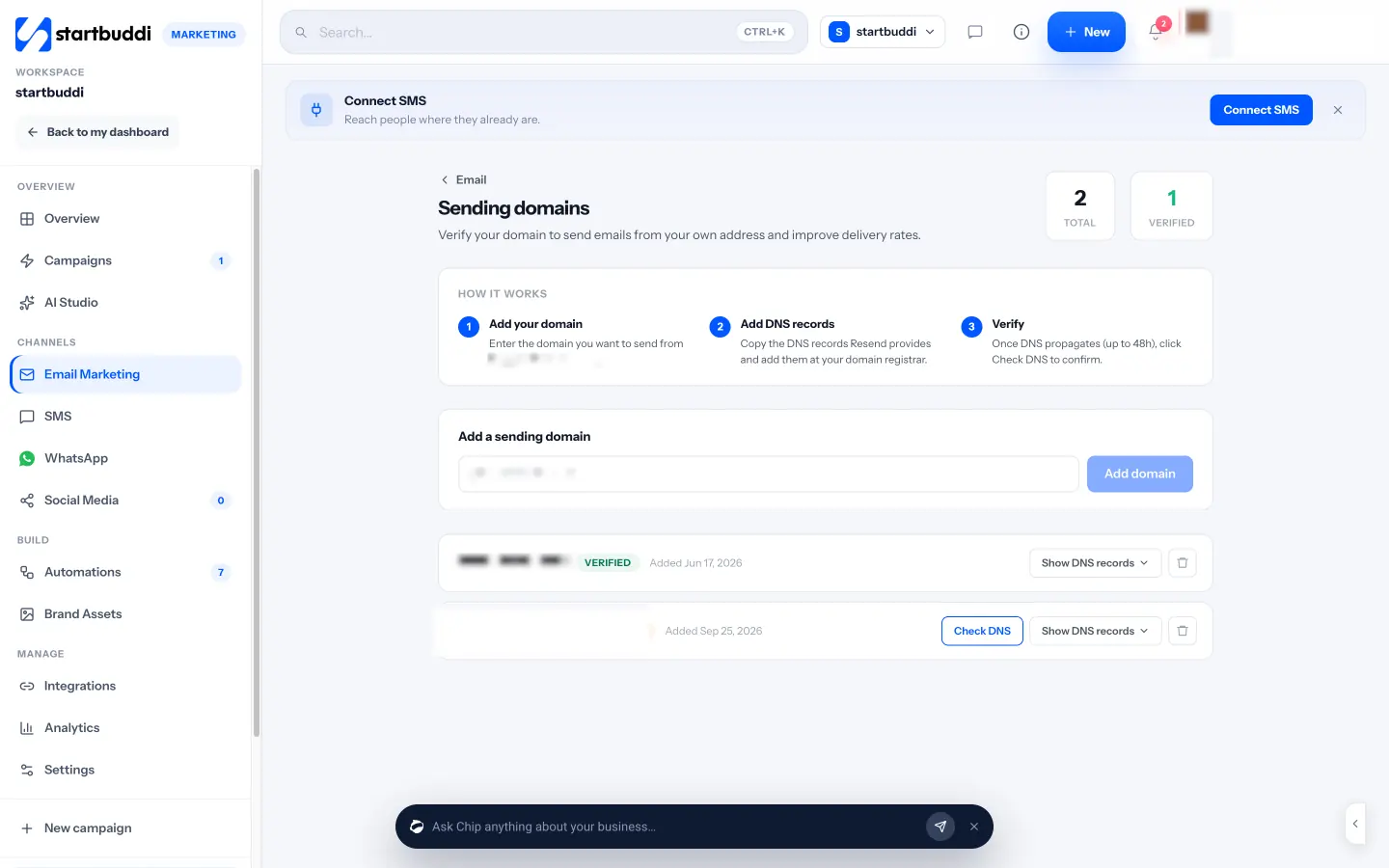
Sending domains are verified with DNS records, and the unsubscribe link, business address and preferences link are added to every marketing email automatically. The brand kit stores logos, colours, fonts and a written voice that Chip uses when it drafts.
Be clear about the limits before you choose it for client work:
- One workspace is one business. It holds one brand kit and one set of contacts. To keep a client’s list and brand fully separate, create a separate workspace for them from the account menu. Each workspace runs on its own plan.
- Marketing is a paid feature. The Marketing module, including email campaigns, needs the Starter plan or above, which also raises active automations from 2 to 10 (see pricing). Every paid plan has a 30-day trial.
- Send limits apply. Starter includes 3,000 email sends a month, Growth 10,000 and Scale 25,000. Until you verify your own domain, marketing email from the shared startbuddi address is capped at 1,000 a month and 200 a day.
- Some features are not there yet. Scheduling uses your timezone, not each recipient’s, and A/B winners are picked by opens or clicks, not by bookings or sales.
If you are weighing it against a dedicated email tool, our startbuddi vs Mailchimp comparison sets out the differences, and our page on email marketing for agencies explains how startbuddi handles email for an agency and its clients.
Your next step
Pick one job to fix this month. If your own list is quiet, write one useful email to your past clients this week. If client email is the mess, move one client to their own verified sending domain and a report built on clicks and outcomes. When you want both in one place, start a 30-day trial and set up your first campaign.
Sources
- Google: Email sender guidelines
- US Federal Trade Commission: CAN-SPAM Act compliance guide for business
- UK Information Commissioner’s Office: Electronic mail marketing
- Nigeria Data Protection Commission: FAQs
- Apple Support: Use Mail Privacy Protection on iPhone
Frequently asked questions
How often should an agency email its own list?
Every two to four weeks is enough for most small agencies. Consistency matters more than frequency, and one useful idea per email beats a long roundup.
Should each client have their own sending domain?
Yes. Sending each client's email from their own verified domain protects their reputation and yours, and it is what inbox providers like Gmail expect from authenticated senders.
Is the agency responsible if a client's email breaks the law?
It can be. Under the US CAN-SPAM Act, both the company promoted and the company that sends the email can be held responsible. Check consent before you import any list.
What should replace open rate in client reports?
Use click rate, replies and outcomes such as bookings, form submissions and paid invoices. Keep opens only as a rough trend, since privacy features inflate them.
Can I run email for several clients in one startbuddi workspace?
A workspace holds one brand kit and one set of contacts. For fully separate lists and branding, create a separate workspace for each client, each on its own plan.
Olabimpe Salami is the email and outreach specialist at startbuddi. Olabimpe writes about the messages that bring customers in and back: email, WhatsApp and SMS campaigns, follow-ups, and turning enquiries into paying clients.
Runs email and outreach at startbuddi