Time clock apps for small businesses: what to look for
How to choose the best time clock app for a small business: what it does, the record-keeping rules, a feature checklist, options with published prices and a rollout plan.


Photo: Kelum Chathuranga / Unsplash
- A good time clock app makes clocking in quick, handles corrections with a manager's approval, produces weekly timesheets and hands hours to payroll without retyping. Check your local record-keeping rules, price it at your future headcount, and trial it with real staff for two weeks.
The best time clock app for small business is the one your team will actually clock in with every shift, that records hours accurately enough to meet your local record-keeping rules, and that gets those hours to whoever runs payroll without retyping. For most small teams that means simple clock in and out on a phone or shared device, easy corrections with a manager’s approval, clear weekly timesheets, and a price that works per person or per location.
This guide explains what a time clock app does, why accurate records matter, what to look for, a few options with the facts their makers publish, and how to roll one out without upsetting your team.
What an employee time clock app does
An employee time clock app replaces paper time cards and the punch clock on the wall. Staff clock in when they start, clock out when they finish, and the app adds up the hours. Most also handle breaks, show who is working right now, and turn clock times into a weekly timesheet a manager can check.
Time clock vs time tracking
The two terms overlap, but they answer different questions:
- A time clock records attendance: when someone started and finished. It suits shift work in shops, cafes, cleaning, care and trades.
- A time tracking app records what the time was spent on: which client, project or task, and whether it was billable. It suits agencies, consultants and freelancers who bill by the hour.
Many businesses need a bit of both. A cleaning company needs clock times for pay and job times for pricing. If you mostly bill clients by the hour, read time tracking for freelancers alongside this guide.
Why accurate time records matter
For hourly staff, the clock is the payslip. Get it wrong and you either overpay or underpay, and underpaying is a legal problem as well as a trust problem. Many countries also require employers to keep working time records. A few examples, as general information rather than legal advice:
- United States: the Department of Labor’s Fact Sheet #21 says employers covered by the FLSA must record hours worked each day and each workweek. Payroll records are kept for at least three years, and time cards and work schedules for two. Employers may use any timekeeping method as long as it is complete and accurate.
- United Kingdom: the Working Time Regulations 1998 require records adequate to show compliance with working time limits, kept for two years.
- European Union: in 2019 the Court of Justice ruled in the Deutsche Bank case (C-55/18) that member states must require employers to set up an objective, reliable and accessible system to measure each worker’s daily working time.
- Canada (Ontario): the Employment Standards Act guide says employers must record the dates, times and hours worked, and keep them for three years.
- Australia: the Fair Work Ombudsman says employers must keep time and wages records for seven years.
Rules differ by country, state and industry, so check the official guidance where you operate, or ask an employment adviser.
What about “buddy punching”?
Buddy punching is when one worker clocks in for another. How common it is depends on who you ask. A 2026 survey of 831 US hourly workers, commissioned by time clock maker OnTheClock and published through Stacker, found a quarter said they had done it in the past year. Treat vendor surveys with care, but it is a reminder that a clear process beats trust alone. A photo, a shared device at the door or a location check all make it harder.
What to look for in the best time clock app for small business
Here is a checklist to take into any trial.
| Feature | Why it matters | Question to ask |
|---|---|---|
| Easy clock in and out | If it takes more than a few seconds, people forget | Can staff clock in from a phone, a shared tablet or a computer? |
| Corrections with approval | Everyone forgets to clock out sometimes | Can staff request a fix, and does a manager approve it with a record kept? |
| Schedules and breaks | You need to compare planned and actual hours | Does it show late starts and missed breaks? |
| Weekly timesheets | Payroll runs from them | Can a manager review and approve hours each week? |
| Export or payroll link | Retyping hours causes mistakes | Does it export to your payroll tool or accountant’s format? |
| Location options | Useful for mobile teams, sensitive for privacy | Is GPS or geofencing optional, and can staff see what is recorded? |
| Pricing model | Per user, per location or flat fee changes the maths | What will it cost at your headcount in a year? |
Features you can skip at first
Face recognition, detailed labour cost forecasting, multi-site rotas and built-in payroll are useful for larger employers, but they add setup time and cost. If you have fewer than ten people in one or two places, start with reliable clock in and out, corrections and timesheets. Add scheduling when rotas start taking more than an hour a week to build, and add payroll links when you are paying enough people that retyping hours becomes risky.
Location tracking and privacy
GPS stamps and geofencing stop people clocking in from home when they should be on site. They also collect personal data. The UK ICO’s guidance on monitoring workers says employers must tell workers about the nature, extent and reasons for any monitoring. A fair rule anywhere: only record location at clock in and out, explain why, and write it into your staff handbook. Our guide to writing an employee handbook can help.
Time clock apps: some options and what they publish
These are well-known apps, with facts from their own pricing pages in September 2026 as shown to a US visitor. Prices change and may differ by region, so check each page before you decide. We have not ranked them.
| App | Free plan | Paid plans (as published) |
|---|---|---|
| Homebase | Yes, 1 location and up to 10 employees | Essentials $30 per location a month, or $24 billed annually |
| Clockify | Yes, up to 5 users | Basic $3.99 per seat a month billed annually; GPS tracking is on Pro |
| Connecteam | Yes, up to 10 users | Basic from $29 a month for the first 30 users, billed yearly |
| Jibble | Yes, unlimited users | Paid tiers are listed on its pricing page |
| QuickBooks Time | No, 30-day trial | Premium $20 a month base plus $10 per user a month |
| Deputy | No, free trial | Lite $5 per user a month, with a minimum monthly spend on monthly plans |
| When I Work | No, 14-day trial | From $2.50 per user a month for single-location teams; time clock is an add-on |
For timesheet tools aimed at teams who bill clients, see our timesheet software list. If you are not sure what counts as timesheet software, the glossary entry explains it.
How to choose the best time tracking app for your small business
- Decide what you are measuring. Attendance for pay, time on tasks for billing, or both. That decides whether you need a time clock, a time tracker, or one tool that does both.
- Map where people work. One shop with a front door suits a shared tablet. Staff on client sites suit a phone app. Remote staff may only need a simple start and stop.
- Work out the real cost. Per-user pricing suits small teams; per-location pricing suits larger teams in one place. Price it at your headcount in 12 months, in your currency.
- Check the payroll handover. Ask your accountant or payroll provider what format they need, then check the app can produce it.
- Trial with two or three staff for two weeks. Include one person who is not keen on apps. If they can use it, everyone can.
- Test a correction. Forget to clock out on purpose and see how easy it is to fix, and whether the change is recorded.
Example: two very different teams
A cafe in Cape Town with eight part-time staff needs a shared tablet by the till, schedules and break tracking, and a clean export for payroll. A four-person design studio in Manchester needs almost none of that. It needs a timer on client tasks and a weekly view of billable hours. Both are “time tracking”, but the right app is completely different.
Rolling out a time clock app to your team
The software is the easy part. How you introduce it decides whether staff trust it.
- Explain why. Accurate records protect staff pay as much as they protect the business. Say that out loud.
- Write the rules down. When to clock in, how breaks work, what happens if someone forgets, and who approves corrections. Put it in your handbook or a short policy.
- Be clear about location data. If you use GPS, say exactly when it is recorded and who can see it.
- Check the first two weeks closely. Most problems show up early: forgotten clock-outs, wrong time zones, missing breaks.
- Keep corrections fair. A quick request and approval process with a record of what changed avoids arguments later.
If you are hiring for the first time, how to hire your first employee and writing a leave policy cover the other records you will need. A free timesheet template also works well for the first few weeks before you choose an app.
Common mistakes with time clock apps
- Choosing on price alone. A cheap app that nobody uses costs more than a dearer one that works, because you end up rebuilding timesheets by hand.
- Ignoring time zones. If staff or managers work across regions, check that clock times show in the right zone, or totals will look wrong.
- Letting corrections pile up. Review missed clock-outs every week, not at the end of the month when nobody remembers.
- Tracking salaried staff like shift workers. Salaried staff may still need working time records in some countries, but minute-by-minute clocking can feel like distrust. Match the method to the role.
- No export plan. If the app shuts down or you switch, you still need those records for years. Export them regularly.
How startbuddi helps
In startbuddi, attendance and time tracking sit inside the same system as your projects, customers and invoices. To be clear about fit: it does not run payroll or calculate tax, and it has no GPS, geofencing or biometric clock-in. If you need those, a dedicated time clock or payroll app will suit you better, and you can use startbuddi alongside it.
Clock in, clock out and corrections
In People, Time and Attendance shows who is working, remote or on leave today. Clock-in is an optional switch: turn it on and staff tap Clock in and Clock out; leave it off and leave, schedules and holidays still work. If a time is wrong, the person requests a correction, a manager approves it, and the record stays auditable. Settings cover requiring clock-in, allowing remote work, a grace period and manager approval for corrections. You can also set default working days, hours and time zone, and add public holidays.

The Timesheets tab shows each person’s hours for the week, and People Reports shows attendance over the last seven days next to leave and headcount, so an owner can spot patterns without building a spreadsheet. Overtime is not a separate type yet; staff submit overtime hours through Requests, where a manager approves them.
Timers and billable hours
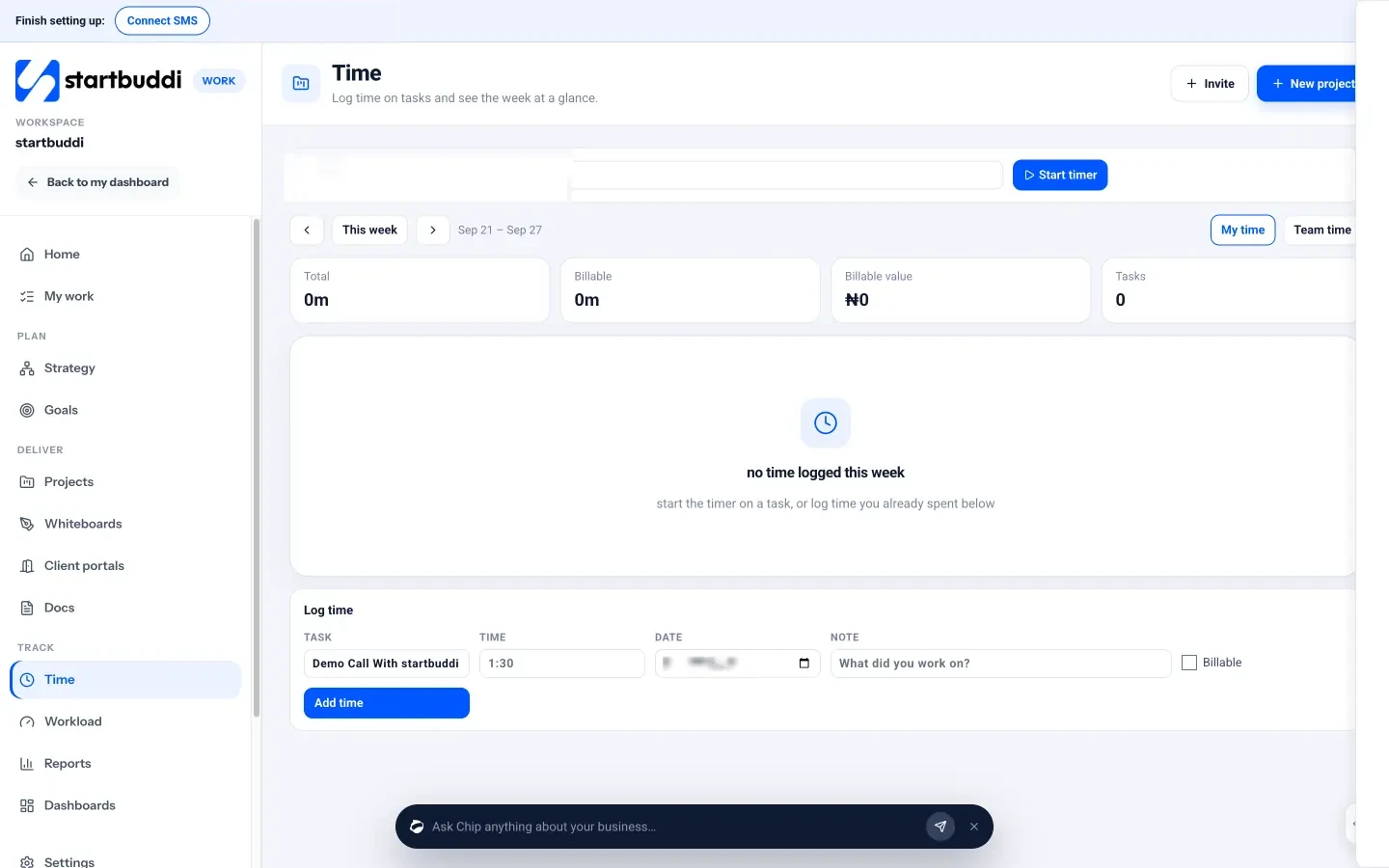
Time tracking in Work lets people start a timer on a task or log time by hand, tick whether it is billable, and see weekly totals for time, billable hours and billable value. Managers can switch to Team time to see the whole team’s week.
Each person who clocks in themselves needs a seat. The Free plan includes the owner only, Starter includes 2 seats, Growth 5 and Scale 15 (see pricing). Every paid plan has a 30-day trial. See the People overview for leave, onboarding and policies in the same place.
Your next step
Write down what you need to measure (attendance, billable time or both), where your team works, and what your payroll person needs each week. Then trial two apps with a couple of staff for two weeks, including a deliberate correction. If you want attendance, leave and project time next to your customers and invoices, compare plans on the pricing page.
Sources
- US Department of Labor: Fact Sheet #21, recordkeeping under the FLSA
- UK Working Time Regulations 1998, regulation 9
- Court of Justice of the EU: press release on case C-55/18 (May 2019)
- Ontario: Employment Standards Act guide, record keeping
- Fair Work Ombudsman: record-keeping
- OnTheClock via Stacker: time theft report (2026)
- ICO: employment practices and data protection, monitoring workers
- Homebase: pricing
- Clockify: pricing
- Connecteam: pricing
- Jibble: pricing
- QuickBooks Time: pricing
- Deputy: pricing
- When I Work: pricing
Frequently asked questions
What is the best time tracking app for a small business?
It depends on what you measure. Shift teams need a simple employee time clock with schedules; teams that bill clients need a timer on tasks with billable hours.
Is there a free employee time clock app?
Yes, several apps have free plans, usually capped by the number of users or locations. Check what happens when you hire past the limit.
Can I track employees' location when they clock in?
Many apps offer GPS or geofencing. Tell staff what is recorded and why, only record what you need, and follow your local data protection rules.
How long should I keep time records?
It varies by country. For example, the US requires two to three years depending on the record, the UK two years for working time records, and Australia seven years.
Tiwalade Joanna Okedara-Kalu is the founder, CEO and CTO of startbuddi, the business system that brings clients, bookings, invoices, projects, marketing and the Chip AI assistant into one place. Tiwalade builds software around how service businesses really work day to day, and writes about client management, getting paid on time and why small businesses outgrow the tools they start with.
Founded startbuddi and leads its product and engineering