What is round robin scheduling and how does it work?
Round robin scheduling shares bookings fairly across a team. Here is how it works, the three ways tools balance the load, and how to set up a rotation people trust.



Photo: Chidy Young / Unsplash
- Round robin scheduling lets clients book with your team instead of one person, and the software picks who takes each booking. Choose between strict rotation, balanced distribution or availability first, set everyone's hours and a daily cap, and keep returning clients with their usual person.
Round robin scheduling is a way of sharing incoming bookings across a team so that each person takes a turn. When a client books a call, a class or an appointment, the system picks the next suitable person in the rotation instead of sending everything to the same diary. Done well, it spreads the work fairly, fills more slots and gets clients booked with someone who is actually free.
This guide explains where the idea comes from, how round robin booking works step by step, the different ways tools balance the load, and when it is the wrong choice. It ends with a checklist for setting up a rotation your team will think is fair, and an honest look at how it works in startbuddi.
What is round robin scheduling?
The phrase is older than any calendar app. A “round robin” was originally a petition with the signatures written in a circle, so nobody could tell who had signed first. Merriam-Webster still lists that meaning, and Etymonline traces it to sailors’ petitions in the 1700s. The idea that survived is equality: no name at the top, everyone in the same position.
Computing borrowed the term for a simple way of sharing a processor between programs. Each program gets a short slice of time, then goes to the back of the queue, so no single program hogs the machine. Round-robin scheduling in operating systems works on the same principle: take turns, in order, and keep going round.
In a small business, the “programs” are your people and the “time slices” are client appointments. Round robin scheduling means a client books with your team rather than with one named person, and the software decides who takes it. You might also see it called round robin booking, team booking, lead rotation or pooled availability. For a short definition, see our glossary entry on what round robin scheduling is.
How round robin scheduling works, step by step
Every tool does it slightly differently, but the logic behind round robin booking follows the same five steps.
- You define the pool. These are the people who can take a given type of booking. It might be your whole team, or only the three people who can run a discovery call.
- Each person sets their hours. The system needs to know when each person works, plus any time they have blocked off for holidays, lunch or internal meetings.
- The client sees combined availability. The booking page shows a time as open if at least one person in the pool is free. The client usually picks a time, not a person.
- The system picks a host. When the client confirms, the tool chooses one of the free people using its rules: next in line, fewest bookings, highest priority or longest since their last booking.
- Everyone is told. The client gets a confirmation with the host’s name and a meeting link or address. The host gets the booking on their calendar.
A worked example
Imagine a small accountancy practice in Manchester with three advisers: Amira, Ben and Chloe. They offer a free 30-minute “first chat” that anyone can run. On Monday morning, five people book.
| Booking | Time | Who is free | Who gets it | Why |
|---|---|---|---|---|
| 1 | 9:00 | Amira, Ben, Chloe | Amira | Nobody has a booking yet, so the first in the order takes it |
| 2 | 9:00 | Ben, Chloe | Ben | Amira is now busy at 9:00 |
| 3 | 11:00 | Amira, Ben, Chloe | Chloe | She has the fewest bookings today |
| 4 | 14:00 | Amira, Ben | Amira | Chloe is out until 15:00; Amira and Ben have one each, so the tie goes to the first in the order |
| 5 | 15:00 | Amira, Ben, Chloe | Ben | Amira has two; Ben and Chloe have one each, and Ben’s last booking was earlier |
By the end of the day Amira and Ben have two each and Chloe, who was out for half the day, has one, even though the clients chose the times freely and nobody had to hand out work by hand. That is the whole point.
Three ways tools share out bookings
“Round robin” is used for a few different rules, and it matters which one your tool uses. Most fall into three families.
| Method | How it picks | Good for | Trade-off |
|---|---|---|---|
| Strict rotation | A, then B, then C, then back to A, regardless of who is free | Very even teams with identical hours | Fewer bookable slots, because a time only shows if the next person is free |
| Balanced distribution | Whoever is free and has the fewest bookings in a period | Teams where fairness matters, such as commission-based sales | Can slightly reduce the times on offer |
| Availability first | Anyone free, with priority or recency deciding ties | Getting as many bookings as possible | The person with the emptiest calendar may end up with most of the work |
Big scheduling tools let you choose. Calendly, for example, offers “Maximize for availability” and “Optimize for equal distribution”, and explains that the equal option “can mean fewer bookings overall” because availability is limited to keep things even (Calendly Help). In its availability mode, ties go to the highest priority, then to whoever has not had a recent meeting, then to random choice. CRMs use the same idea for leads rather than meetings: HubSpot’s “Rotate record to owner” workflow action shares new records equally across a team by default (HubSpot Knowledge Base).
No method is “right”. A salon wants chairs full, so availability first often wins. A sales team on commission cares more about each person getting a fair share of new enquiries. Decide which matters more to you before you switch anything on.
When round robin scheduling makes sense (and when it doesn’t)
Round robin is a good fit when the client cares about the time more than the person. Typical examples:
- First calls and sales demos, where any trained team member can run the conversation.
- Service businesses with interchangeable staff, such as cleaners, tutors, physiotherapy assistants or IT support technicians.
- Support or onboarding sessions where speed matters more than continuity.
- Agencies running free consultations that are shared across account managers.
It is the wrong tool when the relationship is the product. A client who has seen the same therapist, coach or stylist for a year does not want to be rotated to someone new. For those, give each person their own booking link and let returning clients book directly. It is also wrong for meetings that need several people at once, such as a pitch where the strategist and the designer both attend. That is sometimes called collective scheduling: the slot shows only when everyone is free.
Many businesses mix the two. New enquiries go through a round robin link on the website, and once a client is assigned, they get the personal link of their account manager for every booking after that. If you are weighing up booking tools more generally, our guide to booking software for consultants covers the wider choice.
Why round robin matters for new leads
For enquiries and sales calls, the biggest benefit is speed. If one person owns every new lead, leads wait whenever that person is busy, ill or on holiday. A rotation means someone is almost always available.
Speed makes a measurable difference. In a study published in Harvard Business Review, Oldroyd, McElheran and Elkington audited how over 2,000 US companies responded to web leads. Firms that tried to contact a lead within an hour were nearly seven times as likely to have a meaningful conversation with a decision maker as firms that waited even an hour longer, and more than 60 times as likely as firms that waited 24 hours or more. The study is from 2011, but the lesson has aged well: the first business to reply often wins.
Letting the lead book a time straight away, with whoever is free, removes the delay completely. Pair it with a quick confirmation and a reminder, and fewer people drop off between enquiry and call. For the reminder side, see how to automate client bookings with reminders.
How to set up a fair round robin rotation
Most complaints about round robin are really complaints about set-up. These seven rules keep it fair and predictable.
1. Get everyone’s hours right first
A rotation is only as good as the hours behind it. If one person has not set their working hours, many tools treat them as always available, and they will get bookings at 7am on Sunday. Ask each person to set their weekly hours and block holidays before the rotation goes live.
2. Make the pool per service, not per business
Not everyone can do everything. A junior can take a 15-minute intro call but not a two-hour strategy session. Set up the pool for each type of booking, so only qualified people are in each rotation.
3. Cap the number of bookings per day
A daily limit per person, or per service, stops one keen team member ending up with eight calls in a row because their diary was the emptiest. It also protects time for the actual work.
4. Add buffer time
Back-to-back bookings leave no time for notes, travel or a comfort break. A 10 or 15-minute buffer after each appointment keeps the day humane and reduces late starts.
5. Give people a pause button
Someone off sick or buried in a deadline should be able to step out of the rotation for a day without editing every service. Look for a simple on/off per person.
6. Decide what happens when someone leaves or changes role
Before you remove a person from the pool, check their upcoming bookings. Reassign them by hand and tell the clients, rather than letting appointments quietly fall through.
7. Review the numbers monthly
Look at bookings per person, no-shows per person and, if you track it, conversion per person. Uneven numbers usually point to uneven hours, not a broken tool. Small teams can review this in ten minutes.
Common round robin mistakes
- Rotating returning clients. A long-term client who suddenly meets a stranger feels like a number. Send returning clients to their usual person.
- Assuming your other calendar blocks slots. Some tools read your Google or Outlook calendar to hide busy times; others only write bookings into it. Check which yours does, or block time inside the booking tool itself.
- Forgetting time zones. A remote team across Lagos, London and Toronto needs every person’s hours set in their own time zone, and the booking page should show times in the client’s.
- No owner for no-shows. Decide who follows up when a client misses a call: the host, or a shared inbox. Our guide on how to reduce no-shows has templates.
- Treating fairness as a feeling. If someone says they “always get the bad slots”, pull the numbers before changing rules.
How startbuddi helps with round robin booking
In startbuddi, round robin is part of Bookings. The Team tab has a “Booking rotation” section, and every team member has an “In the booking rotation” switch. By default, members share incoming bookings, and a service that names its own hosts uses only those people instead. Each person can also turn “Accepting right now” off to pause new bookings without leaving the team.
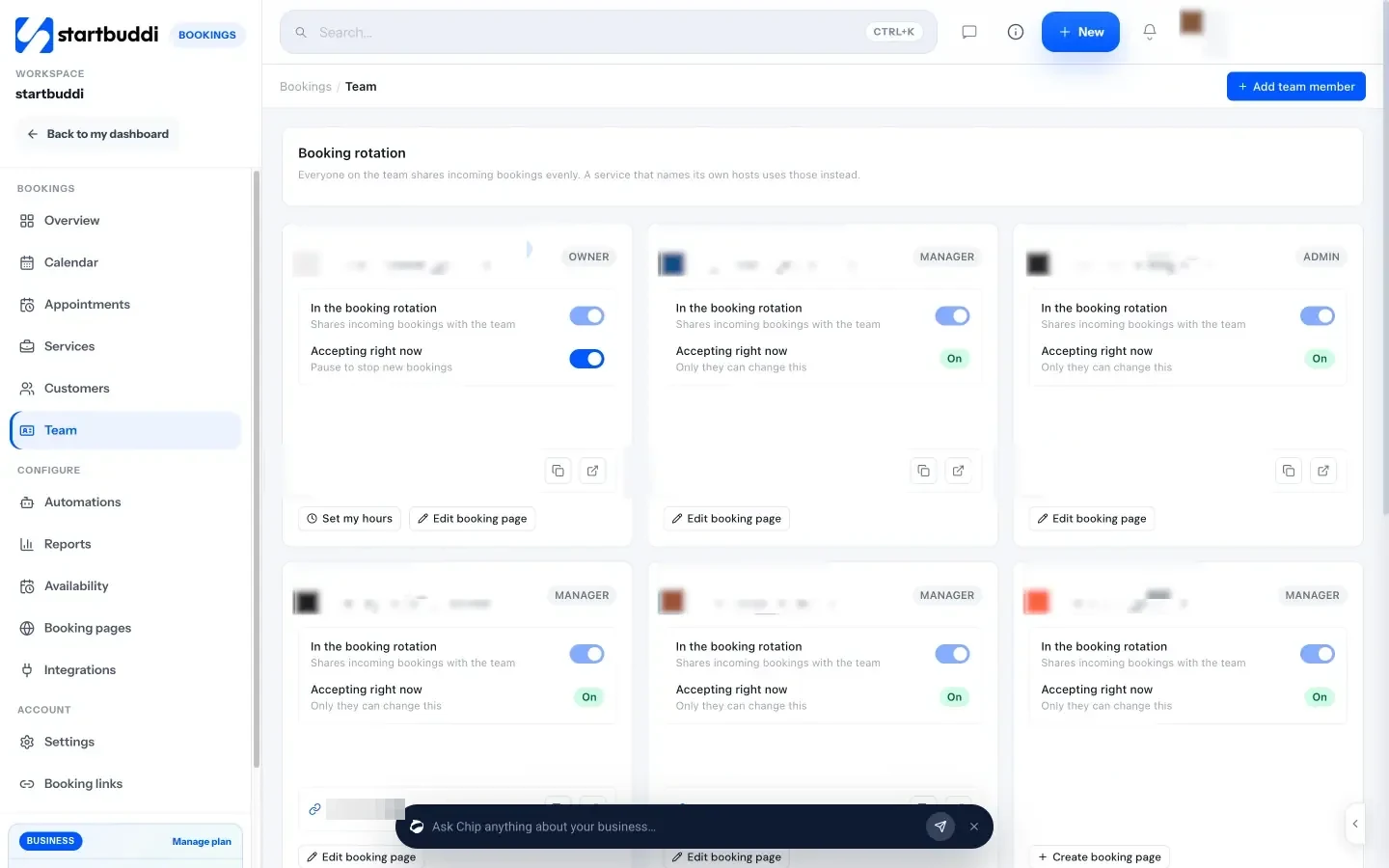
To share a service, open it and choose the hosts under Staff assignment. When more than one host can take a booking, the client picks a time and sees “Next available host” rather than a name. startbuddi aims to keep things even: among the hosts who are free and accepting bookings, it favours whoever has fewer bookings that day and that week, then whoever was booked longest ago. You can cap bookings with “Max bookings per day” on a service. Each person sets their own weekly hours with “Set my hours”, and anyone who hasn’t set hours is treated as always available, so set them before you go live.
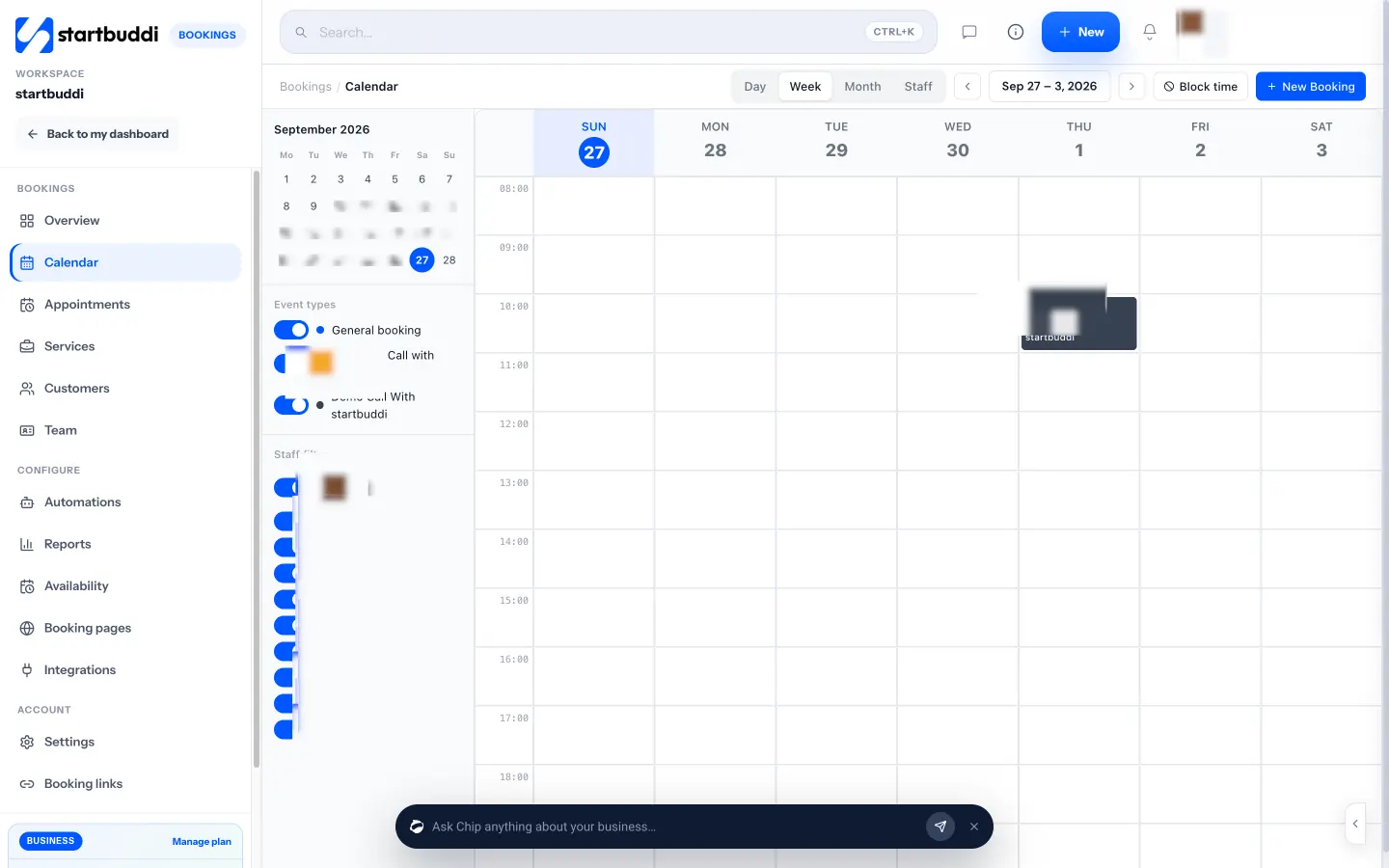
Around the rotation you get the rest of the booking basics: a buffer after each event, an advance booking window, “Block time” for lunch or holidays, reminder emails at a lead time you choose, and a no-show follow-up. The Calendar has a Staff view so you can see who has what, and Reports show staff performance. For returning clients, Booking pages gives each teammate a personal link with their own photo and welcome message.
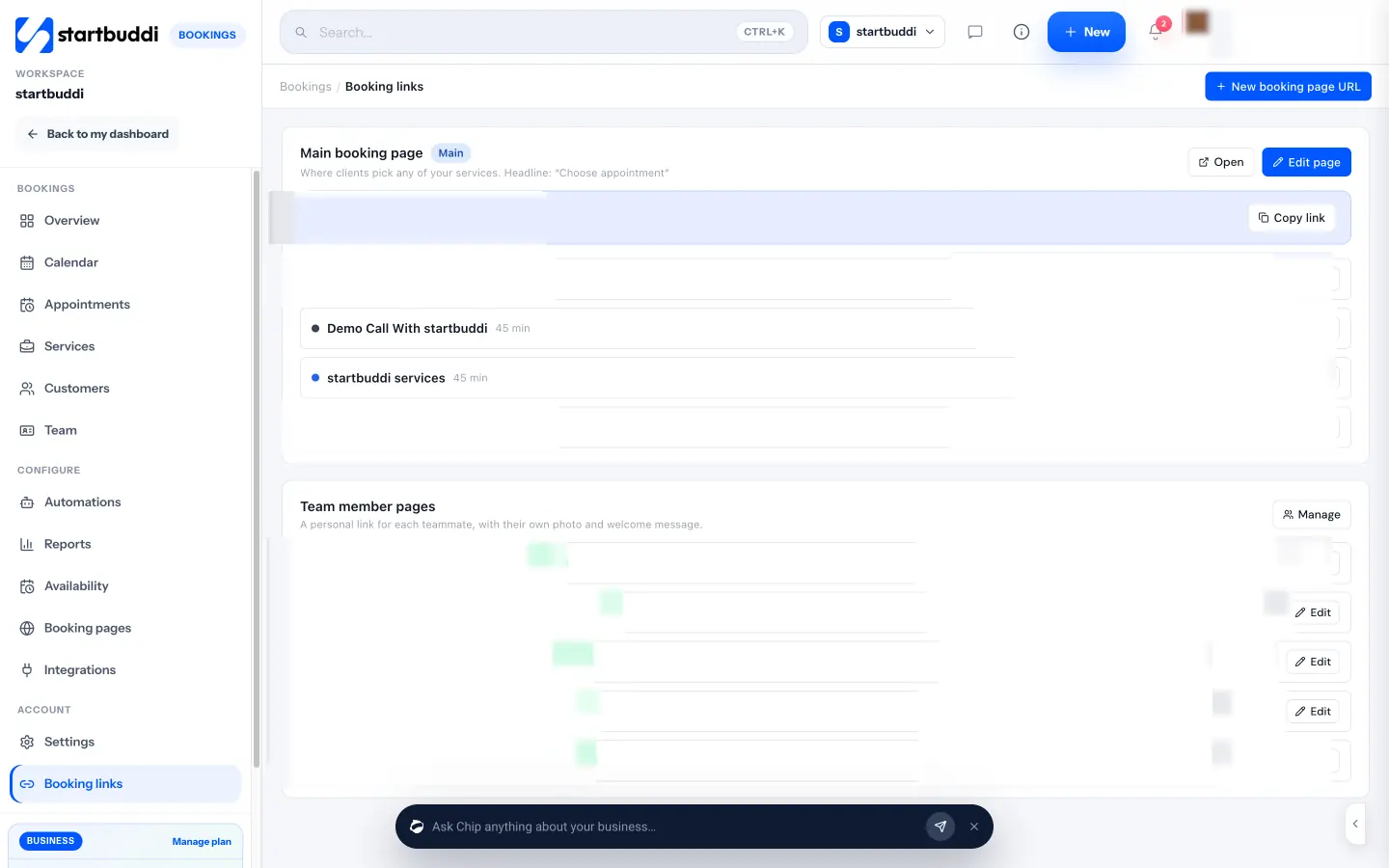
Two honest limits. First, calendar sync is one way: startbuddi pushes bookings into Google Calendar (and Outlook where it is set up), but it does not read busy times from those calendars to hide slots. Use “Block time” in Bookings for anything that should stop bookings. Second, round robin needs more than one person on the account. The Free plan includes one seat, Starter two, Growth five and Scale 15. The step-by-step set-up is in our help article on how to configure round robin scheduling, and there is more on the feature at round robin scheduling software.
Your next step
Write down which of your bookings could be taken by anyone on the team, and which need a named person. Put the first group into a rotation, set everyone’s hours and a daily cap, and share one booking link on your website and WhatsApp. Check the numbers after a month. You can try Bookings on the Free plan, then compare plans when you add teammates. If you are coming from another tool, our startbuddi vs Calendly comparison sets out the differences.
Sources
- Merriam-Webster, definition of round-robin
- Online Etymology Dictionary, round robin
- Wikipedia, Round-robin scheduling (computing)
- Calendly Help, Round Robin distribution overview
- HubSpot Knowledge Base, Assign and rotate record owners using workflows
- Oldroyd, McElheran and Elkington (2011), The Short Life of Online Sales Leads, Harvard Business Review
Frequently asked questions
Is round robin scheduling the same as collective scheduling?
No. Round robin books one person from a group. Collective scheduling finds a time when several people are free together, for meetings they all need to attend.
Can clients choose a specific person in a round robin?
Usually not on the shared link, because the point is that the system picks. Give each team member a personal booking link for clients who want someone in particular.
How many people do I need for round robin booking?
Two is enough to start. The benefit grows with the team, but even two people sharing first calls means leads are not stuck waiting for one diary.
What happens if nobody in the rotation is free?
The time simply does not show as available on the booking page. If you often run out of slots, widen the pool, extend hours or add a second service with a longer booking window.
Does round robin work across time zones?
Yes, as long as each person's hours are set correctly. The booking page shows times in one zone, so tell clients which zone they are booking in.
Tiwalade Joanna Okedara-Kalu is the founder, CEO and CTO of startbuddi, the business system that brings clients, bookings, invoices, projects, marketing and the Chip AI assistant into one place. Tiwalade builds software around how service businesses really work day to day, and writes about client management, getting paid on time and why small businesses outgrow the tools they start with.
Founded startbuddi and leads its product and engineering