How to automate client bookings and reminders without Calendly
How to automate client bookings end to end: services and availability, booking questions, deposits, automatic reminders and follow-ups, with or without Calendly.


Chinonye wrote this while on the startbuddi team. The product has changed since, so the team updated it on .

- Automating bookings is more than a scheduling link. Set up services and availability once, ask a few booking questions, take a deposit where no-shows hurt, send a confirmation and a 24-hour reminder with a reschedule link, and follow up after every appointment.
To automate client bookings, set up five things once: bookable services with clear rules, a booking page that asks the right questions, payment or a deposit where no-shows hurt, confirmation and reminder emails that send themselves, and a follow-up after every appointment. Calendly is one good way to do the scheduling part. You can also do all of it, including the parts after the meeting, in a tool that already holds your clients and invoices.
This guide walks through each step as a system rather than a single link: what to decide, what to write, and where automation saves you real time. It also covers Calendly fairly, so you can judge when it is the right choice and when a different setup fits your business better. If you just want a side-by-side list of scheduling tools, our Calendly alternatives page has it.
What it means to automate client bookings
Most people think of booking software as “a link where people pick a time”. That is one step out of about eight. Here is the full journey for a typical service business, and what it looks like done by hand versus automated.
| Step | By hand | Automated |
|---|---|---|
| Finding a time | Three or four messages back and forth | The client picks a free slot on your booking page |
| Getting details | “Can you send me your address and what you need?” | Booking questions answered before the slot is confirmed |
| Payment | Bank details sent, transfer chased, receipt checked | Deposit or full payment taken at booking |
| Confirmation | A typed message and a calendar invite | Confirmation email and calendar invite sent instantly |
| Reminder | A WhatsApp message the night before, if you remember | An automatic reminder by email, WhatsApp or SMS at the time you choose |
| Changes | More messages to find a new time | The client reschedules or cancels from their own booking page |
| After the session | A thank-you you mean to send | A follow-up email, a review request or a rebooking invite |
| Billing | An invoice made from scratch later | An invoice generated from the booking |
Automating only the first row saves a few minutes per client. Automating all eight is what gives you back your evenings.
Where Calendly fits, and why some businesses look elsewhere
Calendly is a well-known scheduling tool, and for many people it is the right answer. According to its pricing page (checked September 2026), the free plan includes one event type and one calendar connection, while automated meeting reminders and collecting payment at booking through Stripe or PayPal start on the paid Standard plan. Check the page for current prices in your currency.
Service businesses tend to look for something else when:
- They need the client record, not just the meeting. A booking tool on its own does not hold your notes, past invoices or conversations with that client.
- They get paid in local currencies. A salon in Lagos or a tutor in Nairobi may want deposits taken through a local payment provider such as Paystack.
- The work continues after the call. Consultants, agencies and coaches need the booking to turn into a project, an invoice and a follow-up.
- They want fewer subscriptions. Paying for a scheduler, a CRM and an invoicing app adds up.
If scheduling calls is all you need, a dedicated scheduler is a sensible choice. Our Calendly alternatives list and startbuddi vs Calendly comparison set out the options side by side.
Step 1: set up services and availability once
Good automation starts with clear rules. Before you share a link, decide:
- What people can book. Create one service per thing you sell, with its own length and price: a 30-minute discovery call, a 60-minute session, a 2-hour install.
- When you work. Set working hours per weekday, and block out holidays and events before they arrive.
- Breathing room. Add a buffer after each appointment for travel, notes or a break. Back-to-back bookings look efficient on paper and wear you out in practice.
- How far ahead. An advance window (for example 60 days) stops people booking a slot six months out and forgetting it.
- A daily limit. If you can only do three deep sessions a day, set it, and the booking page will stop offering a fourth.
Write these down as a short policy too. Our free booking policy writer turns your rules on lateness, cancellations and deposits into plain wording you can show on the booking page.
Step 2: ask the right questions before the booking
The booking form is where you save the first 15 minutes of every appointment. Ask only what you need to prepare, and nothing you could look up yourself.
- Consultant: “What would a great outcome from this call look like?” and “What have you tried so far?”
- Salon or beauty: “Hair type and length” and “Any allergies we should know about?”
- Home services: “Full address, including gate or access notes” and “A photo of the problem, if you can”.
- Tutor: “Year group or level” and “Which topic is hardest right now?”
Three to five questions is plenty. Make the essentials required and the rest optional, and save useful answers onto the client’s record so you do not ask again next time.
Step 3: take payment or a deposit where it matters
Payment at booking does two jobs: it gets you paid without chasing, and it raises commitment, so fewer people disappear. You do not need it everywhere. A sensible default:
- Free discovery calls: no payment. You want as few barriers as possible.
- Paid sessions under an hour: full payment at booking, since the amount is small.
- Long or high-value appointments: a deposit, often 20% to 50%, with the rest invoiced after.
Say clearly on the page whether the deposit is refundable and until when. Our deposit calculator helps you pick an amount that covers your costs if someone does not show.
Step 4: automate booking reminders so you stop chasing
Reminders are the part people most often do by hand, and the part automation does best. The evidence is solid: a Cochrane review of appointment reminders found attendance of 78.6% with text reminders against 67.8% with none, and text reminders worked about as well as phone calls while costing less. That research was in healthcare, but forgetting works the same way for a haircut or a consultation.
A simple, effective set of automated messages:
- At booking: confirmation with date, time, address or video link, and a link to reschedule.
- 24 hours before: a reminder with anything they need to bring or prepare.
- On the day, if it helps: a short nudge a couple of hours before, for appointments people often forget.
Here is a reminder template you can adapt:
Hi {{first_name}}, a reminder that your {{service}} is tomorrow at {{time}}. The address is {{location}}. Need to change it? Pick a new time here: {{reschedule_link}}. See you then.
The reschedule link matters as much as the reminder. People who cannot come often stay silent because cancelling feels awkward. Make changing the time easier than not turning up.
Step 5: follow up after the appointment
This is the step dedicated schedulers usually leave to you, and it is where repeat business comes from. Automate three paths:
- They came: a thank-you email the same day with next steps, and a review request a day or two later.
- They did not come: a friendly “we missed you” email with a link to rebook. Keep it warm; most no-shows are accidents.
- They are due again: for repeat services such as haircuts, cleaning or coaching, a reminder to book the next one.
Then bill. If the session was not prepaid, generate the invoice from the booking so the service and price are already filled in, and send it before the client has left your mind.
Sharing bookings across a team
With two or more people taking appointments, you need to decide who gets each booking. Round robin scheduling shares new bookings across the team so nobody is overloaded, while personal booking pages let regular clients book their usual person. Our post on how round robin scheduling works explains when to use each.
Booking automation mistakes to avoid
A few setup choices quietly undo the time you meant to save. Watch for these:
- Too many services. Twelve slightly different options make people hesitate. Start with three or four and add more only when clients ask.
- Wrong timezone. Set your business timezone before you share the link, and say it on the page if you have clients abroad. A 9am call in Lagos is 8am in London for half the year and 9am for the other half.
- Reminders with no way out. A reminder that only says “see you tomorrow” leaves someone who cannot come with nothing to do but disappear. Always include how to cancel or change.
- Forgetting the no-show email. The first message after a missed appointment decides whether that client books again. Write it kindly, once, and let it send itself.
- Never checking the automations. Test a booking yourself every few months. Links break, prices change and staff leave.
- A link nobody can find. Put your booking link in your email signature, your social profiles, your WhatsApp business profile and your website header, not just in replies.
What to check before choosing a booking tool
Whichever tool you pick, test it against your real week, not the demo. Five questions cover most businesses:
- Can clients pay the way they already pay you? Cards, bank transfer or local options, in your currency.
- Does it know your calendar? Check whether it only adds bookings to your calendar or also reads your existing events to block busy times.
- Where do client details end up? In a list you have to copy somewhere else, or on a client record you already use?
- What happens after the booking? Follow-ups, invoices and rebooking, or just the meeting itself?
- What does it cost as you grow? Look at the price for your whole team and the number of services you sell, not the single-user price.
Book yourself a test appointment in any tool you trial, on your phone, and pay the deposit. Five minutes as your own client shows you more than an hour of feature lists.
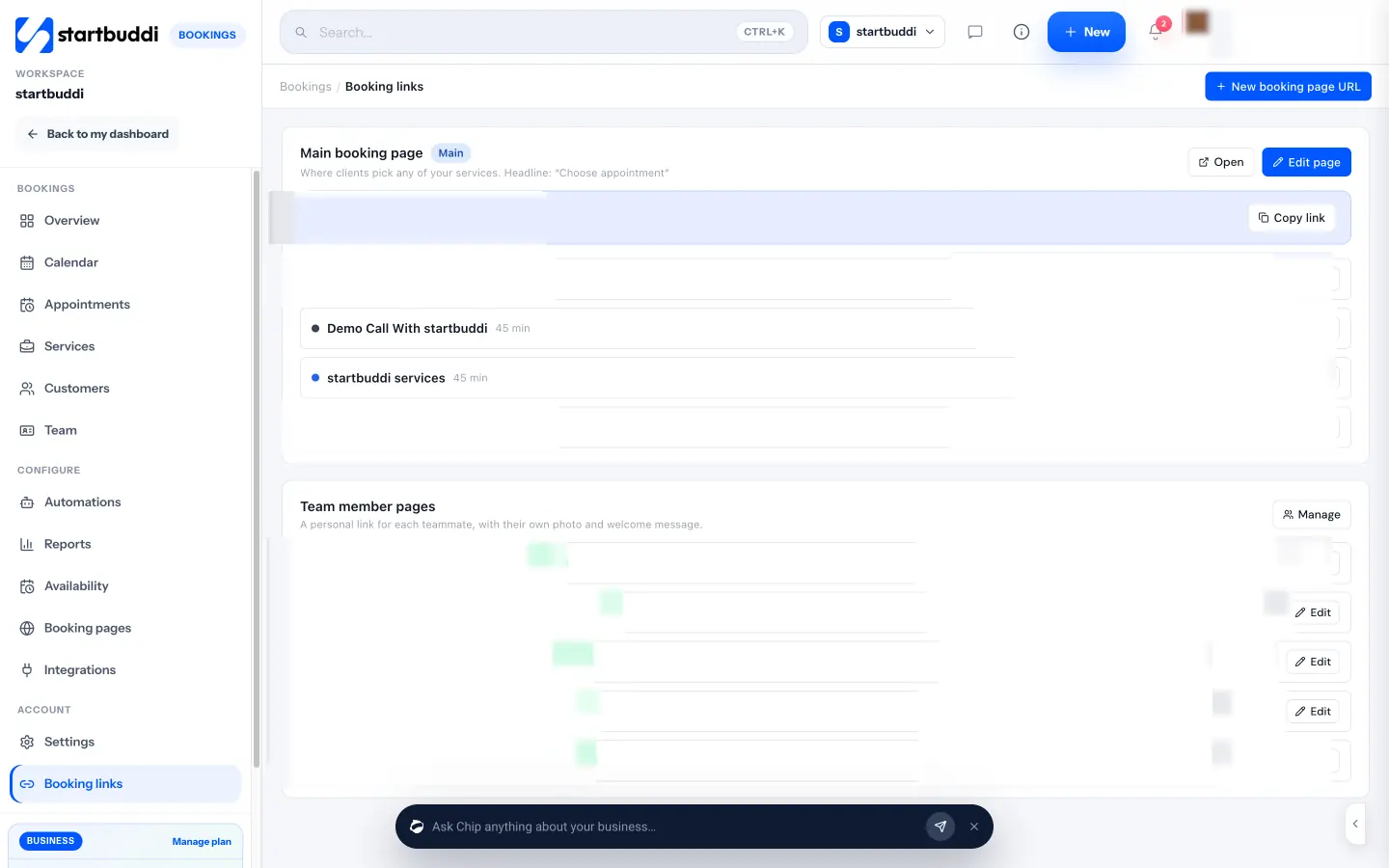
How to automate client bookings in startbuddi
Bookings in startbuddi covers all five steps, and every booking lands on the client’s record in Customers alongside their messages and invoices.
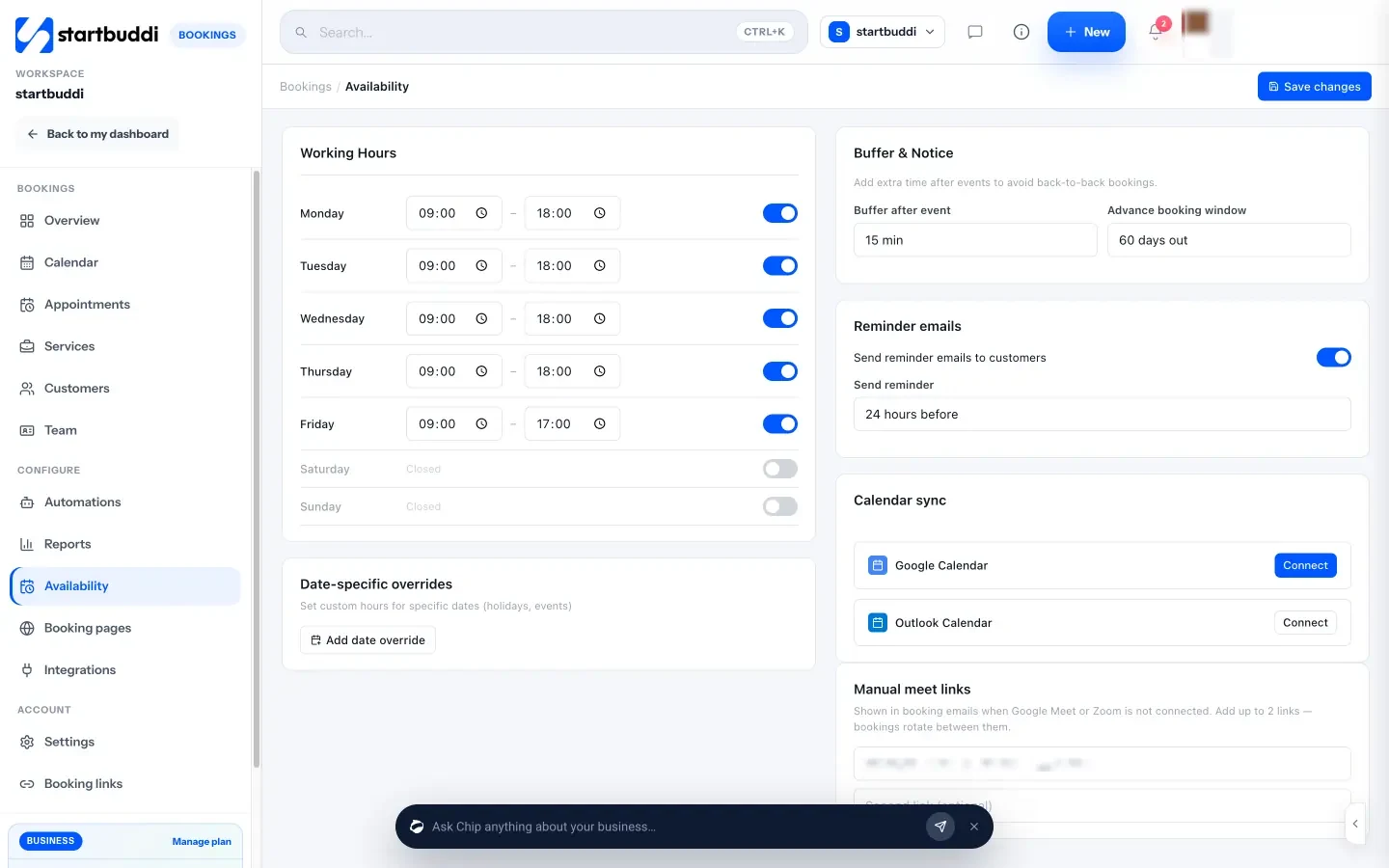
- Services and availability: create a service with its length, price and currency, set working hours, a buffer and an advance booking window, cap bookings per day, and block time for holidays.
- Booking questions: add short answer, choice or rating questions, and save answers to a contact property. Chip can suggest questions for a service.
- Payment at booking: turn on “Require payment to book” and take the full amount or a deposit through Paystack or Stripe. The slot is held for 30 minutes while the client pays.
- Confirmations and reminders: confirmation emails with a calendar invite, and an automatic reminder by email, WhatsApp or SMS at a lead time you choose, such as 24 hours before. Clients can join or cancel from their own booking page.
- After the appointment: mark a booking complete or a no-show, and startbuddi sends the matching follow-up email from templates you can edit. You can generate an invoice from any booking.
- Team scheduling: a booking rotation shares bookings round robin, and each teammate can have a personal booking page.
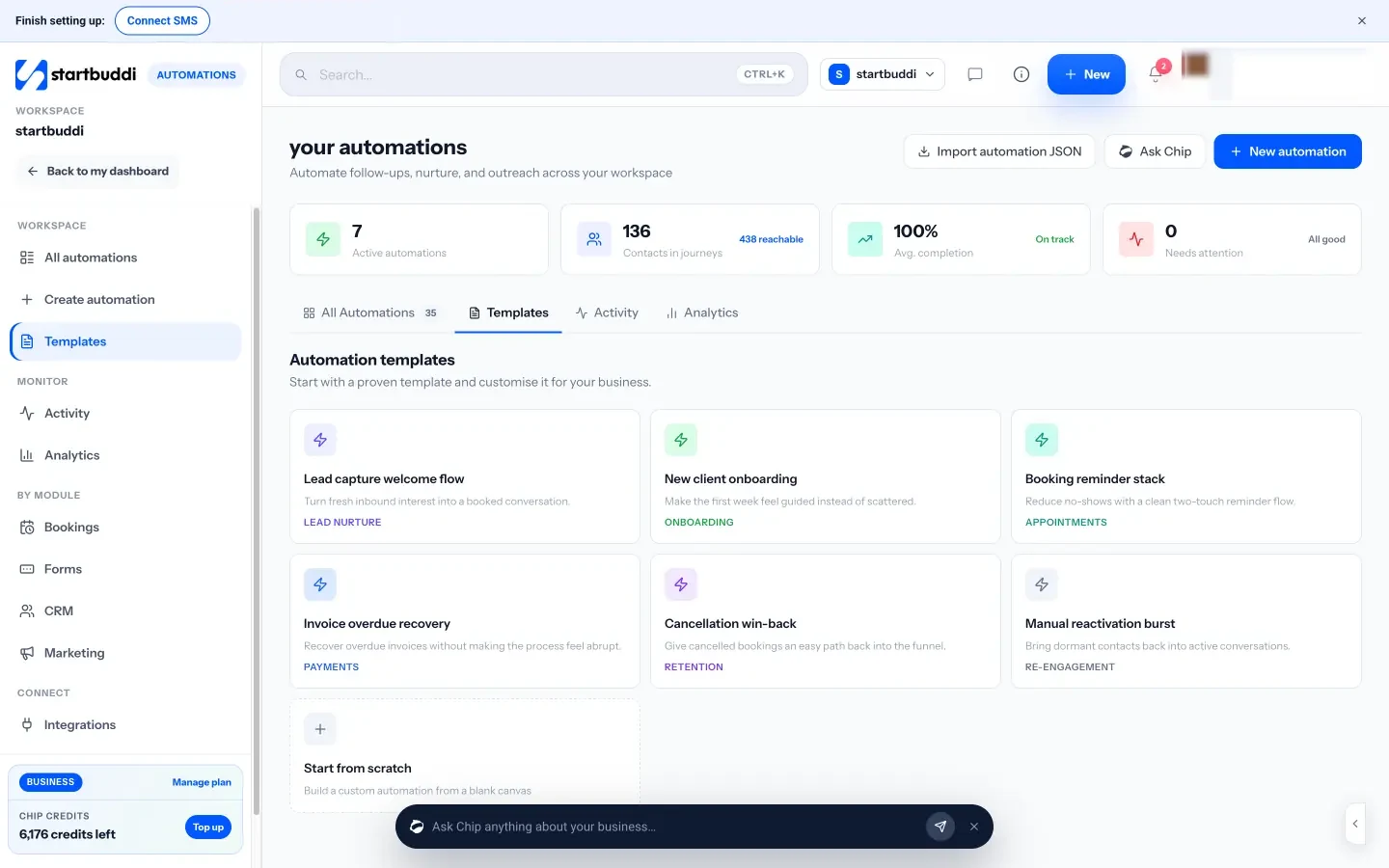
For anything beyond the built-in emails, Automations can start when a booking is made, confirmed, rescheduled, cancelled, completed or missed, and send email, WhatsApp or SMS messages, wait, or create a task. The help guide on booking reminders and notifications shows the settings step by step.
Know the limits before you move over:
- Calendar sync is one way. Bookings are pushed into Google Calendar (and Outlook where it is available), but startbuddi does not read busy times back from your calendar. Block personal time inside Bookings so it cannot be booked.
- WhatsApp and SMS reminders need setting up. Switch them on in Bookings settings. WhatsApp needs a connected WhatsApp number, and SMS needs an SMS connection and a plan that includes SMS. Each booking gets one automatic reminder; for a second one, use an automation.
- Guests cancel rather than reschedule. The client’s booking page lets them join or cancel. To move a time, they book again, or you reschedule it for them from the booking.
- No Zoom connection yet. Google Meet links come through Google Calendar; otherwise add up to two meeting links of your own.
- Plan limits apply. The free plan includes one live service. Starter includes 10 (see pricing), and bookings received are unlimited on every plan.
Your next step
List the services you sell, then write your three messages: the confirmation, the 24-hour reminder and the after-appointment follow-up. Once they exist, any tool can send them. If you want the booking, the reminders and the invoice in one place, start with the free plan and share your first booking link today. Add it to your email signature, social profiles and a QR code on your counter too.
Sources
- Calendly: Pricing
- Cochrane: Mobile phone messaging reminders for attendance at healthcare appointments
Frequently asked questions
When should booking reminders go out?
A confirmation at booking and a reminder about 24 hours before work for most services. Add a short same-day nudge for appointments people often forget.
Can clients reschedule themselves?
They should be able to. Put a reschedule or cancel link in every confirmation and reminder, so changing the time is easier than not turning up.
Do I need Calendly if I use startbuddi Bookings?
Not for booking services, taking deposits and sending reminders. If you rely on a scheduler reading your calendar's busy times, note that startbuddi only pushes bookings to your calendar.
Can I send booking reminders by WhatsApp?
In startbuddi, yes. Switch on WhatsApp reminders in Bookings settings and each confirmed booking gets a reminder at the time you choose, as long as your WhatsApp number is connected. SMS reminders work the same way once SMS is set up on a plan that includes it.
SEO Copywriter| Email growth Specialist| I help businesses increase revenue with strategic SEO content & high-converting email funnels.