HVAC appointment booking: how to let customers book service calls online
How HVAC appointment booking software works, which heating and cooling jobs to put online, what to ask customers, and how to turn tune-ups into repeat bookings.



- Put predictable HVAC jobs, like tune-ups and boiler services, on an online booking page with fixed prices, buffers, daily limits and reminders. Keep emergencies on the phone, assign services only to qualified technicians, and remind customers to book again each season.
HVAC appointment booking software lets customers choose a service, such as an AC tune-up or a boiler service, pick a free slot and give you the details you need, without a phone call. It confirms the booking, sends reminders, and can take a deposit. It works best for planned work like maintenance visits, installation quotes and filter changes. Emergencies, such as no heat in January, still belong on the phone.
This guide explains which heating and cooling jobs to put online, how to set up HVAC scheduling so the diary stays realistic, the questions to ask when someone books, how to turn seasonal maintenance into repeat bookings, and what to look for when you compare tools. It is for heating, air conditioning, heat pump and refrigeration businesses of any size, anywhere.
Which HVAC jobs to let customers book online
Not every job suits a booking page. The rule of thumb: if you can predict roughly how long it takes and what you need to bring, it can be booked online. If you need to talk to the customer first, offer a call-back instead.
| Job | Book online? | How |
|---|---|---|
| Annual AC or furnace tune-up | Yes | Fixed price, fixed duration, pick a slot |
| Boiler service or landlord gas safety check | Yes | Fixed price, ask for appliance details |
| Filter or duct cleaning | Yes | Price by number of units or rooms |
| Quote visit for a new system or heat pump | Yes | Free or small refundable fee, longer slot |
| Diagnosis for “it’s not working” | Sometimes | Call-out fee, triage questions first |
| No heat, no cooling in extreme weather, gas smell | No | Phone line, and emergency services for gas |
Start with the first two rows. They are predictable, they repeat every year, and customers are happy to book them at 10pm on a Sunday when your phone is off.
How online booking for HVAC works
Most online booking systems follow the same flow. You set it up once, and every booking after that runs itself.
- Create a service menu. Each service has a name, duration, price and the staff who can do it. “AC tune-up, 90 minutes, $129” is clear. “Service” is not.
- Set availability. Working hours per day, time off, the gap you need between jobs, and how far ahead people can book.
- Ask the right questions. Address, system type and the problem, so the right technician turns up with the right parts.
- Take a deposit if you need one. Useful for quote visits and for customers you have not worked with before.
- Confirm and remind. An instant confirmation, then a reminder the day before, with a way to reschedule.
- Share the link everywhere. Your website, Google Business Profile, van signage via a QR code, and your WhatsApp or email signature.
HVAC scheduling that works in the real world
An online calendar will happily book five jobs back to back across town. Your technicians cannot do that. Build the realities of the job into your settings.
Use buffers and daily limits
Add travel time after each job, and cap how many of each service can be booked per day. If you only want two installation quotes a day so your seniors can do repairs in between, set that limit.
Plan for the seasons
Demand for HVAC is lumpy. ENERGY STAR advises homeowners to have the cooling system checked in spring and the heating system in autumn, because contractors get busy once summer and winter arrive. That is your cue: open maintenance bookings early, and fill the quiet shoulder months before the rush. It is a large market too. The US Energy Information Administration reports that 88% of US households used air conditioning in 2020 (EIA).
Match jobs to qualified people
In many countries, only certified people may handle refrigerants or gas. In the US, the EPA’s Section 608 requires technicians who maintain, service or repair equipment that could release ozone-depleting refrigerants to be certified. In the UK, GOV.UK says you need your own F gas qualification to work on refrigeration, air conditioning and heat pump equipment, and HSE requires gas work to be done by a Gas Safe registered engineer. Assign each bookable service only to the people qualified to do it, so the system never books the wrong person.
Keep room for emergencies
Block a slot each day for urgent call-outs. If nothing comes in by the afternoon before, release it for planned work. Our guide to job management for plumbers covers the same approach for plumbing call-outs.
Questions to ask when customers book HVAC service online
Good booking questions save a wasted trip. Keep them short and make only the essential ones required.
- Service address, and anything about access (gate code, parking, pets).
- What type of system: central AC, split system, heat pump, gas furnace, boiler.
- Roughly how old it is, and the make if they know it.
- What is happening: noise, leaking, not cooling, error code.
- A photo of the unit’s model plate, if your form accepts uploads, or a note to have it ready.
- For landlords: the tenant’s name and contact details.
Also publish a clear policy on cancellations and late changes. Our post on writing a cancellation policy explains what is fair.
Where to share your HVAC booking link
A booking page nobody sees books nothing. Put the link where people already look for you:
- Google Business Profile. Many people find a heating engineer by searching on their phone. Add your booking link to your profile. Our guide to setting up a Google Business Profile shows where.
- Your website. A “Book a service” button on every page, not just the contact page.
- Vans, invoices and leave-behind stickers. A QR code on the boiler or outdoor unit you just serviced is the easiest way to win next year’s visit. The free booking link QR code tool makes one in seconds.
- Messages. Your WhatsApp auto-reply, email signature and text replies to missed calls.
Track where bookings come from for a month or two, then put more effort into the channels that work.
Turn maintenance into repeat bookings
The most valuable booking is the one that repeats every year. A customer who books a spring tune-up this year should get a reminder to book next spring. Some examples:
- Annual reminders. After each maintenance visit, schedule a message for 11 months later with your booking link.
- Landlord checks. In Great Britain, HSE guidance says landlords must have an annual gas safety check done by a Gas Safe registered engineer, and can have it done up to two months early without losing the original deadline. Landlords with several properties value a business that reminds them in good time.
- Maintenance plans. Sell a yearly plan that covers two visits, billed monthly or annually. It smooths your cash flow and fills your quiet months.
Reminders also cut no-shows. Our post on reducing no-shows explains what the research says about how many reminders to send.
Write service descriptions people understand
Customers searching to book HVAC service online are not experts. They know the house is too hot, or the boiler is making a noise. Name services in their words and say exactly what is included, so they pick the right one and you arrive prepared.
An example service card:
Air conditioning tune-up (one system), 90 minutes, $129. We clean the coils and condensate drain, check refrigerant pressure and electrical connections, test the thermostat and replace your standard filter. If we find a fault, we will quote the repair before doing any extra work. Please make sure we can reach the indoor and outdoor units.
Three things make this work: a plain name, a clear list of what is and is not included, and a promise about extra work. The last point matters most, because surprise bills are the fastest way to lose a maintenance customer.
Common HVAC scheduling mistakes
- Too many services. Twelve options confuse people. Start with three or four and add more when customers ask.
- No buffer. Back-to-back slots across town guarantee late arrivals and apologetic calls.
- Hiding the price. A fixed price for routine work builds trust. Use “from” prices only where the job truly varies.
- No way to reschedule. If changing a booking means a phone call, people just do not turn up.
- Never looking at the numbers. Check monthly how many bookings came online, which services sell, your busiest hours and your no-show rate, then adjust your hours and prices.
What to look for in HVAC appointment booking software
Use this checklist when you compare tools:
- Service menu with prices, durations and deposits.
- Availability rules: working hours, days off, buffers, daily limits, advance window.
- Staff assignment: only qualified technicians for each service, and sharing bookings across the team.
- Custom booking questions, including the address.
- Reminders and a self-service reschedule or cancel link.
- Calendar sync with the calendars your team already uses.
- From booking to invoice without retyping the job.
- Dispatch and GPS, only if you run several vans and need them.
HVAC scheduling tools compared
Here is what each tool’s own pricing page said in September 2026. Prices are in US dollars and some vary by region.
| Tool | Online booking | Dispatch and GPS | Price as published |
|---|---|---|---|
| ServiceTitan | Call booking listed | Dispatch board and GPS tracking | Not published, request pricing |
| FieldEdge | Call booking listed | Dispatching on all plans, advanced on higher plans | Not published, book a demo |
| Housecall Pro | Yes, on Basic | GPS tracking on Essentials and above | Basic from $59 a month billed yearly |
| Jobber | Yes, on Core | GPS and routing on Grow and above | Core $49 a month billed monthly |
For a wider list of booking tools, see our best booking software for service businesses.
How startbuddi helps HVAC businesses take bookings
First, the honest fit. startbuddi is not HVAC field service software. It has no dispatch board, GPS tracking, route planning or native mobile app, and its calendar sync pushes bookings into Google Calendar but does not read busy times back. If you run a large fleet, a dedicated field service tool is the better choice. What startbuddi gives a small heating and cooling business is a professional booking page, reminders and payments, connected to customers and invoices.
In Bookings, each service gets a name, duration, price and the staff who can do it, and you can require full payment or a deposit before a booking is confirmed, through Stripe or Paystack. Booking questions (short or long answer, single or multiple choice) collect the address, system type and problem, and can save answers to the customer’s contact record. Set a maximum number of bookings per day on any service.
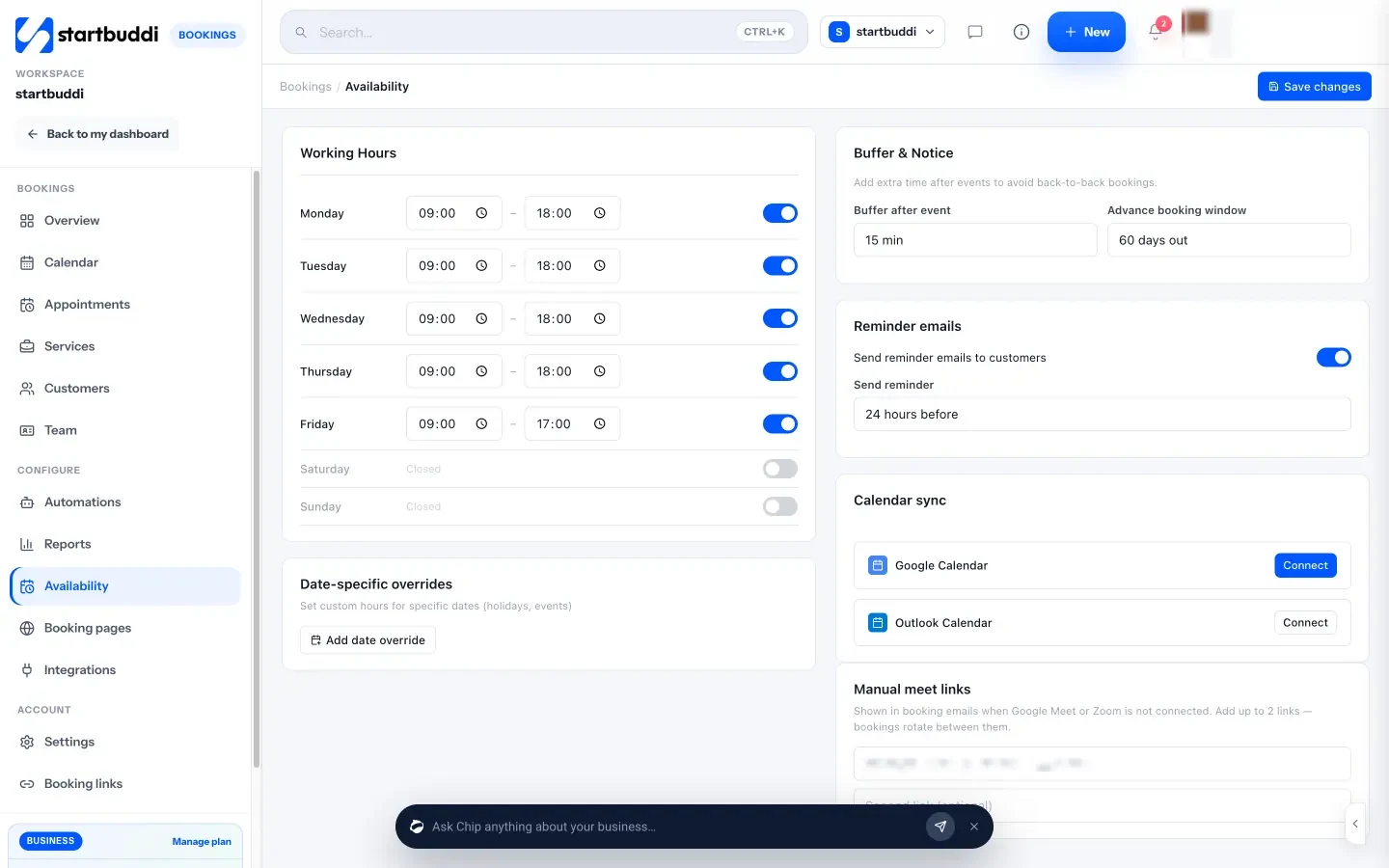
Availability sets working hours, a buffer after each booking, how far ahead people can book, and when reminder emails go out. For holidays, use Block time on the calendar.
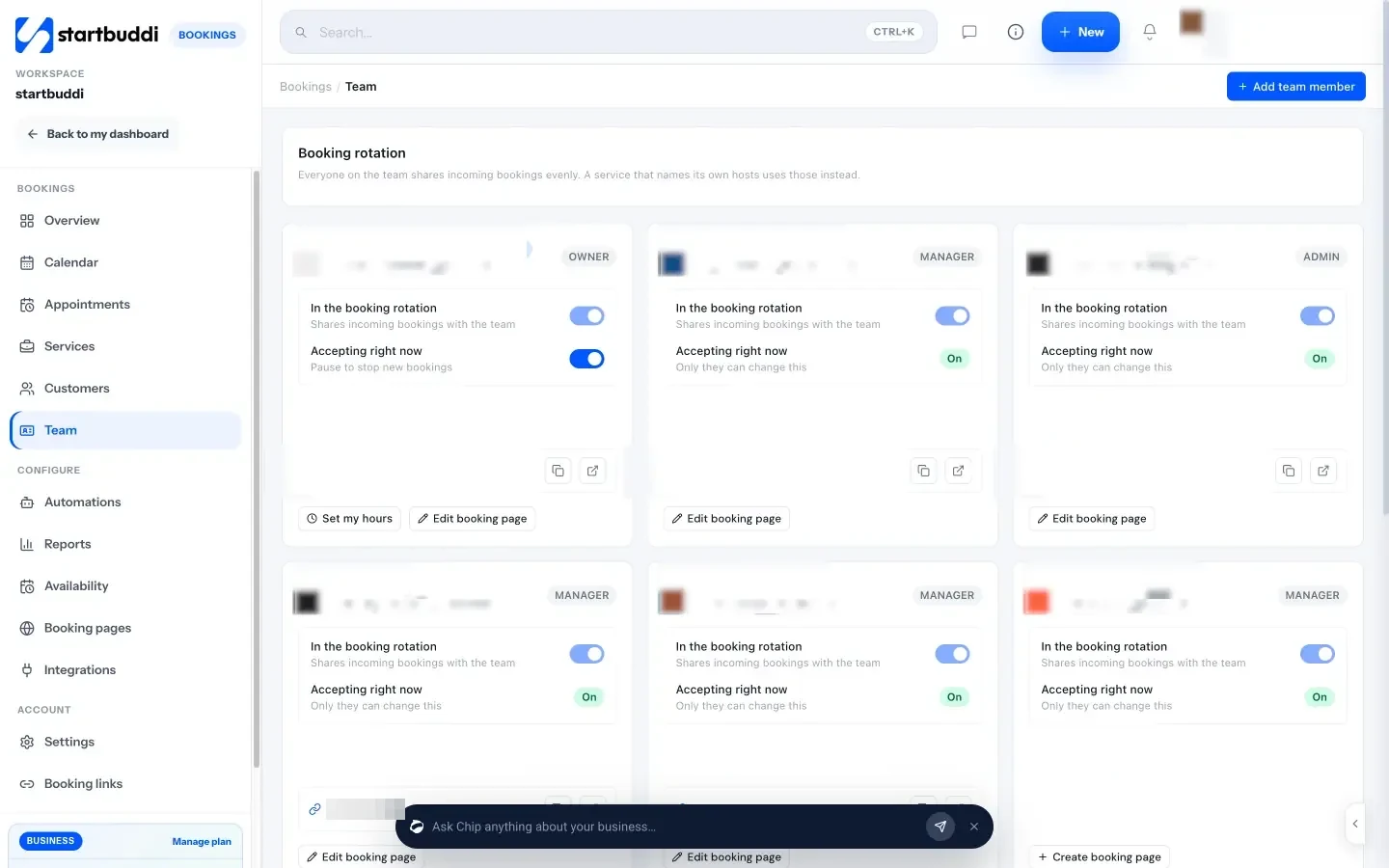
With a team, bookings can rotate across technicians, each person sets their own hours, and each can have their own booking page. Assign a service only to the people qualified to do it.
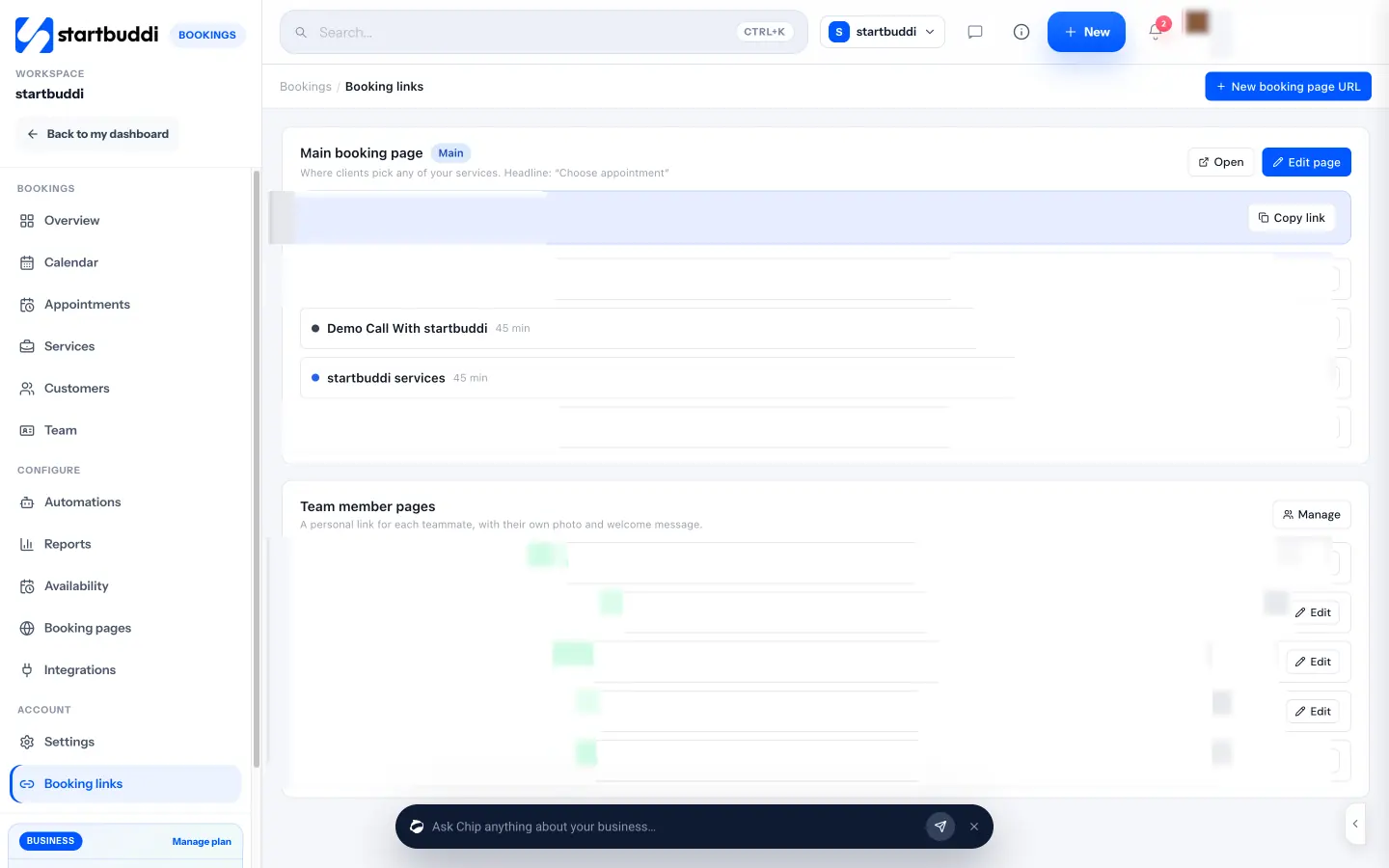
Share your main booking page by link, embed code or QR code, or run separate booking pages for different services or areas.
The Overview shows today’s bookings and a Needs attention list for pending confirmations and missed visits, and Reports show bookings by service, your cancellation rate, repeat customers and peak hours. That tells you when to open spring and autumn maintenance slots and which services are worth promoting. When a customer does not show, marking the no-show sends your follow-up email so they can rebook.
From any booking you can generate an invoice, and Subscriptions in Money lets you sell a yearly or monthly maintenance plan that renews automatically through your payment provider. With Automations (Starter plan and above) you can send follow-up emails, WhatsApp or SMS messages after a booking is completed or missed. The Free plan includes one live service, and Starter gives you ten (see pricing).
Your next step
Pick your most predictable job, probably the annual tune-up or boiler service, and put just that one online this week with a fixed price, a buffer and a reminder. Add the link to your Google profile and your van. When it works, add the next service. You can start on startbuddi’s Free plan and have a booking page live in an afternoon.
Sources
- ENERGY STAR: Maintenance checklist
- US EIA: Nearly 90% of US households used air conditioning in 2020
- US EPA: Section 608 technician certification
- GOV.UK: Qualifications to work with F gas
- HSE: Gas safety for employers
- HSE: Gas safety, landlords and letting agents
- Pricing pages: ServiceTitan, FieldEdge, Housecall Pro, Jobber
Frequently asked questions
Can customers book HVAC service online for emergencies?
It is better not to. Emergencies need triage and a fast call-back, and a gas smell needs the emergency services first. Put planned work online and keep a phone line for urgent jobs.
What is the best way to handle HVAC scheduling in peak season?
Open maintenance bookings early in spring and autumn, cap how many of each job can be booked per day, add travel buffers, and keep one slot a day for emergencies.
Should I charge a deposit for online booking for HVAC?
For quote visits and new customers, a small deposit reduces no-shows. For regular maintenance customers you trust, a reminder is usually enough.
Do I need dispatch and GPS in HVAC appointment booking software?
Only with several technicians on the road who need live routing. Smaller teams usually get more from a clear booking page, reminders and fast invoicing.
Tiwalade Joanna Okedara-Kalu is the founder, CEO and CTO of startbuddi, the business system that brings clients, bookings, invoices, projects, marketing and the Chip AI assistant into one place. Tiwalade builds software around how service businesses really work day to day, and writes about client management, getting paid on time and why small businesses outgrow the tools they start with.
Founded startbuddi and leads its product and engineering