How to choose a client tracking system for your small business
What a client tracking system does, what to track for each client, the main types of tool, fair questions to ask before you buy, and how to set one up in an afternoon.


Chinonye wrote this while on the startbuddi team. The product has changed since, so the team updated it on .
- A client tracking system keeps every client's details, conversations, work and payments in one place and tells you who needs attention. Decide what you need to track, compare spreadsheets, sales CRMs and all-in-one tools against your real week, and pick the one your team will update every day.
A client tracking system is software that keeps every client’s details, conversations, work and payments in one place, and tells you who needs attention next. For most small businesses the right one is not the tool with the longest feature list. It is the one that fits how clients reach you, connects to the work you deliver after the sale, and that you and your team will actually update every day.
This guide explains what a client tracking system should track, the main types of tool, the questions worth asking before you commit, and how to set one up without losing a week. It is for freelancers, consultants, agencies and service businesses that have outgrown a spreadsheet and a busy phone.
What is a client tracking system?
Think of it as the answer to three questions you should be able to answer about any client in ten seconds: who are they, where do things stand, and what happens next? A client tracking system stores contact details, logs messages and calls, shows which stage each client or deal is in, and reminds you when something is due.
The term overlaps with CRM (customer relationship management). A traditional CRM is often built around sales: leads, deals and forecasts. A client tracking system for a service business usually needs to go further, into onboarding, delivery, invoices and repeat work. Many modern tools cover both. Our glossary entry on what a CRM is explains the wider category.
What you should track for each client
Before you look at any software, decide what information you actually need. For most service businesses it comes down to six groups:
| Group | Examples | Why it matters |
|---|---|---|
| Who they are | Name, company, phone, email, preferred channel | You can reach the right person on the channel they answer |
| Where they came from | Referral, Google, Instagram, event | Shows which marketing brings good clients |
| Where things stand | Enquiry, proposal sent, active client, past client | Turns your list into a to-do list |
| History | Messages, calls, meetings, notes | Nobody has to ask the client to repeat themselves |
| Work | Projects, bookings, deliverables, deadlines | Links the relationship to what you promised |
| Money | Quotes, invoices, payments, amount outstanding | You know who owes you before you do more work |
If a tool can’t hold one of these groups, you’ll end up keeping it somewhere else, and the “one place” promise breaks. Our post on storing client information goes deeper on what to collect and when.
What a good client record looks like
It helps to picture the end result. Here is an example client record for a made-up web design studio in Cape Town, written out in plain words:
- Client: Thandi Mokoena, owner of a two-branch physiotherapy practice. Prefers WhatsApp during the day, email for documents.
- Source: referral from an existing client.
- Stage: active client, website project in progress.
- History: discovery call on 2 September, proposal sent on 4 September, signed and deposit paid on 9 September, content workshop on 16 September.
- Work: project due 31 October, waiting on photos from the client.
- Money: R45,000 project, R22,500 deposit paid, balance due on launch.
- Next step: chase photos on Friday. Owner: Sipho.
Anyone in the studio can open this and know exactly what to do, without a single “quick question” to the founder. That is the whole point. If your current setup can’t produce a record like this in one place, it isn’t really tracking the client, it’s just storing their phone number.
Signs you need a proper client tracking system
- You search WhatsApp, email and your notes app before every client call.
- Quotes go out and nobody checks back.
- Two people on the team reply to the same client with different answers.
- You find out a client was unhappy only when they leave.
- You aren’t sure who has paid this month without opening your bank app.
These problems grow with every new client. Fixing them early is much easier than cleaning up three years of scattered data later. If you still run on spreadsheets, CRM vs spreadsheet explains where they usually stop working.
The main types of client tracking tool
1. Spreadsheets
Free, flexible and familiar. Fine for your first 10 to 20 clients if you are disciplined. They struggle when more than one person edits them, when you need reminders, or when conversations and invoices live somewhere else.
2. Sales-focused CRMs
Tools such as Pipedrive, HubSpot, Zoho CRM and Salesforce are built around leads, deals and sales pipelines. They are strong at tracking who is interested and forecasting sales. For a service business, you may need extra tools for bookings, invoices and project delivery, and connecting them is part of the job.
3. Freelancer and studio tools
Client-management tools aimed at freelancers and creative studios tend to combine proposals, contracts, invoices and scheduling. They suit solo operators and small studios selling projects.
4. All-in-one business systems
These put contacts, conversations, bookings, invoices and projects in one app. The benefit is that everything about a client sits on one record without integrations. The trade-off is that each part may be simpler than a specialist tool, so check the parts you depend on most.
No type is right for everyone. A recruitment agency with a sales team may be happiest in a sales CRM. A cleaning company that books jobs, invoices and follows up may prefer an all-in-one tool. For side-by-side details, see our best CRM software for small business list, our best client management software list and our HubSpot alternatives page.
Questions to ask before you choose a client tracking system
- Can I set it up this week? If the tool needs a consultant or a month of configuration, a small team will abandon it.
- Does it take in my real channels? If most clients message you on WhatsApp or through your website, those messages should land on the client record, not in a separate phone.
- Does it remind me? Tracking is only useful if the system tells you who is waiting on a reply, which quotes have gone quiet and which clients you haven’t spoken to in weeks.
- Does it connect to money? Seeing invoices and payments next to the conversation changes how you prioritise.
- What does it cost as I grow? Check contact limits, per-user pricing and which features sit on higher plans. Read the provider’s own pricing page, as prices change often.
- Can I get my data out? A simple CSV export protects you if you ever switch.
- Who can see what? Client details are personal data. Look for roles and permissions, and keep only what you need.
- Does it work on my phone? Many owners check clients between jobs or on the move. If the mobile view is painful, updates will wait until evening and then never happen.
Run a one-week trial with real clients
Demos always look tidy. The honest test is to put five real clients into each shortlisted tool and run a normal week: reply to messages, book a call, send a quote, log a payment. By Friday you’ll know which tool you open without thinking and which one you avoid.
How to set up your client tracking system in an afternoon
- Choose your stages. For example: Enquiry, Proposal sent, Active client, Past client. Keep it to five or six.
- Import your current clients. Clean up duplicates first, and put phone numbers in international format.
- Add three extra fields at most, such as service, source and owner.
- Connect one intake route, usually your website form or booking page, so new clients appear on their own.
- Set two reminders: reply to new enquiries the same day, and follow up on quotes after three days.
- Book a weekly 20-minute review to check new enquiries, stuck deals and unpaid invoices.
Moving over from your current setup
Don’t try to move everything at once. Start with active clients and open quotes, because those are the records you will use this week. Past clients can follow later in a single import, tagged as “past client” so you can invite them back when you have something new to offer. Keep the old spreadsheet read-only for a month in case you need to check something, then archive it so nobody updates two places by mistake.
Tell regular clients if anything changes for them, such as a new booking link or a new number for WhatsApp. A short, friendly message avoids confusion and is a good excuse to get back in touch.
Our step-by-step CRM setup guide for service businesses covers each of these in more detail.
Why it’s worth the effort
Keeping existing clients happy is usually cheaper than finding new ones. Research by Frederick Reichheld of Bain & Company, summarised in Harvard Business Review, found that increasing customer retention rates by 5% increases profits by 25% to 95%. A client tracking system is how a small business notices who needs attention before they drift away.
Common client tracking mistakes
Tracking contacts but not next steps
A list of names with no dates is an address book. Every active client or open deal should have a next action and a date. That single habit turns the system into your weekly plan.
Letting conversations stay on personal phones
When the real conversation happens in one person’s WhatsApp, the record is always out of date. Move client conversations into a shared inbox, or at least log key decisions as notes on the client.
Too many fields on day one
Twenty required fields slow down every new entry, so people stop entering clients. Start with the essentials and add a field only when you find yourself wishing you had it.
Never closing anything
Quotes that went nowhere months ago make your pipeline look healthier than it is. Mark them lost, record why, and move on. The reasons you collect are some of the most useful data you will have.
Tracking clients as a team
Once two or more people deal with clients, add three rules. Every client has one owner who is responsible for the next step. Every call or meeting ends with a short note on the record, even if it’s one line. And decisions agreed in chats, such as a new deadline or an extra deliverable, are copied onto the record the same day. These rules sound small, but they are what let someone cover for a colleague on holiday without calling them.
How startbuddi works as a client tracking system
As an all-in-one business system, startbuddi keeps client tracking in Customers, which connects to Bookings, Forms, Money Manager and Work, so each client’s story sits in one place.
- One page per client. Each contact has tabs for activity, notes, tasks, deals, files and communications, plus a money tile showing invoiced, paid, outstanding and overdue amounts. Companies get their own page too.
- Stages and pipeline. View contacts as a table or a board by stage, and track deals on a pipeline with values and expected close dates. See sales pipeline and deals.
- Every conversation in one inbox. WhatsApp, email, SMS, website chat, Instagram and Facebook messages arrive in a shared inbox, with internal notes your team can see. WhatsApp and SMS need the Starter plan or above.
- Activities and reminders. Calls, emails, meetings and follow-ups in one list with due dates, overdue counts and owners.
- Money on the record. Create an invoice from a contact, see what is outstanding in Receivables, and send reminders.
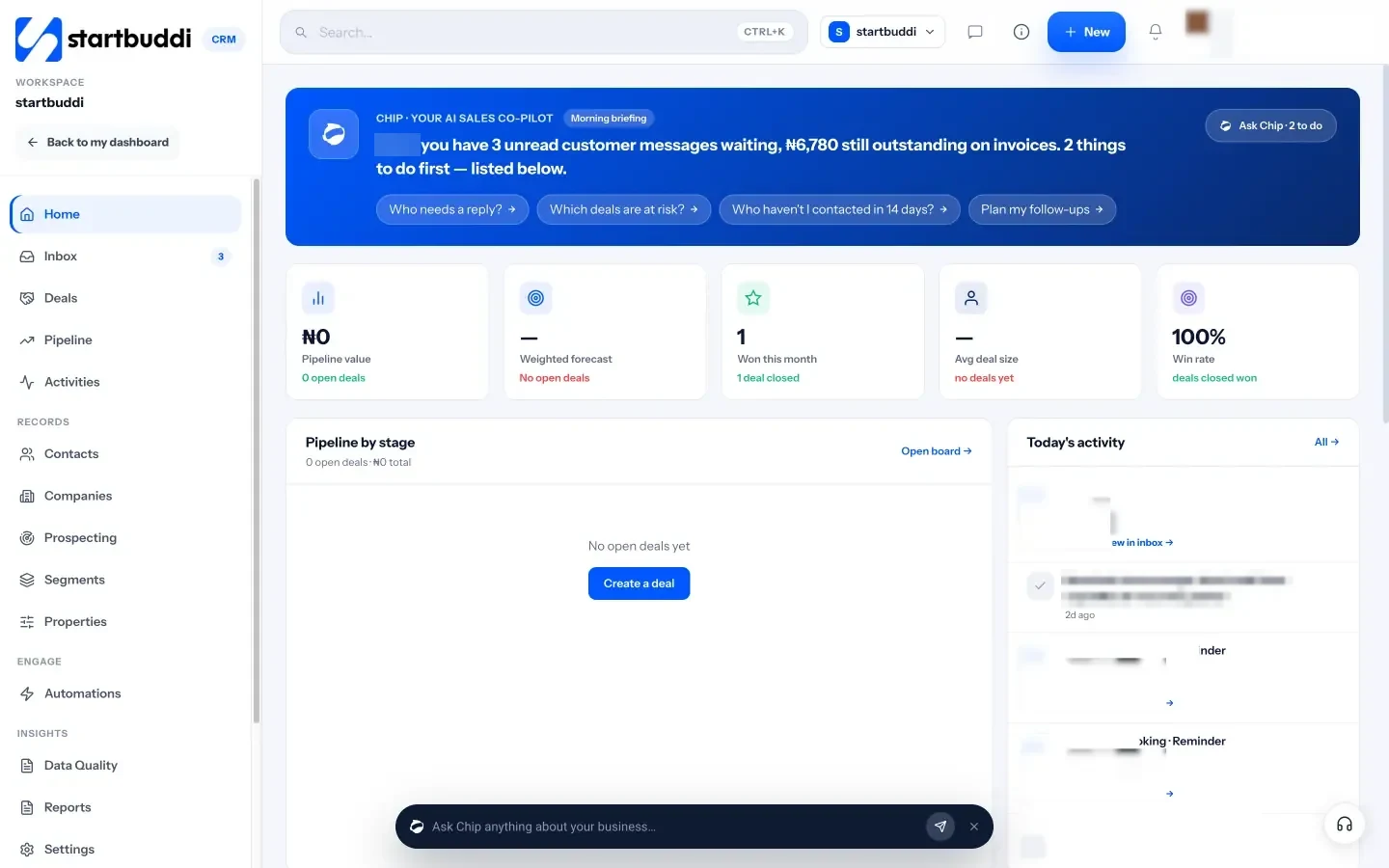
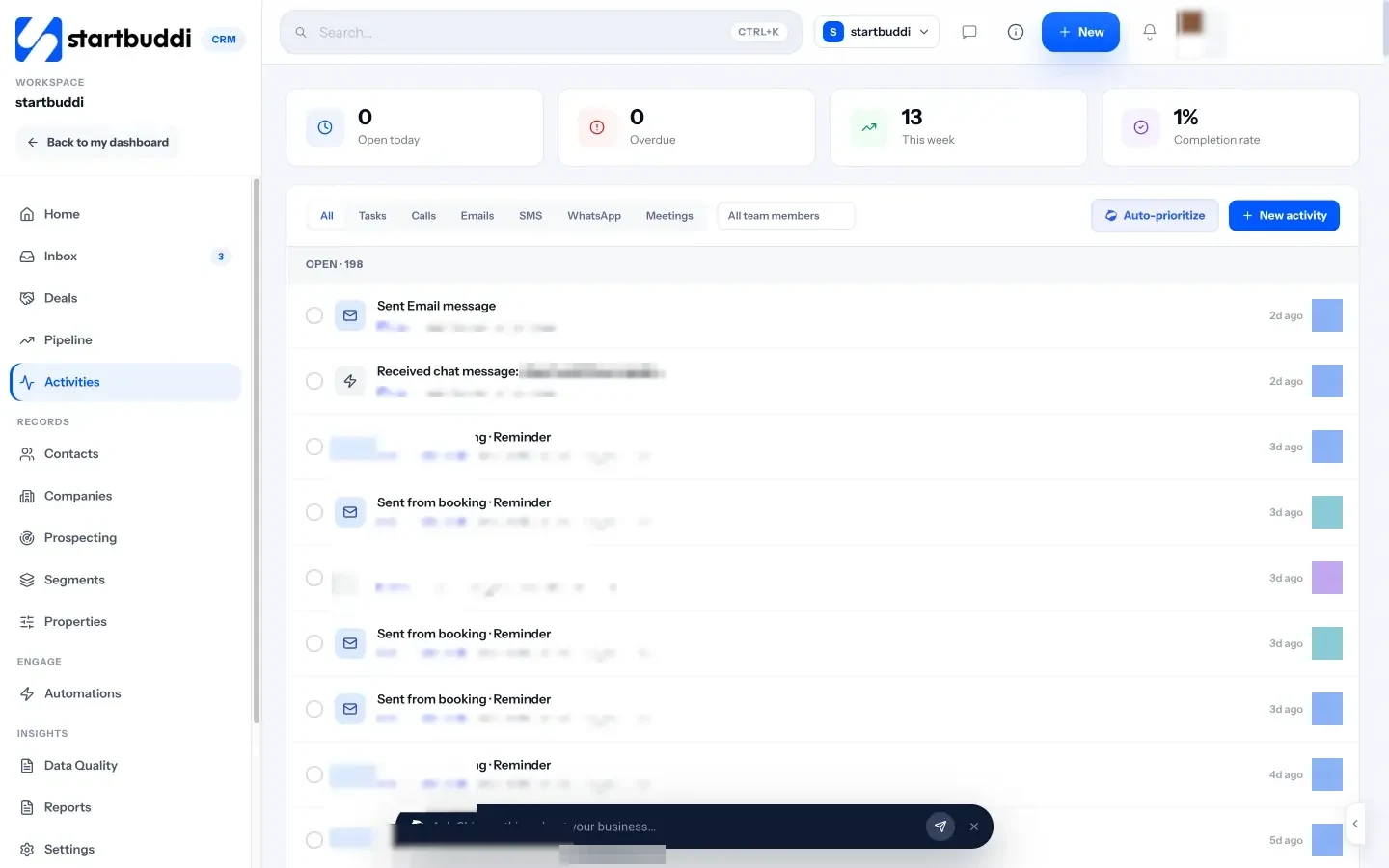
Chip, the AI assistant, reads the same data. Ask “Who needs a reply?” or “Which deals are at risk?” and it answers from your real contacts, messages and deals.
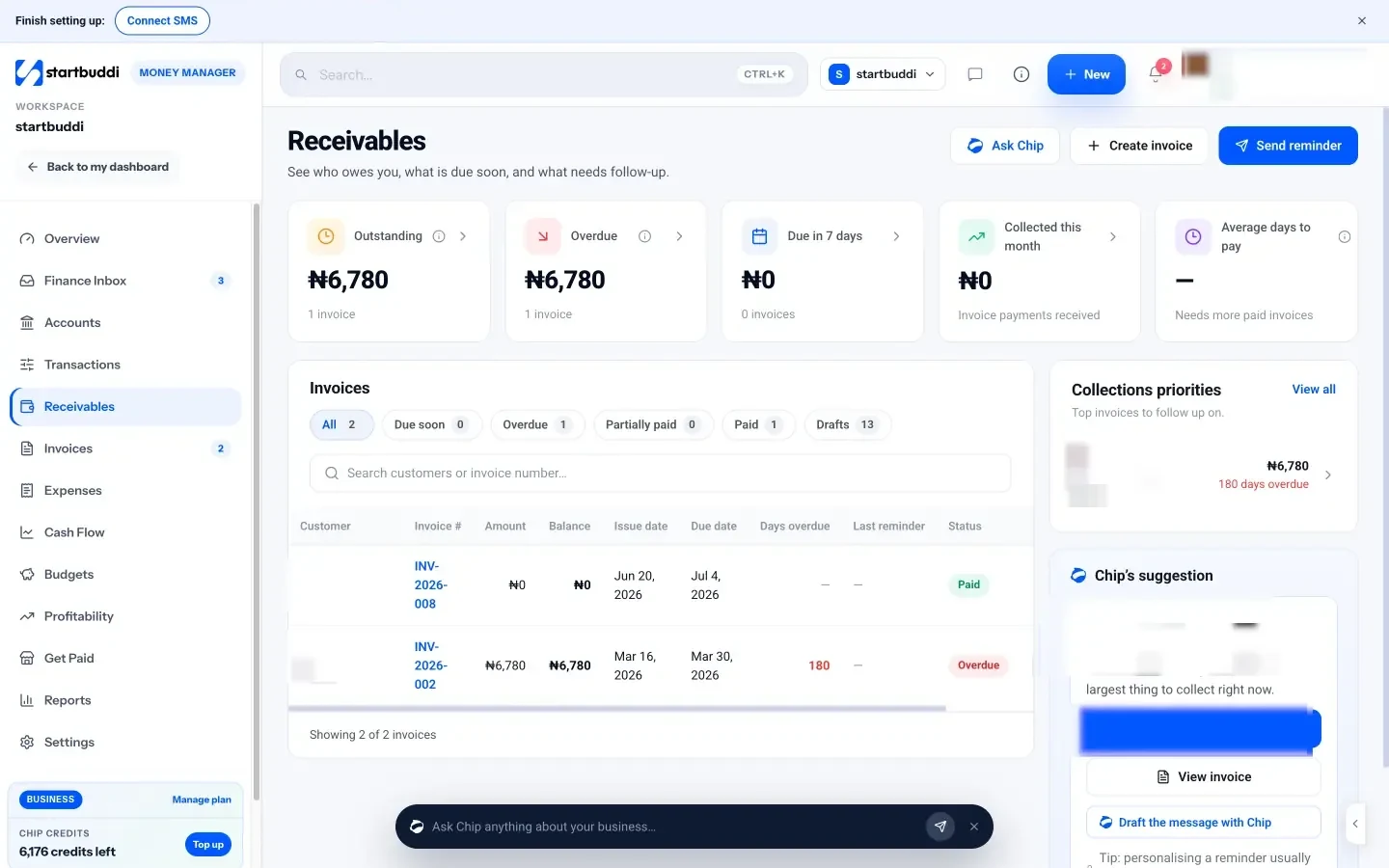
The Free plan covers up to 250 contacts, Starter covers 2,500 and Growth covers 15,000 with five seats (see pricing). Every paid plan has a 30-day trial. See contacts and companies for details.
Your next step
List the six groups of information above and tick the ones you track today, and where. Every place on that list that isn’t your main tool is a gap. Then shortlist two or three tools and give each one a real week. When you are ready, compare startbuddi’s plans on the pricing page.
Sources
Frequently asked questions
What is the difference between a CRM and a client tracking system?
They overlap. A CRM is often sales-focused, while a client tracking system for a service business also covers onboarding, delivery and payments. Many tools now do both.
Do I need a client tracking system if I only have a few clients?
It helps even with five or ten clients, because it builds good habits and a clean record before growth makes things messy. A free plan is usually enough at that stage.
Can I use a spreadsheet to track clients?
Yes, at the start. Spreadsheets struggle once several people edit them, you need reminders, or conversations and invoices live elsewhere.
How much does a client tracking system cost?
It ranges from free plans to hundreds of dollars a month for large teams. Check contact limits and per-user pricing on each provider's own pricing page.
SEO Copywriter| Email growth Specialist| I help businesses increase revenue with strategic SEO content & high-converting email funnels.