How to choose the best scheduling app for your small business
Appointment booking or staff rotas? What to look for, published prices and free plans for well-known scheduling apps, and how to set one up in an afternoon.



Photo: alex starnes / Unsplash
- First decide whether you are scheduling customers (appointment booking) or staff (shift rotas), because they are different apps. Look for reminders, deposits and calendar sync for appointments, and availability and shift swaps for staff. Free plans work well for solo businesses until a limit costs you time.
The best scheduling app for small business depends on what you are scheduling. If customers book time with you, such as appointments, consultations or classes, you need an appointment booking app. If you are putting staff on shifts, you need an employee scheduling app. They are different tools, and many businesses need one of each. For appointments, look for a booking link, reminders, deposits and calendar sync. For shifts, look for rotas, availability, shift swaps and hours tracking. Both kinds have good free plans for very small teams.
This guide explains how to tell which you need, what to look for, published prices and free plans for well-known apps, and how to set one up in an afternoon.
Appointment booking or staff scheduling: which do you need?
| Appointment booking app | Employee scheduling app | |
|---|---|---|
| Who uses it | Your customers book, you and your team manage | You build the rota, staff see their shifts |
| Main job | Fill your calendar without back-and-forth messages | Cover every shift with the right people |
| Key features | Booking page, reminders, deposits, calendar sync | Rotas, availability, shift swaps, clock-in, overtime alerts |
| Typical users | Consultants, coaches, salons, clinics, tutors, trades | Cafés, shops, restaurants, cleaning and care teams |
A hair salon may need both: a booking app for clients and a rota for stylists. A solo consultant only needs the first. A café with no appointments only needs the second.
What to look for in an appointment scheduling app
A booking page you can share anywhere
Customers should be able to pick a service and a free time from one link you can put in WhatsApp, Instagram, your email signature and your website. Check that it looks good on a phone, because that’s where most people will open it.
Reminders that cut no-shows
Reminders are the feature that pays for itself. A Cochrane review of trials in healthcare found text message reminders raised attendance from 67.8% to 78.6% compared with no reminder (Cochrane). Your business isn’t a clinic, but the lesson carries over: people forget, and a nudge helps. Check whether reminders go by email, SMS or both, and whether SMS costs extra. Our guide to reducing no-shows covers the other habits that help.
Deposits or payment when they book
Taking some money upfront is the strongest no-show protection there is. Check which payment providers the app supports in your country, and whether you can take a deposit rather than the full price.
Think about how the slot is held while the customer pays. The best apps hold the time for a short period and release it if the payment doesn’t go through, so an unpaid booking doesn’t block a paying customer. Also check how refunds work if you need to cancel, because you will need to do it sooner or later.
Calendar sync
Bookings should appear on the calendar you already use. Ask whether sync is one-way (bookings go into your calendar) or two-way (the app also reads your busy times and blocks them). Two-way sync matters if you have other commitments in that calendar.
Buffers, notice and limits
You want time between appointments, a minimum notice so no one books you in 10 minutes, and a limit on how far ahead people can book.
Team scheduling
If more than one person takes bookings, look for round robin, where bookings are shared across the team automatically. Our glossary explains round robin scheduling in plain words.
Best scheduling apps for small business: appointment booking
These are well-known options, with prices exactly as each company publishes them on its own site (checked in September 2026). Prices change, and some depend on your country, so check the vendor’s page before you sign up.
| App | Free plan | Published starting paid price |
|---|---|---|
| Calendly | Yes: one event type, one calendar connection | See current pricing |
| Acuity Scheduling | No, 7-day free trial | Starter $16 a month billed annually, $20 billed monthly |
| Square Appointments | Yes: for solo professionals, with payments through Square | See current pricing |
| Setmore | Yes: up to 4 users, no SMS reminders | Pro $5 per user a month billed annually, $12 billed monthly |
| SimplyBook.me | Yes: 50 bookings a month, 1 provider | Basic €11.90 a month billed annually, €13.90 monthly |
| Zoho Bookings | Yes: one user, one event type | See Zoho’s pricing page for your region |
| Cal.com | Yes: one user, unlimited event types | Teams $12 per user a month, billed yearly |
You may already have a scheduler. Microsoft Bookings is included in several Microsoft 365 plans, including Business Basic, Business Standard and Business Premium (Microsoft Learn). Google Calendar’s appointment schedules are available on personal and Workspace accounts, although some features need an eligible Workspace or Google One subscription (Google). For more options, see our researched lists of booking software and Calendly alternatives.
Best employee scheduling apps for small business
If your challenge is covering shifts rather than taking appointments, these rota apps publish their prices (US dollars, checked in September 2026):
| App | Free plan | Published starting paid price |
|---|---|---|
| Homebase | Yes: up to 10 employees at 1 location | Essentials $30 a month per location, billed monthly (annual billing saves 20%) |
| Connecteam | Yes: up to 10 users | See current pricing |
| When I Work | No, 14-day free trial | See current pricing |
| Deputy | No, free trial | Lite $5 per user a month billed monthly, with a $30 minimum monthly spend |
Shift scheduling also has legal rules in some places. New York City’s Fair Workweek law, for example, requires fast food employers to give workers their schedules 14 days in advance (NYC Department of Consumer and Worker Protection). Rules on breaks, overtime and notice differ by country and city, so check with your local labour authority. This is general information, not legal advice.
What to look for in an employee scheduling app
A rota app has a different job: making sure every shift is covered by the right person, without a flood of messages every week.
Availability and time-off requests
Staff should be able to say when they can and can’t work, and request time off, inside the app. That way you build the rota around real availability instead of guessing.
Publishing and confirming shifts
When you publish the rota, everyone should get it on their phone. Look for a way to see who has viewed or confirmed their shifts, so you don’t find out on the day that someone missed the message.
Shift swaps and open shifts
People get sick and plans change. The best rota apps let staff offer a shift to colleagues and let you approve the swap, instead of you phoning around.
Hours and labour costs
A clock-in feature and a running total of hours help you spot overtime before it happens and export hours for payroll. Check the app works with your payroll provider or at least exports a clean file.
Best free scheduling app for small business: what free really gets you
Free plans are genuinely useful for a solo business, but each one draws the line somewhere. Before you commit, check these limits:
- Number of services or event types. One free event type is fine for a single consultation, not for a menu of services.
- Reminders. Some free plans send email reminders only, with SMS on paid plans.
- Payments. Free plans may still take payments but charge a higher card rate.
- Branding. Expect the app’s name on your booking page on most free plans.
- Users. Many free plans cover one person. Adding a second often means paying.
- Bookings per month. A few free plans cap how many bookings you can take.
A good rule: use the free plan until a limit costs you a booking or an hour a week, then pay.
Scheduling apps by type of business
Every business books time differently. Here is what to prioritise for common types.
Salons, barbers and beauty
You need several services with different lengths, multiple staff with their own hours, deposits to protect busy slots, and ideally a client history. Our guide to salon booking apps goes into detail.
Trades and home services
Customers book a visit rather than a slot in your chair, so you need travel time between jobs, service areas and a way to collect address and job details upfront. See our guide to home service scheduling software.
Consultants, coaches and tutors
Your needs are simpler: a few session types, video call links, intake questions and payment upfront for paid sessions. A free plan often covers you for a long time.
Fitness studios and classes
You need group bookings with a capacity limit, class packs or memberships, and waitlists. Check the app supports several people booking the same slot, because many one-to-one booking apps don’t.
Caterers and event businesses
You book tastings and consultations, then run events with a crew. Most need both kinds of app. Our guide to catering scheduling software covers that setup.
Common mistakes when setting up a scheduling app
- Offering every hour of the day. Block out admin time and breaks, or you will be fully booked and never have time to do the paperwork.
- No buffer between bookings. Appointments run over. Ten or fifteen minutes between them keeps your day on time.
- Hiding the cancellation policy. Put it on the booking page and in the confirmation email, not just in your head.
- Forgetting time zones. If you take online bookings from other countries, make sure the page shows times in the customer’s time zone or states yours clearly.
- Keeping the old way open. If people can still book by message, many will. Reply with your booking link every time until it becomes the habit.
How to choose: five questions
- Are you scheduling customers, staff or both? This decides which kind of app you need.
- How do your customers pay? Card, bank transfer, mobile money? Make sure the app supports it where you are.
- How many people take bookings? Per-user pricing adds up fast.
- What happens after the booking? If you also need to invoice, follow up and keep customer notes, an app that connects those saves retyping.
- Does it work on your phone? You’ll check your schedule on the move more than at a desk.
Set up your scheduling app in an afternoon
- List your services with a name, length and price.
- Set your working hours, buffers between bookings and minimum notice.
- Decide your deposit and cancellation rules and write them on the booking page.
- Connect your calendar and turn on reminders.
- Book a test appointment on your phone as if you were a customer.
- Share the link everywhere customers find you: WhatsApp, Instagram, email and your Google profile. A QR code of your booking link works well on printed material.
How startbuddi handles appointment scheduling
startbuddi’s Bookings is an appointment booking tool, connected to your customers, invoices and follow-ups. It is not an employee rota or shift scheduling app, so if you need rotas, pair it with one of the apps above.
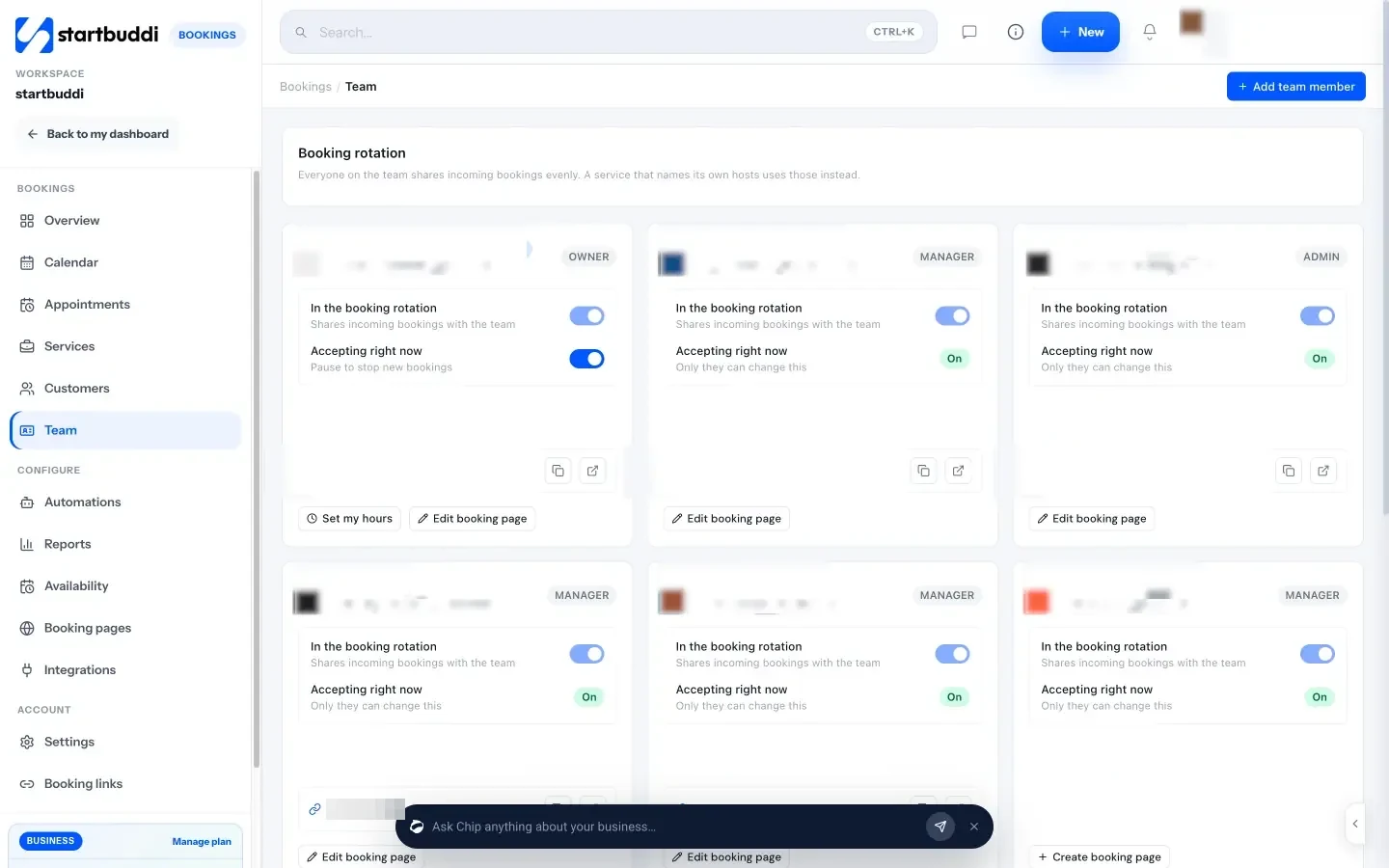
You create services with a duration and price, and can turn on “Require payment to book” for the full amount or a deposit through Paystack or Stripe. Clients book from your own booking page, with extra pages for different offers and a personal page for each teammate.
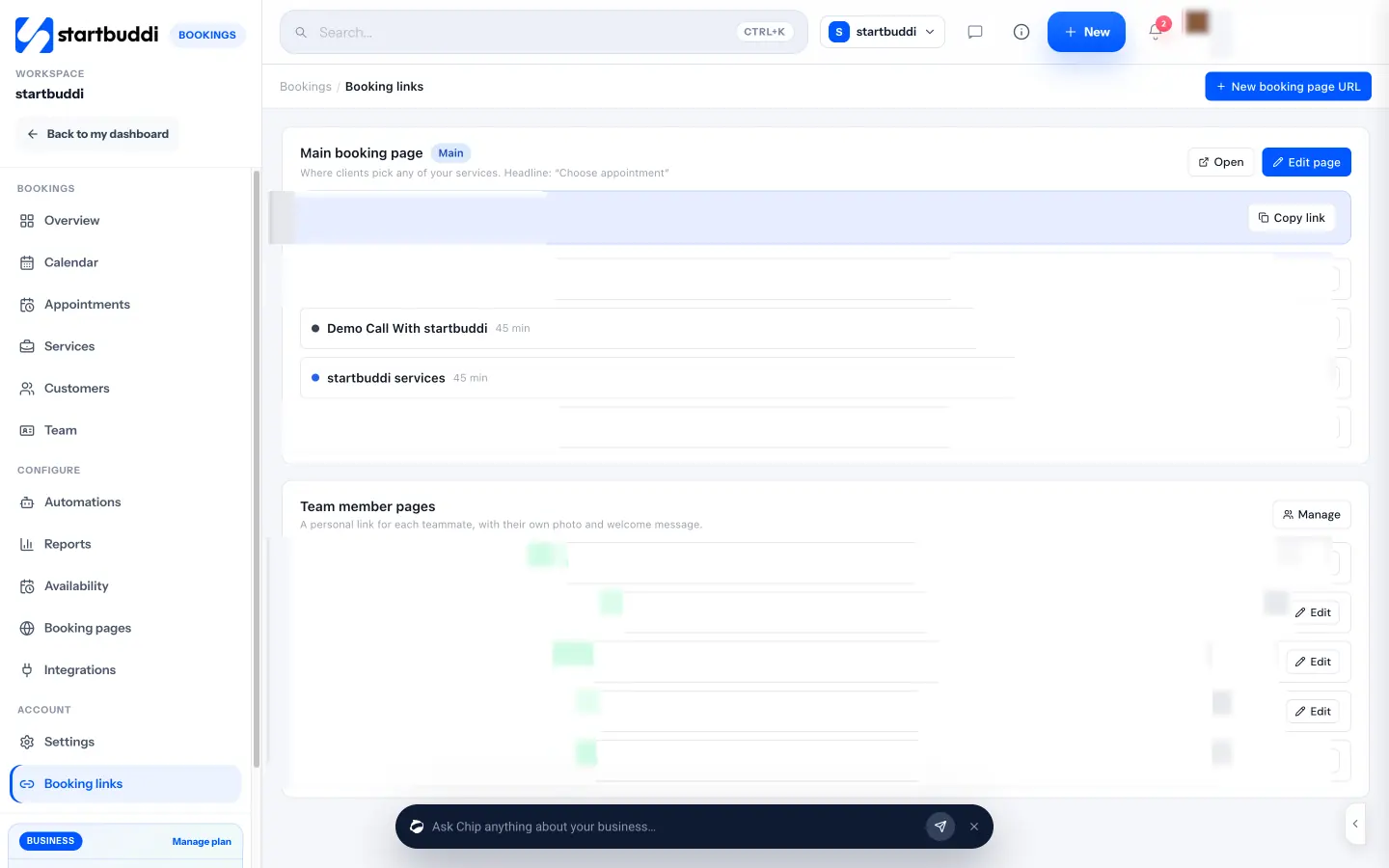
Availability sets working hours, a buffer after each booking, how far ahead people can book, and reminder emails from 1 to 48 hours before. Bookings are pushed to Google Calendar, and to Outlook where it is set up. Sync is one-way today, so startbuddi does not read other events in your calendar to block times.
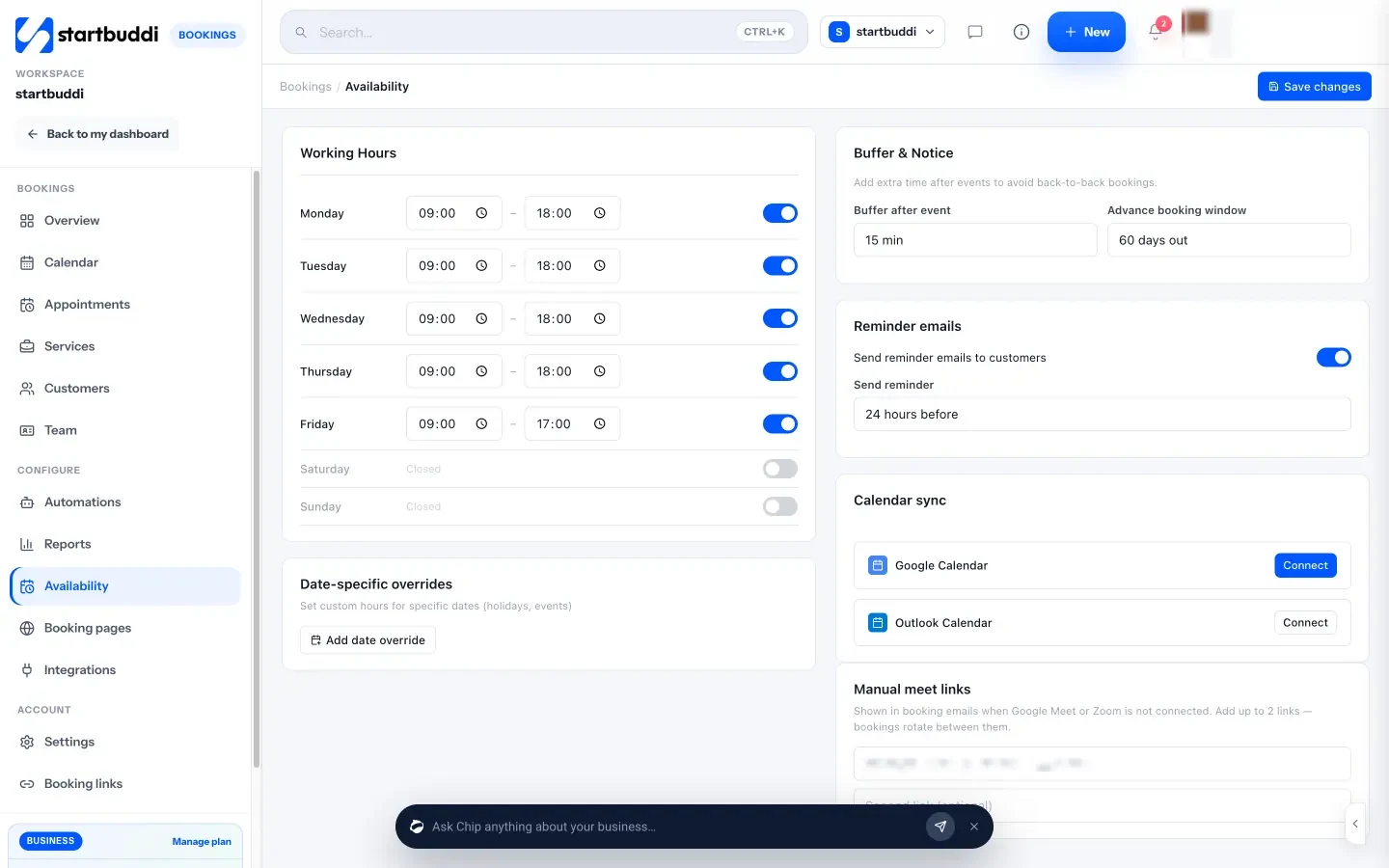
For teams, the booking rotation shares bookings across hosts round robin, and each person sets their own hours.
After the appointment, you can mark it complete or a no-show, send a follow-up email, or generate an invoice from the booking. Every booking also creates or updates the customer’s contact record. The Free plan includes one live service and one booking page, and Starter unlocks 10 live services (see pricing). See how it compares in startbuddi vs Calendly.
Your next step
Count how many messages it took to book your last five appointments or fill your last week of shifts. If the answer is more than two or three per booking, a scheduling app will pay for itself in time. Pick one from the right table above, set it up with the six steps, and share the link this week. If you want bookings, invoices and customer follow-ups in one place, compare plans on the pricing page.
Sources
- Cochrane: Mobile phone messaging reminders for attendance at healthcare appointments
- Calendly pricing
- Acuity Scheduling plans
- Square Appointments pricing
- Setmore pricing
- SimplyBook.me pricing
- Zoho Bookings pricing
- Cal.com pricing
- Microsoft Learn: Microsoft Bookings overview
- Google Calendar Help: appointment schedules
- Homebase pricing
- Connecteam pricing
- When I Work pricing
- Deputy pricing
- NYC DCWP: Fair Workweek law
Frequently asked questions
What is the best free scheduling app for small business?
For a solo business, several apps have useful free plans, including Calendly, Setmore, Square Appointments, Zoho Bookings and Cal.com. Compare their limits on services, users and reminders.
Can one app handle customer appointments and staff shifts?
Some can, but most small businesses use two: an appointment booking app for customers and a rota app for staff.
Do scheduling apps send reminders automatically?
Most do by email. SMS reminders are often limited to paid plans or charged per message, so check before you rely on them.
Should my scheduling app take payments?
If no-shows cost you money, yes. Taking a deposit when people book is one of the most effective ways to make sure they turn up.
Tiwalade Joanna Okedara-Kalu is the founder, CEO and CTO of startbuddi, the business system that brings clients, bookings, invoices, projects, marketing and the Chip AI assistant into one place. Tiwalade builds software around how service businesses really work day to day, and writes about client management, getting paid on time and why small businesses outgrow the tools they start with.
Founded startbuddi and leads its product and engineering