Salon booking apps: what to look for before you choose one
A practical checklist for choosing a salon booking app: deposits, reminders, stylist choice, free plans and the real monthly cost, for hair, nail and beauty salons.



- Pick a salon booking app that handles your real service times, lets clients choose a stylist or anyone free, takes deposits in your currency and sends reminders. Test it on your phone as a client, and add up the full monthly cost for your team before you commit.
A good salon booking app lets clients pick a service, a stylist and a time on their own, takes a deposit if you want one, reminds them before the appointment and keeps a record of every visit. Before you choose one, check five things: that it handles your real service times, lets clients choose (or not choose) a stylist, takes deposits in your currency, sends reminders, and costs a price you can live with once your team grows. Everything else is a nice extra.
This guide walks through what to look for in a salon booking app, how the needs of hair, nail and beauty salons differ, whether a free app is enough, and how to switch without losing a single client. We name a few well-known options with facts from their own websites, and we are clear about where startbuddi fits and where it does not.
What a salon booking app actually does
At its simplest, a salon booking app replaces the paper diary and the endless “are you free on Saturday?” messages. Clients open a link, see your services and prices, pick a free slot and get a confirmation. You see the booking in a calendar, and the app handles the reminder.
Most booking apps for salons also do some of the following:
- Staff calendars, so each stylist or technician has their own hours and bookings.
- Deposits or prepayment, so a no-show does not cost you the whole slot.
- Client records: visit history, notes, allergies, colour formulas and contact details.
- Reminders and follow-ups by email, text or WhatsApp.
- Reports on busy hours, popular services and who books again.
Some go further and add a card reader, product sales and payroll. That is where “booking app” turns into “salon management software” or a point of sale, and the price usually jumps. Decide early which of those you need, because it changes the shortlist completely. If you are not sure what the terms mean, our explainer on what an online booking system is covers the basics.
What to look for in a salon booking app: a 10-point checklist
Use this list when you try any app. Book a fake appointment as if you were a client, on your phone, before you commit to anything.
1. Service durations that match real life
A silk press is not a 30-minute slot, and a full set of acrylics takes longer than a fill. Check that each service can have its own length and price, and that you can add a buffer after it for cleaning and setting up. Some salon apps also support “processing time”, a gap in the middle of a colour service when the stylist can take another client. If you do a lot of colour, ask about this specifically.
2. Choice of stylist, or “anyone available”
Regulars want their person. New clients often just want the earliest slot. The best setup offers both: a page per stylist for loyal clients, and a shared page that gives the booking to whoever is free.
3. Deposits and prepayment
Deposits are the strongest defence against no-shows for long, expensive services. Check which payment providers the app works with in your country, whether you can take a deposit rather than the full amount, and who holds the money. Our guide on how much deposit to charge helps you set the amount.
4. Reminders that actually go out
Reminders are cheap and they work. A systematic review of 20 randomised trials on appointment reminders found that 19 showed a positive effect, with missed appointments falling by 41% on average. That research was in clinics, not salons, but the behaviour is the same: people forget. Check the channel (email, SMS, WhatsApp) and when reminders go out.
5. Easy rescheduling
If cancelling means an awkward phone call, some clients simply do not turn up. A link to reschedule or cancel inside every confirmation turns a lost slot into a slot you can refill.
6. Where clients can book from
Your clients find you on Instagram, TikTok, WhatsApp and Google. You need one link you can put everywhere. Google lets you add your own booking link to your Business Profile. Instagram’s built-in Book button only works with a limited list of partner providers, so for most apps you will put the link in your bio instead.
7. Walk-ins and blocked time
You still need to add a walk-in or a phone booking in seconds, and to block lunch, training or a day off so nobody books into it.
8. Client notes you can find in a hurry
Colour formulas, patch-test dates, allergies, the nail shape they always ask for. If notes are hard to reach mid-appointment, nobody will use them.
9. Reports you will read
You only need a few numbers: bookings per week, no-shows, busiest hours and how many clients came back. Fancy dashboards you never open are not worth paying for.
10. The real monthly cost
Add up the subscription, the price per extra staff member, any fee on new clients from a marketplace, text message charges and card processing. A cheap headline price can look very different with four stylists.
Hair salon, nail salon or beauty salon: what changes
The checklist above applies to everyone, but each type of salon leans on different parts of it.
Choosing a hair salon booking app
Hair services vary most in length and price, from a quick trim to a six-hour braid install. Look for per-service durations, deposits on long services, and booking questions such as “What is your hair type?” or “Is this a first-time colour?” so you arrive prepared. A hair salon booking app with good client notes saves you from asking for the same formula twice.
Choosing a nail salon booking app
Nail salons usually run shorter, more frequent appointments and often several technicians at once. Speed matters: clients should be able to book in under a minute. Add-ons (nail art, removal of an old set) are common, so check that clients can pick extras or answer a quick question at booking. A nail salon booking app also needs a fast way to add walk-ins, because many nail bars still take them.
Beauty salon booking apps for lashes, brows and skin
Beauty salons and spas often need consultation or intake questions before a first treatment, plus patch tests for lashes, brows and tints. The UK’s NHS, for example, advises testing hair dye at least 48 hours before you use it. Your app should let you ask these questions at booking and keep the answers on the client’s record.
Booking apps for salons: marketplace or your own link?
This is the biggest choice most salon owners do not realise they are making. Booking apps for salons fall into two groups.
Marketplace apps list you in a public directory where people browse and book local salons. That can bring new clients, but it can also cost you. Fresha, for example, says on its pricing page that it charges a one-time fee for brand-new clients who find you through its marketplace, and no fee for returning clients. Booksy and Vagaro also run consumer marketplaces alongside their business software.
Your-own-link apps give you a booking page that you share yourself, on Instagram, WhatsApp, Google and your website. You do the marketing, but every client relationship and every naira, dollar or pound is yours.
Many salons do both: a marketplace for discovery in the first year, and their own link for regulars. If you go that way, make sure clients who first came through a marketplace have an easy way to rebook with you directly.
Is a free salon booking app good enough?
Often, yes, at the start. A salon booking app free plan usually covers one person, a small number of services or a cap on bookings, and email reminders. Here are a few, with details from each company’s own pricing page at the time of writing:
| App | Free plan? | What the pricing page says |
|---|---|---|
| Square Appointments | Yes | A free plan “for solo professionals”, with paid Plus and Premium plans for teams. Card payments go through Square, at the rates on Square’s fee page. |
| Setmore | Yes | Free for up to 4 users with email reminders; Pro from $5 per user a month billed annually, per its pricing page. |
| SimplyBook.me | Yes | Free plan limited to 50 bookings a month and 1 provider, per its pricing page. |
| Booksy | No (14-day trial) | $29.99 a month plus tax, and $20 a month for each extra team member, per its US pricing page. |
| Vagaro | No (30-day trial) | From $23.99 a month for the first six months, then $30, with extra staff licences at $10 each, per its pricing page. |
| GlossGenius | No (14-day trial) | Standard from $24 a month billed annually or $28 monthly, with card payments built in, per its pricing page. |
Prices change and vary by country, so check the page yourself before you decide. The limits matter more than the price: a free plan capped at a handful of bookings or one service will not last a busy salon a month. For a wider view, see our researched list of booking software for service businesses.
A free plan stops being enough when you add a second stylist, want deposits, need text or WhatsApp reminders, or start spending more time working around the limits than doing hair.
How to switch booking apps without losing clients
Switching feels risky because your diary is full of future bookings. Do it in this order:
- Set up the new app fully first. Services, prices, durations, staff hours and your booking questions. Book two or three test appointments.
- Import or copy your client list, ideally as a CSV export from the old app.
- Keep existing bookings where they are. Honour them in the old system, and send only new bookings to the new link.
- Change every link on one day: Instagram bio, Google Business Profile, WhatsApp Business profile, website.
- Tell clients. A short message with the new link, sent to people who agreed to hear from you, plus a card or QR code at the front desk.
- Cancel the old app only when its last booking has passed.
How startbuddi helps
To be clear, startbuddi is not a salon-only app. It is one place to run bookings, clients, payments and marketing for any service business, and its Bookings module covers most of the checklist above. Here is what it does, and what it does not.
Services with real durations and prices. Each service has its own length (from 15 minutes up to 2 hours), price and currency, including USD, GBP, EUR, NGN, KES, ZAR and GHS. You can turn on “Require payment to book” and choose the full amount or a deposit, paid by card through Paystack or Stripe. The slot is held for 30 minutes while the client pays.
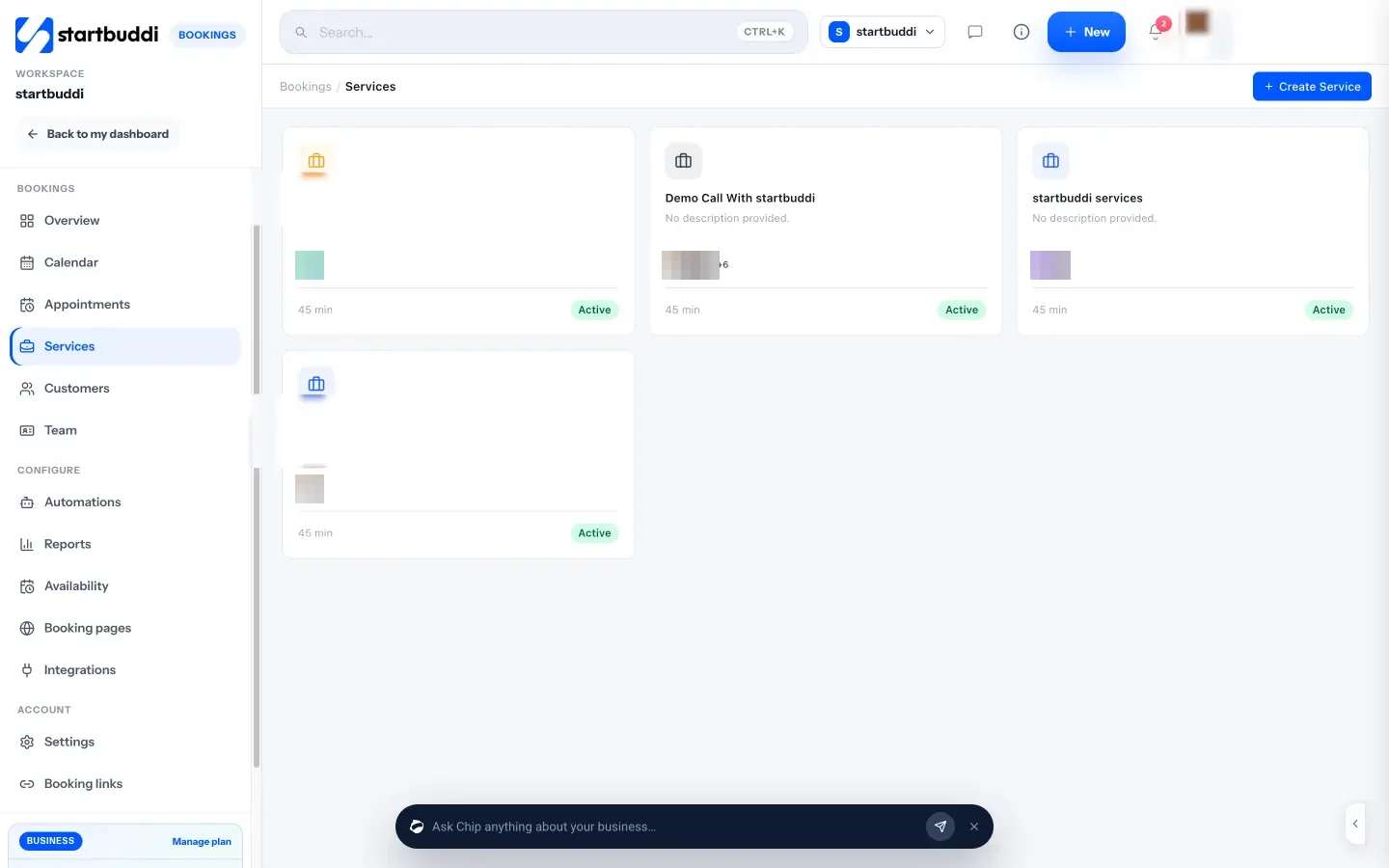
Booking questions. Ask what you need before the appointment (short or long answers, choices or a rating) and save the answer to the client’s record. Chip, the built-in AI assistant, can suggest questions for a service if you tell it what you need to know, such as hair type.
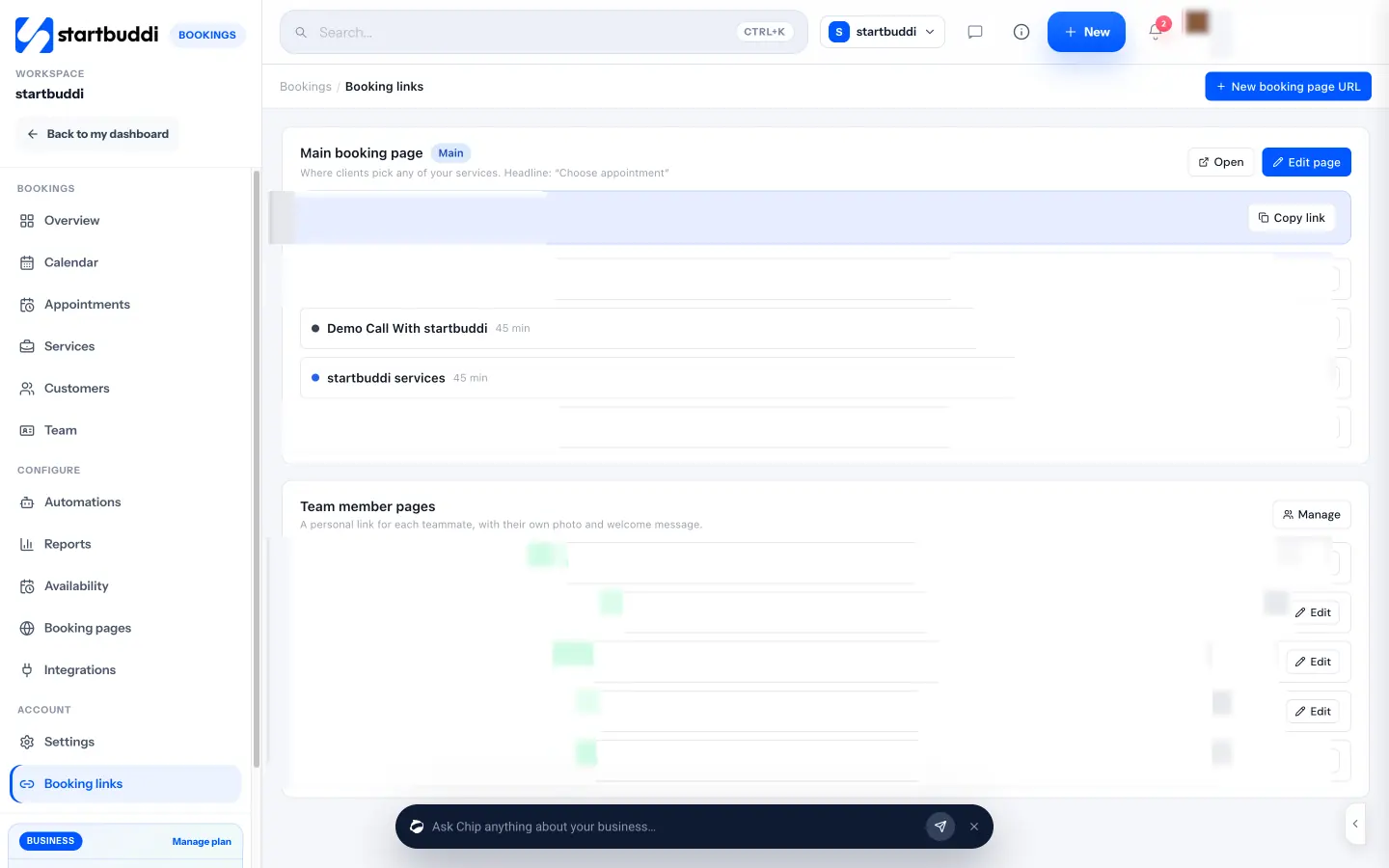
One link for everything, plus a page per stylist. Your main booking page lists every live service. You can add a personal page for each team member with their own photo and welcome message, and share bookings round robin so “anyone available” goes to whoever is next. Share by copying the link, on WhatsApp, by email, with an embed code or a QR code for the front desk. You can also add a Booking block to a link in bio page.
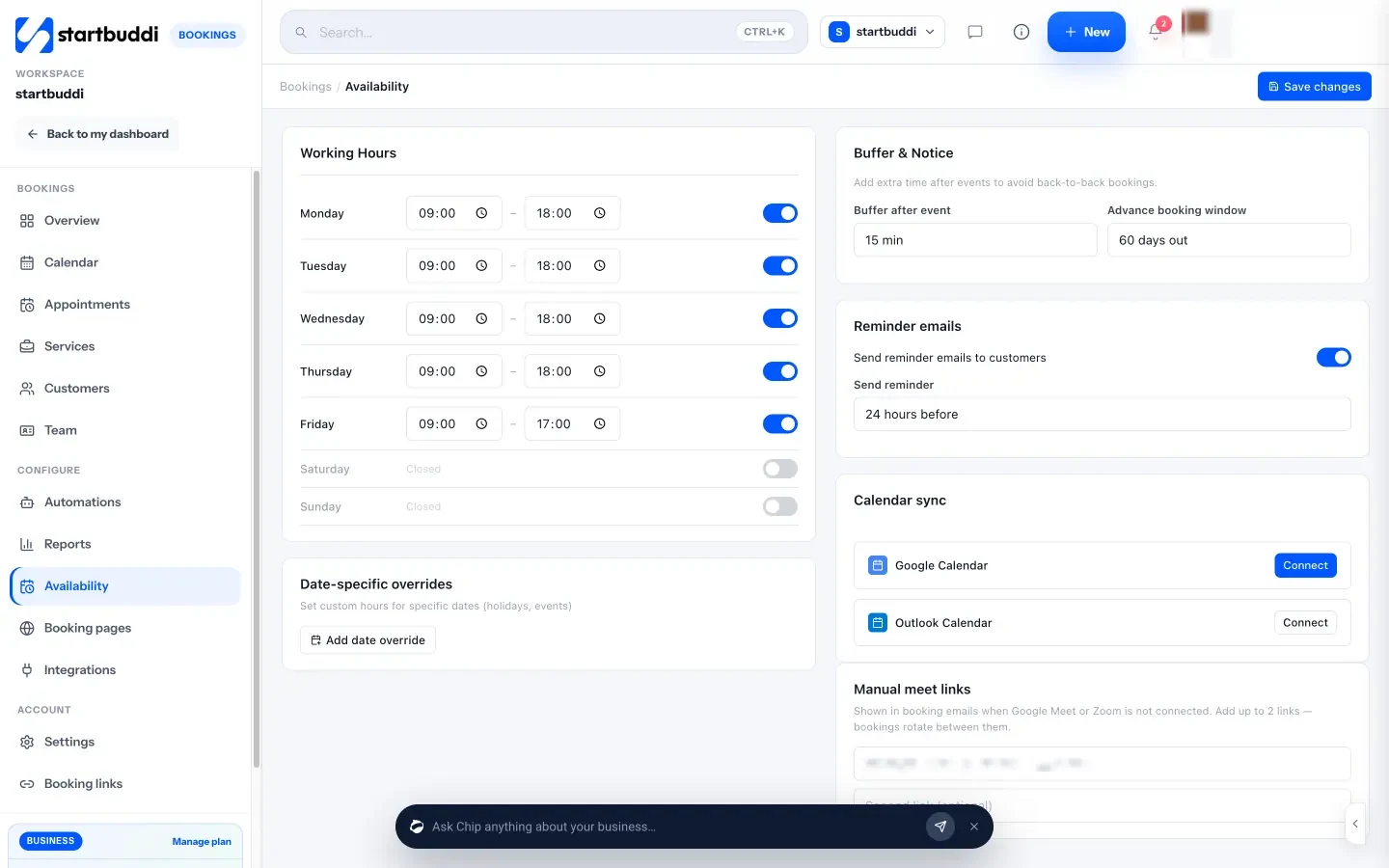
Hours, buffers and reminders. Set working hours per day, a buffer after each appointment and how far ahead people can book, and block time for holidays. An automatic reminder goes out by email, WhatsApp or SMS at the time you choose, and a no-show follow-up email invites the client to rebook.
What startbuddi does not do. It has no public marketplace, so it will not send you new clients on its own. It does not support processing-time gaps inside a colour service. It is not a POS and has no card reader. There is no native phone app: you use it in the browser, and on a phone the Bookings module shows the overview and your booking links only. Calendar sync pushes bookings to Google Calendar but does not read your busy times. WhatsApp reminders need a connected WhatsApp number, and SMS reminders need an SMS connection and a plan that includes SMS. Each booking gets one automatic reminder; extra messages run through automations.
Plans. The Free plan includes one live service and one booking page, which is fine for testing but tight for a salon. Starter allows 10 live services, Growth 25, and Scale unlimited (see pricing), and every plan takes unlimited bookings. See pricing for the full list, or our startbuddi vs Square Appointments comparison if you are weighing the two.
Your next step
Write down your five most booked services with their real durations and prices, then try booking each one as a client in two or three apps. The one that feels quickest on your phone is usually the right one. If you want to set up the rest of the salon too, our guide on how to run a salon business covers bookings, clients and payments step by step.
Sources
- PAMJ One Health: systematic review of appointment reminders (2020)
- Google Business Profile Help: bookings and booking links
- Instagram Help Centre: action buttons for business accounts
- NHS: hair dye reactions
- Fresha pricing
- Square: what are Square’s fees
- Setmore pricing
- SimplyBook.me pricing
- Booksy pricing (US)
- Vagaro pricing
- GlossGenius pricing
Frequently asked questions
Is there a good salon booking app free of charge?
Several apps have free plans, usually limited to one person, a few services or a monthly booking cap. They work well for a solo stylist starting out. Once you add staff, deposits or text reminders, expect to pay.
What is the best booking app for a nail salon?
The one your clients can use in under a minute on their phone. Nail salons should look for quick booking, add-on options, several technician calendars and a fast way to add walk-ins.
Should a hair salon booking app take deposits?
For long or expensive services, yes. A deposit makes a no-show far less likely and covers part of the lost slot. Keep short, low-cost services deposit-free so booking stays easy.
Can clients book a salon appointment from Instagram?
Yes. Put your booking link in your bio or on a link in bio page. Instagram's own Book button only works with certain partner providers, so check whether your app is one of them.
Omolola Akiyode is the operations and project manager at startbuddi, leading cross-functional projects and the content that helps founders get set up. Omolola writes about projects, websites and getting found online, and turns complex ideas into clear, practical steps.
Runs operations and projects at startbuddi