What is WhatsApp Business API?
Also called: WhatsApp Business Platform, WhatsApp Cloud API, WhatsApp API, WABA
The WhatsApp Business API, now part of Meta's WhatsApp Business Platform as the Cloud API, lets businesses send and receive WhatsApp messages through software: shared team inboxes, approved templates, automations and chatbots.
The WhatsApp Business API is Meta’s way for businesses to send and receive WhatsApp messages through software instead of a phone. It lets a business message many customers, share one number across a team, connect WhatsApp to a CRM or inbox, and run chatbots and automations. Meta now calls it the WhatsApp Business Platform, and the version businesses use today is the Cloud API, hosted by Meta.
You don’t use the API by opening an app. You use it through a tool built on top of it, or through code your developer writes.
WhatsApp Business app vs WhatsApp Business API
Most small businesses start with the free WhatsApp Business app on their phone. It is great for one person replying to customers. It gets hard when you have hundreds of chats, several teammates, or want to send updates to many people.
| WhatsApp Business app | WhatsApp Business API (Cloud API) | |
|---|---|---|
| How you use it | Phone app | Through software or a provider’s dashboard |
| Team access | Limited linked devices | Many teammates through a shared inbox |
| Messaging many people | Broadcast lists to people who saved your number | Approved templates to opted-in contacts, at scale |
| Automation and chatbots | Basic quick replies and away messages | Full automations, chatbots and CRM connections |
| Cost | Free app | Meta charges per delivered template message |
You no longer always have to choose. Meta supports using the same number on the app and the Cloud API (often called coexistence). Chats from the last 180 days can sync, and those shared numbers have a fixed speed of 20 messages a second.
How the WhatsApp Business API works
Templates and the 24-hour window
When a customer messages you, a 24-hour customer service window opens and you can reply freely. Outside that window, you can only start a conversation with a message template: a pre-written message that Meta reviews and approves. Meta’s template docs list three categories: marketing, utility and authentication. Review can take up to 24 hours, though it is often much quicker.
Pricing
Since 1 July 2025, Meta charges per delivered template message, with rates set by template category and the recipient’s country code. Non-template messages sent inside a customer service window are free, and so are utility templates sent inside an open window. If someone reaches you through a click-to-WhatsApp ad and you reply within 24 hours, a free window of 72 hours opens. See Meta’s pricing page for current rates.
Messaging limits
Meta limits how many unique people you can message with templates in a rolling 24 hours. According to Meta’s messaging limits page, new business portfolios start at 250, then move to 2,000 (for example by verifying your business), 10,000, 100,000 and unlimited as you send good-quality messages. Limits are shared by all numbers in a business portfolio.
One more change: Meta retired the older On-Premises API, which stopped sending messages after 23 October 2025. New numbers register for the Cloud API only.
Why it matters for a small business
If WhatsApp is where your customers talk to you, the API turns it from a busy phone into a proper business channel. Your team can share one number without passing a phone around. Every chat can be linked to a customer record. Order updates, booking confirmations and offers can go out automatically, and a chatbot can answer the same questions you answer twenty times a day.
Common mistakes
- Messaging without opt-in. Meta’s opt-in rules require people to agree to hear from your business by name. Low-quality or unwanted messages lower your quality rating and limits.
- Writing templates like adverts. Clear, useful wording gets approved and read. Misleading or vague templates get rejected.
- Using the wrong category. A promotion sent as “utility” can be reclassified. Pick honestly.
- Ignoring the 24-hour window. Reply quickly, while replies are free and unrestricted.
Related terms
A WhatsApp broadcast is sending one approved message to many opted-in contacts. WhatsApp marketing is the wider strategy of using WhatsApp to win and keep customers.
The WhatsApp Business API in startbuddi
In startbuddi, the connection to Meta’s Cloud API is done for you, so there is no code involved. In Marketing, open WhatsApp and click Connect WhatsApp. Meta’s own signup window opens: pick your business and number, and come back. If the number already runs on the WhatsApp Business app, you can keep using the app too.
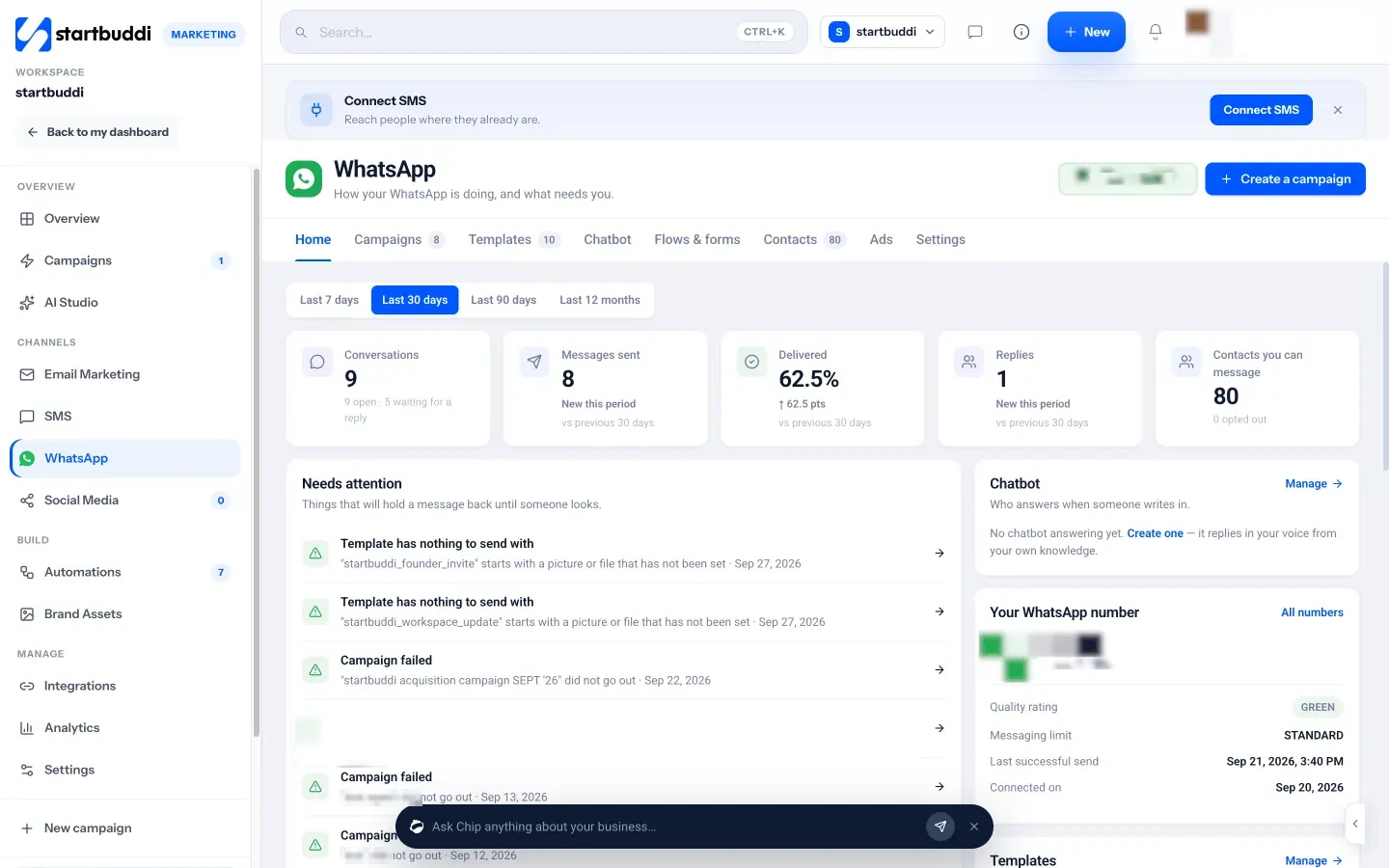
Once connected, you can create templates and send them to Meta for review, send campaigns to opted-in contacts, and see your number’s quality rating and messaging limit in plain words. Conversations land in your Customers inbox beside email and live chat. Chip can build a WhatsApp chatbot from a few questions; switching it on to answer needs the Growth plan. WhatsApp is available on Starter and above, and Meta’s message charges apply to your own WhatsApp Business account. Read the help guide on how to connect WhatsApp to startbuddi or see the WhatsApp marketing page.
Next step
Count how many WhatsApp chats you handle a week and how many people share the phone. If either number keeps growing, it is time to move to the API. Compare plans on the pricing page.
Related terms
FAQ
Is the WhatsApp Business API free?
Connecting is free, but Meta charges per delivered template message, based on the template category and the recipient's country. Replies inside the 24-hour customer service window are free.
Can I keep using the WhatsApp Business app after moving to the API?
Yes, Meta supports using the same number on both. Recent chats can sync, and replies show in both places, with a fixed sending speed of 20 messages a second.
What is a WhatsApp message template?
A pre-written message Meta approves before you can use it to start conversations outside the 24-hour window. Templates are marketing, utility or authentication.
Do I need a developer to use the WhatsApp Business API?
Not if you use a tool that connects for you. In startbuddi you click Connect WhatsApp, complete Meta's signup window, and manage everything from the dashboard.
Olabimpe Salami is the email and outreach specialist at startbuddi. Olabimpe writes about the messages that bring customers in and back: email, WhatsApp and SMS campaigns, follow-ups, and turning enquiries into paying clients.
Runs email and outreach at startbuddi