What is a WhatsApp broadcast?
Also called: WhatsApp broadcast list, WhatsApp bulk message, WhatsApp campaign, bulk WhatsApp
A WhatsApp broadcast is one message sent to many people at once, delivered as a private chat to each. Small lists use the WhatsApp Business app; larger campaigns use Meta-approved templates through the WhatsApp Business API.
A WhatsApp broadcast is one message sent to many people on WhatsApp at the same time, where each person receives it as a private, one-to-one chat. Unlike a group, recipients can’t see each other or each other’s replies. When someone answers, the reply comes back to you alone.
There are two very different ways to do it. The free WhatsApp Business app has broadcast lists for small audiences. The WhatsApp Business API (Meta’s Cloud API) lets businesses send broadcast campaigns to large opted-in audiences using message templates approved by Meta.
Why WhatsApp broadcasts matter for small businesses
In many countries, WhatsApp is where customers already talk to businesses. A broadcast puts your news in the same place as their chats with friends and family, which makes it hard to miss. It is ideal for new stock, restocks, event reminders, price updates and service announcements.
Because every recipient gets a private chat, broadcasts also start real conversations. A customer can reply “Is the blue one still available?” and you pick it up from there, without a noisy group thread.
How a WhatsApp broadcast works
Broadcast lists in the WhatsApp Business app
According to the WhatsApp Help Center, you can add up to 256 contacts to each broadcast list, and you can create as many lists as you like. The catch: only people who have saved your number in their phone will receive it. For a small, loyal customer base this is fine. For anything bigger, it quickly becomes manual and patchy.
Broadcast campaigns through the WhatsApp Business API
- Collect opt-in. Meta’s opt-in rules say people must clearly agree to receive messages from your business, by name.
- Create a template. Write the message, choose a category (marketing or utility for most broadcasts) and submit it to Meta for review.
- Personalise. Fill variables such as first name or order number for each person.
- Send or schedule. The message goes to your chosen audience, within your messaging limit.
- Track results. See sent, delivered, read, replied and failed.
Contacts don’t need to save your number for API broadcasts. Meta charges per delivered template message, based on the category and the recipient’s country, as explained on Meta’s pricing page. Your daily reach is capped by messaging limits that start at 250 unique people and rise as your number sends good-quality messages.
Example: a fashion boutique in Kumasi collects WhatsApp opt-ins at checkout. When new dresses arrive, it sends an approved marketing template with a photo, “Hi Efua, new arrivals just landed”, and a button to view the collection. Replies about sizes come straight into the shop’s inbox, where staff answer them.
WhatsApp broadcast vs WhatsApp group
| Broadcast | Group | |
|---|---|---|
| Who sees replies | Only you | Everyone in the group |
| Recipients see each other | No | Yes |
| Best for | Offers, updates, reminders | Discussion among members |
| Privacy | High | Low, numbers are visible |
A simple rule: if you are telling customers something, use a broadcast. If you want customers talking to each other, such as a class group or a members’ club, use a group. Adding customers to a group without asking exposes their phone numbers to strangers, which many people dislike and which can create privacy problems for your business.
Best practices and common mistakes
- Never broadcast to people who didn’t opt in. Blocks and reports lower your quality rating and can shrink your messaging limit.
- Make it worth opening. A useful update or a genuine offer, not “Good morning!” every day.
- Add a picture or button where it helps. Templates can start with an image, video or file and include quick replies or links.
- Keep frequency sensible. WhatsApp feels personal. Weekly is plenty for most businesses.
- Be ready for replies. Broadcasts start conversations, so have someone (or a chatbot) ready to answer.
- Offer an easy opt-out. “Reply STOP to stop these messages” keeps your list healthy.
Related terms
The WhatsApp Business API is the Meta platform that makes large broadcasts possible. Bulk SMS is the text-message equivalent, and it reaches phones without WhatsApp.
WhatsApp broadcasts in startbuddi
In startbuddi, WhatsApp broadcasts are called campaigns and run on Meta’s Cloud API through your own connected number. Create a campaign is a five-step wizard: Audience, Template, Personalise, Schedule and Review. Only approved templates are listed. Marketing templates only reach opted-in contacts, while utility templates can go to anyone with a phone number. In Personalise you map each blank to a contact field such as first name, or type one value for everyone.
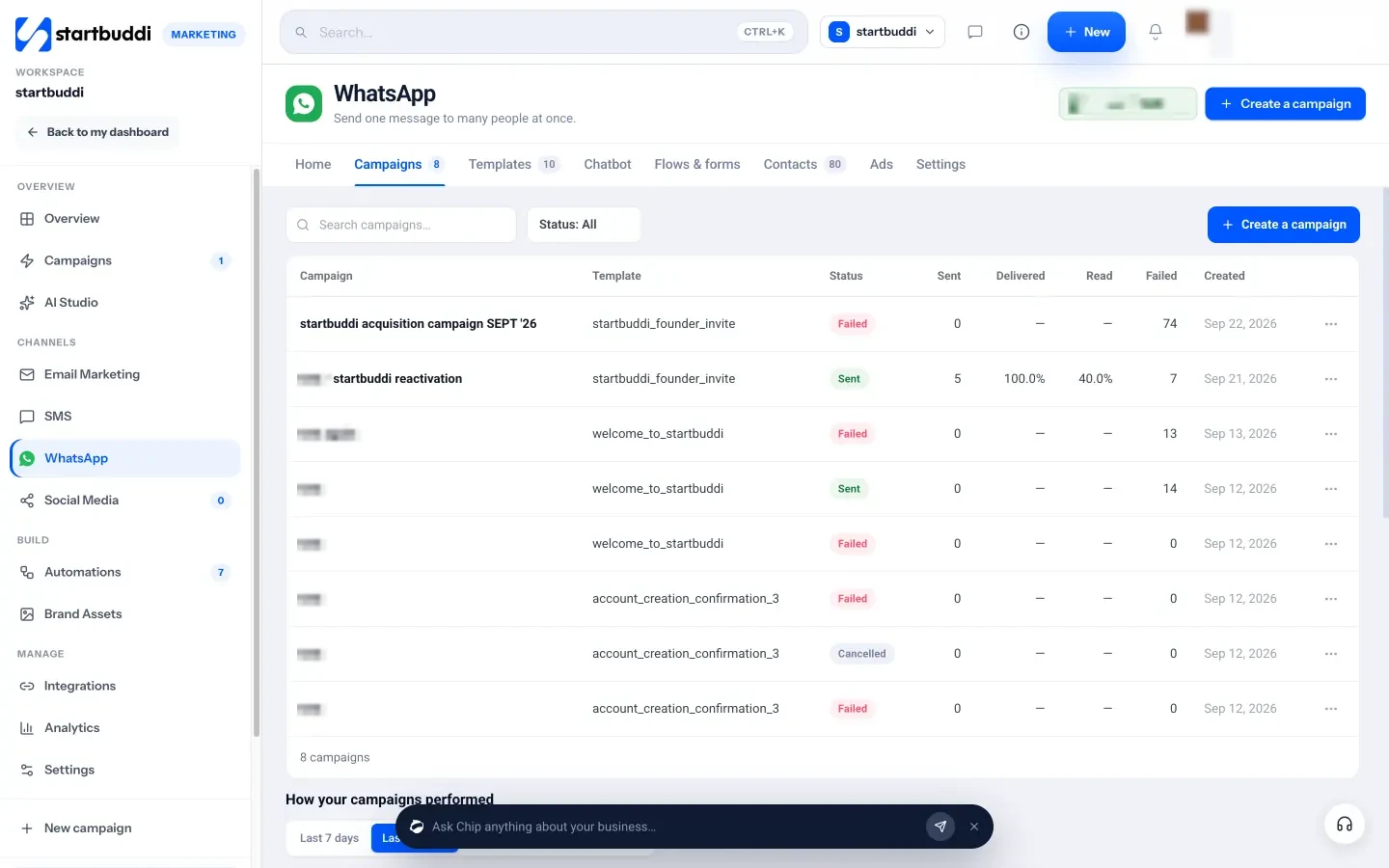
After sending, the Campaigns tab shows a funnel from sent to delivered, read, replied and failed, and each campaign has a failure reasons table. Replies land in your Customers inbox. WhatsApp is available on the Starter plan and above, and Meta’s message charges apply to your WhatsApp Business account. Follow the help guide on how to send a WhatsApp campaign, see the WhatsApp marketing page, or read about bulk WhatsApp marketing in Nigeria.
Next step
Start collecting WhatsApp opt-ins today with one clear line on your forms or at checkout, then draft your first broadcast as a template. When you are ready to send it at scale, compare plans on the pricing page.
Related terms
FAQ
How many people can I send a WhatsApp broadcast to?
In the WhatsApp Business app, up to 256 contacts per broadcast list, and only people who saved your number receive it. Through the API, your reach depends on Meta's messaging limits, which start at 250 unique people a day and rise over time.
Can people see who else received my broadcast?
No. Each person receives it as a private chat, and replies come only to you.
Do WhatsApp broadcasts cost money?
App broadcast lists are free. API broadcasts use message templates, which Meta charges per delivered message based on category and the recipient's country.
Why was my WhatsApp broadcast not delivered to some people?
On the app, they may not have saved your number. On the API, common reasons include numbers not on WhatsApp, opt-outs, messaging limits and Meta's delivery rules. Check your failure reasons.
Olabimpe Salami is the email and outreach specialist at startbuddi. Olabimpe writes about the messages that bring customers in and back: email, WhatsApp and SMS campaigns, follow-ups, and turning enquiries into paying clients.
Runs email and outreach at startbuddi