What is a drag-and-drop form builder?
Also called: Visual form builder, no-code form builder, drag and drop form maker, online form creator
A drag-and-drop form builder is a visual tool for making online forms without code. You drag fields such as name, email or a dropdown onto a canvas, arrange them in order, set which are required, and publish the form as a link or embed it on your website.
A drag-and-drop form builder is a visual tool for making online forms without writing code. You pick fields from a list (name, email, phone, dropdown, file upload and so on), drag them onto a canvas, put them in order, and publish. The result is a form you can share as a link, embed on your website or add to a landing page.
The phrase describes how you build, not what you get. What matters for your business is how quickly you can make a good form and what happens to the answers afterwards.
Why a drag-and-drop form builder matters for a small business
Forms are how most businesses collect information: enquiries, quote requests, bookings, orders, applications and feedback. Building them in code takes a developer. Building them in a document or a chat thread means copying answers by hand.
A visual form builder puts the job in your hands. You can make a new form in minutes, change a question the moment a customer finds it confusing, and try a shorter version when too many people give up halfway. For a small team with no developer, that speed is the main benefit.
How a drag-and-drop form builder works
- Start: from a blank canvas or a template, such as a contact form or client intake form.
- Add fields: drag (or click) field types onto the canvas.
- Set each field: label, placeholder, help text, required or optional, and options for choice fields.
- Arrange: reorder fields, group them into sections or split the form into steps.
- Style: colours, button text and the message people see after submitting.
- Publish: share the link, embed the form or show it as a popup.
Example: a property agent needs to qualify enquiries. She adds name, phone, email, a dropdown for “Buy or rent”, a budget range and a preferred viewing date. In ten minutes the form is live on her page, and she stops asking the same five questions on every call.
Key features to look for
| Feature | Why it matters |
|---|---|
| Field types | Text, email, phone, choices, dates, file uploads, signatures |
| Conditional logic | Show or skip questions based on earlier answers |
| Multi-step forms | Break long forms into short screens |
| Templates | Start from a proven form, not a blank page |
| Where answers go | Straight into your contact list, not just an email |
| Payments | Take a deposit or fee when the form is submitted |
| Sharing options | Link, embed, popup, QR code |
Drag-and-drop vs HTML forms
An HTML form is written in code and fully under your control, but every change needs someone who can edit code. A visual builder is faster for most businesses. Some tools let you keep your own coded form and just send its answers to the builder. We compare both in HTML form builder vs drag-and-drop.
Best practices and common mistakes
Ask only what you need now. Every extra field gives people a reason to stop.
Label every field clearly. Visible labels help everyone, including people using screen readers. The W3C’s guide to labelling form controls explains why placeholders alone are not enough.
Use the right field type. An email field checks the format. A dropdown avoids spelling variations.
Test on a phone. Many people fill in forms on mobile, so check that fields and buttons are easy to tap.
Split long forms into steps. Five short screens feel easier than one long page, and a progress indicator tells people how far they have to go.
Decide what happens next. A common mistake is building a beautiful form whose answers sit in an inbox nobody checks. Connect it to your contacts and a follow-up before you share it.
Related terms
A form builder is the general term for any tool that makes forms, visual or not. A landing page builder creates the pages forms often live on. Workflow automation decides what happens after someone submits.
Building forms in startbuddi
Forms in startbuddi is a visual, no-code form builder. It uses click-to-add rather than dragging: you click a field type on the left and it appears on the canvas, where you can edit, duplicate or delete it. Field types include short and long text, email, phone number, dropdowns, checkboxes, date and time, file upload, signature, rating, consent and payment.
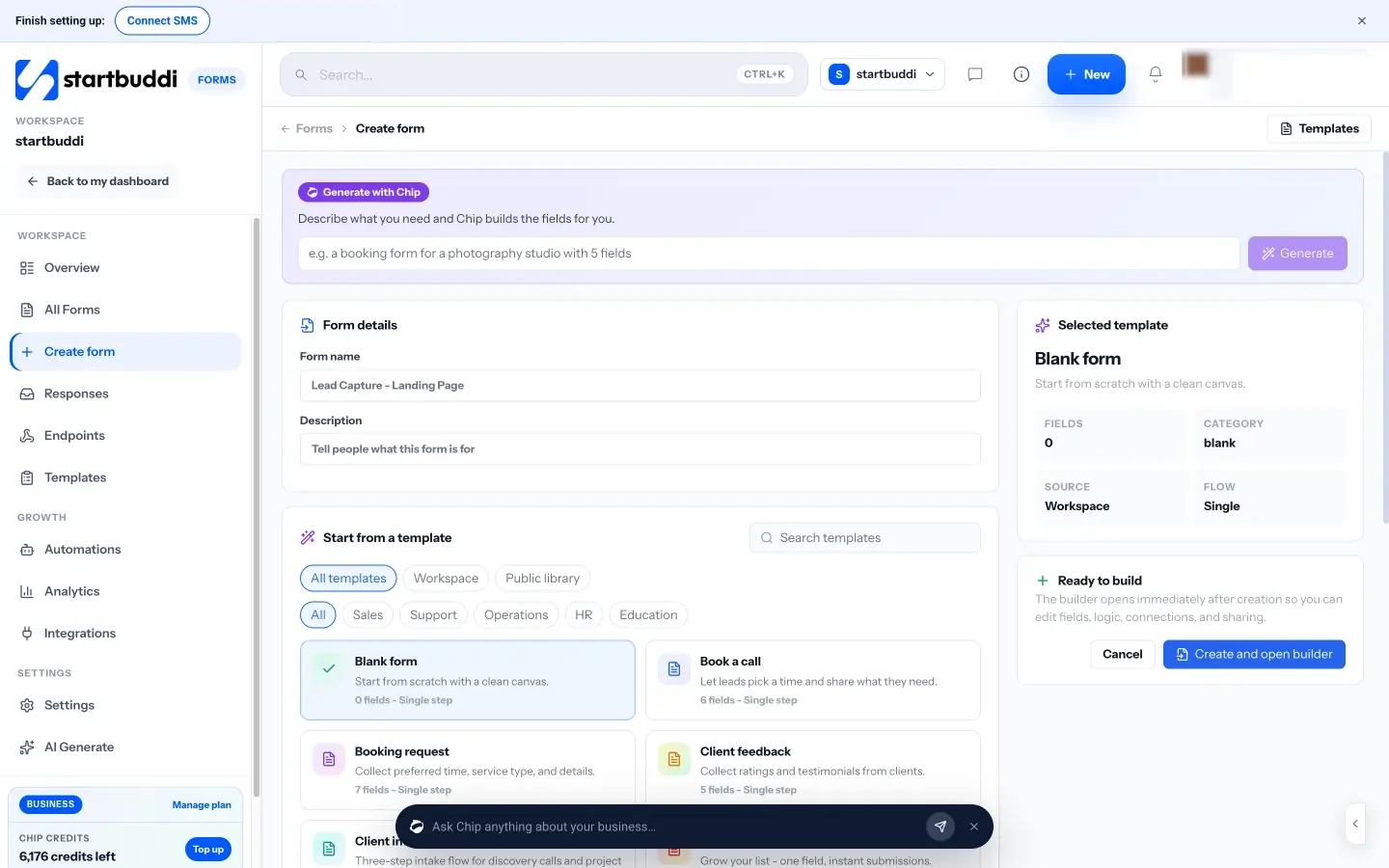
You can also describe the form you need and let Chip build the fields as a draft you edit. The Logic tab shows, hides or skips questions based on earlier answers, and you can describe a rule in plain words for Chip to build. Multi-step mode shows one question per screen. Every response can create or update a contact, take a payment through Paystack or Stripe, and start an automation.
The Free plan includes one form, Starter includes 20, and Growth and Scale are unlimited. Submissions aren’t limited. See our guide to building a lead capture form that converts, try the client intake form template, or compare startbuddi and Jotform.
Your next step: write down the questions you ask every new customer, then turn them into your first form in startbuddi Forms.
Related terms
FAQ
Do I need coding skills to use a drag-and-drop form builder?
No. That is the point of a visual builder. You choose fields, set labels and publish, and the tool writes the code.
Is click-to-add different from drag-and-drop?
Only in how you place fields. With click-to-add you click a field type and it is added to the form. Both are visual, no-code ways to build.
Can I embed a form builder form on my own website?
Usually, yes. Most builders give you a link, an embed code and often a popup option. In startbuddi you get all three plus a QR code.
Tiwalade Joanna Okedara-Kalu is the founder, CEO and CTO of startbuddi, the business system that brings clients, bookings, invoices, projects, marketing and the Chip AI assistant into one place. Tiwalade builds software around how service businesses really work day to day, and writes about client management, getting paid on time and why small businesses outgrow the tools they start with.
Founded startbuddi and leads its product and engineering