Hair salon appointment software: a buyer’s checklist
A buyer's checklist for hair salon appointment software: the questions to ask, how to test the calendar and booking flow, and a two-week trial plan.



- Judge hair salon appointment software on the front-desk calendar, the client booking flow, team rules, payments, data export and total cost. Score each option on the checklist, run a two-week trial in parallel with your diary, and let your stylists vote.
Hair salon appointment software should do three jobs well: keep one accurate diary for every stylist, let clients book and pay without calling you, and give you the numbers to run the week. When you compare options, test the front-desk calendar, the client booking flow, team rules, payments, data export and the true monthly cost. The checklist below turns that into questions you can ask any vendor and tests you can run in a free trial.
This is written for salon owners and managers with a chair or two, or a team of up to ten. If you are a solo stylist who mainly needs a booking link, start with our shorter guide to choosing a salon booking app, then come back here when you hire.
Appointment software vs a booking app: why the difference matters
A booking app is the part your clients see: a page where they pick a service and a time. Appointment software is the whole system behind it: the calendar your front desk lives in, staff hours, walk-ins, rebooking, reminders, notes and reports. In a busy hair salon the back end matters more, because that is where double bookings, missed reminders and lost colour notes happen.
The market is big and varied. In the US alone there were about 670,800 barber, hairstylist and cosmetologist jobs in 2025, and around 48% of hairdressers, hairstylists and cosmetologists were self-employed, according to the US Bureau of Labor Statistics. That is why salon appointment scheduling software ranges from free apps for one stylist to full suites for multi-site chains. Knowing which end you are on saves hours of demos.
The buyer’s checklist for hair salon appointment software
Print this, or copy it into a note, and score each option from 0 to 2 on every line. Anything that scores 0 on a must-have is out, however nice the rest looks.
| Area | Question to ask | How to test it |
|---|---|---|
| Services | Can every service have its own duration, price and buffer? | Set up your five longest services exactly as you charge them. |
| Calendar | Is there a day and week view by stylist? | Load a fake Saturday with 20 bookings and see if it is readable. |
| Walk-ins | How fast can the front desk add a booking? | Time yourself adding one on a phone and on a laptop. |
| Staff | Can each stylist set their own hours and days off? | Give one stylist a split shift and check the booking page. |
| Client choice | Can clients pick a stylist or “anyone available”? | Book both ways as a client. |
| Payments | Deposits, full prepayment, which providers, which currencies? | Take a small real deposit and refund it. |
| Reminders | Which channels, and when do they send? | Book yourself for tomorrow and wait. |
| Client records | Can you store notes, formulas and booking answers? | Add a colour formula and find it again in under 10 seconds. |
| Reports | No-shows, busiest hours, repeat clients, staff bookings? | Open the reports after your test week. |
| Data | Can you export clients and bookings to CSV at any time? | Export on day one, before you rely on it. |
| Cost | What is the total with your team size and card volume? | Ask for a written quote. |
The sections below explain the lines that trip salons up most often.
Scheduling rules that match how you work
The best appointment scheduling software for salons respects the way your day actually runs. Check buffers after each service, a minimum notice period so nobody books 10 minutes before closing, how far ahead clients can book, and date-specific hours for holidays. If your colour services have a waiting period in the middle, ask whether the software can book another client into that gap. Some tools can; many cannot.
Chairs, rooms and equipment
If two stylists share a basin or you have one treatment room, you need “resource” scheduling so two bookings cannot claim the same space. Some suites include it: Vagaro lists calendar and resource management among its features on its pricing page, and Square’s Premium tier of Square Appointments lists resource management too. If you have no shared resources, skip this line and save money.
The front desk view
Whoever answers the phone needs a calendar they can read at a glance, filters by stylist, and one-click actions for “arrived”, “no-show” and “rebook”. Ask to see the front desk view on a Saturday-sized day, not an empty demo diary.
Salon appointment booking software for teams
A second stylist changes what you need. Three things become important.
- Fair distribution. When a new client picks “anyone available”, who gets the booking? Round robin shares new clients evenly, which avoids the senior stylist getting everything by default.
- Personal booking links. Established stylists often bring their own clients. A personal page per stylist lets them share their own link while the salon keeps the record.
- Permissions. A junior stylist may need to see their own diary but not the salon’s revenue. Check what each role can see and change.
Also check how the price scales. Booksy, for example, lists $29.99 a month plus $20 a month for each extra team member on its US pricing page. Per-seat pricing is common and fair, but work out the cost for the team you expect in a year, not the team you have today.
Beauty salon appointment software: extra questions
If you offer lashes, brows, tints, waxing or skin treatments, beauty salon appointment software needs a few extras on top of the hair checklist.
- Intake and consent questions before a first treatment, saved to the client’s record.
- Patch-test tracking. Many products tell you to test first, and the NHS advises testing hair dye at least 48 hours before use. Your software should make it easy to book a patch test and see when the last one was done.
- Courses and packages, if you sell a set of treatments up front. Not every tool supports these, so ask.
Questions to ask before you sign
Demos show the best side of a product. These questions show the rest.
- Can I export all my clients, bookings and notes to CSV whenever I want? Your client list is the most valuable thing in the business. If you cannot take it with you, you are locked in.
- Am I tied to your payment processor? Some suites only take card payments through their own processor. That can be fine, but check the rate before you sign up. GlossGenius publishes its card rate on its pricing page, and Square publishes its rates on its fees page.
- Is there a contract, and how do I cancel? Monthly is safest in year one.
- What does support look like, and in which time zone? A problem on a Saturday morning needs an answer on a Saturday morning.
- How do you look after client data? You are responsible for the personal information you hold. The US Federal Trade Commission’s guide for businesses sums it up as know what you hold, keep only what you need, protect it and dispose of it properly. In the UK the ICO has guidance for small businesses, and in Nigeria the Nigeria Data Protection Commission oversees the Data Protection Act 2023. Check the rules where you are. This is general information, not legal advice.
How to run a two-week trial properly
Most salon appointment software offers a free trial. Two weeks is enough if you use it on purpose.
- Days 1 to 2: set up services, staff, hours and your booking questions. Export an empty client list to prove you can.
- Days 3 to 5: run the software in parallel with your current diary. Enter every real booking in both.
- Days 6 to 10: send the new booking link to five loyal clients and ask for honest feedback on how easy it was.
- Days 11 to 14: check reminders went out, open the reports, and ask each stylist one question: “Would you rather keep this or go back?”
If the answer is a shrug, keep looking. Software your team avoids is worse than a good paper diary.
Common mistakes when choosing salon software
- Paying for features you will not use. Inventory, payroll and loyalty points are useful for some salons and dead weight for others.
- Ignoring the client side. Owners test the admin screens and forget to book as a client on a slow phone connection.
- Forgetting reminders and no-shows. Our guide on how to reduce no-shows shows why reminders and a clear policy matter as much as the calendar.
- Not writing the policy down. Decide your deposit and cancellation rules before you switch them on. The free booking policy writer gives you a first draft.
A worked example: scoring three options
Here is how the checklist plays out for an imaginary four-chair salon in Manchester that does a lot of colour and braids. It shortlists three tools: A, an all-in-one salon suite; B, a general appointment app; and C, a free booking app.
- Must-haves: per-service durations, deposits, a calendar by stylist, reminders and CSV export. All three pass except C, which cannot take deposits on its free plan. C is out.
- Nice-to-haves: processing-time gaps and a card reader. A has both. B has neither, so the salon would need a separate card reader and would lose the colour gap.
- Cost for four stylists: A costs more each month and requires its own card processor. B is cheaper but needs a separate card reader.
- Stylist vote: three of four preferred A’s calendar on the salon tablet.
The salon picks A. A barber shop with no colour, fast cuts and lots of walk-ins might score the same three tools differently and pick B. That is the point of a checklist: the right answer depends on your services and your team, not on anyone’s “top 10” list. If you want a starting shortlist, our researched list of booking software for service businesses is a fair place to begin.
How startbuddi helps
Unlike salon-only suites, startbuddi is a general business system, not software built only for salons. Its Bookings module covers the scheduling, team and client parts of the checklist, and it connects to the rest of the business: clients, invoices, payments and marketing.
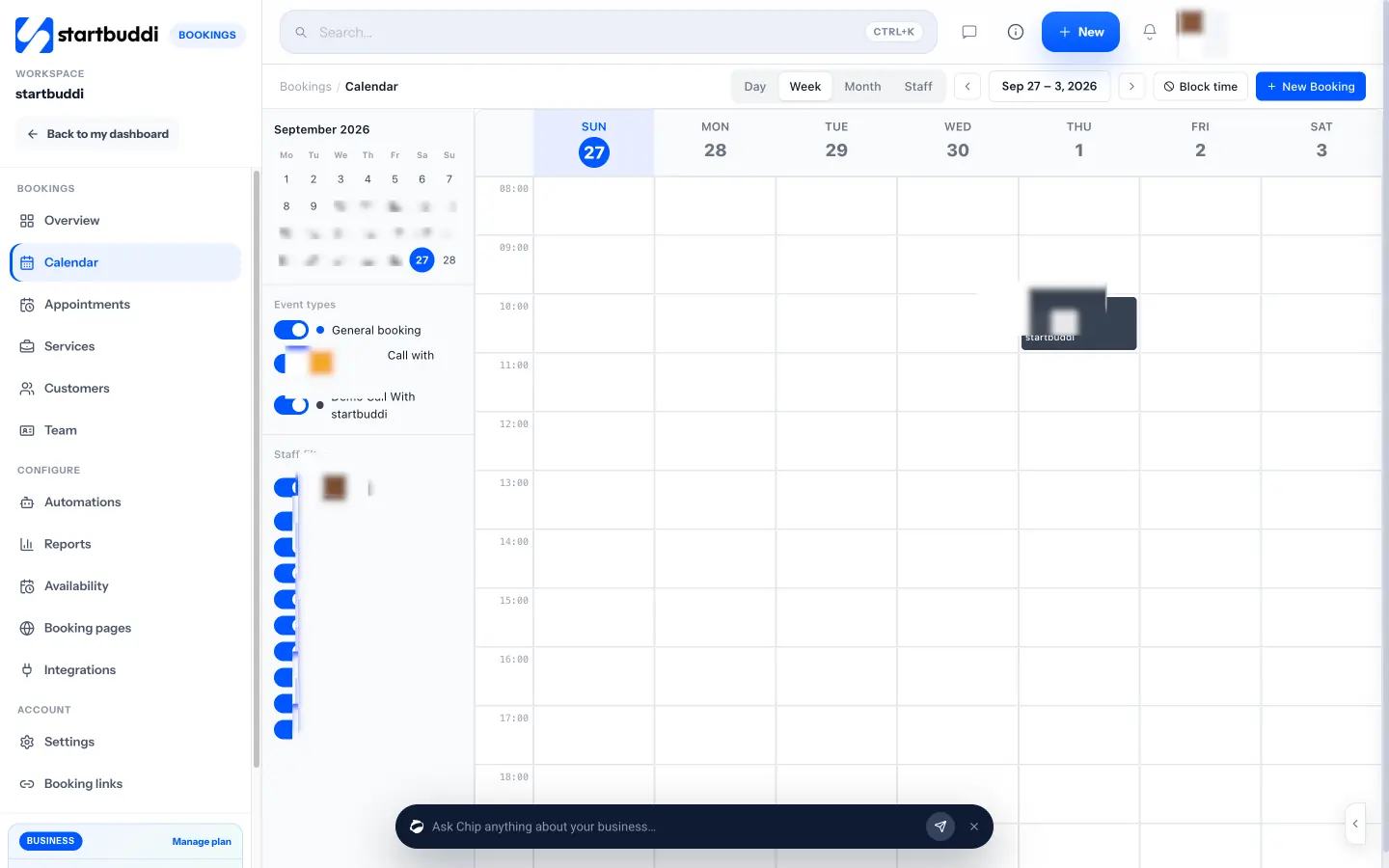
A calendar for the whole team. The Calendar has Day, Week, Month and Staff views, filters by service and stylist, a Block time button for lunch or training, and New Booking for walk-ins and phone bookings. Statuses cover pending, awaiting payment, confirmed, completed, no-show and cancelled.
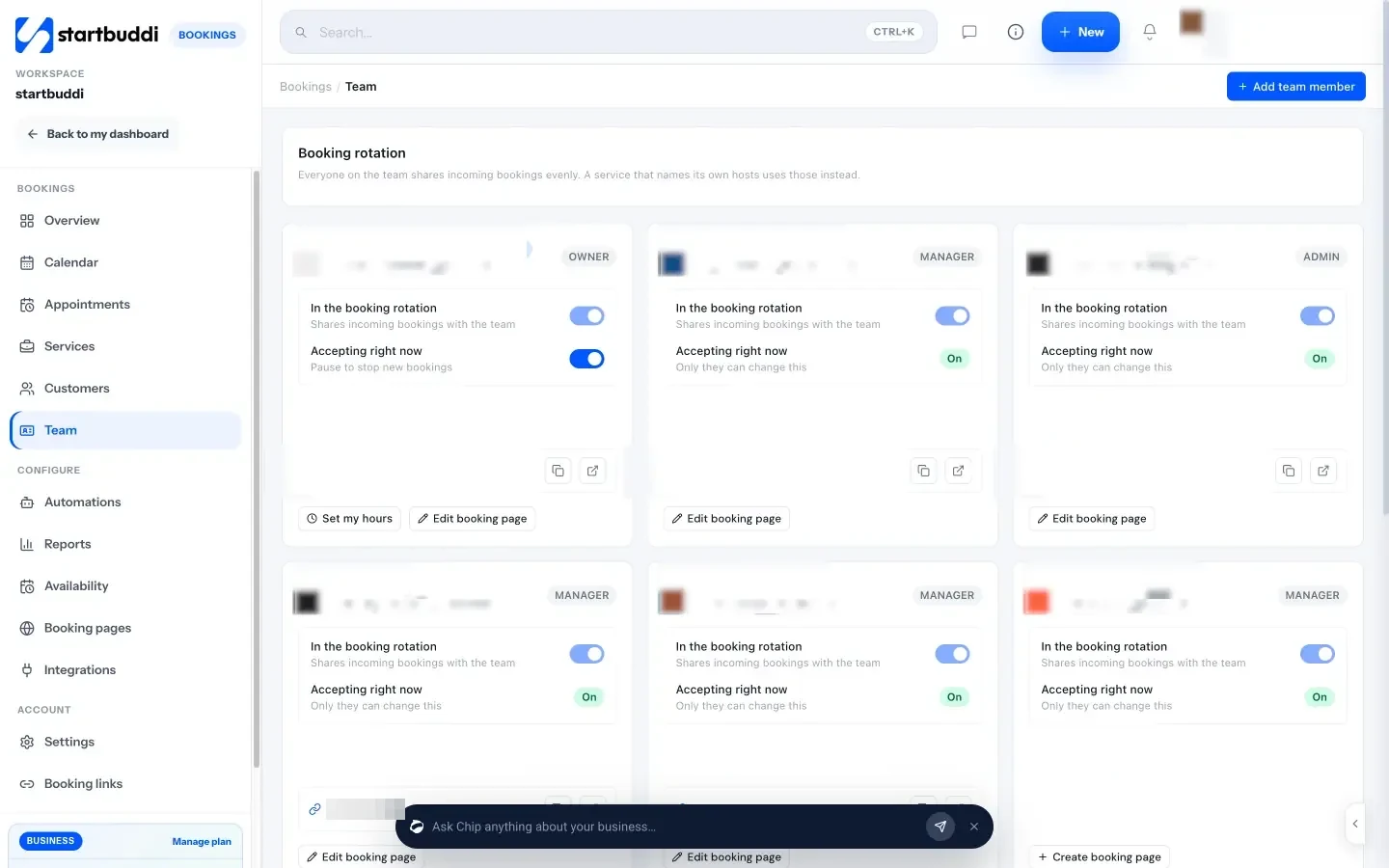
Fair sharing across stylists. On the Team tab each member sets their own hours and can be in the booking rotation, which shares incoming bookings round robin. Each stylist can also have a personal booking page with their own photo and welcome message.
Payments and records. Services can require a deposit or full payment through Paystack or Stripe, and a booking can generate an invoice in Money Manager. Every booking creates or updates the client’s contact record, and you can export your booking customers to CSV.
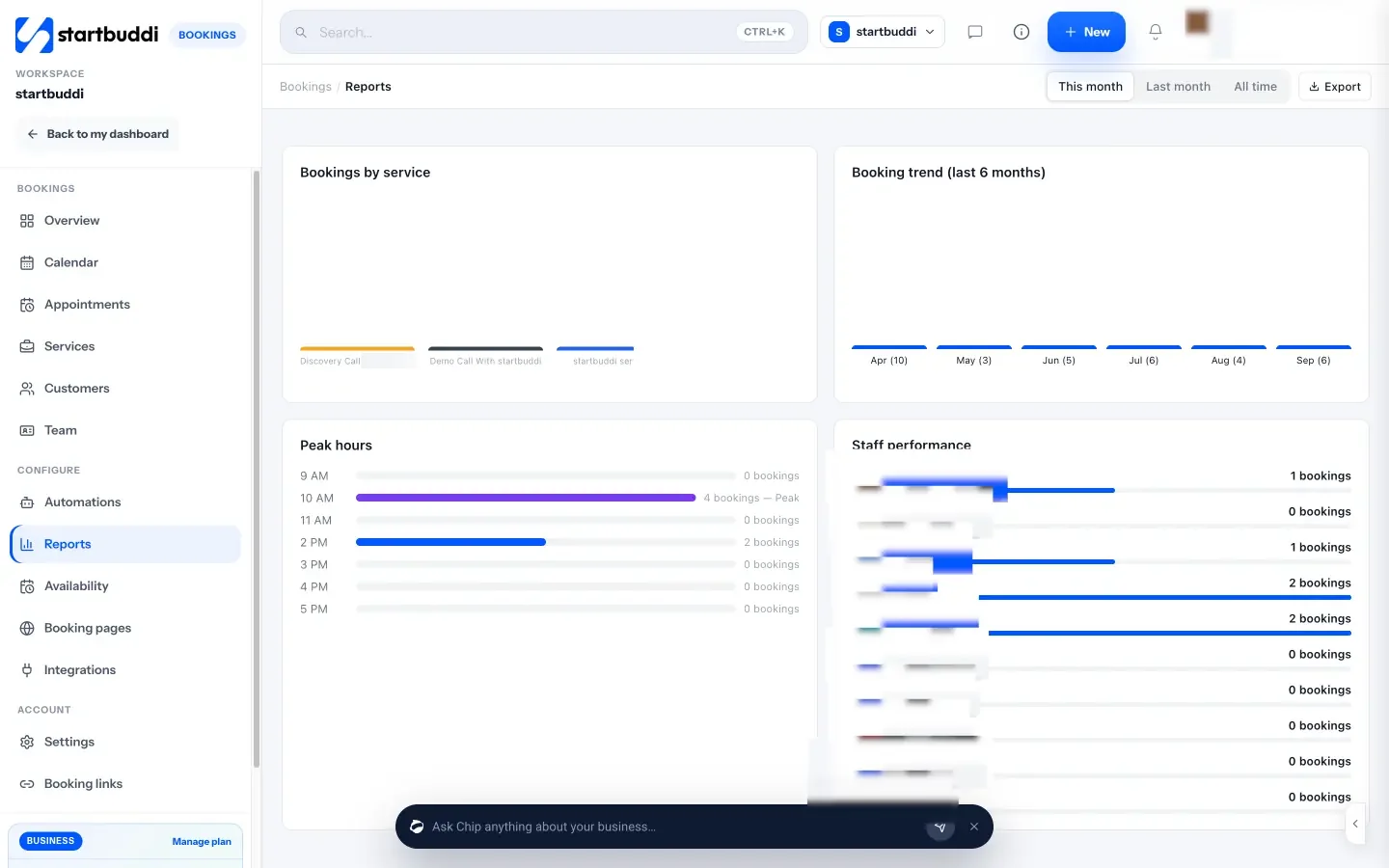
Reports. Total bookings, cancellation rate, repeat customers, bookings by service, a six-month trend, peak hours and staff performance, with a CSV export.
What it does not do. There is no resource scheduling for chairs or rooms, no processing-time gaps, no card reader or point of sale, no payroll or commission tracking, and no public marketplace. Calendar sync is one-way: bookings go to Google Calendar, but your Google events do not block slots. There is no native mobile app, and on a phone the Bookings module shows the overview and booking links only, so the full front desk runs best on a laptop or tablet browser.
Plans. Free covers one live service and one seat. Starter gives 10 live services and two seats; Growth gives 25 services and 5 seats; Scale gives unlimited services and 15 seats (see pricing). Every paid plan has a 30-day trial, which fits the two-week test above. See pricing for details.
Your next step
Copy the checklist table, pick three options, and run the same two-week trial on each. Score them honestly and ask your stylists to vote. If you want the full picture of running the salon, from bookings to client records to payments, read our guide on how to run a salon business.
Sources
- US Bureau of Labor Statistics: barbers, hairstylists and cosmetologists
- Vagaro pricing
- Square Appointments pricing
- Square: what are Square’s fees
- Booksy pricing (US)
- GlossGenius pricing
- NHS: hair dye reactions
- FTC: Protecting personal information, a guide for business
- ICO: advice for small organisations
- Nigeria Data Protection Commission
Frequently asked questions
What is the difference between salon appointment software and a booking app?
A booking app is the page clients use to book. Appointment software is the whole system behind it: staff calendars, walk-ins, reminders, client notes and reports. Most products include both, but they vary a lot in depth.
How much does salon appointment scheduling software cost?
Anything from free for a solo stylist to well over $100 a month for a large team. Add per-seat charges, text message costs and card processing to the headline price to get the real figure.
Do I need resource scheduling for my salon?
Only if two services can compete for the same chair, basin or room at the same time. If each stylist has their own station, you can skip it.
Can I move my client list to new salon software?
Usually, yes, if your current tool lets you export clients to CSV. Check this before you sign up for anything new, and export a test file on day one.
Tiwalade Joanna Okedara-Kalu is the founder, CEO and CTO of startbuddi, the business system that brings clients, bookings, invoices, projects, marketing and the Chip AI assistant into one place. Tiwalade builds software around how service businesses really work day to day, and writes about client management, getting paid on time and why small businesses outgrow the tools they start with.
Founded startbuddi and leads its product and engineering