Time Tracking: Definition, Examples and How It Works

Time tracking is recording how much time is spent on work, and on which tasks, projects or clients, using a timer, manual entries or clock-in times. Businesses use it to bill clients, price future work, pay staff correctly and see where the week goes.
So what is time tracking in practice? It’s the habit; the timesheet is the record it produces.
Key takeaways
- Time tracking is the method. A timesheet is the weekly or daily result.
- There are four ways to track time: a timer, manual entry, clock-in and clock-out, and automatic activity tracking.
- Track against a task or client, and mark what’s billable, or the numbers can’t be used.
- Explain why you track. Teams keep accurate records when the goal is better pricing and fair workloads, not surveillance.
Why time tracking matters for a small business
For a service business, time is what you sell. Without tracking, you’re guessing on three decisions that decide profit.
- Billing. Hourly and retainer clients are billed from tracked time. Untracked billable hours are income you never invoice.
- Pricing. Comparing tracked hours with the quote shows which jobs make money. A website quoted at 40 hours that took 65 is a pricing lesson.
- Staff and compliance. Hourly pay, overtime and working-time limits all depend on records. In the EU, the Court of Justice ruled in 2019 (case C-55/18) that member states must require employers to set up a system to measure each worker’s daily working time (CJEU press release, checked on 1 October 2026). Other countries set their own rules.
How time tracking works: four methods
| Method | How it works | Best for | Watch out for |
|---|---|---|---|
| Timer | Press start on a task, stop when you finish | Desk work, client projects | Forgetting to stop it |
| Manual entry | Type in the hours, date and task afterwards | Site visits, calls, work away from a screen | Memory gets worse by Friday |
| Clock-in and clock-out | Record start and finish of the working day | Hourly staff, shifts, attendance | Shows presence, not what was done |
| Automatic activity tracking | Software records apps, websites or activity | Rarely needed by small teams | Privacy law and trust; get advice first |
Most small businesses combine a timer with manual entry for project work, and clock-in only where pay depends on hours. Monitoring software is a different thing from time tracking: in the UK, the Information Commissioner’s Office publishes guidance on monitoring workers under data protection law, and similar rules apply elsewhere, including under Nigeria’s data protection law.
What to record for each entry
- the person;
- the date and the length of time;
- the client, project or task;
- whether it’s billable;
- a short note (“Call with client about checkout bug”).
What is time tracking compared with timesheets and attendance?
- Time tracking is the ongoing act of recording time as you work.
- A timesheet is the summary for a period, usually checked and approved.
- Attendance records whether someone was working, remote, absent or on leave. Being present for eight hours isn’t the same as eight hours of client work.
Our guide on how to track employee hours fairly covers attendance, breaks and rounding for staff.
An example with numbers
These figures are an illustration.
A three-person IT services company in Lagos tracks time for one month. Each person works about 160 hours.
| Person | Hours tracked | Billable hours | Utilisation (billable ÷ tracked) |
|---|---|---|---|
| Ifeoma | 160 | 120 | 75% |
| Bayo | 158 | 96 | 61% |
| Owner | 165 | 66 | 40% |
| Team | 483 | 282 | 58% |
Arithmetic check: 120 + 96 + 66 = 282, and 282 ÷ 483 = 58%. At an illustrative rate of ₦20,000 an hour, the 282 billable hours are worth ₦5,640,000. Before tracking, the owner had been invoicing from memory and estimated about 240 billable hours, so tracking found 42 hours (₦840,000) that would otherwise have gone unbilled. It also shows the owner spends most of their time on admin and sales, which is useful to know before hiring.
Common time tracking mistakes
- Tracking without a task. “6 hours” with no client can’t be billed or used for pricing.
- Rounding up by habit. Agree a rule, such as nearest 15 minutes, and apply it both ways.
- Using it to police people. Accuracy drops as soon as the team thinks the numbers will be used against them.
- Never looking at the data. Review billable hours and utilisation every month and adjust prices.
Related terms
- Timesheet: the record of hours for a period, produced by time tracking.
- Billable hours: the tracked hours you can charge to a client.
- Timesheet software: tools that combine timers, entries and timesheets.
How startbuddi handles time tracking
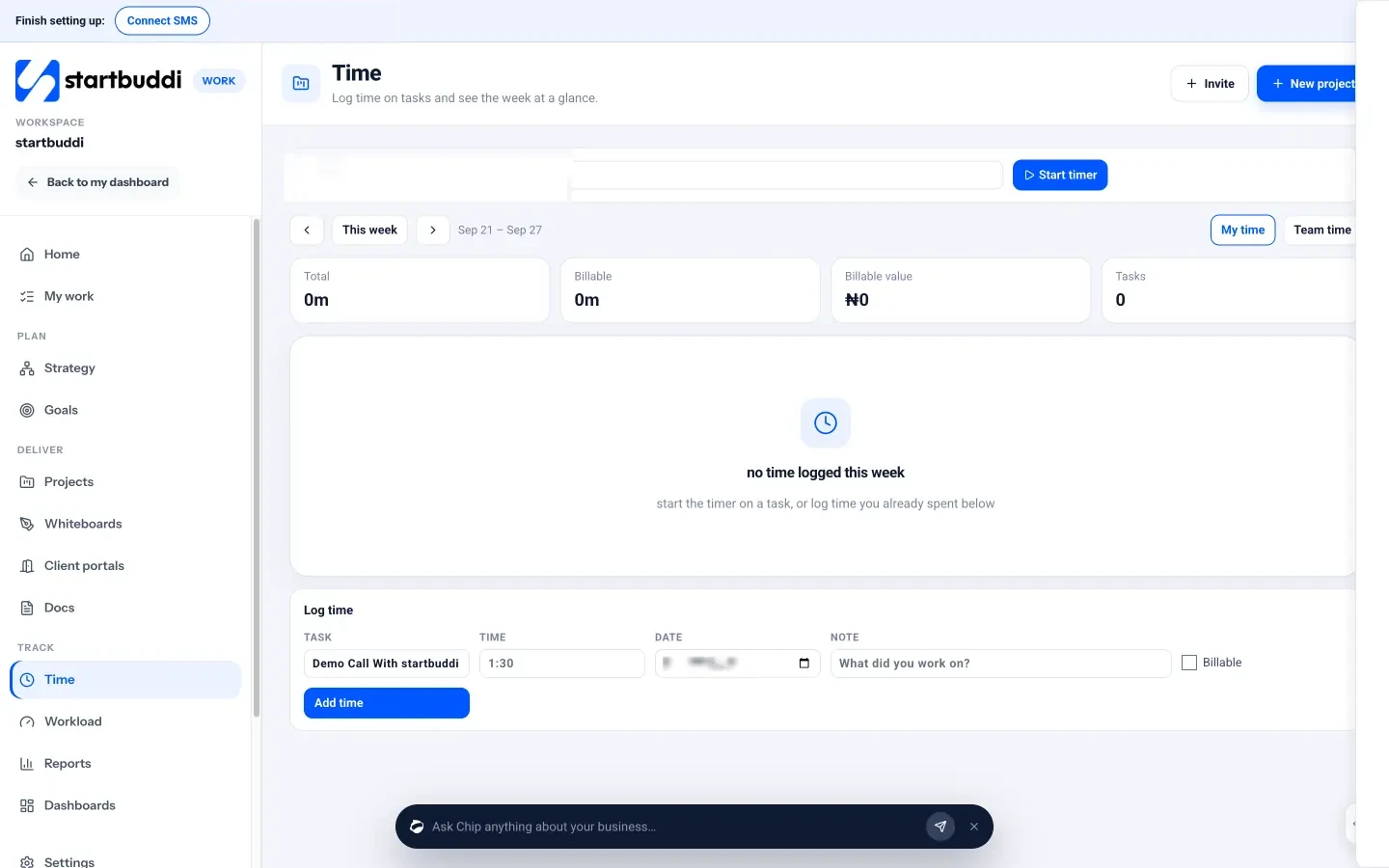
Time tracking in startbuddi sits in Work, right next to your tasks and projects. On the Time page, choose a task and press Start timer, then Stop when you’re done, or use Log time to add hours, a date, a note and a Billable tick for work done away from your desk. The week view shows total hours, billable hours and billable value where rates are set. Managers, admins and owners can open Team time to see everyone’s week, and each project’s Budget tab compares time logged with the plan. For staff who clock in, People has an optional Time and Attendance area.
Freelancers billing by the hour can follow our routine for tracking billable hours without a spreadsheet. Consultants can see how it fits their work on time tracking for consultants, and you can read more about time tracking in startbuddi.
Know where the hours go
Start a timer on a task, mark what’s billable and see your week in one place. Start free with startbuddi, or see what each plan includes on our pricing page.
Time Tracking is part of Work in startbuddi.
See WorkRelated terms
FAQ
What is time tracking in simple words?
Time tracking means recording how long you spend on work and what you spent it on. You can use a timer, type in hours afterwards or clock in and out. The result is a timesheet you can use for billing, pricing or pay.
What is the difference between time tracking and a timesheet?
Time tracking is the ongoing act of recording time as you work. A timesheet is the summary of that time for a day, week or pay period, usually checked by a manager. Good tracking makes the timesheet accurate.
Is time tracking the same as employee monitoring?
No. Time tracking records hours against tasks, usually entered or started by the person. Monitoring software watches activity such as apps and websites, and it's covered by stricter privacy rules in many countries. Most small businesses only need time tracking.
Should freelancers track time on fixed-price projects?
Yes. Even when the client doesn't pay by the hour, tracking shows whether the fixed price covered your time. Compare the hours with the quote after each project and adjust your next price.
How often should I review tracked time?
Check your own entries daily and review the team's week every Friday, while people still remember what they worked on. Look at billable hours and utilisation monthly to spot pricing and workload problems.
Tiwalade Joanna Okedara-Kalu is the founder, CEO and CTO of startbuddi, the business system that brings clients, bookings, invoices, projects, marketing and the Chip AI assistant into one place. Tiwalade builds software around how service businesses really work day to day, and writes about client management, getting paid on time and why small businesses outgrow the tools they start with.
Founded startbuddi and leads its product and engineering