Timesheet: Definition, Examples and How It Works

A timesheet is a record of the hours a person worked over a period, usually a day or a week, broken down by date and often by task, project or client. It's used to pay staff correctly, bill clients for time and keep the working-time records many employment laws require.
So what is timesheet data actually for? Two things that both affect money: making sure people are paid for the hours they worked, and making sure clients are charged for the hours you spent on them.
Key takeaways
- A timesheet shows who worked, which days, how many hours, and on what.
- Payroll timesheets record working time for pay; project timesheets record time per client or task for billing.
- A timesheet is usually checked and approved by a manager before it’s used for pay or invoices.
- Employers in many countries must keep working-time records for at least two years.
Why timesheets matter for a small business
For an agency or IT support firm, hours are the product. Unrecorded hours can’t be billed, priced or paid fairly.
- Accurate pay. Hourly staff, overtime and part-timers are paid from timesheets.
- Accurate invoices. Clients billed by the hour expect to see where the time went. A timesheet is your evidence.
- Better quotes. Comparing timesheets with what you quoted shows which jobs you underprice.
- Legal records. In the UK, Acas says employers must keep records showing they comply with working-time limits, for 2 years from the date they were made (Acas, working time rules). In the US, the Department of Labor says time cards should be kept for 2 years and payroll records for at least 3 (US DOL, Fact Sheet 21). Both checked on 1 October 2026; rules differ by country, and this isn’t legal advice.
How a timesheet works
A typical timesheet is a grid: days across the top, tasks or projects down the side, hours in each cell and totals at the end.
| Field | What it records |
|---|---|
| Name and period | Who the timesheet belongs to, and the week or day it covers |
| Date | Each working day |
| Start, end and breaks | For payroll timesheets, when work started and stopped |
| Task, project or client | For project timesheets, what the time was spent on |
| Hours | Time per line, usually in hours and minutes or decimals |
| Billable or not | Whether the hours can be charged to a client |
| Notes | A short description of the work |
| Totals and sign-off | Daily and weekly totals, and the approver’s name and date |
The usual cycle is: the person fills it in during the week, submits it at the end, a manager checks and approves it, and the approved hours flow into payroll or client invoices.
Types of timesheet
- Daily, weekly or fortnightly, matching your pay or billing cycle.
- Payroll timesheets focus on start, finish, breaks and overtime.
- Project timesheets focus on hours per client and task.
- Paper, spreadsheet or app. A printed sheet or a spreadsheet works for one or two people; timesheet software adds timers, totals and team views as you grow.
An example with numbers
These figures are an illustration.
Wanjiru is an IT support technician at a four-person firm in Nairobi. Her weekly project timesheet:
| Client or task | Mon | Tue | Wed | Thu | Fri | Total | Billable |
|---|---|---|---|---|---|---|---|
| Law firm network fix | 3.0 | 2.5 | 0 | 0 | 0 | 5.5 | Yes |
| Clinic laptop set-up | 2.0 | 3.0 | 4.0 | 0 | 0 | 9.0 | Yes |
| School monthly support | 0 | 0 | 2.0 | 4.5 | 3.0 | 9.5 | Yes |
| Internal admin and training | 2.5 | 2.0 | 1.5 | 3.0 | 4.5 | 13.5 | No |
| Total | 7.5 | 7.5 | 7.5 | 7.5 | 7.5 | 37.5 |
Billable hours: 5.5 + 9.0 + 9.5 = 24 of 37.5, or 64%. At an illustrative rate of KES 3,000 an hour, that’s KES 72,000 of billable hours to invoice this week. The 13.5 hours of admin tell the owner that Friday afternoons need a look.
What is timesheet approval, and who signs it off?
Approval is the check before hours turn into pay or invoices. A manager confirms the hours match the work, fixes obvious errors with the person, and signs off. Keep approvals within a day or two of the period ending, while people still remember the week. Our guide on how to track employee hours fairly covers rounding, corrections and breaks.
Common mistakes with timesheets
- Filling them in from memory on Friday. Hours go missing, especially short calls and emails.
- No task or client. A bare “8 hours” can’t be billed or used to price the next job.
- Mixing leave with work. Record paid time off separately so totals stay honest.
Related terms
- Timesheet software: tools that build timesheets from timers and logged hours.
- Billable hours: the hours on a timesheet you can charge a client for.
- Paid time off: leave that’s recorded separately from hours worked.
How startbuddi handles timesheets
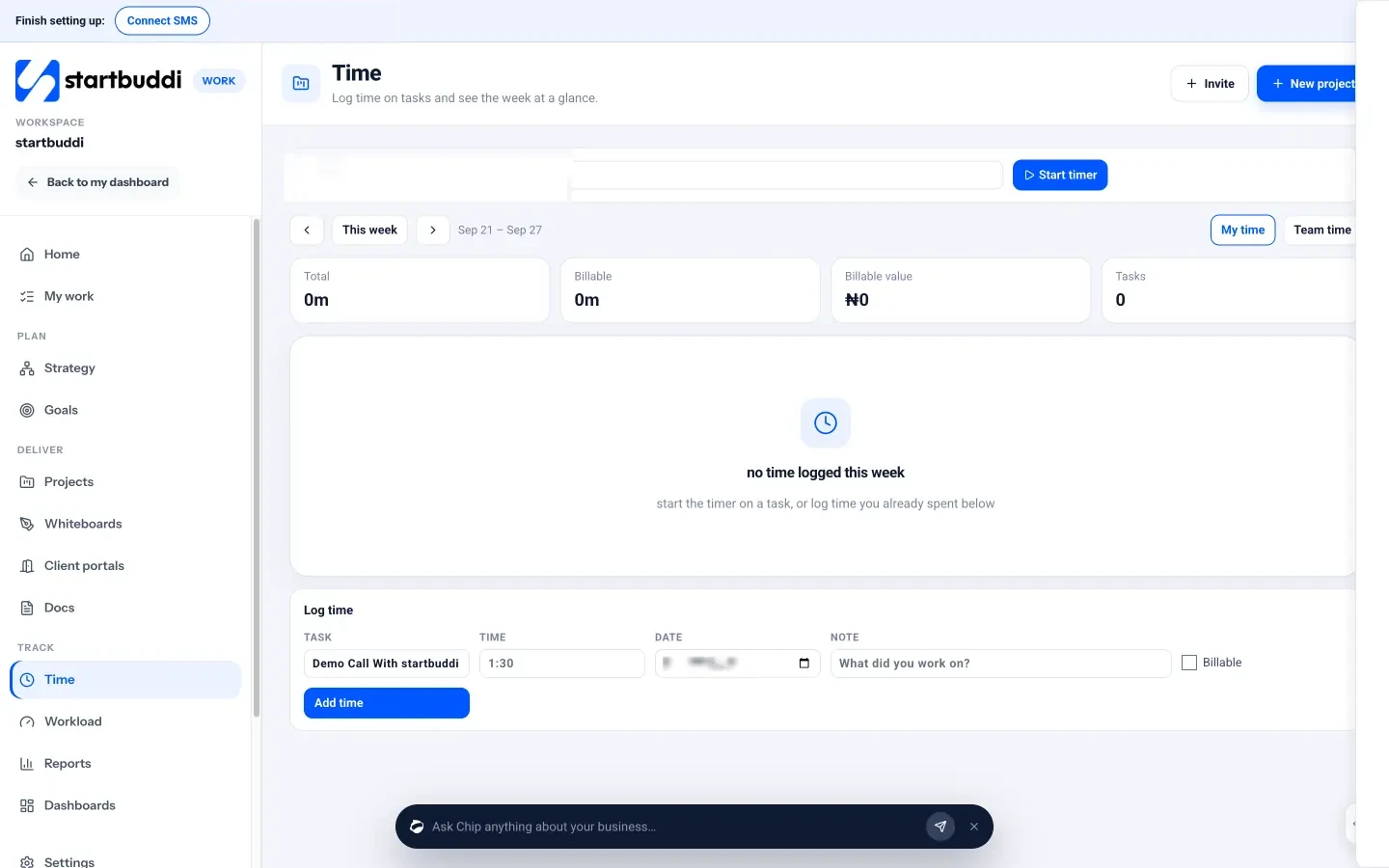
In startbuddi, time is logged in Work, next to the tasks it belongs to. On the Time page, pick a task and press Start timer, or use Log time to add hours, a date, a note and a Billable tick. The week view shows your total and billable hours, billable value where rates are set, and a grid of hours by task and day. Owners, admins and managers can switch to Team time to see everyone’s week. For clock-in and attendance, People’s Time and Attendance area shows each person’s hours for the week.
Prefer paper or a spreadsheet for now? Our free timesheet template is ready to copy. Comparing tools? See the best timesheet software, or read about time tracking in startbuddi.
Track hours where the work happens
Log time on tasks, mark what’s billable and see the week for you or your team. Start free with startbuddi, or see what each plan includes on our pricing page.
Timesheet is part of Work in startbuddi.
See WorkRelated terms
FAQ
What is a timesheet in simple words?
A timesheet is a record of how many hours someone worked and, usually, what they worked on, over a day or a week. Businesses use it to pay staff and to bill clients for time.
What should a timesheet include?
At minimum: the person's name, the period, each date, the hours worked and the total. Project timesheets add the client or task, whether the time is billable and a short note. An approver's sign-off makes it ready for payroll or invoicing.
Is a timesheet the same as a timecard?
Not quite. A timecard traditionally records clock-in and clock-out times for hourly pay, while a timesheet usually also records what the work was. Many businesses now use the two words for the same thing.
How long should a business keep timesheets?
It depends on the country. Acas says UK employers must keep working-time records for 2 years, and the US Department of Labor says time cards should be kept for 2 years and payroll records for at least 3. Check your own country's rules, and keep timesheets used for client billing as long as your financial records.
Who approves a timesheet?
Usually the person's line manager or the business owner. They check the hours against the work, agree any corrections with the person, and sign off before the hours are used for pay or invoices.
Tiwalade Joanna Okedara-Kalu is the founder, CEO and CTO of startbuddi, the business system that brings clients, bookings, invoices, projects, marketing and the Chip AI assistant into one place. Tiwalade builds software around how service businesses really work day to day, and writes about client management, getting paid on time and why small businesses outgrow the tools they start with.
Founded startbuddi and leads its product and engineering