What is an online event booking system?
Also called: Event registration software, event booking software, ticket booking system, online event registration, RSVP system

An online event booking system is software that lets people register for, or buy a place at, an event through a web page. It tracks capacity, takes payment where needed, sends confirmations and reminders, and gives the organiser an up-to-date guest list.
An online event booking system lets people sign up for, or buy a place at, your event through a web page instead of by message, phone or spreadsheet. It shows the event details, limits the number of places, takes payment if the event is paid, sends a confirmation straight away and reminds people before it starts. You get a live guest list without typing anything up.
It works for all kinds of events: workshops, classes, webinars, networking evenings, conferences, open days, launches and training sessions, in person or online.
Event booking vs appointment booking
The two are often confused. Appointment booking is one-to-one (or one-to-few): a client picks a free time in your calendar for a service, such as a haircut or consultation. Event booking is one-to-many: you set the date and time, and many people register for the same session until it is full.
Some businesses need both. A yoga teacher might take private sessions by appointment and run a monthly Saturday workshop as an event.
Why an online event booking system matters for a small business
- No more manual lists. Registrations, contact details and payments are captured in one place.
- No overbooking. Capacity is tracked automatically and registration closes when you are full.
- Payment upfront. Paid events collect money when people sign up, not on the door.
- Better attendance. Automatic confirmations and reminders cut forgotten sign-ups.
- A list for next time. Every attendee becomes a contact you can invite to future events, with their permission.
How an online event booking system works
- You create the event: title, description, date, time, time zone, location or joining link, capacity and price.
- You share a registration page on social media, by email, on WhatsApp or on your website.
- People register: they enter their details, answer any questions and pay if required.
- They get a confirmation with the details and a calendar invite.
- Reminders go out before the event, often the day before and shortly before it starts.
- After the event you mark who attended, send a thank-you or replay, and invite people to the next one.
An example
Hannah runs pottery classes in Bristol. She used to take bookings by Instagram message and keep a list in her notes app, which led to double-booked wheels and people who never paid. Now each Saturday workshop has its own registration page with 8 places and payment at sign-up. Confirmations and reminders go out on their own. On the day she checks the guest list on her phone, and afterwards everyone gets a thank-you with a link to the next date.
Types of events it handles
- In-person events: workshops, classes, meetups and open days, where you need a venue address, a capacity and often a check-in list.
- Online events: webinars, live demos and virtual workshops, where the joining link and time zone matter most.
- Recurring sessions: a weekly class or monthly clinic, where people book a specific date.
- Free or paid: free events need reminders to keep attendance up; paid events need payment and a clear refund policy.
Key features to look for
- A clear registration page that works well on phones, where most people will open it.
- Capacity limits, and ideally a waiting list for popular sessions.
- Online payment in your currency, with deposits or free places where needed. See payment links.
- Automatic confirmations and reminders by email, and by SMS or WhatsApp if your audience prefers them.
- Custom questions, such as dietary needs, experience level or company name.
- Time zones for online events with an international audience.
- Attendance tracking and follow-up after the event.
- Your contact list, so attendees don’t stay stuck inside a ticketing tool.
Best practices and common mistakes
- Ask for the minimum. Every extra form field loses some registrations.
- State the time zone. Especially for online events, write it next to the time.
- Remind people. Free events in particular see many sign-ups who don’t turn up without a reminder.
- Have a refund and cancellation policy for paid events, and show it before people pay.
- Follow up within a day. Thank attendees, share materials and tell them what is next while they still remember you.
Related terms
Appointment booking handles one-to-one sessions, and booking software is the wider category. A no-show is the problem reminders are meant to reduce, and a landing page builder helps you create the page that promotes your event.
Online events in startbuddi
To be clear, startbuddi is not a ticketing platform for in-person venues, with seating plans or door check-in. It covers online events and bookable sessions. Webinars in Publish set up online events for you: a registration page, a thank-you page and a replay page, confirmation and reminder emails (the day before, one hour before and 15 minutes before), a guest list with the number of seats, and attendance tracking. Everyone who registers becomes a contact. Webinars start on the Starter plan, and the session can run in startbuddi Live or on the joining link you paste in from Zoom, Google Meet or YouTube Live.
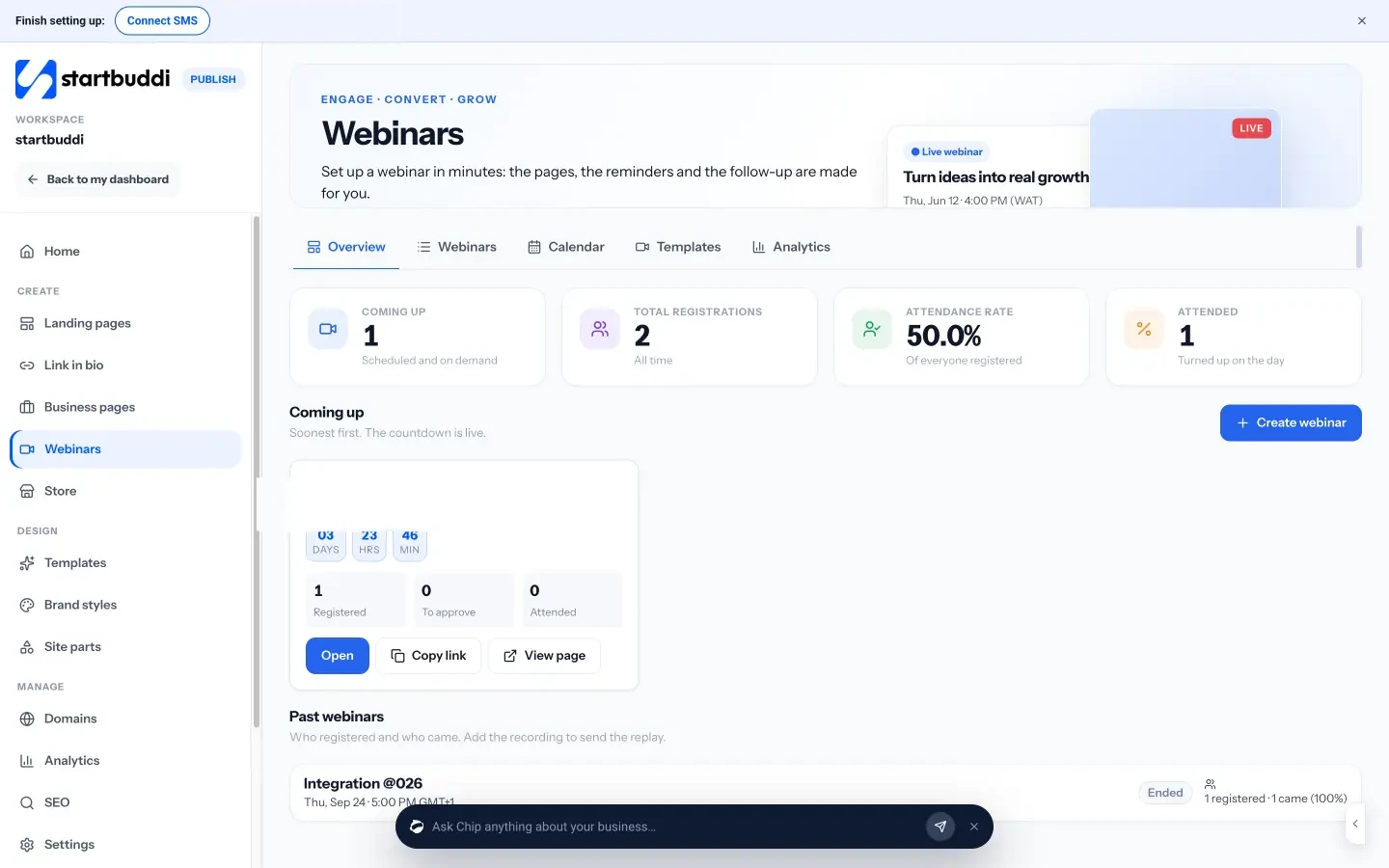
For one-to-one or small paid sessions, Bookings lets clients pick a time, pay a deposit and get reminders, and a landing page can promote any event with a sign-up form. Your next step: list the details for your next event (date, capacity, price and joining link), then build its registration page. See plans on the pricing page.
Related terms
FAQ
What is the difference between an event booking system and appointment scheduling?
Appointment scheduling lets one client book a free slot in your calendar. Event booking lets many people register for the same session that you have already scheduled, up to a capacity limit.
Can I use an online event booking system for free events?
Yes. Most systems handle free registrations as well as paid ones. Reminders matter even more for free events, where more people sign up and forget.
Do I need a website to use an event booking system?
No. The system gives you a registration page with its own link, which you can share on social media, WhatsApp or by email.
How do I reduce no-shows at events?
Send a confirmation with a calendar invite, remind people the day before and shortly before, and for paid events take payment at registration.
Omolola Akiyode is the operations and project manager at startbuddi, leading cross-functional projects and the content that helps founders get set up. Omolola writes about projects, websites and getting found online, and turns complex ideas into clear, practical steps.
Runs operations and projects at startbuddi