What is email open rate?
Also called: Open rate, email open percentage, unique open rate
Email open rate is the percentage of delivered emails that were opened, calculated as unique opens divided by emails delivered. It is a rough guide to how well your subject line and sender name worked.
Your email open rate is the percentage of people who opened an email out of everyone it was delivered to. If you send a newsletter to 1,000 people, 20 of those emails bounce, and 245 people open it, your open rate is 245 ÷ 980 = 25%. It is the first number most people look at after a campaign, because it hints at whether your subject line and sender name made people want to read.
It is a useful signal, but a less reliable one than it used to be, for reasons explained below. Treat it as a guide, and look at clicks and replies alongside it.
Why email open rate matters for a small business
- It tests your subject lines. If one subject line gets far more opens than another sent to similar people, you have learned something.
- It shows list health. A steady fall in opens often means your list is ageing or your emails are landing in spam.
- It helps with timing. Comparing opens by day and hour shows when your readers are most likely to look.
- It flags who has gone quiet. Contacts who have not opened anything in months may need a re-engagement email, or removing.
How to calculate email open rate
Open rate = emails opened ÷ emails delivered × 100
Use delivered emails, not sent, so bounces do not drag the number down. Most tools count unique opens, meaning each person counts once however many times they open it.
Worked example
David runs a bike repair shop in Dublin and emails 600 customers about a spring service offer. 12 emails bounce, so 588 are delivered. 147 people open it. His open rate is 147 ÷ 588 = 25%. Of those, 29 click through to book, a click rate of 29 ÷ 588, about 4.9%, and 18 book a service at €60 each (about $70), bringing in €1,080.
The open rate told him the subject line worked. The clicks and bookings told him the offer worked.
Why open rates are not the whole story
Opens are usually tracked with a tiny invisible image. When the image loads, the email counts as opened. That has limits:
- Some opens are not people. Privacy features and security scanners can load images automatically, which inflates opens.
- Some real opens are missed. If someone reads with images turned off, the open may not count.
- Benchmarks vary widely. Published averages differ by industry, provider and method. Mailchimp’s benchmarks are one example. Your own trend over time matters more than anyone else’s average.
For decisions that matter, lean on clicks, replies, bookings and sales. A click is almost always a real person.
How to improve your email open rate
- Use a sender name people recognise, such as your name or your business name, not “noreply”.
- Write specific subject lines. “Your spring bike check: 20% off until Friday” beats “March newsletter”.
- Use the preview text, the line shown after the subject, to add a second reason to open.
- Send to people who want your emails. A confirmed list, for example through double opt-in, opens more.
- Segment. A message sent to the right group beats one sent to everyone. See email segmentation.
- Clean your list. Remove addresses that bounce and people who have not opened anything for a long time.
- Test your send time rather than guessing.
Common mistakes
- Chasing opens with clickbait. A misleading subject line may get the open but loses trust and clicks.
- Comparing yourself to averages. A small, loyal list and a large, cold one will never look alike.
- Judging one email alone. Look at the trend across several sends.
- Ignoring the quiet ones. A slice of your list that never opens still affects delivery. Send them one friendly “do you still want these emails?” message, then stop mailing those who do not respond.
Related terms
Click rate is the share of delivered emails where someone clicked a link. Conversion rate is the share who went on to buy, book or sign up. Email marketing covers the whole practice. New to it? Our guide to email marketing for beginners starts from the basics.
Email open rate in startbuddi
Email Marketing shows your open rate, click rate, unsubscribe rate and bounce rate on the Overview, compared with the previous period, and the Campaigns list shows opens and clicks for every email you send.
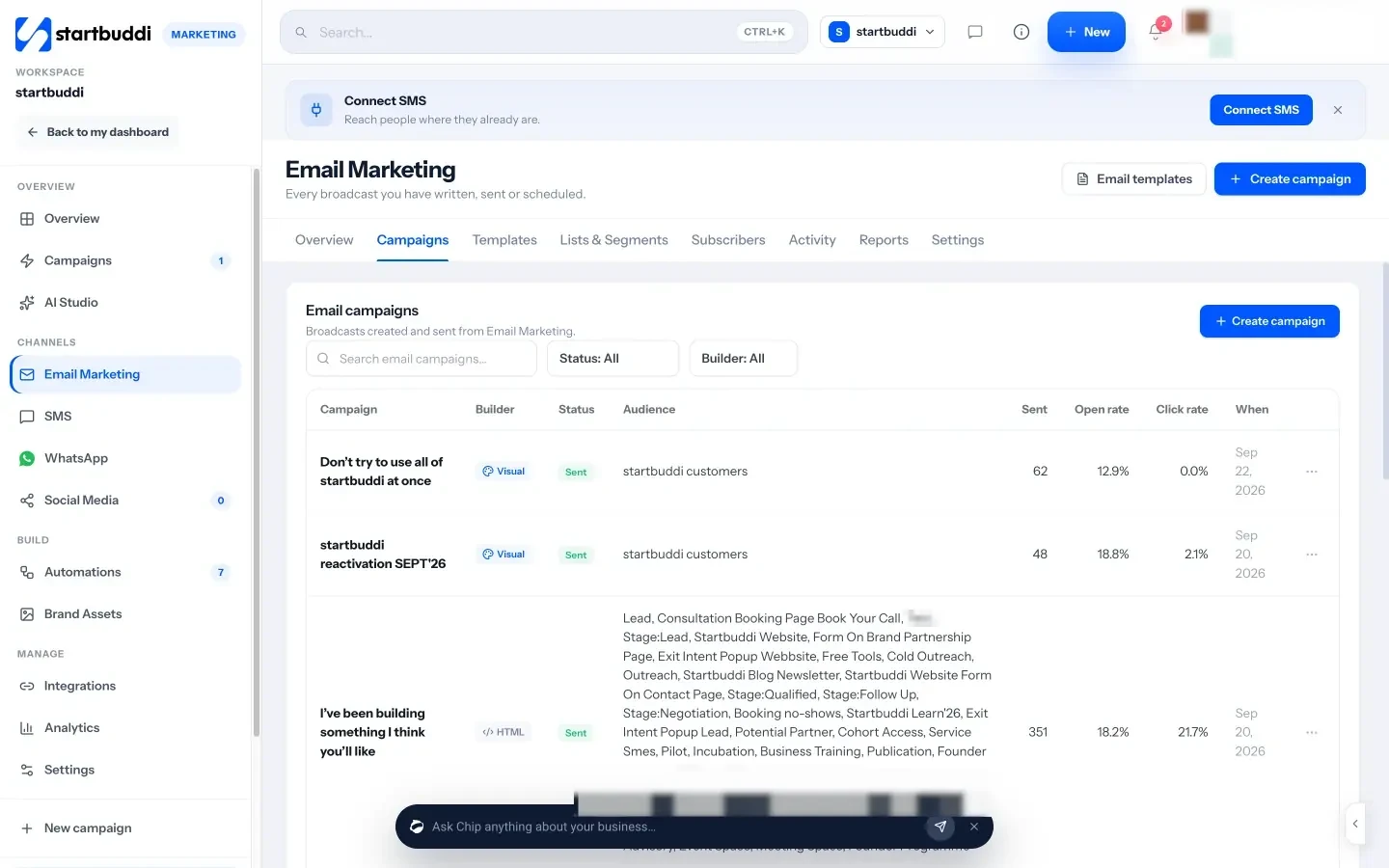
Each campaign’s report shows opens and clicks over time, a heatmap of when people read it, link clicks, devices and email clients, with an honest note that Apple Mail pre-loads images. For A/B tests you can pick the winner by click rate or open rate; startbuddi recommends clicks, because opens over-count. You can resend once to people who did not open, with a new subject line, and Smart send picks the hour your readers open most once there is enough data. Email marketing needs a paid plan, from Starter. Your next step: look at your last five campaigns and compare clicks, not just opens.
Related terms
FAQ
What is a good email open rate?
It depends on your industry, list and how opens are measured. Rather than chasing a benchmark, track your own open rate over time and compare it with your clicks.
How is open rate calculated?
Divide the number of unique opens by the number of emails delivered, then multiply by 100.
Why is my open rate suddenly higher?
Privacy features such as Apple Mail Privacy Protection load emails automatically, which can count as opens even when nobody read the email.
Is click rate better than open rate?
For judging results, usually yes. A click is almost always a real person taking action, while opens can be inflated or missed.
Olabimpe Salami is the email and outreach specialist at startbuddi. Olabimpe writes about the messages that bring customers in and back: email, WhatsApp and SMS campaigns, follow-ups, and turning enquiries into paying clients.
Runs email and outreach at startbuddi