What is CRM reporting?
Also called: CRM analytics, sales reporting, CRM dashboards, pipeline reporting, customer reporting

CRM reporting is using the data in your CRM, such as leads, deals, activities and payments, to produce reports and dashboards that show how sales and customer relationships are going and what to change.
CRM reporting is how you turn the everyday activity in your CRM (new leads, calls, deals, invoices and payments) into numbers and charts that show how your business is doing. Instead of guessing whether sales are up or which marketing works, you look at the report.
A good CRM report answers a business question in plain terms: Where do my best customers come from? How many enquiries turn into paid work? How long does that take? Who owes me money?
Why CRM reporting matters for a small business
When you are small, it is tempting to run on gut feel. But gut feel is shaped by the last loud week. A few simple reports give you a steadier view.
- Spend marketing money wisely. See which sources bring clients who actually pay, not just enquiries.
- Spot problems early. A falling win rate or a longer sales cycle shows up in the numbers before it hits your bank account.
- Plan ahead. Open deals and their likely close dates give you a rough view of next month’s work.
- Coach your team. Response times and conversion by person show where help is needed, without guesswork.
How CRM reporting works
Every time someone fills in a form, a deal moves stage, an email is sent or an invoice is paid, the CRM records it with a date. Reports group and count those records over a period: this month, the last 90 days, or this month compared with last. Dashboards show the most important reports on one screen so you can check them in a minute.
Because reports are built from records, they are only as good as the data behind them. If deals are never closed as lost, or contacts have no source, the numbers will mislead you. That is why reporting and data management go together.
Key CRM reports and how to read them
| Report | What it tells you | How it is worked out |
|---|---|---|
| Leads by source | Which channels bring people in | New contacts grouped by where they came from |
| Win rate | How often you close | Deals won divided by deals closed (won plus lost) |
| Average deal size | What a typical sale is worth | Total value of won deals divided by the number won |
| Sales cycle | How long deals take | Average days from deal created to won |
| Pipeline value | Work that could come in | Total value of open deals, often by stage |
| Lead response time | How fast you reply | Time from first enquiry to first reply |
| Collected vs invoiced | Whether money is actually arriving | Payments received compared with invoices sent |
An example
Olu runs a cleaning company in Abuja with a small office team. His monthly CRM report shows 60 enquiries, most from Instagram, but a low win rate for that source. Referrals bring only 10 enquiries but win more than half the time, at a higher average deal size. He also notices the average response time to Instagram messages is almost a day. He sets up an instant reply for new enquiries and a referral thank-you for past clients. Next month he checks the same report to see what changed.
Best practices and common mistakes
- Pick five numbers, not fifty. Leads, win rate, average deal size, sales cycle and money collected cover most small businesses.
- Look at trends, not single days. Compare this month with last month or the same month last year.
- Close deals honestly. Mark lost deals as lost with a reason, or your win rate and forecast will be wrong.
- Record the source of every contact. Without it, you can’t tell which marketing works.
- Act on what you see. Every monthly review should end with one change to try.
- Don’t confuse activity with results. Lots of calls and emails mean little if deals and payments don’t follow.
Related terms
A CRM collects the data that reports are built from. Your sales pipeline provides deal stages and values, and pipeline management keeps those numbers current. CRM data management makes sure the underlying records are accurate enough to trust. For a view across your whole business, see Analytics.
CRM reporting in startbuddi
In startbuddi, Customers has a Reports page. The Sales performance section covers the last 90 days: win rate, average deal size, sales cycle, sales velocity, lead response time, forecast accuracy, time in stage and stage conversion. Because invoices live in the same system, the page also shows collected versus invoiced over six months, your invoice pipeline, clients by source (“How clients found you”), this month against last month and recent payments.
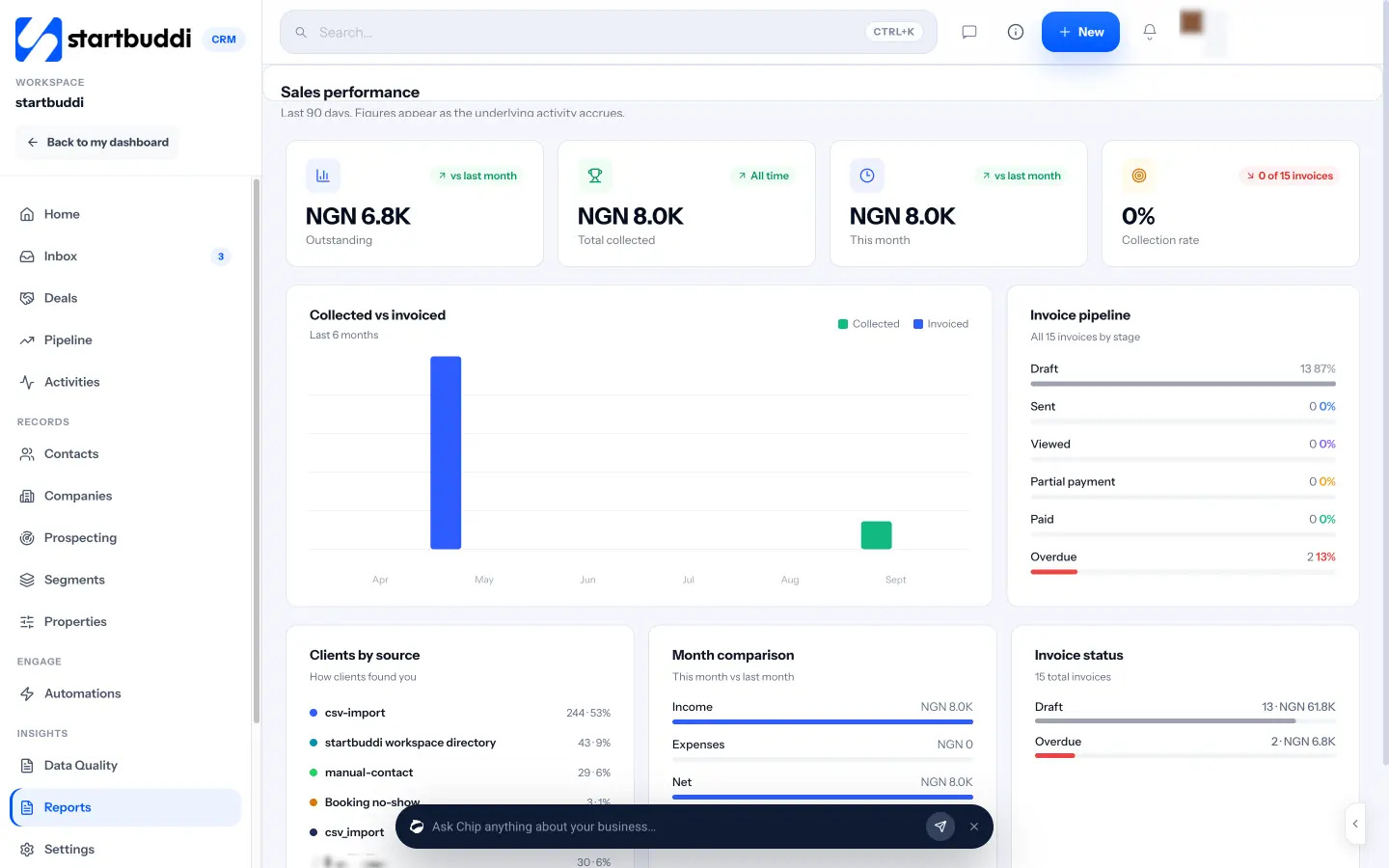
The Pipeline has its own Forecast and Analytics tabs, with forecast revenue, win rate, open deals and deals likely to close soon. The Customers home shows pipeline value, won this month and average deal size at a glance, and you can ask Chip questions such as “Which deals are at risk?” to get an answer from your own data.
Your next step: choose the five numbers you will check on the first Monday of every month and put a reminder in your calendar. See plans on the pricing page.
Related terms
FAQ
What is the most important CRM report for a small business?
Leads by source combined with win rate. Together they show which marketing brings customers who actually buy.
How often should I look at CRM reports?
A quick weekly look at open deals and a fuller monthly review of leads, win rate, deal size and money collected works for most small teams.
Why don't my CRM reports match reality?
Usually because of data gaps: deals left open when they were lost, contacts with no source, duplicates, or payments not recorded. Clean the data and the reports improve.
Is CRM reporting the same as accounting reports?
No. CRM reports focus on customers, sales and payments received. Profit and loss, tax and balance sheets come from your accounting records.
Omolola Akiyode is the operations and project manager at startbuddi, leading cross-functional projects and the content that helps founders get set up. Omolola writes about projects, websites and getting found online, and turns complex ideas into clear, practical steps.
Runs operations and projects at startbuddi