What is CRM data management?
Also called: Customer data management, CRM data hygiene, CRM data quality, contact data management, database cleanup

CRM data management is the ongoing work of keeping the customer information in your CRM accurate, complete, consistent and free of duplicates, from how data comes in to how it is cleaned, used and eventually deleted.
CRM data management is how you keep the customer information in your CRM accurate, complete and usable. It covers how records get in (forms, imports, bookings, typing them in), how they are kept tidy (standard fields, no duplicates, regular updates) and how old data is removed when you no longer need it.
A CRM is only as useful as what is in it. If half the phone numbers are wrong and every customer appears twice, your email lists bounce, your reports are off and your team stops trusting the system.
Why CRM data management matters for a small business
Small businesses usually start with contacts spread across phones, spreadsheets, email and WhatsApp. Moving them into a CRM is a big step, but the mess comes with them unless you manage it.
- Follow-ups reach the right person. Correct emails and numbers mean messages actually arrive.
- Segments and campaigns work. You can’t email “clients in Lagos who bought in the last 90 days” if cities and dates are blank.
- Reports can be trusted. Duplicates inflate your contact count and split a customer’s history in two.
- Handovers are easier. A new team member can pick up any customer from a complete record.
- You meet your legal duties. Data protection laws in many countries expect personal data to be accurate and kept no longer than needed. The UK’s ICO explains the accuracy principle, for example. This is general information, not legal advice.
Types of CRM data
- Identity data: name, email, phone, company, job title.
- Descriptive data: location, industry, company size, how they found you, tags.
- Activity data: messages, calls, bookings, form responses, email opens.
- Money data: deals, quotes, invoices, payments.
- Qualitative data: notes about needs, preferences and what was agreed.
How CRM data goes wrong
Duplicates
The same person is added from a form, an import and a booking, each slightly different. Now you have three records and three half-histories.
Missing fields
Records with a first name only, no company, or no source. They are hard to segment and easy to forget.
Inconsistent formats
“Lagos”, “lagos” and “LAG” in the city field, or phone numbers with and without country codes. Filters miss people because the data doesn’t match.
Data decay
People change jobs, emails and numbers. A record that was right two years ago may be wrong today.
How CRM data management works: an example
Chen runs an events company in Singapore with two colleagues. They import 1,200 contacts from old spreadsheets. Before importing, Chen maps each column to the right field and chooses to update existing contacts rather than create new ones when an email already exists. After the import he agrees three rules with the team: every new contact gets a source, city uses a fixed list, and phone numbers include the country code. On the first Monday of each month, one person spends 30 minutes merging duplicates and filling gaps. Six months later, their segments and campaign lists work first time.
Best practices for clean CRM data
- Fix data at the door. Use required fields and dropdowns on forms, and map imports carefully. Prevention is far easier than cleaning.
- Agree simple standards. Decide how you write names, cities, phone numbers and tags, and write the rules down.
- Merge duplicates regularly. Keep the fullest record and combine the history.
- Record the source. Knowing where each contact came from tells you which marketing works.
- Give someone ownership. Data quality needs a named person, even if it is only 30 minutes a month.
- Delete what you don’t need. Old, unreachable contacts add risk and skew your reports.
Related terms
A CRM is the system that holds your customer data. CRM notes are the written part of each record. Email segmentation depends on clean fields to build accurate groups, and CRM reporting is only as reliable as the data underneath it. If you are moving from spreadsheets, read CRM vs spreadsheet.
CRM data management in startbuddi
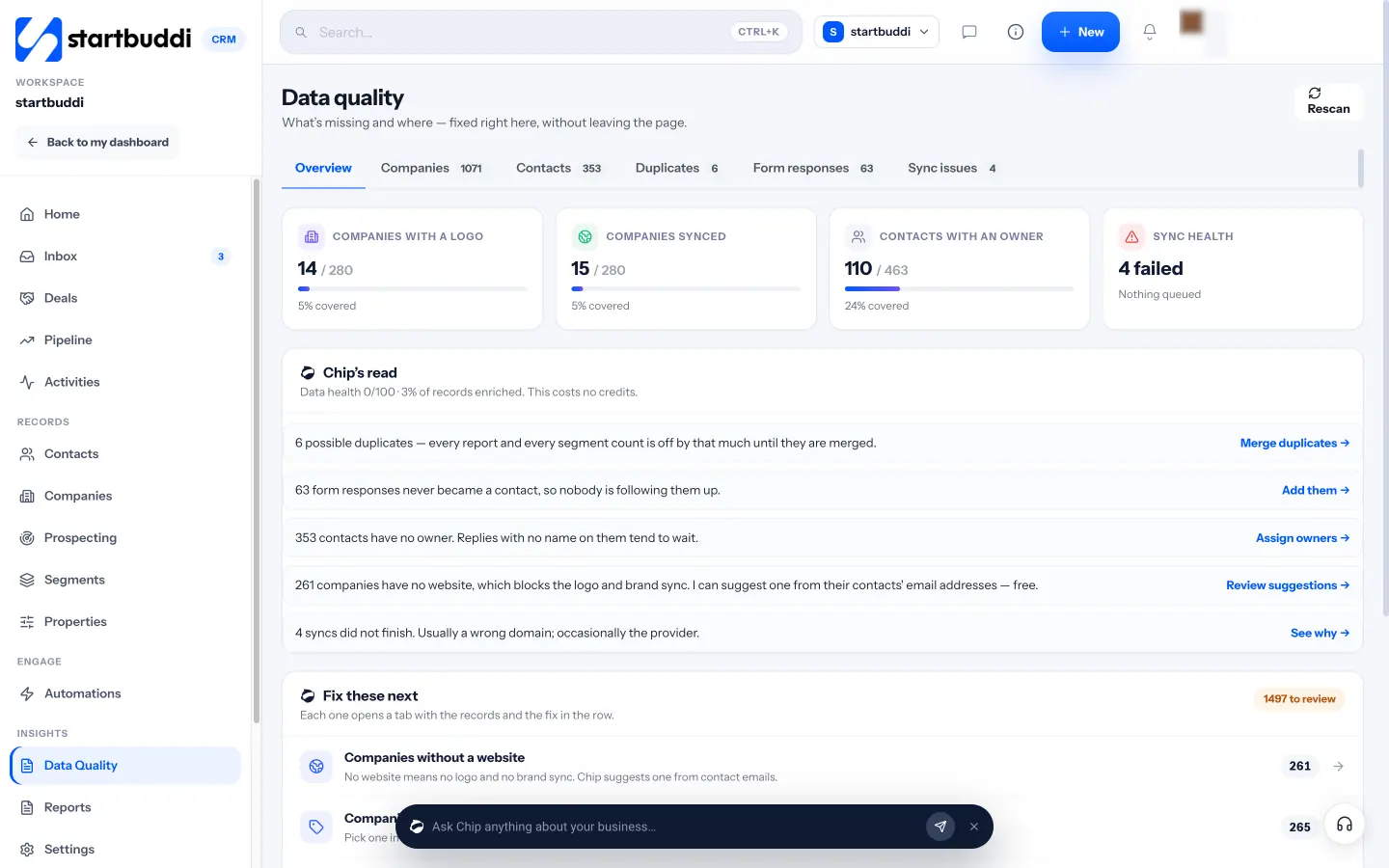
In startbuddi, Customers has a Data quality page that finds the problems for you: possible duplicate contacts (same email, phone, or name and company), contacts without an owner, companies without a website or industry, and form responses that never made it into your contacts. Each tab lets you fix records in the row, merge duplicates and keep the fullest record, and click Rescan to check again.
When you import a CSV into your contact list, you map each column to a field and choose whether to update or leave alone contacts that already exist. Properties let you define your own fields, such as dropdowns and dates, once and use them in forms, booking questions, automations and segments. Contacts also fill in from forms, bookings and chats, so less is typed by hand.
Your next step: open the Recently Added view of your contacts, check the last 20 records for gaps and duplicates, and agree three data rules with your team. See plans and contact limits on the pricing page.
Related terms
FAQ
How often should I clean my CRM data?
A short monthly check for duplicates and gaps works for most small businesses, with a deeper review once or twice a year to remove contacts you no longer need.
What are the signs of bad CRM data?
Emails that bounce, the same customer appearing more than once, segments that miss obvious people, and reports that don't match what you see day to day.
Should I delete old contacts?
If someone hasn't engaged for a long time and you have no reason to keep their data, removing them is usually sensible. Check the data protection rules where you operate.
What is the best way to avoid duplicates?
Match on email or phone when importing, use one form per purpose that feeds your CRM, and merge any duplicates you find as part of a regular routine.
Omolola Akiyode is the operations and project manager at startbuddi, leading cross-functional projects and the content that helps founders get set up. Omolola writes about projects, websites and getting found online, and turns complex ideas into clear, practical steps.
Runs operations and projects at startbuddi