How to manage consulting projects and deliver client work on time, at any size
How to manage consulting projects from first call to handover: the five stages of an engagement, what to set up as you grow, and how to track hours and budget.


Chinonye wrote this while on the startbuddi team. The product has changed since, so the team updated it on .

- Project management for consultants means agreeing scope clearly, tracking hours and budget against it, and keeping clients informed. Build one engagement template with milestones, time every task, and send a four-line weekly update. Add workload, budgets and client portals as the team grows.
To manage consulting projects well, you need to do three jobs: agree exactly what you will deliver, track the hours and money against that agreement, and keep the client informed without them having to chase you. A solo consultant can do all three with a simple engagement template, a timer and a weekly update. A firm of ten needs the same three things, plus shared templates, a view of who is overloaded and one place where every client engagement can be seen side by side. The tools change as you grow. The habits don’t.
This guide walks through the consulting engagement from first call to handover, shows what to set up at each size, and explains how to track utilisation and budget without a spreadsheet.
Why consulting projects are different to manage
An agency ships deliverables. A consultant sells judgement, time and outcomes, which are harder to pin down. That creates three problems most general project tools don’t solve on their own.
- Scope is fuzzy. “Help us fix our sales process” can mean two workshops or six months of work. The Project Management Institute found that 52% of projects completed in the previous year had experienced scope creep, up from 43% five years earlier (PMI Pulse of the Profession 2018).
- Your hours are the product. If you don’t know how many hours an engagement really took, you can’t price the next one. SPI Research’s 2026 benchmark of professional services firms reported billable utilisation falling to 66.4% in 2025, the lowest in its survey history, and on-time delivery at 73.8% (Deltek summary of the SPI benchmark).
- The client wants visibility. Senior clients pay for confidence. Silence between meetings feels like nothing is happening, even when you are working hard.
Good consulting project management answers three questions at any moment: what did we promise, how much of the budget have we used, and what does the client know?
The consulting engagement in five stages
Most engagements, whether a two-week audit or a year-long retainer, follow the same arc. Naming the stages helps you build a repeatable template instead of starting from a blank page every time.
| Stage | What you produce | What to track |
|---|---|---|
| 1. Discovery | Notes from calls, a problem statement | Questions still open, who the decision maker is |
| 2. Proposal and scope | Proposal, statement of work, signed agreement | Deliverables, fee, dates, what is out of scope |
| 3. Delivery | Workshops, analysis, drafts, recommendations | Tasks, hours against budget, milestones |
| 4. Review | Final report or implementation plan | Client approvals and feedback rounds |
| 5. Handover | Close-out summary, final invoice | Lessons learned, follow-on work, testimonial request |
If you write this as a project template once, every new client starts with the right milestones already in place. Our statement of work template and consulting agreement template cover stage 2.
Stage by stage: what to set up
Discovery: write the problem down
End every discovery call by writing the client’s problem in one or two sentences and sending it back to them. “Your team closes 12% of qualified leads and you want to reach 20% by March” is a scope you can manage. “Improve sales” is not. Keep the notes attached to the client record so they are there when you write the proposal.
Scope: list what is out as well as what is in
The single most useful line in a statement of work is the one that says what you are not doing. For example: “This engagement covers the sales process for the Lagos and Abuja teams. It does not include CRM configuration, hiring or training delivery.” When a new request arrives, you can point to it calmly and offer a change order.
Delivery: milestones before tasks
Break the engagement into three to five milestones the client recognises, such as “current state report approved” or “pilot running with two teams”. Tasks sit under milestones. Clients care about milestones; you care about tasks. Mixing the two in one long list is how important dates get buried.
Review: make approval explicit
Ask for a written “approved” on each milestone. An email reply is fine. A clear approval step stops a finished phase being reopened three weeks later, and it gives you a natural point to raise the next invoice if you bill by milestone.
Handover: close the loop
Send a short close-out note: what you delivered, what the client should do next, and what you would suggest as a follow-on. Then note, for yourself, how many hours the engagement took against the estimate. That number is the best pricing data you will ever have.
How your system changes as you grow
You don’t need a firm-sized system on day one. You also shouldn’t keep a one-person system when five people depend on it. Here is what tends to work at each size.
| Size | What breaks first | What to add |
|---|---|---|
| Solo consultant, 1 to 4 clients | Remembering what you promised each client | One engagement template, a timer, a weekly client update |
| Small practice, 2 to 5 people | Nobody knows who is doing what, or which client is slipping | Shared task lists with owners and due dates, a project health view, shared templates |
| Growing firm, 6 to 20 people | Some people are overloaded while others wait for work; margins are unclear | A workload view, budgets per project, portfolio reporting, a client portal |
The pattern is the same at every size: move information out of heads and inboxes into one shared place, before it becomes a problem. Our project management guide for agencies covers the team side in more depth.
Tracking hours, budget and utilisation without a spreadsheet
Consultants usually price in one of three ways: hourly or daily rates, a fixed fee per engagement, or a monthly retainer. Whichever you use, track hours. On hourly work, hours are your invoice. On fixed fees and retainers, hours tell you whether the price was right.
A simple utilisation check
Utilisation is billable hours divided by available hours. If you are available for 40 hours in a week and log 26 billable hours, your utilisation is 65%. That leaves 14 hours for sales, admin and learning, which is healthy for a solo consultant who also does their own business development.
Budget burn on a fixed fee
Say you quote $12,000 (or £9,500, or ₦9,000,000) for a six-week engagement and plan 80 hours. Halfway through, you have used 55 hours. You are on course to spend about 110 hours, so your effective rate drops from $150 an hour to around $109. Seeing that in week three lets you have a scope conversation. Seeing it in week six only lets you learn a lesson.
Retainers: watch the monthly allowance
On a retainer, agree how many hours or which activities the monthly fee covers, and report hours used in every monthly update. If a client uses 30 hours against a 20-hour retainer three months running, you have the evidence for a new price or a narrower scope. Without the numbers, the conversation turns into opinions, and consultants usually lose those. Work back from the income you need to the hourly rate, then check the retainer covers it.
A timer attached to each task makes this painless, because hours land against the right client and the right milestone without end-of-week guesswork. If you are still on a spreadsheet, our guide to tracking billable hours without a spreadsheet shows the switch.
Keeping clients informed without extra meetings
A short written update every week does more for client confidence than an extra call. Use the same four headings every time:
- Done this week: two or three concrete things, linked where possible.
- Next week: what you will work on and any meeting you need.
- Waiting on you: data, access or decisions the client owes you, with a date.
- Budget and timeline: one line, such as “On track: 42 of 80 hours used, milestone 2 due 14 March”.
The “waiting on you” section is the quiet hero. It makes delays visible and puts responsibility where it belongs, without a difficult conversation.
Switching tools costs more than people think. A Harvard Business Review study of 137 people at three Fortune 500 companies found workers toggled between apps and websites about 1,200 times a day, losing just under four hours a week reorienting themselves (Harvard Business Review). When your tasks, hours, client notes and updates live in one place, the weekly update takes ten minutes instead of an hour.
Common mistakes consultants make
- Starting work before the scope is signed. Goodwill work in week one becomes the baseline for the whole engagement.
- Tracking time only on hourly clients. Fixed-fee work is where you most need to know the real hours.
- Keeping client files in personal email. When you bring in an associate, they can’t see the history.
- Using a different setup for every client. A template makes each engagement faster to start and easier to compare.
- Reporting only at the end. Bad news delivered early is a conversation. Delivered late, it is a dispute.
Choosing software to manage consulting projects
Before you compare brands, check a tool against the jobs above:
- Can you save an engagement as a template with milestones and tasks?
- Can you log time against a task and mark it billable?
- Can you set a budget in hours or money and see how much is used?
- Can clients see progress or approve work without you sending attachments?
- Does it connect to your client list, proposals and invoices, or will you retype everything?
- What does it cost when you add an associate or two?
General project tools such as Asana, Trello and ClickUp are good at tasks and boards, and many consultants pair them with a separate time tracker and invoicing app. Our list of project management software compares published plans and prices.
How startbuddi helps consultants stay organised
With startbuddi, projects, time, client portals, proposals and invoices sit in one account, so an engagement can run from signed agreement to final invoice without copying data between apps. Here is what it does today, and where the limits are. The project management for consultants page has the overview.
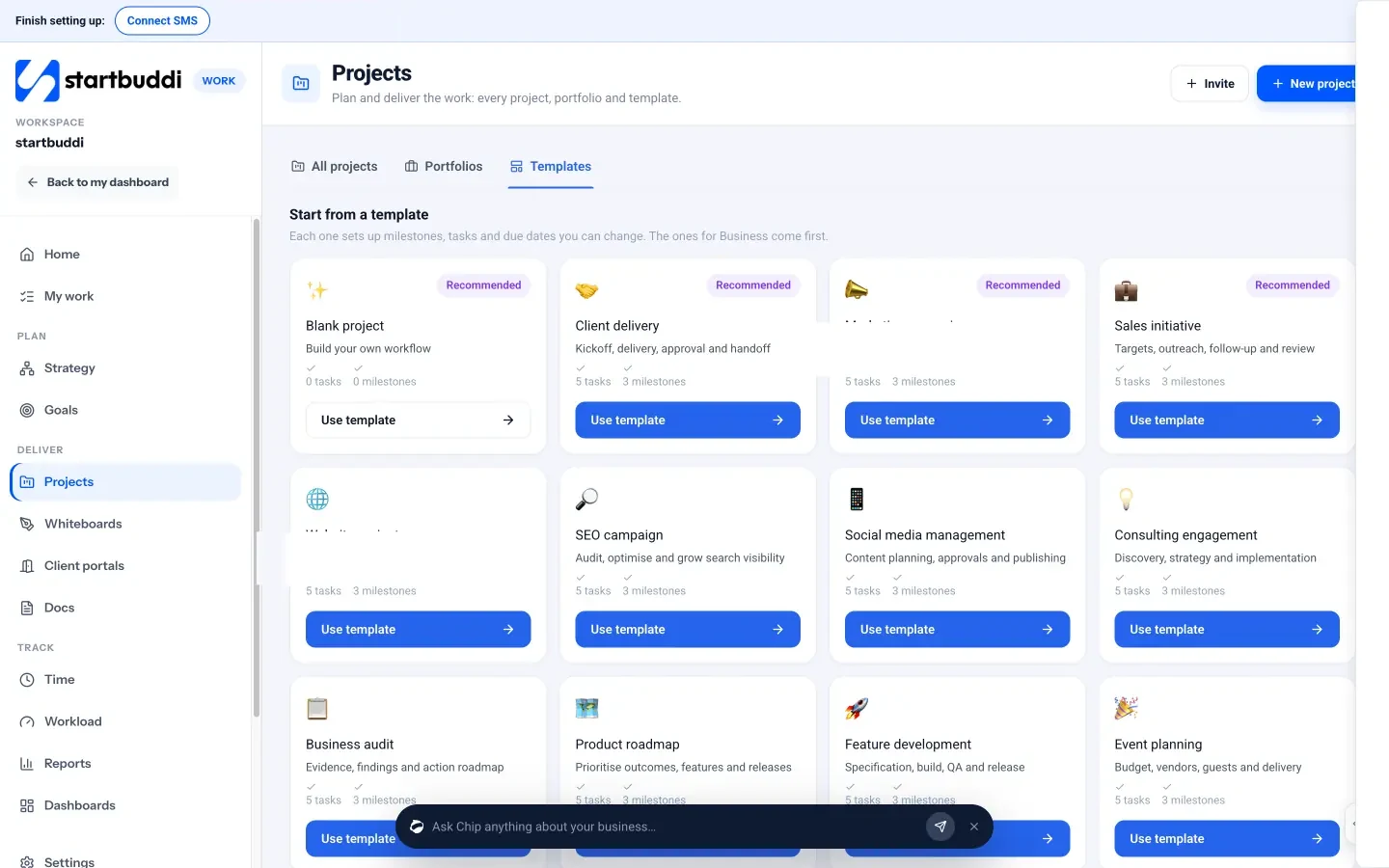
Engagement templates. In Projects, the Templates tab includes a Consulting engagement template (“discovery, strategy and implementation”) and a Business audit template. Each sets up milestones, tasks and due dates you can change. There is also a Complete consulting system bundle covering discovery, evidence, strategy delivery, implementation and reporting.
Milestones, timeline and approvals. Inside a project you get Tasks, a Timeline (gantt) view with dependencies, Milestones with owners and health, and an Approvals view for sign-offs.
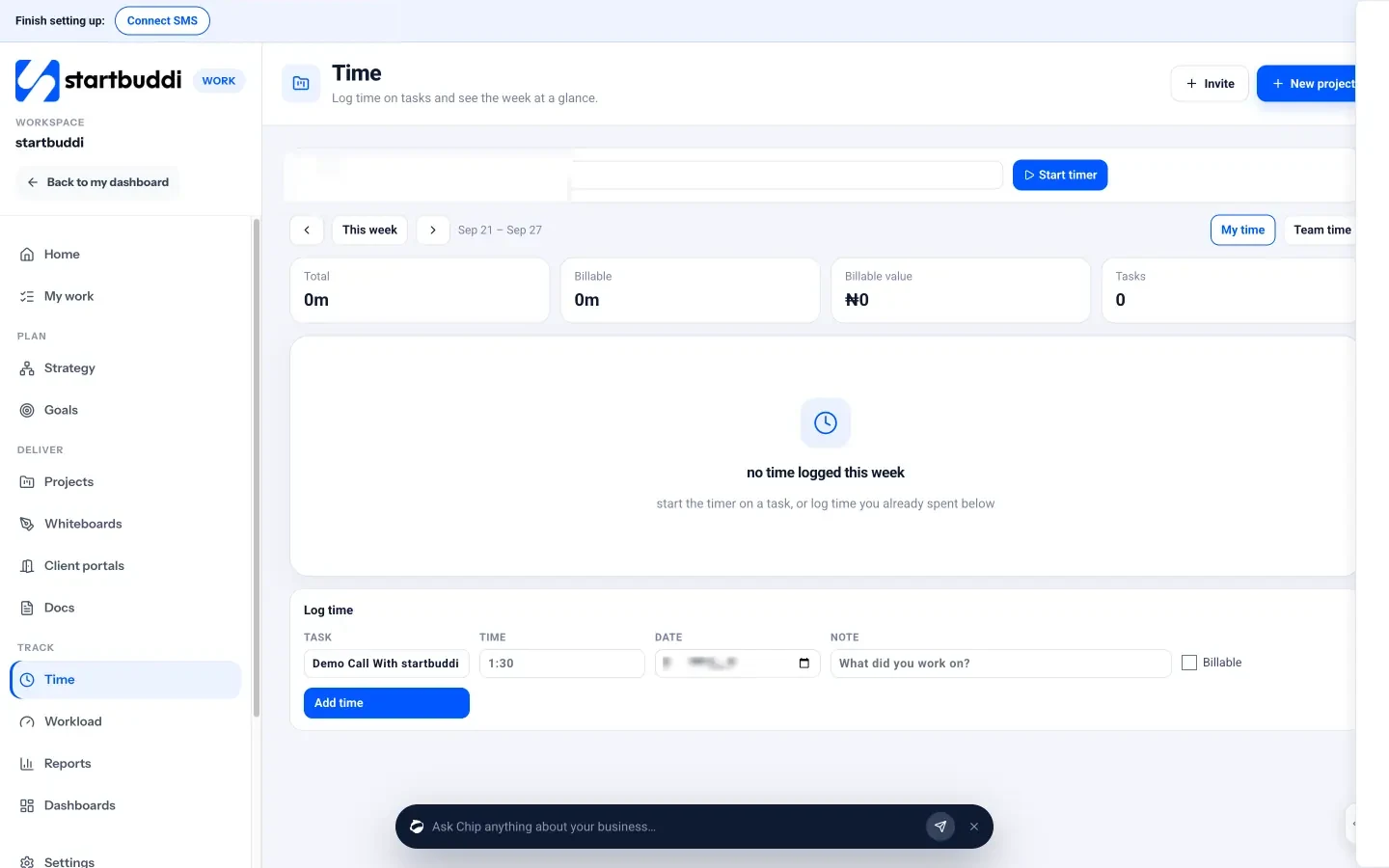
Time and budget. Time tracking lets you start a timer on any task or log time by hand and tick Billable. The week shows your total, billable hours and billable value. Each project has a Budget tab with an hours budget, time logged, spent so far and an hours burn-down chart.
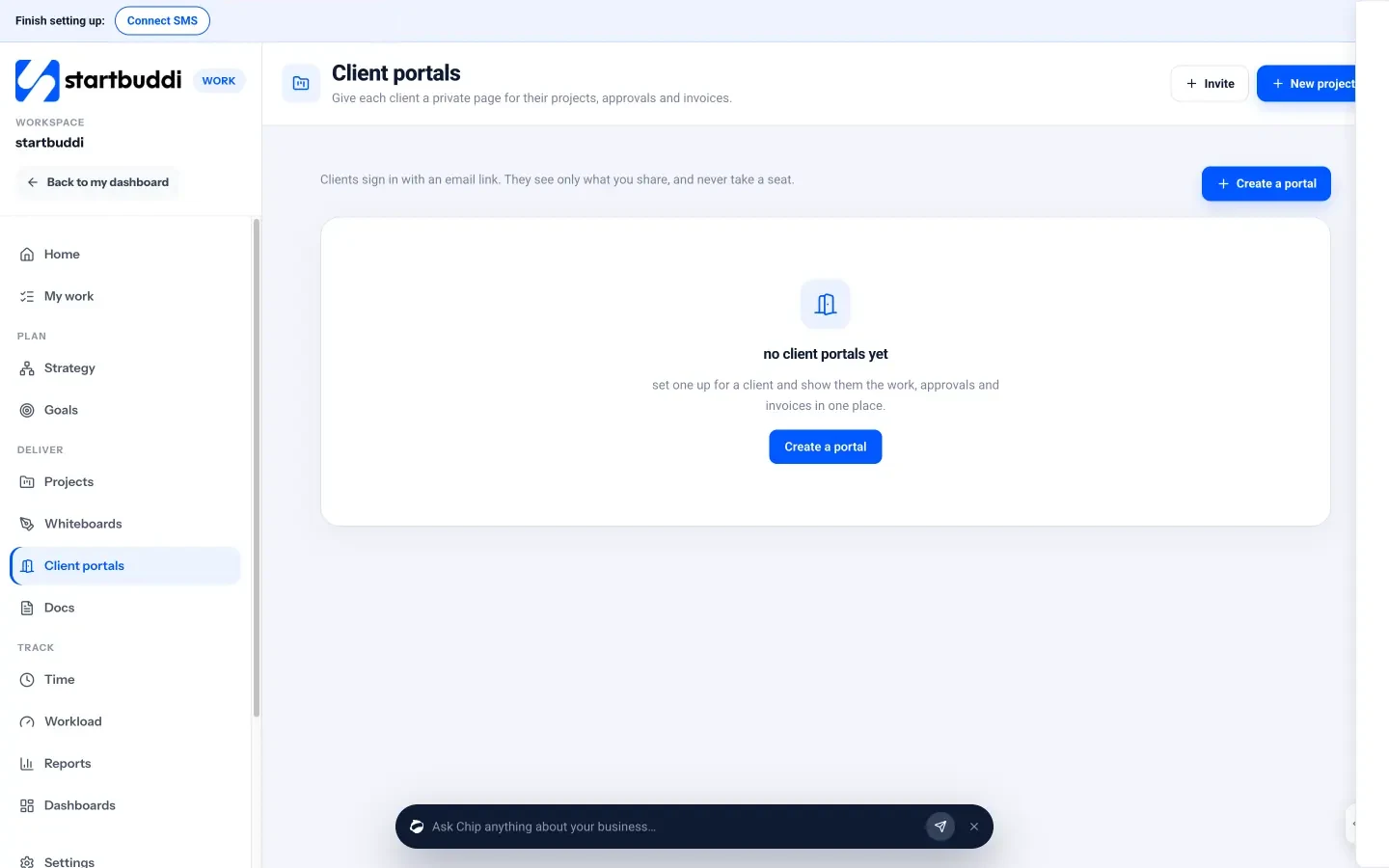
Client portals. Client portals give each client a private page for their projects, shared deliverables, approvals, messages and invoices. Clients sign in with an email link, see only what you share, and don’t take a seat. On Free you can build and preview a portal; inviting clients needs a paid plan (one portal on Starter, ten on Growth, fifty on Scale).
Proposals, contracts and invoices. In Money Manager you can send estimates, turn an accepted estimate into an invoice with the same line items, and send contracts for e-signature. Invoices take card payments through Paystack or Stripe.
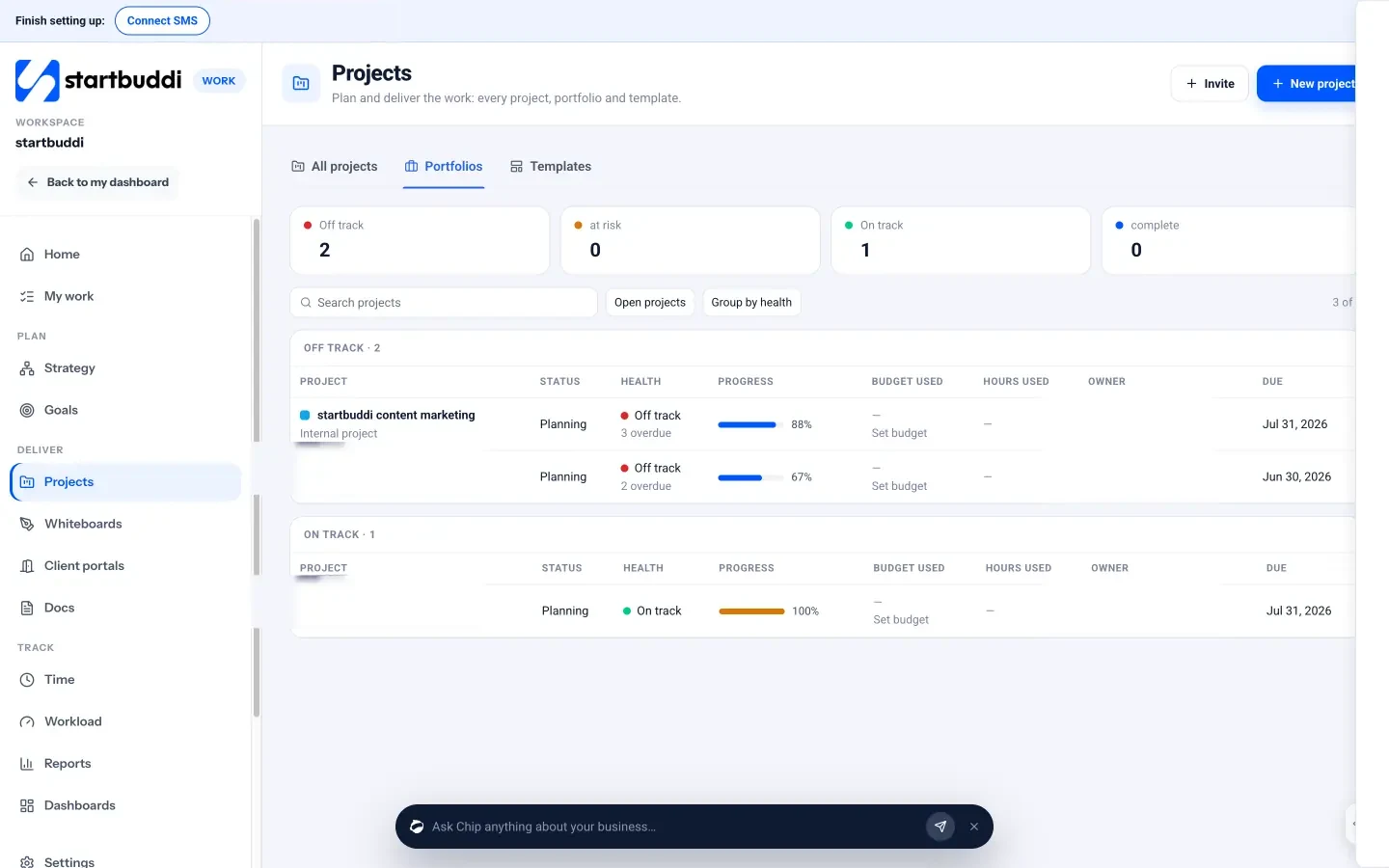
As you grow. Portfolios show every project side by side with health, progress, budget used and hours used. Workload shows hours per teammate per week, for managers, admins and owners.
Honest limits. There is no button yet that turns logged hours straight into an invoice, so you add the hours as line items yourself. Notification and custom field settings on projects are marked as coming soon. It is not accounting software, so keep your bookkeeping and tax filing with your accountant.
Your next step
Pick your most typical engagement and write it down as five milestones with the tasks under each. Then run your next client through it, with a timer on every task and a four-line update every Friday. If you want the template, timer and client portal in one place, see how startbuddi works for consultants or start free on the pricing page.
Sources
- Project Management Institute: Pulse of the Profession 2018
- Deltek: 2026 PSO benchmarks from the SPI Professional Services Maturity Benchmark
- Harvard Business Review: How much time and energy do we waste toggling between applications?
Frequently asked questions
What is the best way for a solo consultant to manage projects?
Keep it simple: one engagement template with milestones, a timer on every task, and a short written update to each client every week. Add more only when something starts slipping.
How do consultants track project budgets?
Set a budget in hours or money for each engagement, log time against tasks, and compare hours used with the plan every week. On fixed fees, this shows early whether the price still works.
What is a good utilisation rate for a consultant?
It depends on how much selling and admin you do. Solo consultants often aim for 60% to 70% of available hours billable. Track your own rate for a few months before setting a target.
Should clients have access to my project tool?
Give them a view, not the whole tool. A client portal or shared page with progress, deliverables and approvals keeps them informed without exposing your internal tasks and notes.
SEO Copywriter| Email growth Specialist| I help businesses increase revenue with strategic SEO content & high-converting email funnels.