How to write AI prompts that sound like your business
Write AI prompts for business that produce drafts in your own voice: a brand voice worksheet, a reusable prompt formula, before-and-after examples and templates.


- AI sounds generic when it lacks context. Write down your brand voice with a we are, we are not table and real examples, then use a prompt formula covering role, task, audience, facts, voice, format and limits, and refine drafts with specific feedback.
Good AI prompts for business tell the AI five things: who it’s writing as, what the task is, who will read it, the facts it must use, and how your business sounds, ideally with a real example of your writing. Add the format you want (length, structure, channel) and you’ll get drafts that need light editing instead of a full rewrite. The generic, over-excited tone people complain about is mostly what AI produces when it hasn’t been told any of this.
This guide shows you how to write down your brand voice, a prompt formula you can reuse for any task, before-and-after examples, and ready-made templates for the messages small businesses send most.
Why AI writing sounds generic
An AI model has read a huge amount of text. When you give it a thin instruction like “write a post about our new service”, it fills every gap with the most typical choice: typical words, typical enthusiasm, typical structure. That’s why so many AI drafts sound the same.
The AI companies say the same thing in their own guides. Anthropic’s prompting best practices suggest treating the model like a brilliant but new employee who doesn’t know your norms, and offer a simple test: if a colleague with little context would be confused by your prompt, the AI will be too. Google’s Prompting Guide 101 for Gemini recommends including a persona, the task, context and the format you want.
So the fix is not a magic phrase. It’s giving the AI what a new team member would need: facts, audience, voice and an example.
Step 1: write down your brand voice
Before you write a single prompt, spend 30 minutes describing how your business sounds. You’ll paste this into prompts, or store it once in a tool that remembers it.
The “we are, we are not” table
Pick three or four qualities, and for each one say what it doesn’t mean. The “not” column stops the AI overdoing it.
| We are | But we are not | Sounds like |
|---|---|---|
| Friendly | Over-familiar or jokey | “Thanks for getting in touch. Here’s what happens next.” |
| Direct | Blunt or cold | “We can deliver on Friday. Weekend delivery isn’t available.” |
| Expert | Full of jargon | “This paint lasts about five years outdoors.” |
| Local | Slangy in formal messages | “We cover Ikeja, Yaba and Surulere.” |
Words you use and words you avoid
List a handful of each. For example, a cleaning company might use “spotless”, “on time” and “your home”, and avoid “cheap”, “best in the world” and “world-class”. Include how you refer to customers (clients, customers, guests, patients) and any phrases you always use, such as your sign-off.
Rules of thumb
- Sentence length: “Short sentences. One idea per sentence.”
- Spelling: British or American English, and how you write prices (₦25,000 or NGN 25,000).
- Emojis: never, sometimes, or only on Instagram.
- Formality by channel: warmer on WhatsApp, more formal on invoices and proposals.
Your best examples
Collect three messages you’ve written that you’re proud of: a reply to a customer, a social post, an email. Examples do more to set tone than any description. Anthropic’s guide calls examples one of the most reliable ways to steer tone and structure.
Step 2: use a prompt formula
You don’t need to be clever. You need to be complete. This formula works for almost any business writing task:
Role: You’re writing for [business name], a [what you do] in [location].
Task: Write a [type of message] that [goal].
Audience: It’s for [who], who [what they know or feel right now].
Facts: Use only these details: [prices, dates, names, links].
Voice: [paste your “we are / we are not” notes]. Match the tone of this example: [paste example].
Format: [length, structure, channel]. End with [one clear next step].
Limits: If a detail isn’t listed above, leave a [placeholder] instead of inventing it.
That last line matters. It tells the AI what to do instead of guessing, which is more reliable than only saying what not to do.
Before and after: the same task, two prompts
A weak prompt
“Write an Instagram caption for our new hair braiding service.”
You’ll probably get something with lots of exclamation marks, generic hashtags and a made-up price.
A strong prompt
“You’re writing for Adaeze’s Studio, a hair salon in Enugu. Write an Instagram caption announcing knotless braids, available from Monday. It’s for our existing followers, mostly working women aged 25 to 40 who book on weekends. Facts: price from ₦35,000, takes about 5 hours, book through the link in our bio. Voice: warm and confident, not over the top. No more than two emojis. Here’s a caption we liked: [paste]. Keep it under 60 words and end with how to book. If anything else is needed, use a [placeholder].”
Put this into practiceEverything in this article works inside startbuddi, free to start.Start free
The second prompt takes a minute longer to write and saves ten minutes of editing. Once you’ve written it, you can reuse the structure for every announcement.
Prompt templates for everyday tasks
Copy these, then add your voice notes and an example. Square brackets are for you to fill in.
Follow-up after a quote
“Write a short follow-up email to [client name], who received our quote for [service] on [date] and hasn’t replied. Remind them of the main benefit, [benefit]. Offer a quick call. Friendly, no pressure, under 100 words.”
WhatsApp reply to a price question
“A customer on WhatsApp asked how much [service] costs. Reply using only these prices: [list]. Ask one question to understand what they need. Warm and brief, three sentences at most, no formal sign-off.”
Reply to a negative review
“Draft a public reply to this review: [paste]. Thank them, acknowledge the specific problem without making excuses, say what we’ve changed, and invite them to contact [email or number]. Calm and sincere, under 80 words. Don’t admit legal fault or offer compensation.”
Proposal introduction
“Write the opening paragraph of a proposal for [client], a [type of business] that wants [goal]. Show we understood their problem using these notes from our call: [notes]. Confident and plain. No clichés like ‘we are delighted’.”
A week of social posts
“Plan five posts for [platform] for next week about [topic or offer]. Mix: one tip, one behind-the-scenes, one customer story, one offer, one question for followers. One line each, then write the first one in full.”
For more ready-to-use wording, see our free AI prompt pack for service businesses.
Adjust the prompt for each channel
Your voice stays the same everywhere, but each channel has its own rules. Add a line to your prompt for the channel you’re writing for.
| Channel | Add to your prompt |
|---|---|
| “Two or three short sentences. Sound like a person, not a company. One question at most.” For approved business templates, see our guide to WhatsApp message templates. | |
| “A subject line under 50 characters, a clear first sentence, one call to action.” | |
| “Hook in the first line. Short paragraphs. Up to five relevant hashtags at the end.” | |
| “Professional but personal. Share one lesson or result. No hashtags in the middle of sentences.” | |
| SMS | “Under 160 characters, including the business name and how to reply or opt out.” |
| Proposals and invoices | “Formal and precise. No emojis. Use exact figures from the notes.” |
Break big jobs into steps
When a job has several parts, like a product launch, one giant prompt usually gives shallow results. Split it into a chain, where each step uses the output of the one before:
- “Here are the facts about our launch. List the three messages our customers most need to hear.”
- “Using those three messages, draft a launch email to existing customers.”
- “Now turn the email into four social posts, one per day, in our voice.”
- “Write a WhatsApp broadcast version under 60 words.”
You check each step before moving on, so a wrong idea at the start doesn’t spread through everything. It’s also a good way to learn what the AI does well: you’ll quickly see which steps need heavy editing and which are nearly right first time. For timing and tone on follow-ups specifically, see how to follow up with leads.
Step 3: refine instead of starting again
The first draft is rarely the final one. Instead of rewriting your prompt from scratch, give feedback the way you would to a colleague:
- “Shorter. Cut it to three sentences.”
- “Less salesy. Remove the exclamation marks.”
- “More specific. Mention the Friday delivery.”
- “This sounds too formal for WhatsApp. Make it sound like a text from a friend who runs a shop.”
- “Give me three different openings to choose from.”
Google’s own tips for Gemini make the same point: experiment and iterate, and adjust how specific you are until the results improve.
When a prompt works well, save it. A shared prompt library (a simple document is fine) means everyone on the team gets the same voice, not just the person who’s best at prompting.
Common prompt mistakes
- Leaving out the facts. If you don’t give prices, dates and names, the AI will invent plausible ones.
- Describing the voice with one word. “Professional” means something different to everyone. Use the “we are, we are not” table and an example.
- Asking for everything at once. A campaign plan, five emails and ten posts in one prompt gets thin results. Break big jobs into steps.
- Not saying who it’s for. A message to a first-time enquiry and one to a five-year customer should sound different.
- Pasting sensitive data into tools you don’t control. Check how a tool stores what you share before you paste customer details in.
- Publishing without reading. AI output is a draft. Read it, check the facts, then send.
How startbuddi helps Chip sound like you
The hardest part of good prompting is supplying context every time. In startbuddi, much of that context is already there, so your prompts to Chip can be shorter. Here’s what’s built in today.
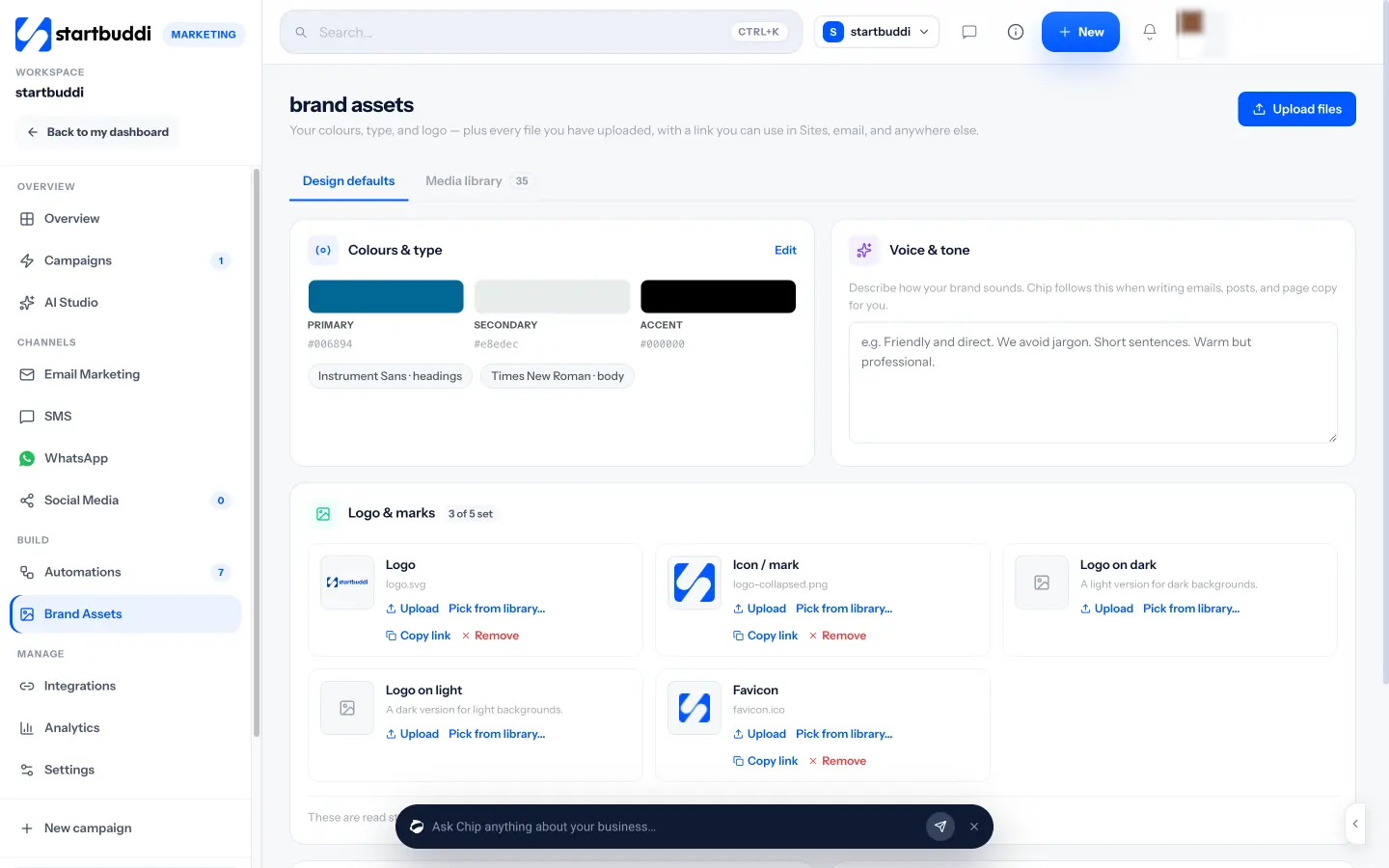
Your voice, saved once. In Marketing, the Brand Assets page has a Voice & tone box where you describe how your brand sounds. Chip follows it when writing emails, posts and page copy for you, alongside your logo, colours and fonts. A What Chip knows checklist shows which parts of your brand Chip already has, and Ask Chip can give you tips on your brand. Brand Assets sits in the Marketing hub, which needs the Starter plan or above.
Your facts, stored as knowledge. Under the AI assistant settings you can add knowledge for Chip, such as pricing, office hours and returns, by uploading documents or writing notes. Chip then uses those facts when it answers your team and your customers.
Your data, one @ away. In the Chip drawer on any page, type @ to point Chip at a contact, project, campaign or deal. Chip can also see the page you have open, so “draft a follow-up” on a contact’s page already knows who it’s for.
Tools that start from your brief. AI Studio has writing tools for a full marketing email from a one-line brief, subject line variants, per-platform social posts, WhatsApp templates and translation that keeps your brand voice across languages. The email composer has “Write with Chip”, and the Documents editor lets you ask Chip to rewrite a document more clearly or summarise it.
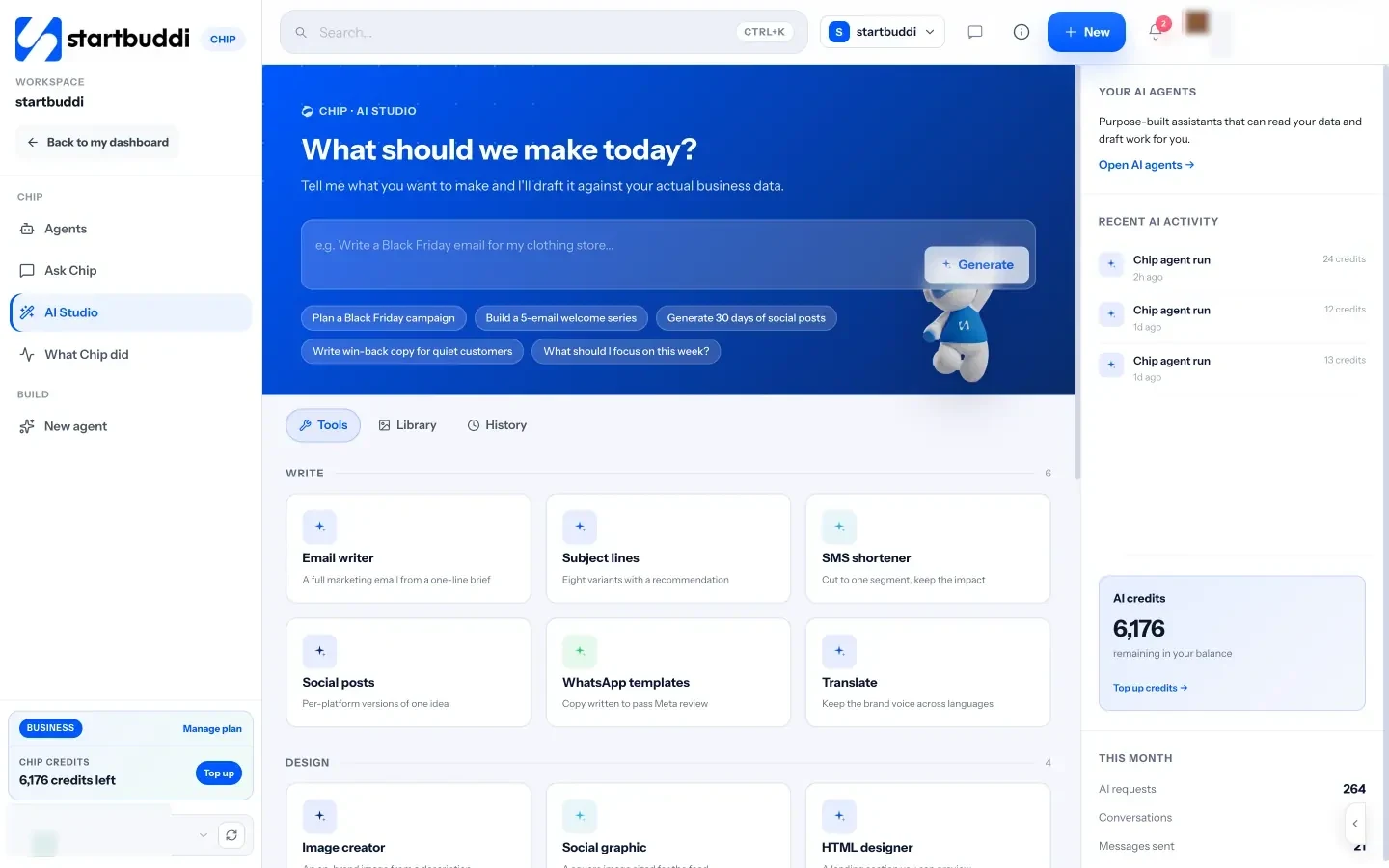
Nothing goes out without you. Chip shows a preview before it creates or changes anything, and anything that reaches customers, like sending a campaign, waits for your confirmation.
Chip is available on every plan with a monthly credit allowance (50 on Free, up to 8,000 on Scale). See pricing for details, and our list of tasks small businesses can hand to AI for where to use your new prompts first.
Your next step
Set a 30-minute timer and write your “we are, we are not” table, a list of words you use and avoid, and three example messages you like. Then try the formula above on one real task this week. If you use startbuddi, paste your voice notes into Brand Assets so Chip uses them every time it writes for you.
Sources
- Anthropic: Prompting best practices
- Google: Gemini for Workspace Prompting Guide 101
- Google: 5 ways to write better AI prompts for Gemini in Workspace
Frequently asked questions
How long should an AI prompt be?
Long enough to include the facts, audience, voice and format. For most business messages that's three to six sentences, plus any example you paste in.
Do I need a different prompt for each AI tool?
The same principles work across tools. Some tools remember your voice and business facts, which lets you write shorter prompts.
How do I stop AI inventing prices or dates?
List the facts it may use and tell it to leave a placeholder for anything missing. Then check every number before you send.
Should my whole team use the same prompts?
Yes, where possible. A shared prompt library and one written brand voice keep messages consistent no matter who writes them.
Tiwalade Joanna Okedara-Kalu is the founder, CEO and CTO of startbuddi, the business system that brings clients, bookings, invoices, projects, marketing and the Chip AI assistant into one place. Tiwalade builds software around how service businesses really work day to day, and writes about client management, getting paid on time and why small businesses outgrow the tools they start with.
Founded startbuddi and leads its product and engineering