CRM for personal trainers: manage sessions, client progress and payments together
What a CRM for personal trainers should do, how it differs from a workout app, what to record for each client, and a weekly routine that keeps clients training.



- A CRM for personal trainers keeps bookings, client notes, goals and payments in one place and reminds you who to check in with. Workout apps deliver programmes; a CRM runs the business side. Many in-person trainers need the CRM first, and some use both.
A CRM for personal trainers is one place that holds each client’s details, sessions, goals, notes and payments, and reminds you who to contact next. For most trainers it needs to do four jobs well: let clients book without back-and-forth, keep a clear record of each client, take payment for sessions or monthly training, and prompt the check-ins that stop clients drifting away. If a tool does those four, it will save you evenings of admin.
This guide explains what a trainer CRM actually does, the features that matter (and the ones that don’t), how it differs from a workout app, what to track for each client, and a simple routine to keep clients training with you for longer. It’s written for independent personal trainers and small studios anywhere, whether you charge $60 a session in Toronto, £45 in Leeds or ₦20,000 in Lagos.
What a CRM for personal trainers actually does
“CRM” stands for customer relationship management. In plain terms it’s your client list with a memory. For a trainer, a useful one connects everything that happens between the first enquiry and the tenth month of training:
- Enquiries: people who messaged you on Instagram, filled in a form or were referred by a friend, with a note of what they want.
- Bookings: consultations, sessions and assessments, with confirmations and reminders.
- Client records: contact details, goals, notes after each session and anything you must remember.
- Payments: who has paid, who owes, and who is on a monthly plan.
- Follow-ups: the check-in after a missed week, the message before a package runs out, the “how are you getting on?” after a client stops.
Without that connection, trainers end up running the business across WhatsApp, a notes app, a calendar, a bank app and memory. It works with eight clients. It breaks somewhere around fifteen.
CRM vs workout app: do you need both?
This is the question most trainers get wrong, so it’s worth being clear. There are two kinds of software for trainers, and they solve different problems.
| Workout and coaching app | CRM and business system | |
|---|---|---|
| Main job | Deliver programmes and track training | Win clients, book them, get paid, keep them |
| Typical features | Exercise libraries, programme builder, client app, habit and nutrition tracking | Contacts, enquiries, booking page, invoices, payment links, reminders, follow-ups |
| Who uses it daily | You and your clients | Mostly you |
| Best for | Online coaching and hybrid clients | In-person trainers and anyone who sells sessions |
Fitness-specific platforms such as Trainerize and My PT Hub focus on delivering training programmes, nutrition plans and a client app, and include business tools alongside. Studio software such as Mindbody is built for studios, gyms and wellness businesses with classes, staff and several locations. A general business system handles the client, booking and money side but doesn’t write workouts.
A sensible rule: if you coach mostly online and your clients follow programmes in an app, start with a coaching app. If you train people in person, sell sessions and packages, and your pain is admin, bookings and payments, a CRM-style business system is the better first buy. Some trainers use one of each.
The features that matter most
Before you compare tools, check them against this list. If one of these is missing, you’ll end up patching the gap with another app.
1. Online booking with reminders
Clients should see your free times, pick a slot and get a confirmation without a WhatsApp thread. Automatic reminders before sessions reduce no-shows. Look for buffer time between sessions, a limit on how far ahead people can book, and the option to take a deposit or full payment when they book. Our guide to reducing no-show appointments covers the reminder side in more detail.
2. A client record you’ll actually update
Each client needs one page with their goals, starting point, session notes and any health information they’ve shared with you. If adding a note takes more than 30 seconds, you won’t do it after a 6am session.
3. Payments that match how you sell
Trainers sell in three ways: single sessions, packs of sessions paid upfront, and monthly training. Your system should handle a quick payment link for a single session or pack, an invoice when a client or company needs one, and recurring billing for monthly clients so you’re not chasing every month.
4. Follow-ups and check-ins
The biggest leak in a training business isn’t new clients, it’s existing ones fading out. You want reminders to check in when someone misses sessions, and simple automated messages such as a welcome email after the first booking.
5. A clear view of who is active
You should be able to answer “who hasn’t booked in two weeks?” in a few seconds. That list is your most valuable page each Monday.
What to record for each client
Keep it light. The aim is a record that helps you coach and keeps the relationship going, not a medical file.
| Section | What to record |
|---|---|
| Basics | Name, phone, email, how they found you, start date |
| Goals | Their goal in their words, a target date, why it matters to them |
| Starting point | Baseline measures you both agreed to track (for example a lift, a timed run, or how they feel) |
| Session notes | Two or three lines: what you did, how it went, what’s next |
| Health notes | Only what you need to train them safely, with their consent |
| Commercial | Current package or plan, sessions left, renewal date, payment status |
A word on health information
General information, not legal advice. Injury history and medical conditions are sensitive. Under UK GDPR, for example, data concerning health is special category data, which carries extra rules. Similar protections exist elsewhere, including the EU GDPR and Nigeria’s data protection law. Collect only what you need, keep it in one secure place rather than in chats and screenshots, and check the rules where you work.
How to use progress to keep clients
Clients rarely quit because a session was bad. They quit because they stop noticing progress, life gets busy, or the renewal arrives at the wrong moment. A good client record lets you get ahead of all three.
- Review every four to six weeks. Book a short progress check. Compare with the starting point you recorded and set the next target together.
- Celebrate small wins in writing. A two-line message after a personal best is remembered longer than the session itself.
- Watch attendance, not just results. Two missed sessions in a row is the earliest warning sign. Send a friendly check-in the same week.
- Plan renewals early. When a pack has two sessions left, talk about the next block. Don’t wait for the last session.
For a wider look at keeping clients, see our guide on how to retain clients without constant discounting.
A simple weekly routine for trainers
Software only helps if you look at it. This routine takes about 20 minutes a week plus a minute after each session.
- After every session (1 minute): add a two-line note and book the next session before the client leaves.
- Monday (10 minutes): check who hasn’t booked in 14 days and send each one a personal message.
- Monday (5 minutes): check payments. Who owes, whose pack is nearly used, whose monthly payment failed.
- Friday (5 minutes): reply to any open enquiries and follow up consultations from the week.
Example check-in messages
Hi Sarah, missed you this week. Everything OK? I’ve got Tuesday 7am or Thursday 6pm free if either works.
Hi Kwame, you’ve got two sessions left in your pack. Your squat is up 10kg since March, so let’s plan the next block. Want me to send the options?
Common mistakes trainers make with client software
Most trainers who give up on a system do so for the same few reasons. Avoid these and you’ll still be using it in six months.
Moving everyone over on day one
Importing 60 clients, three years of notes and every old payment before you’ve learned the tool is a recipe for a weekend lost to admin. Start with new clients and your most regular ones. Add the rest as they book.
Recording too much
If your client template has 25 fields, you’ll fill in five. Decide the handful of things you genuinely use when planning a session or a renewal, and ignore the rest.
Keeping the booking link a secret
A booking page only saves time if clients use it. Put the link in your Instagram bio, your WhatsApp Business profile and your email signature, and reply to “when are you free?” with the link plus one line of warmth.
Paying for features you don’t need
Studio software with class timetables, staff rotas and a branded app is excellent for a studio. For a solo trainer it can mean paying for a lot you never open. Choose for the business you run today and the next step, not for a gym you might open in five years.
Letting payments live somewhere else
If payments sit only in your bank app, you’ll never have a quick answer to “who owes me?” Make sure every payment, even a cash one, is recorded against the client.
Forgetting former clients
People who stopped training with you already trust you. A friendly message in January or before summer brings a surprising number back. Keep them in your list with a clear status rather than deleting them.
How to choose a CRM for personal trainers
Ask these questions before you sign up for anything:
- Where do you train? In person, online or both. This decides whether you need a coaching app, a business system or both.
- How do clients pay you? Per session, packs, monthly, or through a gym. Make sure the tool supports the payment providers available in your country.
- Can clients book themselves? A shareable booking link you can put in your Instagram bio and WhatsApp status matters more than most features.
- Does it work on your phone? You’ll update notes between sessions, not at a desk.
- What happens as you grow? If you might add a second trainer, check how team calendars and booking rotation work.
- Can you try it for free? Set it up with three real clients before you move everyone over.
Our best booking software for service businesses list compares booking tools side by side if scheduling is your main problem.
How startbuddi fits a personal training business
startbuddi isn’t a workout programming app. It doesn’t build training plans or track reps. It runs the business side: clients, bookings, payments and follow-ups, in one place. Here is what that looks like for a trainer.
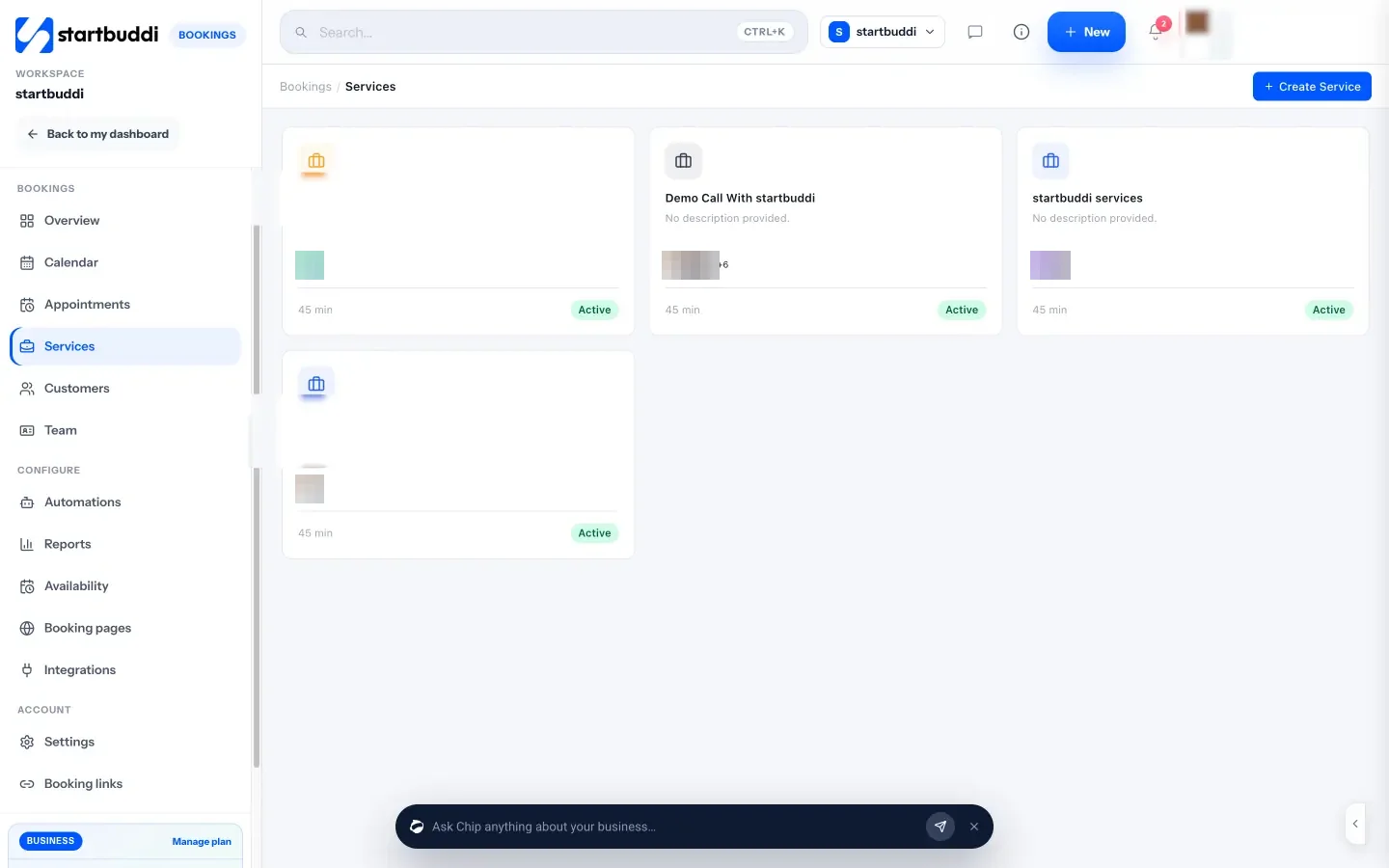
Bookings. In Bookings you create each service (consultation, one-to-one session, assessment) with its length and price, set your working hours and buffer time, and share one booking link. You can require payment or a deposit to book, and send reminder emails at a lead time you choose. Every booking also creates or updates the client’s contact record.
Client records. In Contacts, each client has a page with notes, tasks, files, messages and a money summary showing what’s been invoiced, paid and outstanding. You can add your own fields, such as a goal, a start date or sessions left, and use them in filters and messages.
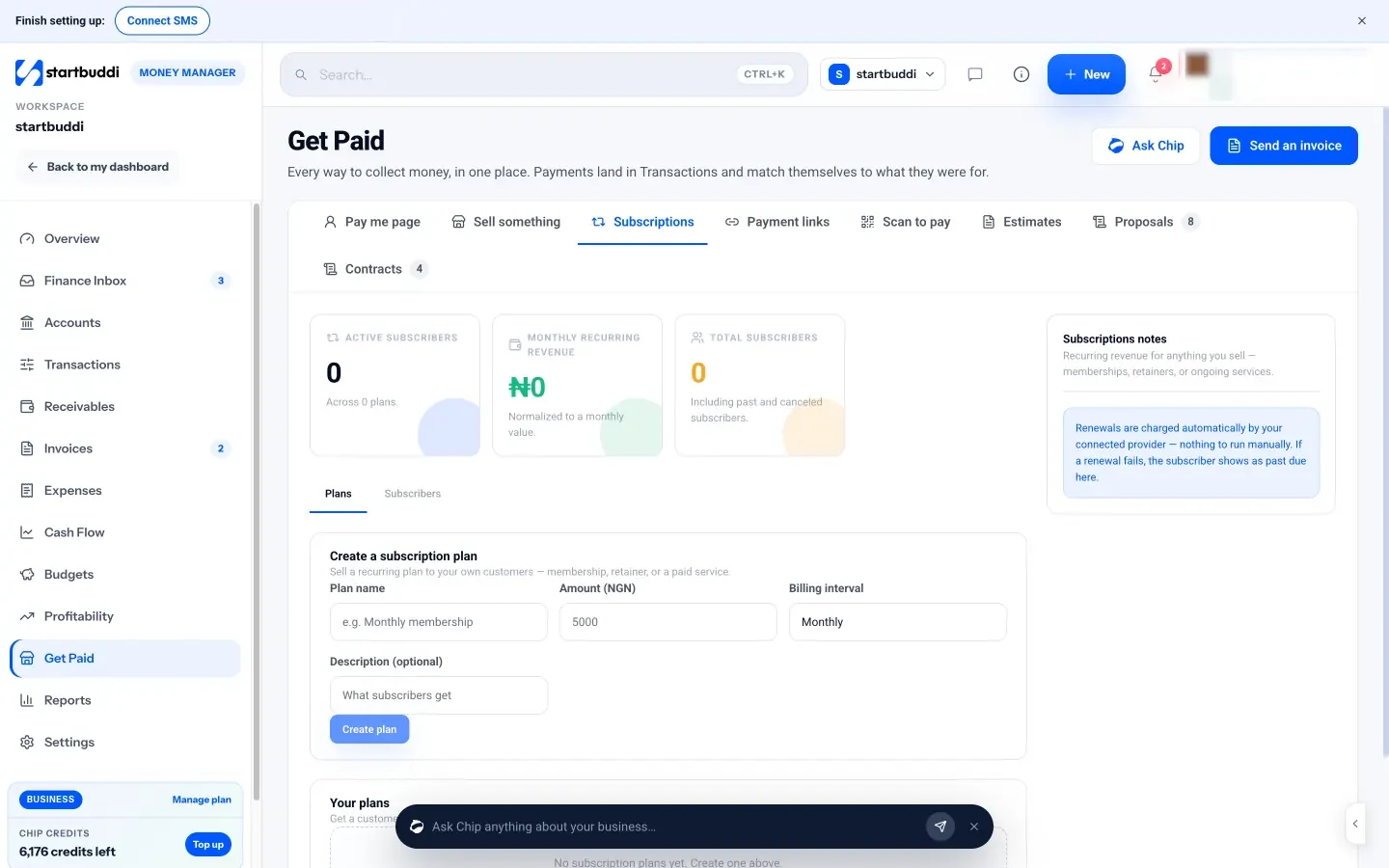
Payments. In Money Manager’s Get Paid area you can create a payment link for a session pack and paste it into WhatsApp, send a proper invoice, or set up a monthly plan through subscriptions with your own Stripe or Paystack account, so renewals happen automatically through the provider.
Follow-ups. Filter your contacts by “last contacted” to find people who’ve gone quiet, and ask Chip, the built-in AI assistant, who you haven’t contacted in 14 days. Automations can send a welcome message after a first booking or a rebooking message after a no-show.
A note on plans: Free covers up to 250 contacts and five invoices. WhatsApp and SMS need Starter or above (see pricing), and every paid plan has a 30-day trial. See pricing for everything included.
Your next step
Pick your three most regular clients and build their records properly this week: goal, starting point, next session booked, payment status. Then share a booking link with one new enquiry instead of messaging times back and forth. If it saves you time with three people, it will save you hours with thirty. You can try this on the startbuddi setup for coaches and trainers for free.
Sources
Frequently asked questions
Do personal trainers need a CRM?
Once you have more than about ten regular clients, usually yes. The time saved on booking, payment chasing and remembering who to check in with pays for itself quickly, and it stops clients quietly drifting away.
Can I use a general CRM as a personal trainer?
Yes, as long as it includes online booking, payments and client notes. A general CRM won't write workout programmes, so pair it with a coaching app if you deliver training plans online.
How should personal trainers track client progress?
Agree two or three measures at the start, write them on the client record, add a short note after each session and review every four to six weeks. Keep health details minimal and stored securely.
What is the best way for trainers to take payment?
Match how you sell: payment links for single sessions or packs, invoices for corporate clients, and recurring billing for monthly training. Taking a deposit at booking also cuts no-shows.
Tiwalade Joanna Okedara-Kalu is the founder, CEO and CTO of startbuddi, the business system that brings clients, bookings, invoices, projects, marketing and the Chip AI assistant into one place. Tiwalade builds software around how service businesses really work day to day, and writes about client management, getting paid on time and why small businesses outgrow the tools they start with.
Founded startbuddi and leads its product and engineering