
startbuddi vs Moxie: an honest comparison
Moxie is business software for freelancers, covering clients, projects, proposals and contracts, invoices, time tracking, forms, a sales pipeline and meeting schedulers, with a white-label client portal and automations on its Pro plan; startbuddi covers the same client work alongside a shared inbox, marketing, bookings with deposits and Paystack payments, so pick Moxie for its low solo price, integrations and mobile app, and startbuddi if you want client work and customer conversations in one place with a free plan to start.
startbuddi is best for
Freelancers and small teams who want client work, bookings, invoices and an inbox together
 Moxie
MoxieMoxie is best for
Solo freelancers who want clients, projects, invoices and time tracking at a low monthly price
At a glance
Where each one is stronger
The short version. Moxie first, because it does some things better than we do.
Moxie is stronger at
startbuddi is stronger at
Feature by feature
| Feature | startbuddi | Moxie |
|---|---|---|
| Free planFree: 1 seat, 250 contacts, 5 invoices a month | Yes | 14-day free trialSource (opens in a new tab) |
| Client records | Yes | YesSource (opens in a new tab) |
| Proposals, quotes and contractsOne built-in proposal template; contracts signed on startbuddi's signing page | Yes | YesSource (opens in a new tab) |
| Invoices and online paymentsMoxie lists cards, PayPal or ACH in 81+ currencies | Paystack, Stripe | Stripe, PayPalSource (opens in a new tab) |
| Time trackingBillable hours tracked; no one-click time-to-invoice | Yes | YesSource (opens in a new tab) |
| SchedulingBooking pages with deposits on every plan | Yes | YesSource (opens in a new tab) |
| Calendar syncPushes bookings to Google or Outlook; doesn't read busy times | One-way push | Google, Outlook, iCloud, CalDAVSource (opens in a new tab) |
| Client portalFree lets you build and preview a portal, not invite clients | Paid plans | Pro plan and upSource (opens in a new tab) |
| Workflow automations | Starter plan and up | Pro plan and upSource (opens in a new tab) |
| Sales pipeline | Yes | YesSource (opens in a new tab) |
| Zapier, Make and public APINo public API yet | No | Pro plan and upSource (opens in a new tab) |
| Mobile app | Web only | IOS and AndroidSource (opens in a new tab) |
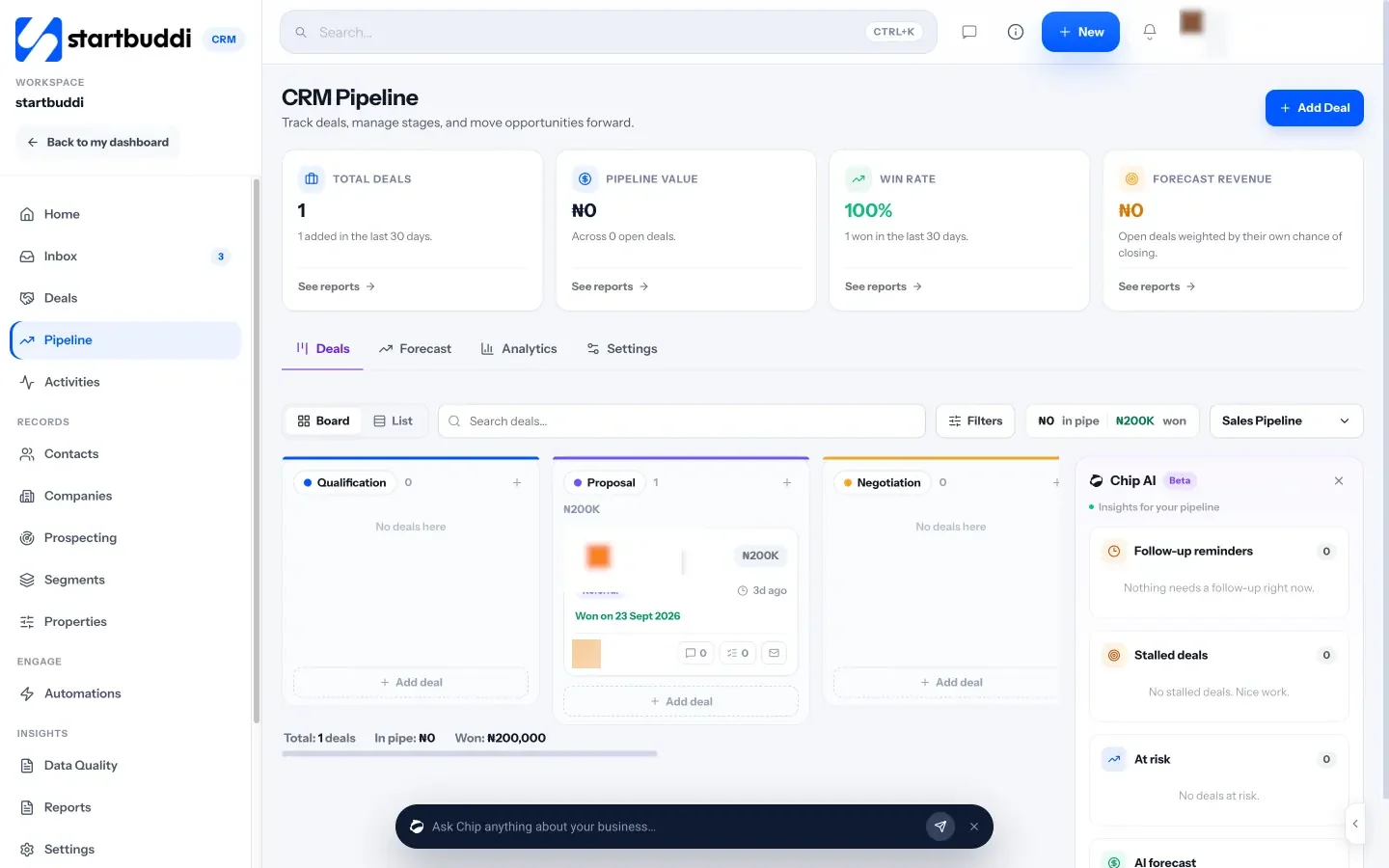
What each one looks like
Real screens, captured by us or taken from the official press kit, each dated.


Pricing side by side
List prices as each company publishes them. We never convert currencies.
startbuddi
- FreeFree
- Starter$29 a month
- Growth$79 a month
- Scale$199 a month
Moxie
- Starter$10 USD per month, $120 charged annually ($12 billed monthly)Source (opens in a new tab)
- Pro$20 USD per month, $240 charged annually ($25 billed monthly)Source (opens in a new tab)
- Teams$32 USD per month, $385 charged annually ($40 billed monthly); up to five team membersSource (opens in a new tab)
Switching from Moxie
What moving across involves.
- Get your clients out of MoxieCheck Moxie's help centre for how to export your clients to a CSV file, then open it in a spreadsheet to tidy the columns.
- Import your clients as contactsIn startbuddi, go to Customers → Contacts → Import, upload the CSV, map the columns and review before importing.
- Rebuild proposals, contracts and formsRecreate proposals and contracts in Money Manager and your intake forms in Forms. There's no automatic importer for Moxie templates or projects.
- Set up projects, bookings and portalsCreate projects in Work, add your meeting types in Bookings, then add a client portal for each active client and invite them by email link.
Sources
- Moxie pricing (opens in a new tab)
- Moxie invoicing (opens in a new tab)
- Moxie meeting scheduler (opens in a new tab)
- Moxie client portal (opens in a new tab)
- Moxie mobile app (opens in a new tab)
- startbuddi Bookings (opens in a new tab)
- startbuddi Forms (opens in a new tab)
- startbuddi Estimates, proposals & contracts (opens in a new tab)
- startbuddi Invoices (opens in a new tab)
- startbuddi Time tracking (opens in a new tab)
- startbuddi Client portals (opens in a new tab)
- startbuddi Work (projects and tasks) (opens in a new tab)
- startbuddi Inbox (opens in a new tab)
- startbuddi Automations (opens in a new tab)
- startbuddi Contacts (opens in a new tab)
- startbuddi pricing (opens in a new tab)
Questions people ask
Does Moxie have a free plan?
No. Moxie offers a 14-day free trial, then Starter, Pro or Teams, paid monthly or annually. It also mentions location-based and need-based scholarships.
Can startbuddi turn tracked time into an invoice?
Not in one click yet. Time tracking in Work records billable hours and their value, and you add them to an invoice in Money Manager yourself.
Does startbuddi sync with my calendar both ways?
No. Confirmed bookings are pushed to Google or Outlook, but startbuddi doesn't read busy times from your calendar.
Does startbuddi have a mobile app?
Not a native one. It is a web app that works in a phone's browser, while Moxie has iOS and Android apps.
Other comparisons
All comparisons


Try startbuddi alongside Moxie.
Start on the free plan with a copy of your contacts and see how it fits before you decide.
Free plan available. Every paid plan starts with a 30-day trial.