
How to create a business budget you will actually use
A four-part guide to creating a business budget: gather real numbers, build a 12-month plan from a template, set project and campaign budgets, and review it every month.


This guide shows you how to create a business budget you will actually use: a one-page plan for what you expect to earn, what you expect to spend and what should be left over each month. It is written for freelancers, solo founders and small service businesses who have never had a budget, or who made one in a spreadsheet once and never opened it again.
The short answer: list your expected income for the next 12 months, list your fixed costs, estimate your variable costs as a share of sales, set aside money for tax and for yourself, then compare the plan with what really happened every month and adjust. Everything else in this guide is how to do each of those steps well, with worked examples, a small business budget template you can copy, and the mistakes that make most first budgets fail.
Each chapter starts with the business thinking and ends with how to do it in startbuddi. By the end you will have a 12-month budget, a separate budget for at least one project or campaign, and a 30-minute monthly routine to keep it honest.
What a business budget is and why it matters
- What a business budget is (and what it is not)
- Why small businesses need a budget more than big ones
- The building blocks: income, fixed costs, variable costs
- Budget words you will hear
- How to think about the numbers: three honest questions
- A worked example: a freelance designer's first budget
- Budgeting when your income is irregular
- Five tests of a good budget
- Common mistakes before you even start
- Getting your real numbers out of startbuddi
Most small business owners know roughly what comes in and roughly what goes out. The trouble is the word "roughly". A budget turns rough into written down, so you can see a problem coming two months early instead of on the day rent is due. This chapter explains what a business budget is, why it matters even when you are tiny, and how to think about the numbers before you open a spreadsheet.
What a business budget is (and what it is not)
A business budget is a plan for your money over a set period, usually a year split into months. It says how much you expect to earn, how much you plan to spend and on what, and what you expect to have left. It is a decision tool: it helps you decide whether you can afford a new laptop, a part-time assistant or a month of advertising before you commit.
People often mix up three documents that look similar. They answer different questions, and you will use all three in this guide.
| Document | Question it answers | Looks |
|---|---|---|
| Budget | What do we plan to earn and spend? | Forward, a target you set |
| Cash flow forecast | Will we have enough cash in the bank each week or month? | Forward, a prediction that changes as invoices and bills move |
| Profit and loss statement | What did we actually earn and spend? | Backward, a record of what happened |
The budget sets the plan, the profit and loss (P&L) shows what really happened, and the cash flow forecast warns you when timing will hurt even if the plan is fine. A business can be on budget for the year and still run short of cash in March because a big client paid 45 days late. That is why chapter 4 pairs the budget with a cash flow view. If you want to go deeper on the backward-looking side, our guide to financial statements for small business explains the P&L, balance sheet and cash flow statement in plain words.
Why small businesses need a budget more than big ones
A large company has a finance team and a cushion. A small business has you, and usually a thin cushion. The JPMorgan Chase Institute studied the bank accounts of hundreds of thousands of US small businesses and found that the median small business holds 27 cash buffer days, meaning it could cover about 27 days of normal spending if money stopped coming in. A quarter held fewer than 13 days.
With a buffer that thin, one surprise can become a crisis. A budget does not remove surprises, but it shows you where the slack is, so you know which costs you could pause and how long you could last.
There are four practical reasons to budget, even if you are a one-person business:
- You stop guessing whether you can afford things. The budget answers "can I spend $400 on a course this month?" in seconds.
- You pay yourself on purpose. Many founders take whatever is left. A budget puts your pay on the list like any other cost.
- You set aside tax before you spend it. Tax bills are the most common nasty surprise for new business owners. We cover this in small business taxes for beginners.
- You can talk to lenders and partners. A bank, investor or co-founder will ask what you expect to earn and spend. A budget is the answer.
The building blocks: income, fixed costs, variable costs
Every budget, from a market stall to a 20-person agency, is built from the same few pieces. Learn these and the rest is arithmetic.
Income (revenue). Money you expect to receive from customers. For a service business, this might be client projects, monthly retainers, bookings or course sales. Split it by source, because each source behaves differently: retainers are steady, one-off projects are lumpy.
Fixed costs. Costs that stay the same whatever you sell. The US Small Business Administration describes them as expenses that do not change with the increase or decrease in production or services. Rent, software subscriptions, insurance, phone and internet, accountant fees and salaries are typical.
Variable costs. Costs that rise and fall with sales. Materials, payment processing fees, freelancers you hire per job, delivery, printing for client work and sales commissions are typical. The easiest way to budget these is as a percentage of income: if every $1,000 of sales costs you $150 in materials and fees, your variable costs are 15%.
Owner's pay. What you take out for yourself. Treat it as a fixed cost in the budget, even if in practice it flexes.
Tax set-aside. A percentage of profit (or of sales, if you are on a turnover tax) that you move out of reach so it is there when the bill arrives.
Buffer and savings. Money you deliberately leave unspent to build the cushion from the section above.
Budget words you will hear
You do not need finance jargon to budget, but a few words come up often enough that it helps to know them.
- Gross profit: income minus the variable costs of delivering it. It shows how much each sale really contributes.
- Operating profit: gross profit minus fixed running costs. It shows whether the business as a whole makes money before tax.
- Variance: the gap between what you planned and what happened. Chapter 4 is all about reading it.
- Forecast: your current best guess of what will happen, updated as you learn more. The budget stays put; the forecast moves.
- Run rate: what a recent month or quarter would add up to over a full year. Useful, but misleading in seasonal businesses.
- Accrual and cash basis: two ways of counting income and costs. Cash basis counts money when it moves; accrual counts it when it is earned or owed. Most small business budgets use cash, which is simpler and closer to how owners think.
How to think about the numbers: three honest questions
Before you write a single figure, answer three questions. They stop the most common first-budget mistake, which is writing down what you hope will happen.
- What did the last 3 to 12 months actually look like? Your past is the best evidence you have. If you have been trading for a while, start from real totals. If you are brand new, start from what you know: prices you have quoted, clients who have said yes, costs you are already paying.
- What is already certain? Signed retainers, rent, subscriptions you cannot cancel, loan repayments. Put these in first. Everything else is an estimate.
- What would the year look like if sales came in 20% below plan? If the answer is "I could not pay rent in month four", your plan is too tight. You need either a lower cost base, a bigger buffer or a more cautious income line.
A worked example: a freelance designer's first budget
Maya is a freelance brand designer in Toronto who has been working for herself for eight months. She invoices in Canadian dollars. Here is how she thinks about her first budget, using her own numbers from the past eight months.
| Item | Last 8 months (actual) | Monthly average | Type |
|---|---|---|---|
| Client projects | C$38,400 | C$4,800 | Income |
| Software (design suite, fonts, storage) | C$1,120 | C$140 | Fixed |
| Co-working desk | C$2,400 | C$300 | Fixed |
| Phone and internet | C$800 | C$100 | Fixed |
| Printing and mock-ups for clients | C$1,920 | C$240 | Variable (5% of sales) |
| Payment fees | C$1,150 | C$144 | Variable (3% of sales) |
Her average month brings in C$4,800. Fixed costs are C$540 a month and variable costs about 8% of sales, so C$384 at her average. That leaves roughly C$3,876 before tax and before paying herself. She now knows three useful things: her business is profitable, her fixed costs are small, and the real question is how much to set aside for tax and how much she can safely pay herself. Chapter 2 turns this into a full 12-month plan.
Budgeting when your income is irregular
Many freelancers and small service businesses say they cannot budget because their income is unpredictable. In fact, irregular income is the strongest reason to budget, because it is the situation where good months get spent and bad months hurt.
The trick is to plan on your low months, not your average ones. Look back over the last 6 to 12 months and find your lowest three months of income. Their average is your "floor". Build your fixed costs and your own pay so the floor covers them. Anything above the floor goes into three pots in an order you decide in advance: tax first, then the buffer, then extra pay or investment in the business.
For example, a wedding photographer in Cape Town might earn R80,000 in a peak month and R15,000 in a quiet winter month. If her three lowest months average R22,000, she keeps fixed costs and base pay under that figure, and treats every peak month as the money that carries her through winter. She is not predicting each month perfectly. She is making sure the plan survives the worst months she has already lived through.
Five tests of a good budget
Once you have a draft (chapter 2 walks you through it), check it against these five tests. A budget that passes all five is one you will actually use.
- It fits on one screen. If you have to scroll sideways and down to understand it, it is too detailed to review every month.
- Every income line has a reason. "Two retainers already signed" or "about three projects a month, as last year" is a reason. "Hopefully more" is not.
- Your own pay is on it. Paying yourself is a cost of running the business, not a leftover.
- It survives a bad quarter. Cut income by 20% for three months and see if you can still pay fixed costs. If not, change the plan now.
- You know when you will next look at it. A budget with no review date will not be reviewed.
Common mistakes before you even start
- Mixing personal and business money. If groceries and software come out of the same account, your "business spending" figures are wrong from the start. Open a separate account or at least tag every business transaction.
- Budgeting from memory. People underestimate small recurring costs. Export your statements or look at your recorded expenses instead.
- Only budgeting costs. A budget with no income line is a spending limit, not a plan.
- Making it too detailed. Forty categories is a spreadsheet nobody updates. Ten to fifteen lines is plenty for most small businesses.
- Treating it as fixed forever. A budget is a plan you revise, not a promise. Chapter 4 covers when to change it.
Getting your real numbers out of startbuddi
The hardest part of a first budget is finding out what really happened. If you already send invoices and record expenses in Money Manager, most of that work is done for you.
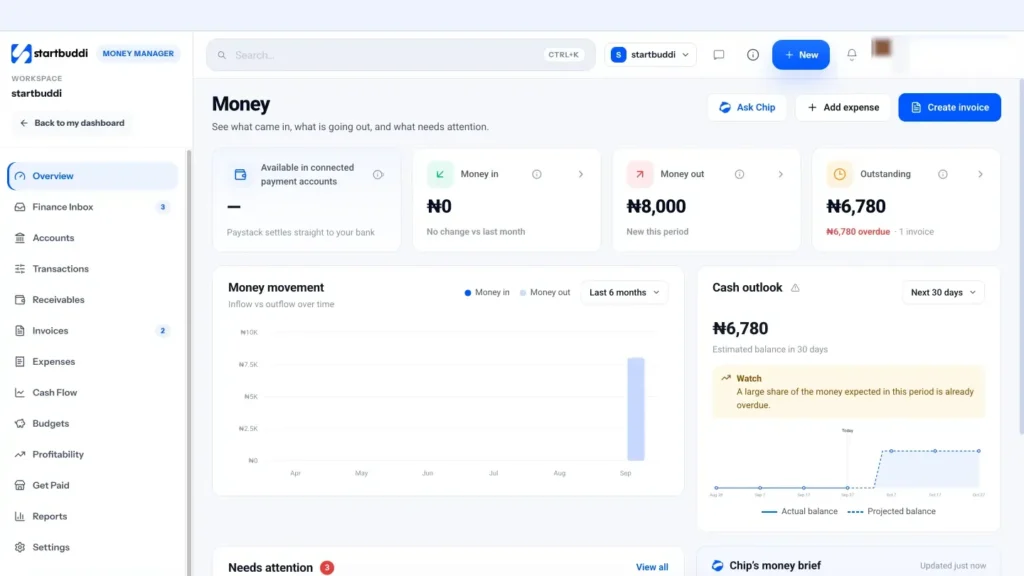
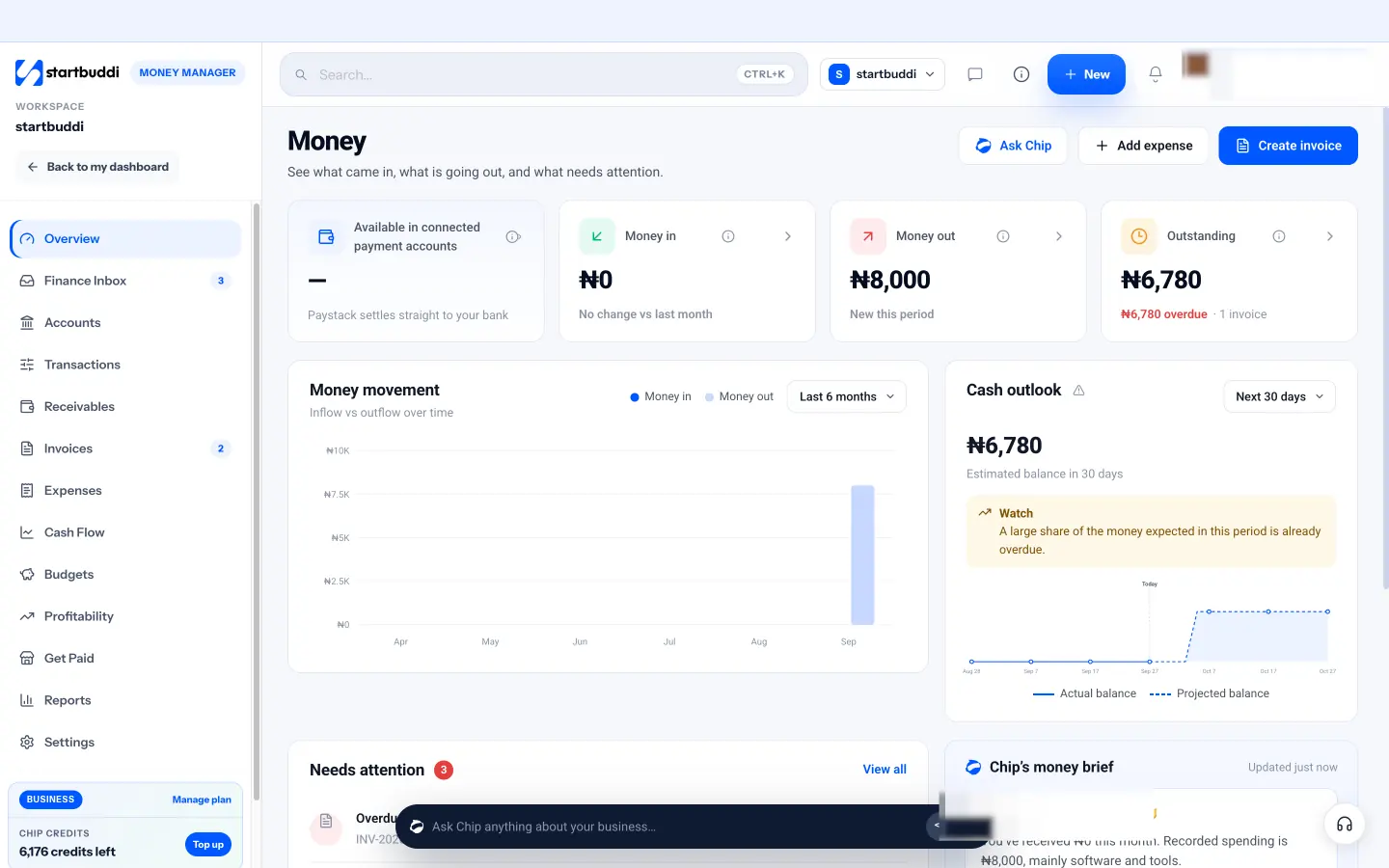
1. Start on the overview. Open Money Manager. The overview, titled "Money", shows four cards: money available in connected payment accounts, money in this month, money out this month and what is outstanding. Below them, the money movement chart shows inflow against outflow for the last six months. That chart is your first rough budget baseline: it shows your typical month and how much it swings.
2. Look at spending by category. Go to Expenses and open the Categories tab to see spend by category for the period. Expenses use a fixed set of categories (software and tools, marketing, travel, office and supplies, contractor or freelancer, taxes and fees, bank fees and other), which map neatly onto budget lines. The Recurring tab lists rent, subscriptions and retainers you pay regularly, which are most of your fixed costs.
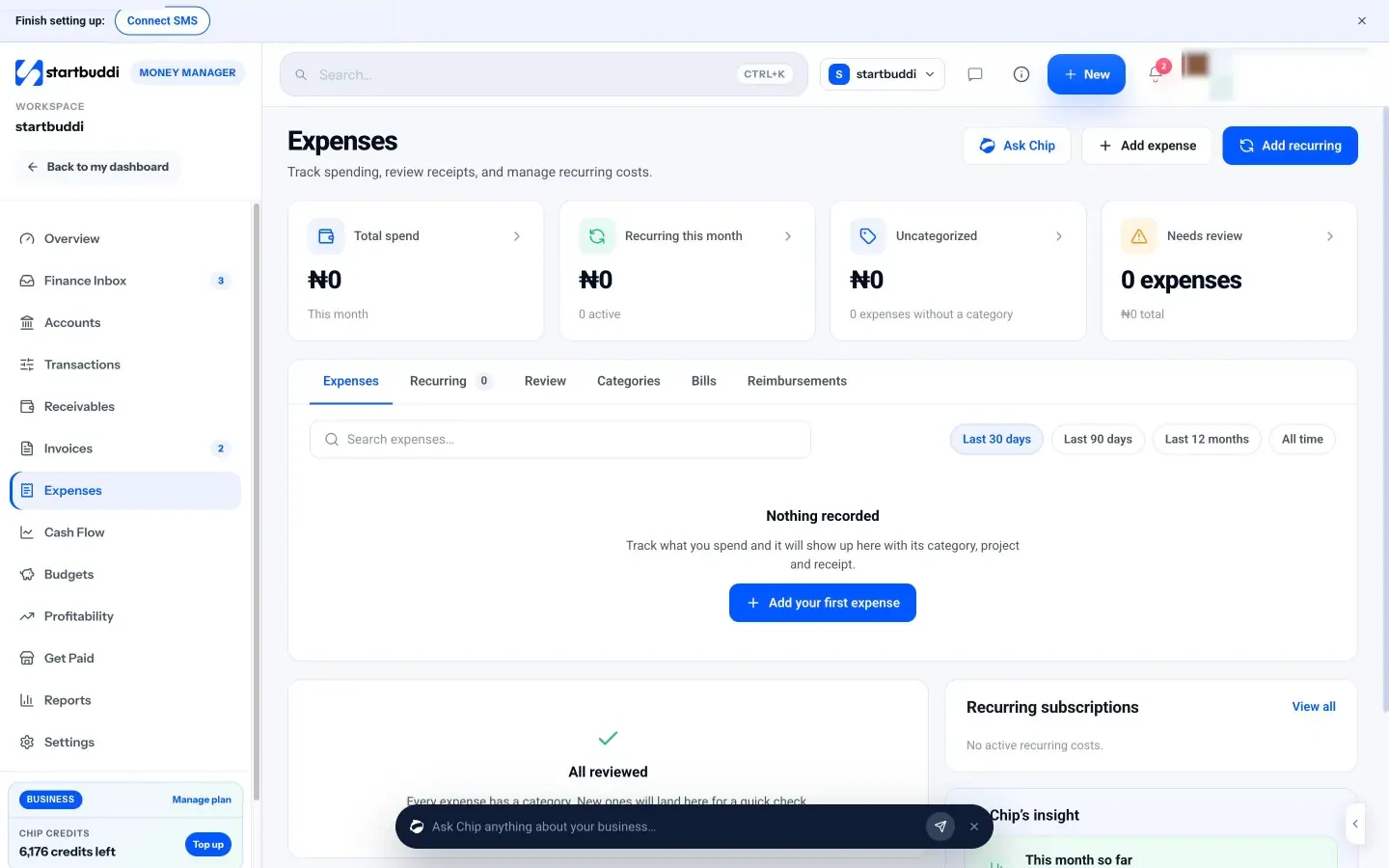
3. Clean up before you trust the numbers. If some expenses are marked Uncategorized, the Review tab steps you through them one at a time and suggests the category that vendor was given last time. A budget built on half-categorised spending will be wrong, so clear the queue first. If you have not been recording expenses, our help article on how to record expenses in startbuddi shows you how, and what expense tracking is explains why it matters.
4. Ask Chip for a summary. On the overview, the Ask Chip button asks for a summary of the month: what came in, what went out, what is owed and what needs attention. Chip's money brief also has a "Summarize my expenses" chip. Use it as a starting point, then check the figures yourself.
A limit worth knowing: Money Manager does not connect to your bank account, so money that never touched an invoice, a connected Stripe or Paystack account or a recorded expense will not be there. If you pay some costs from a card you have not logged, add them before you build the budget. With your real numbers in hand, you are ready for chapter 2.
How to create a business budget: a step-by-step template
- Step 1: choose the period and the level of detail
- Step 2: estimate income cautiously
- Step 3: list fixed costs, including the annual ones
- Step 4: set variable costs as a percentage of sales
- Step 5: pay yourself, set aside tax, keep a buffer
- A small business budget template you can copy
- Worked example: a small bakery in Lagos
- Step 6: check the budget against your break-even point
- Step 7: sense-check it before you commit
- If you have no history yet: a pre-launch budget
- Budgeting in more than one currency
- Mistakes to avoid when building the budget
- Using startbuddi as your starting point
With your real numbers gathered, you can build the budget itself. This chapter walks through the steps in order, gives you a small business budget template to copy, and shows two worked examples: a service business in London and a food business in Lagos. Set aside about an hour for the first version.
Step 1: choose the period and the level of detail
Most small businesses budget for 12 months, split into monthly columns. A year is long enough to include seasonal highs and lows and the annual bills (insurance, domain renewals, accountant fees) that ambush you if you only plan a month ahead. Monthly columns are short enough to spot problems while you can still act.
If you are pre-launch or very new, a 3 or 6-month budget is fine to start. You can extend it once you have real trading months to learn from.
Keep the rows short. A good first budget has three to five income lines, six to ten cost lines, and three "below the line" rows for owner's pay, tax and savings.
Step 2: estimate income cautiously
Income is where most budgets go wrong, because it is the number you most want to be big. Build it from the bottom up, one source at a time, and be conservative.
- Recurring income first. Retainers, memberships and subscriptions that are already agreed. These are the most reliable lines. Our guide to recurring revenue for service businesses explains how to grow this part.
- Repeat customers next. Clients who buy from you every few months. Use their past pattern.
- New work last. Estimate it as number of new clients times average sale. If you win about two new projects a month at an average of $1,500, budget $3,000, not the $6,000 you hope for.
Then check each month against reality. Does December really bring in as much as October? For many service businesses, the summer or year-end holidays are quiet. For a caterer or photographer, they may be the busiest months. Use your past months to shape the year rather than copying one number across all twelve columns.
Step 3: list fixed costs, including the annual ones
Go through the last year of statements, receipts or recorded expenses and list every cost that does not change with sales. Put each in the month it is actually paid. An annual insurance premium of $600 belongs in the month it leaves your account, not spread as $50 a month, because that is when the cash goes. (If you prefer to smooth it, move $50 a month into a separate savings pot so the money is there.)
Commonly forgotten fixed costs include domain and hosting renewals, professional memberships, annual software plans, accountant or bookkeeping fees, business registration or licence renewals, equipment replacement and bank charges.
Step 4: set variable costs as a percentage of sales
Work out what each unit of sales costs you. Look at a few past months: total variable costs divided by total sales gives you a percentage. Use that percentage in each month of the budget, so variable costs rise and fall with your income line automatically.
Payment processing fees are a good example. Card and online payment providers charge a percentage of each payment, and the rate depends on your provider, country and payment method, so check your own provider's published pricing and use what you actually paid last year.
Step 5: pay yourself, set aside tax, keep a buffer
These three lines are what turn a list of numbers into a plan for your life.
Owner's pay. Decide on a fixed monthly amount you will pay yourself, based on what the business can support in an average month, not a great one. Some owners pay themselves a base amount and top it up at the end of each quarter if the budget is ahead.
Tax set-aside. Work out roughly what you expect to owe in income or company tax, and in sales tax or VAT if you charge it, and move that percentage out of your working account every time you are paid. The right percentage depends on your country, structure and profit, so check with a local accountant or your tax authority's guidance.
Buffer. Aim to build savings equal to a few months of fixed costs and owner's pay. Budget a small monthly amount towards it and do not touch it for ordinary spending.
A small business budget template you can copy
Here is the layout. Copy it into a spreadsheet with 12 month columns plus a total. The example shows one month for a two-person marketing consultancy in London, invoicing in pounds.
| Line | How to estimate it | Example month |
|---|---|---|
| Income: retainers | Signed monthly retainers | £6,000 |
| Income: projects | New projects × average value, cautiously | £4,000 |
| Income: workshops | Booked sessions only | £800 |
| Total income | £10,800 | |
| Freelancers per project | 20% of project income | £800 |
| Payment fees | About 2% of income | £216 |
| Gross profit | Income minus variable costs | £9,784 |
| Salary for employee | Fixed, including employer costs | £3,200 |
| Office rent | Fixed | £900 |
| Software and tools | Fixed | £350 |
| Marketing | Planned amount | £500 |
| Accountant | Fixed | £150 |
| Insurance and other | Fixed | £120 |
| Operating profit | Gross profit minus fixed costs | £4,564 |
| Owner's pay | Fixed decision | £2,800 |
| Tax set-aside | Your estimate or your accountant's | £1,000 |
| Buffer savings | Planned amount | £500 |
| Left over | Should be zero or positive | £264 |
The bottom line should be small and positive. If it is large, you are either being cautious (fine) or leaving money idle that could go into savings or growth. If it is negative, something has to change: prices, costs, owner's pay or the income plan. Our profit margin calculator is a quick way to check whether your prices leave enough room.
Worked example: a small bakery in Lagos
Tolu runs a home bakery in Lagos selling celebration cakes and small chops for events. Her business is very seasonal: December and the Easter period are busy, while January is quiet. Her budget uses naira and shapes each month from last year's sales.
| Line | January | April | December |
|---|---|---|---|
| Cake and event orders | ₦600,000 | ₦1,400,000 | ₦2,200,000 |
| Ingredients and packaging (35% of sales) | ₦210,000 | ₦490,000 | ₦770,000 |
| Delivery riders (8% of sales) | ₦48,000 | ₦112,000 | ₦176,000 |
| Assistant baker (fixed) | ₦150,000 | ₦150,000 | ₦150,000 |
| Gas, power and data (fixed) | ₦90,000 | ₦90,000 | ₦90,000 |
| Instagram ads (planned) | ₦40,000 | ₦60,000 | ₦80,000 |
| Before owner's pay and savings | ₦62,000 | ₦498,000 | ₦934,000 |
The budget makes one thing obvious: January cannot pay Tolu's salary on its own. So she plans to pay herself a steady ₦250,000 a month and to save part of December's surplus to cover January and February. Without a budget, December would feel like a windfall, and January like a disaster. With one, both are simply part of the plan.
Step 6: check the budget against your break-even point
Your break-even point is the level of sales where income exactly covers costs, with nothing left over and nothing lost. The SBA defines it as the point at which total cost and total revenue are equal. Knowing it tells you the minimum you must sell each month before the business makes a single dollar of profit.
The quick version for a service business: take your monthly fixed costs (including your own base pay) and divide by your gross margin, the share of each sale left after variable costs. If your fixed costs are $4,000 a month and variable costs are 20% of sales, your gross margin is 80%, so you need $4,000 ÷ 0.80 = $5,000 of sales a month to break even.
Now compare that with your income line. If you have budgeted $5,200 a month, you are only just above break-even, and one quiet month puts you under. If you have budgeted $8,000, you have a comfortable margin. Either way, it is far better to know before the year starts than to find out in the bank statement.
Step 7: sense-check it before you commit
Before you call the budget finished, read it through once as a sceptic. Ask a co-founder, a friend who runs a business or your accountant to do the same. Three questions catch most problems: Where did this income number come from? What happens if the biggest client leaves? What have I forgotten that I paid for last year?
Maya, the Toronto designer from chapter 1, did exactly this. Her friend asked about equipment, and she realised her four-year-old laptop would almost certainly need replacing within the year. She added a C$2,200 one-off line in September, her quietest month, and reduced her planned pay slightly in the two months before so the cash would be there. A five-minute conversation saved her a stressful autumn.
If you have no history yet: a pre-launch budget
If you are just starting, you have no past months to copy. Build the budget in two parts instead.
One-off start-up costs. Equipment, a first batch of stock, registration fees, a website, a deposit on premises. The SBA separates these one-time costs from the monthly ones you pay to keep running. List them, total them and decide how you will fund them: savings, a loan, early sales or a mix.
Monthly running costs and income. Estimate these from quotes, price lists and conversations with potential customers. Be especially cautious with income in the first three months: most new businesses take longer to win customers than their owners expect. Planning for slow early months and being pleasantly surprised is far better than the reverse.
Then set a review date for the end of month three, when you have real numbers to replace your guesses. Our business plan template has a section for these start-up figures if you are also writing a plan for a lender or partner.
Budgeting in more than one currency
Many small businesses earn in one currency and spend in another: a Nigerian developer billing US clients, a Kenyan exporter paying suppliers in shillings, a UK consultant with a client in euros. Pick one reporting currency for the budget (usually the one you pay most costs in), convert everything else at a cautious rate, and write that rate at the top of the sheet. Review it each quarter. If the rate moves sharply in your favour, treat the extra as a bonus for savings, not a reason to raise spending.
Mistakes to avoid when building the budget
- One number copied across 12 months. Real businesses have seasons. Shape each month.
- Forgetting annual costs. They are rare, so they are easy to forget, and they are often big.
- No line for yourself. If the business only works because you are unpaid, the budget should say so plainly.
- Counting invoices as cash. A $3,000 invoice due in 30 days is not money you can spend this month. The budget can count it, but your cash flow view (chapter 4) needs the real payment date.
- Mixing currencies without a rule. If you earn in dollars and spend in naira or rand, pick one reporting currency and a cautious exchange rate, and note it at the top.
Using startbuddi as your starting point
You can keep the 12-month plan in a spreadsheet: that is fine, and many businesses do. Where startbuddi helps is with the parts that are tedious by hand: getting last year's actual figures and keeping track of recurring costs.
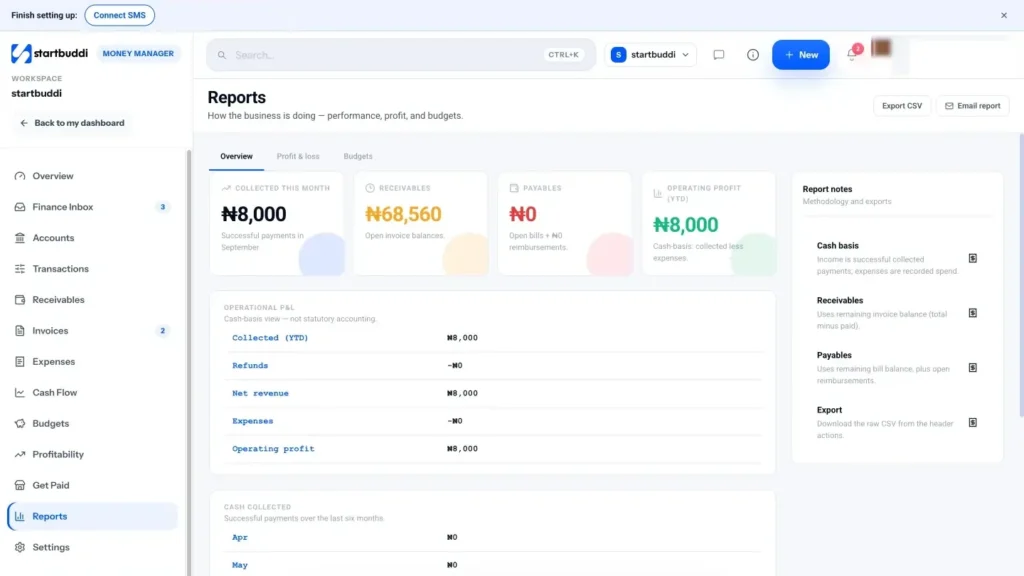
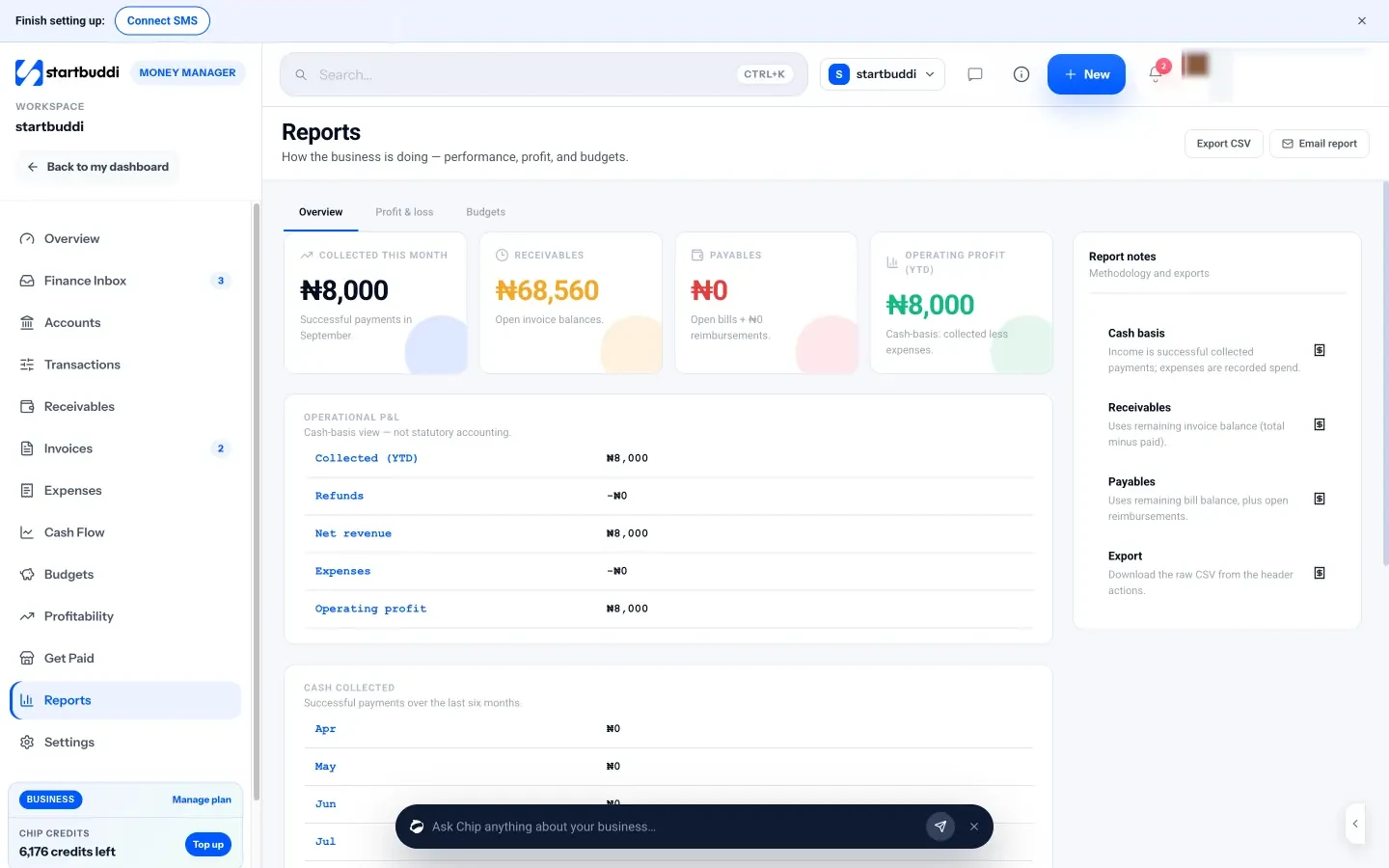
Pull your actuals from Reports. In Money Manager, open Reports and the Profit & loss tab. It is built from your real invoices, payments and expenses, and you can switch between this month, this quarter, this year and year to date. It shows revenue, expenses and net profit, income broken down by source (invoices, bookings, subscriptions, payment links and more) and expenses by category. That is the actual column for your budget. Use Export CSV to take the raw data into your spreadsheet. The page is clear that it is a cash-basis view, not statutory accounts.
Keep fixed costs honest with recurring expenses. In Expenses, use Add recurring for rent, subscriptions and retainers you pay regularly. Each has a vendor, amount, how often it repeats (monthly or quarterly) and the day of the month. Recurring costs feed the cash forecast and budgets, so you are not typing the same numbers into two places. You can pause and resume each one when you cancel or restart a service.
Set your tax line on invoices. In Money Manager settings, under Invoice defaults, you can set a default tax rate and label (for example VAT at your local rate). The Profit & loss tab then shows a running total of tax added to invoices, which is a useful check against your tax set-aside line. It is a reference figure, not a filing.
Free plans include expense tracking and 5 invoices a month, and Starter and above include unlimited invoices. The next chapter covers budgets for specific projects, campaigns and teams, which is where the Budgets page comes in.
Budgets for projects, campaigns and teams
- Why smaller budgets matter
- Four kinds of budget a small business can use
- Choosing a budgeting method
- Incremental budgeting
- Zero-based budgeting
- Percentage-of-revenue budgeting
- Activity-based (bottom-up) budgeting
- How to set a project budget
- A project budget template
- How to set a marketing campaign budget
- Team and department budgets
- Budgeting for a new hire
- Equipment and other big one-off purchases
- A simple spending approval template
- Common mistakes with project and campaign budgets
- Setting budgets in startbuddi
A company-wide budget tells you whether the business as a whole is on track. It does not tell you whether the website rebuild for one client is eating your margin, or whether this month's advertising is worth it. For that, you need smaller budgets for specific pieces of work. This chapter covers project, campaign and team budgets, the main budgeting methods and how to choose one, and how to set them up so you get warned before you overspend.
Why smaller budgets matter
Overspending rarely happens in one big decision. It happens in small ones: an extra freelancer here, a stock photo subscription there, "just one more round" of ads. On a single business-wide budget these disappear into the total. On a project budget of $2,000, a $400 surprise stands out at once.
Smaller budgets also answer the question every owner eventually asks: which clients, projects and activities actually make money? A client who pays well but needs constant extra work can be less profitable than a smaller one who does not. Project budgets make that visible.
Four kinds of budget a small business can use
| Budget | Use it for | Example |
|---|---|---|
| Company | The overall annual plan from chapter 2 | Total spending of $60,000 this year |
| Project | A piece of client or internal work with a clear end | $3,500 of freelancer and printing costs on a rebrand |
| Campaign | A marketing push with a start and finish | ₦300,000 on a festive-season promotion |
| Team or department | A group that spends regularly | R8,000 a month for the sales team's travel and tools |
You do not need all four. A freelancer might only need a company budget and a few project budgets. A 15-person agency might use all of them.
Choosing a budgeting method
There are several ways to decide the numbers. Each suits a different situation, and you can mix them.
Incremental budgeting
Take last year's figures and adjust them up or down. It is quick and works well for stable costs. The risk is that it carries old waste forward: if you overspent on software last year, you will budget to overspend again.
Zero-based budgeting
Start every line at zero and justify each cost from scratch. "Do we need this tool? What would happen if we stopped?" It takes longer, but it is the best way to find money you are wasting. A good compromise is to do a zero-based review of your fixed costs once a year and use incremental budgeting the rest of the time.
Percentage-of-revenue budgeting
Set some lines as a share of income: marketing at a set percentage of sales, for example. It keeps spending in proportion as you grow or shrink. It works best for variable costs and discretionary lines like marketing, not for rent.
Activity-based (bottom-up) budgeting
Start from the work. A project that needs 20 hours of a freelancer at $50 an hour, $200 of stock images and $150 of printing has a $1,350 cost budget. This is the natural method for project budgets, and it ties straight into quoting: if the quote does not cover the bottom-up cost plus your margin, the price is wrong. Our hourly rate calculator helps you set that rate.
How to set a project budget
- Start from the quote or estimate. The price you agreed with the client is the income side. If you are still pricing the work, see our guide to pricing strategy for small business.
- List the direct costs. Freelancers, materials, travel, software bought for this job, printing, delivery.
- Decide the margin you want. If the job is $5,000 and you want at least 40% left after direct costs, the cost budget is $3,000.
- Add a contingency. Five to ten per cent for things that go wrong. If you do not use it, it becomes profit.
- Agree what happens on scope changes. If the client asks for more, the budget and the price should both change. That is how you stop scope creep eating your margin.
A project budget template
Here is a simple layout for one client project, using a website build for a dental clinic priced at $6,000. Keep one of these per project, even if it is just a few lines in a note.
| Line | Budget | Actual so far | Notes |
|---|---|---|---|
| Agreed price | $6,000 | $3,000 received | 50% deposit paid |
| Freelance developer | $1,800 | $1,200 | 36 hours at $50 |
| Copywriter | $600 | $600 | Done |
| Stock photos and plugins | $250 | $180 | |
| Contingency (7%) | $420 | $0 | Unused so far |
| Total direct costs | $3,070 | $1,980 | |
| Expected margin | $2,930 (49%) | Before your own time |
The "before your own time" note matters. If you spend 40 hours on the project yourself, that $2,930 is really about $73 an hour for your time. Whether that is good depends on your target rate, which is exactly the kind of thing a project budget helps you see.
How to set a marketing campaign budget
Campaign budgets are where small businesses most often spend without a plan, because ad platforms make it easy to add "just a bit more". Work backwards from what a customer is worth to you.
Say a new client is worth $1,200 in profit over their first year. If you would be happy to spend up to a quarter of that to win one, you can afford about $300 per new client. If past campaigns have turned roughly one in ten enquiries into a client, you can afford about $30 per enquiry. A $1,500 campaign then needs to bring in about 50 enquiries to pay for itself. Those are example numbers: use your own conversion rates and profit per client.
Write down the total budget, the channels, the dates, and the result you expect (enquiries, bookings, sales). Then check spend against it weekly while the campaign runs.
If you have never run a campaign before, you will not know your conversion rates yet. In that case, treat the first campaign as a paid experiment: set a small, fixed budget you can afford to lose, decide in advance how long it runs, and measure everything. The numbers you learn become the basis for the next, larger budget. Spending more before you know what one customer costs you is how small businesses burn through marketing money with nothing to show for it.
Team and department budgets
Once you have people spending on the business's behalf, give each area a monthly or quarterly budget and one person who owns it. Owners should be able to see spend against the budget without asking you, and should get a warning before they go over. Keep approval rules simple: for example, anything over a set amount needs your approval, anything under can be spent within budget.
If your team pays for things themselves and claims them back, those claims are part of the team's spending too. Include reimbursements in the budget, not only company card spend.
Budgeting for a new hire
Hiring is often the biggest single budget decision a small business makes, and the one most often under-budgeted. A salary is only part of the cost. Depending on your country, an employee can also mean employer social security or pension contributions, statutory benefits, equipment, software seats, training and the time you spend managing them.
Budget the full monthly cost, not just the salary. Then ask the key question: how much extra income does this person need to make possible for the hire to pay for itself? If a part-time assistant costs $1,800 a month in total and frees you to take on two more $1,500 projects, the numbers work. If they free up time but you have no extra work to fill it, they do not, at least not yet. Our post on cash flow management covers the timing side: salaries go out every month from day one, while the extra income may take a few months to arrive.
Equipment and other big one-off purchases
Some spending is not a running cost at all: a new laptop, a camera, a vehicle, an oven. These are assets you will use for years. In a simple budget, show them as separate one-off lines in the month you pay for them, so they do not make a single month look like a disaster or hide in "other".
Before you buy, check three things: can the cash forecast take the hit in that month, would leasing or paying in instalments be better for cash, and how much extra income or saved time the purchase will bring. Your accountant can tell you how the purchase is treated for tax where you are, which often differs from how it shows in your budget.
A simple spending approval template
Once other people spend money for the business, write down who can approve what. Keep it short enough to fit in a message to the team.
- Within budget, under a set amount: the budget owner can spend without asking.
- Within budget, over that amount: the budget owner checks with you first.
- Anything outside a budget: needs your approval and a note of which budget it comes from.
- Recurring commitments (new subscriptions, contracts): always need your approval, because they become fixed costs.
Common mistakes with project and campaign budgets
- Setting the budget after the spending starts. A budget written at the end is a report, not a plan.
- Forgetting your own time. A project can be "on budget" for costs and still lose money because it took three times the hours you quoted.
- No owner. A budget nobody watches will be exceeded.
- Only tracking what has been paid. A signed order you have not paid yet is still committed spend. Watch committed as well as actual spend.
- Never closing the budget. When a project ends, compare budget to actual and write down one lesson for the next quote.
Setting budgets in startbuddi
Money Manager has a Budgets page for exactly this. Its subtitle sums it up: plan spending across your company, projects and campaigns.
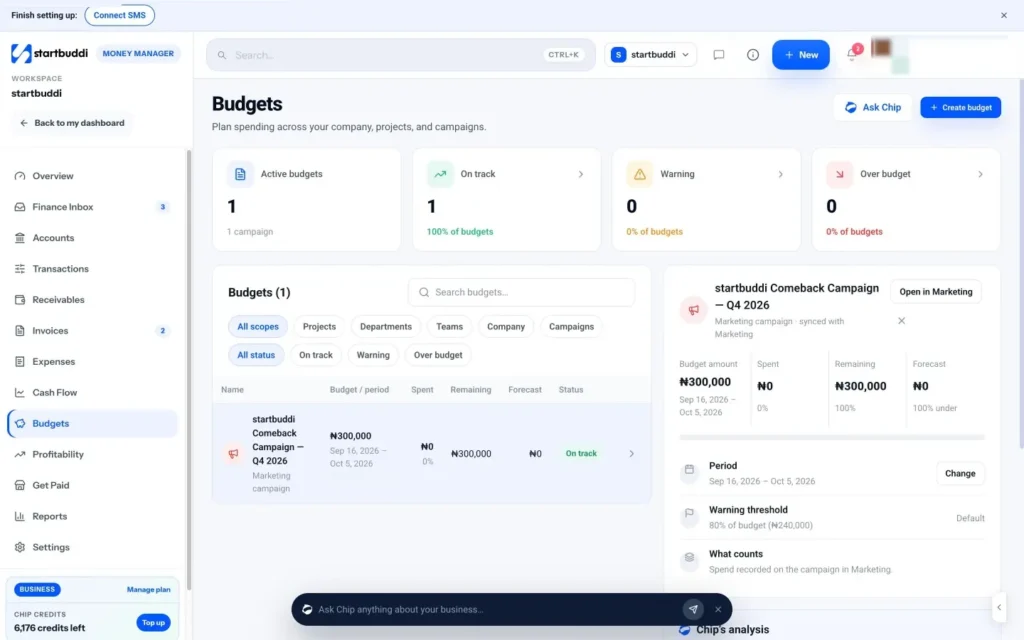
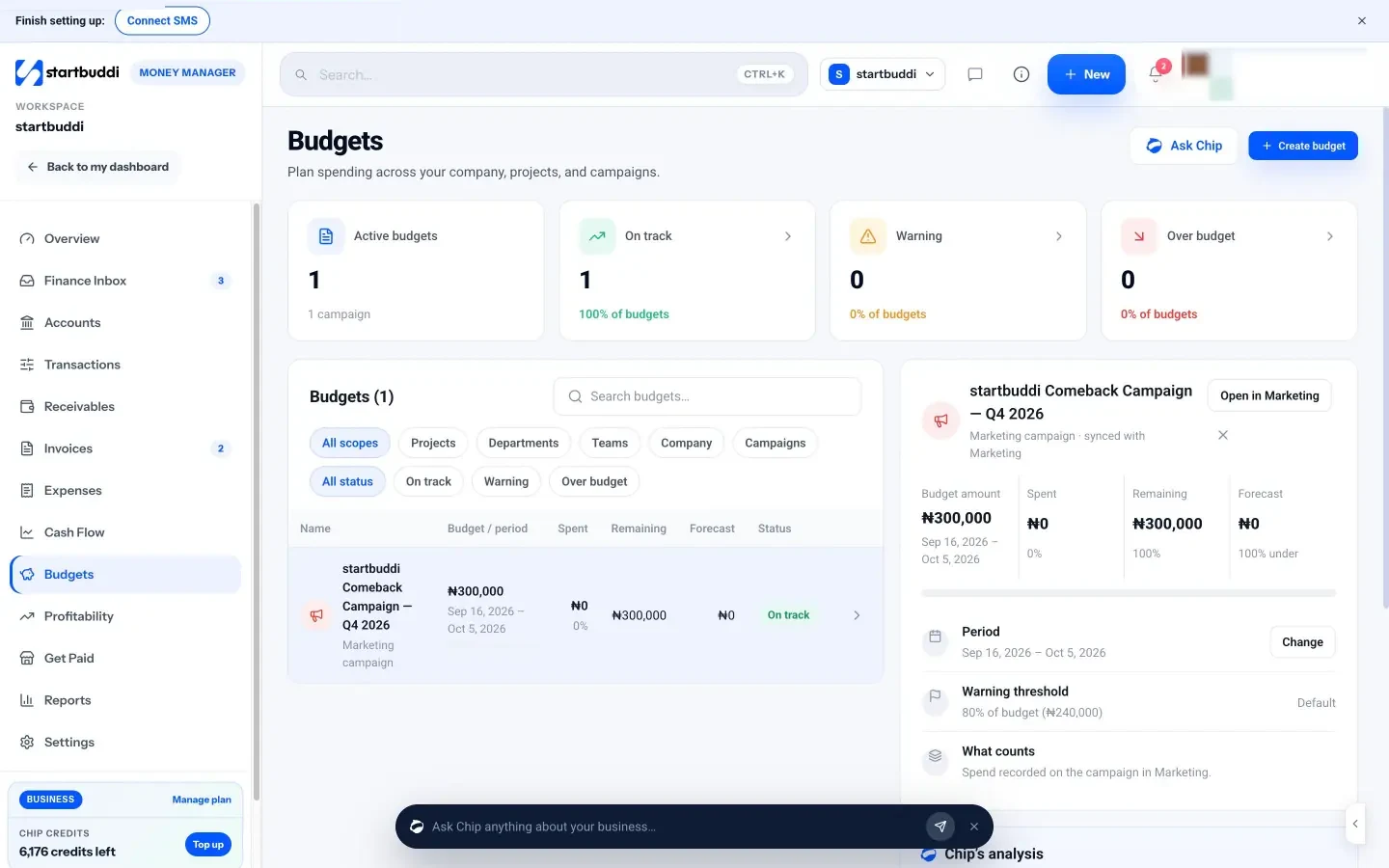
1. Create a budget. Open Money Manager, go to Budgets and click Create budget. Choose the scope: company, project, department, team or campaign. Give it an amount and a period. The page promises to track spend against it, warn you at 80% and forecast where the period will land.
2. Link spending to the right budget. When you add an expense, you can choose a project and a customer as well as a category. That is what lets a project budget see its own spending. Get into the habit of tagging the project at the moment you record the cost, while you still remember what it was for.
3. Use one number for campaigns. If you run campaigns in the Marketing campaigns area, a campaign budget created in Money Manager also sets that campaign's budget in Marketing, so the same figure shows in both places. (The Marketing module needs the Starter plan or above.)
4. Watch status at a glance. The page shows how many budgets are on track, in warning or over budget, with filters by scope and status. Open any budget to see the amount, what has been spent, what remains and the forecast, with a chart of budget against actual spend. It also tracks committed against actual spend, so orders you have agreed but not yet paid are not invisible.
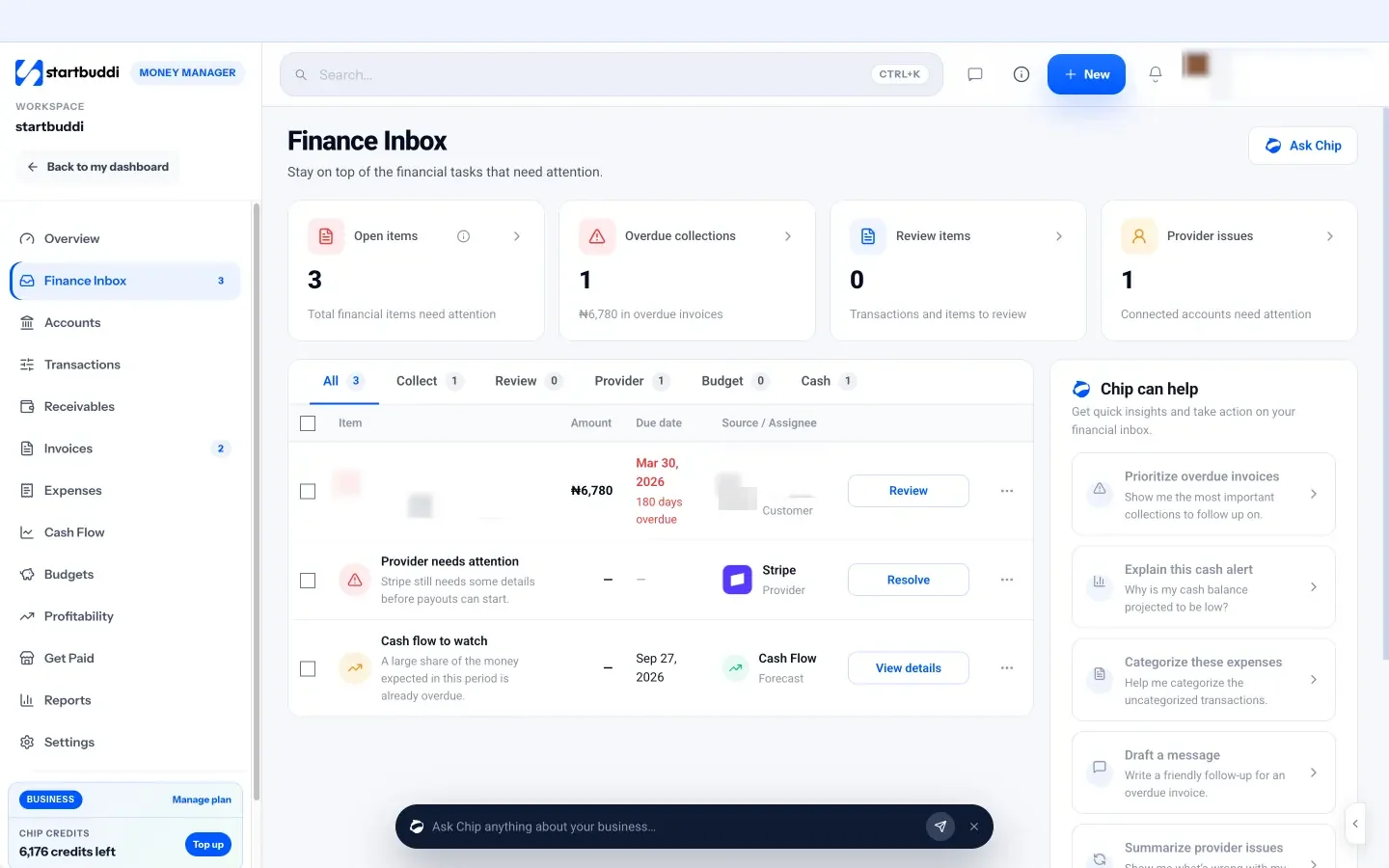
5. Get warned in one place. When a budget reaches 80% or goes over, a warning appears in the Finance Inbox alongside overdue invoices and other money tasks, so you do not have to go looking. Chip can also analyse each budget and suggest how to stay within it: ask "How are my budgets doing?" from the Budgets page.
Project budgets work best alongside the projects themselves. If you run client work in Work projects, the same project can carry its tasks and its budget, and the Profitability page (covered in chapter 4) shows revenue collected against costs for each one.
Review your budget every month and adjust
- Budget versus actual: the one report that matters
- Timing versus real change
- Why you also need a cash flow forecast
- A 30-minute monthly budget routine
- When to change the budget
- What to do when you are over budget
- Three numbers to watch alongside the budget
- A quarterly re-forecast in practice
- Sharing the budget with your team
- Common mistakes in the review
- The year-end review
- Running the review in startbuddi
- Your next step
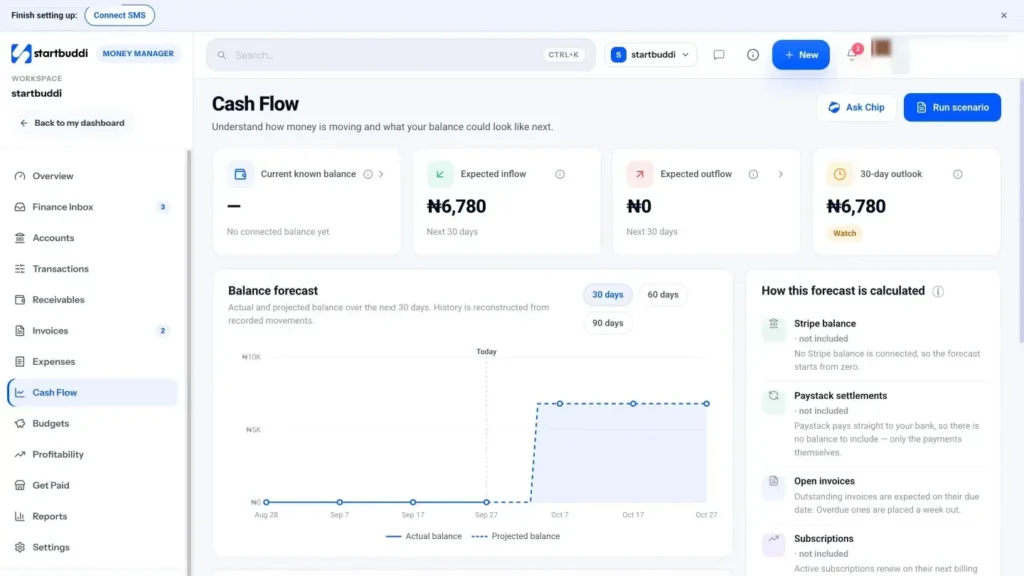
A budget is only useful if you look at it. Most first budgets fail not because the numbers were wrong, but because nobody compared them with reality after January. This chapter gives you a monthly routine, shows you how to read the gap between plan and actual, explains how a cash flow forecast fits in, and covers when to change the plan.
Budget versus actual: the one report that matters
Once a month, put three columns side by side for each line: what you budgeted, what actually happened, and the difference. The difference is called the variance. A positive variance on income (you earned more than planned) is good. A positive variance on costs (you spent more than planned) needs a look.
| Line | Budget | Actual | Variance | Note |
|---|---|---|---|---|
| Project income | $4,000 | $3,200 | −$800 | One project slipped to next month |
| Retainers | $2,500 | $2,500 | $0 | On plan |
| Freelancers | $800 | $1,150 | +$350 | Extra revisions on the Harper job |
| Software | $220 | $260 | +$40 | New AI tool trial |
| Marketing | $400 | $150 | −$250 | Paused ads for a week |
You do not need to explain every dollar. A simple rule: investigate any line that is more than 10% or more than a set amount (say $100 or ₦50,000) away from the plan, whichever is bigger. Write one short note for each. After three or four months, the notes tell you where your budget is consistently wrong.
Timing versus real change
When a line is off, ask one question: is this a timing difference or a real change?
- Timing difference. The money will still come or go, just in a different month. A project that slipped from March to April is timing. Leave the annual budget alone and note it.
- Real change. The plan was wrong or circumstances have changed. A client who cancelled, a supplier who raised prices by 15%, a new hire. Update the budget for the rest of the year.
Mixing the two up leads to bad decisions: panicking about a slipped payment that will arrive next month, or ignoring a price rise that will cost you every month from now on.
Why you also need a cash flow forecast
Your budget can show a profitable month while your bank account runs dry. That happens when income is earned but not yet paid, or when a big annual bill lands before the busy season. A cash flow forecast looks at timing: which invoices are due when, which bills and renewals fall in which week, and what your balance will be.
A simple forecast starts with today's balance, adds money you expect to receive (by due date, with late payers pushed back) and subtracts money you expect to pay out. If the line dips below zero, or below your comfort level, you know weeks in advance and can act: chase invoices, move a purchase, ask for a deposit or talk to your bank. For a fuller walk-through, see our post on cash flow management.
A 30-minute monthly budget routine
Put this in your calendar for the first working day of each month. It takes about half an hour once your records are up to date.
- Close last month (10 minutes). Make sure every invoice, payment and expense is recorded and categorised. Match any payments that have not been matched to their invoices.
- Compare budget and actual (10 minutes). Fill in the actual column, work out the variances and write a one-line note for each big one.
- Look ahead (5 minutes). Check the cash forecast for the next 30 to 90 days. Note any dip.
- Decide one action (5 minutes). Chase a late client, cancel an unused tool, move money to the tax pot, pause a campaign. One action, written down, done this week.
Once a quarter, add 30 minutes to re-forecast the rest of the year. Once a year, rebuild the budget from scratch using the zero-based review from chapter 3.
When to change the budget
Some owners never change the budget, so it becomes fiction by March. Others change it every time a number is off, so it stops being a plan. A sensible middle path:
- Keep the original budget as the yardstick for the year, so you can see how far reality moved from the plan.
- Update a rolling forecast each quarter that shows what you now expect for the remaining months.
- Rewrite the budget outright only after a big change: a major client won or lost, a new hire, a price change, a move, or a new product line.
What to do when you are over budget
Being over budget is information, not failure. Work through it calmly.
- Find the line. Which specific cost or income line caused it?
- Check if it paid off. Extra marketing spend that brought in extra sales may be a good overspend. Extra freelancer hours on a fixed-price job are not.
- Decide: absorb, cut or raise. Absorb it from the buffer if it is one-off, cut another line if it is ongoing, or raise prices if costs have genuinely gone up.
- Fix the cause. If one client always needs extra revisions, change how you quote them.
Three numbers to watch alongside the budget
Your budget covers the detail. These three numbers give you a quick health check in under a minute.
Gross margin. Income minus variable costs, as a percentage of income. If it drifts down month after month, your costs per job are rising faster than your prices. That is usually a pricing or scoping problem.
Runway. How many months you could keep going if income stopped. Divide the cash you hold (including your buffer) by your monthly fixed costs and owner's pay. If you have $12,000 set aside and fixed costs plus pay come to $4,000 a month, your runway is three months. When runway drops, spending decisions should get more careful.
Average days to get paid. How long, on average, customers take to pay after you invoice. If it creeps up from 14 days to 30, you have the same sales but much less cash to work with. Tighter payment terms, deposits and reminders are the fix. Our guide on sending your first invoice covers all three.
A quarterly re-forecast in practice
Here is what a re-forecast looks like for the London consultancy from chapter 2 at the end of March. The original budget planned £32,400 of income for the first quarter. The actual figure was £29,100, because one project moved into April and one retainer client paused for a month.
The owner does not rewrite the year's budget. Instead, she notes that the project is timing (it will land in April) and the paused retainer is a real change (it restarts in June, so April and May are £1,500 lower each). Her rolling forecast for the year drops by £3,000, not by the full £3,300 gap. She then looks for £3,000 to cover it: she cancels two unused software plans (£60 a month), delays a planned marketing push by a month and moves some of the buffer contribution to later in the year. Total time: about 40 minutes, and she now knows the rest of the year is still on track.
Sharing the budget with your team
If you have a team, share the parts of the budget people can influence. A project lead should see their project budget. Whoever runs marketing should see the campaign budgets. You do not need to share everyone's pay or your full numbers. Clear budgets with named owners mean fewer "can I spend this?" messages and fewer surprises at the end of the month.
Common mistakes in the review
- Reviewing with half the data. If expenses are not recorded, the variance is meaningless. Close the month first.
- Only looking at totals. A total that is on budget can hide one line far over and another far under.
- Ignoring good news. If income is consistently above plan, raise the savings or tax set-aside, not just spending.
- Doing it alone forever. Once a quarter, share the numbers with a co-founder, accountant or mentor. A second pair of eyes spots what you have stopped seeing.
The year-end review
At the end of each year, before you build next year's budget, spend an hour looking back. This is where budgeting starts to pay off, because each year's plan gets more accurate than the last.
- Total budget against total actual. How far off were you on income and on costs, in money and as a percentage?
- Your three biggest misses. Which lines were furthest from the plan, and why? Were they timing, bad estimates or things you could not have known?
- Your best and worst clients and projects. Which made the most profit for the effort, and which made the least? Should you raise prices for some, or stop taking a certain kind of work?
- Costs to cut or renegotiate. Run the zero-based review from chapter 3 on every fixed cost.
- One change to how you work. Perhaps deposits on every project, a stricter approval rule, or monthly reviews that actually happen.
Write the answers at the top of next year's budget. They are the most valuable thing in it.
If this is your first year of budgeting, expect to be well off on several lines. That is normal. The point of the first budget is not accuracy; it is building the habit and learning where your guesses go wrong. Most owners find that by the second or third year, their budget is close enough to reality that they trust it for real decisions, such as when to hire or whether they can afford a quiet month off.
Running the review in startbuddi
Here is how the monthly routine maps onto Money Manager.
Close the month with the Finance Inbox and Transactions. The Finance Inbox lists items that need attention: overdue invoices, invoices due soon, failed payments, uncategorised expenses, possible duplicates, payments that need matching, and budget or cash warnings. Work through it until it says you are all caught up. In Transactions, any payment marked "needs matching" can be matched to its invoice from the transaction drawer.
Check budget against actual on the Budgets page. Each budget shows its amount, spend, remaining and forecast, with a chart of budget against actual spend. Anything at 80% or over will already be in your Finance Inbox.
Look ahead with Cash Flow. The Cash Flow page shows your current known balance, expected inflow and expected outflow, and a balance forecast you can view over different horizons. The forecast is built from open invoices by due date (overdue ones are counted a week out), subscription renewals, recurring expenses and bills, and every input is listed so the number is never a mystery.
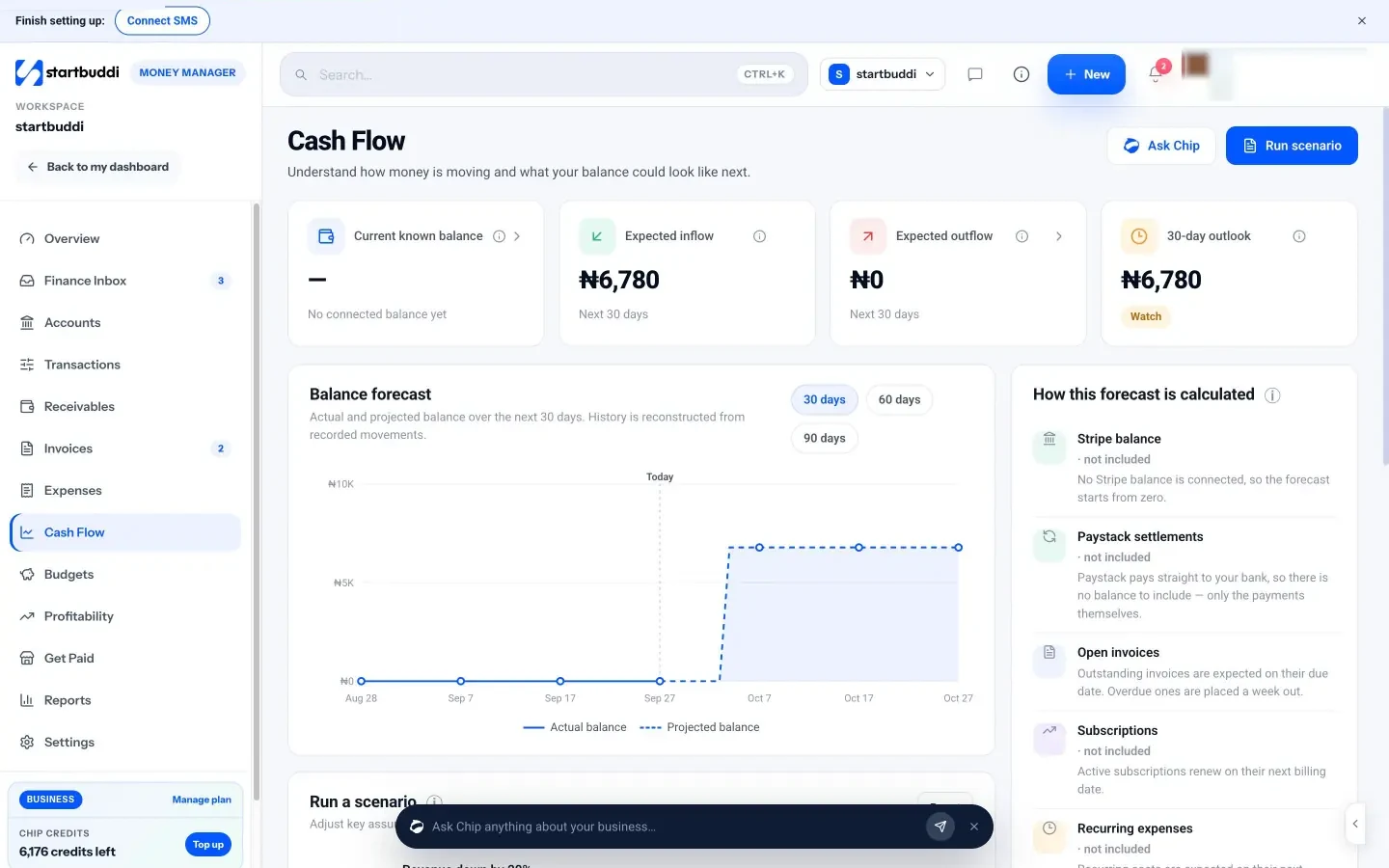
Test "what if" before you decide. Run a scenario lets you move revenue up or down by a percentage, assume overdue invoices are paid this week, or raise marketing spend, and see a scenario balance line. Scenarios change the forecast's inputs, not your records, so you can try ideas safely. This is a quick way to answer "what happens to next month if sales drop 20%?"
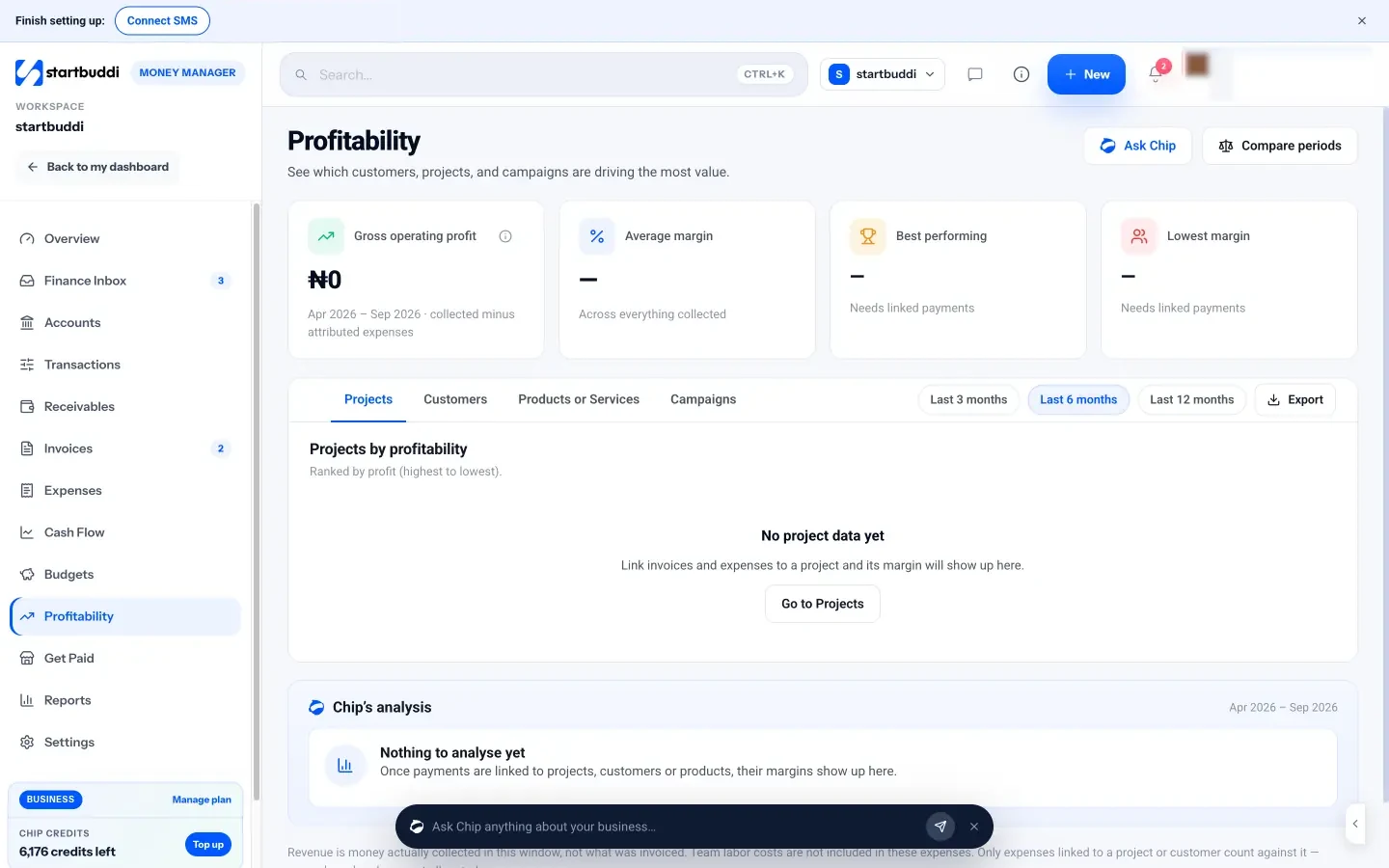
See what actually makes money. The Profitability page ranks projects, customers, products or services and campaigns by profit, showing revenue, attributed expenses, profit and margin. It is a good place to decide where next year's budget should go. Note that it counts recorded expenses, not the value of your team's time.
Ask Chip to explain. On Cash Flow, Ask Chip explains the forecast, and the chips offer to summarise it, suggest what you can do, or draft a plan. On the overview, "What can I cut?" looks at your spending. Chip shows its reasoning from your numbers; you make the decision.
Two honest limits: Money Manager does not connect to bank feeds, and the forecast uses your connected Stripe balance plus your records rather than your bank balance. It is a planning tool, not accounting software. If you need a full ledger or statutory accounts, use accounting software or an accountant alongside it, and use Export CSV from Reports to share your figures.
Your next step
Block one hour this week to build your first 12-month budget using the template in chapter 2, and one recurring 30-minute slot on the first working day of each month to review it. If you want your actual numbers, recurring costs, budgets and cash forecast in one place, you can start on the Free plan, or try any paid plan free for 30 days from the pricing page.
Tiwalade Joanna Okedara-Kalu is the founder, CEO and CTO of startbuddi, the business system that brings clients, bookings, invoices, projects, marketing and the Chip AI assistant into one place. Tiwalade builds software around how service businesses really work day to day, and writes about client management, getting paid on time and why small businesses outgrow the tools they start with.
Founded startbuddi and leads its product and engineering