Free form builder in Nigeria: how to choose one and use it well
How to pick a free form builder in Nigeria, build order, registration and enquiry forms, take naira payments, send replies to WhatsApp and follow the NDPA.


Photo: Towfiqu barbhuiya / Unsplash
- Choose a free form builder that works well on phones, shares cleanly on WhatsApp, can take a naira payment and saves each answer as a contact. Keep forms short, ask for marketing consent with an unticked box, and tell people what you will do with their details under the Nigeria Data Protection Act 2023.
The best free form builder in Nigeria is one your customers can fill in on a phone in a minute, that you can share as a link on WhatsApp, and that sends every answer somewhere useful instead of a spreadsheet you forget to open. If you sell anything, it also helps if the form can take a naira payment the moment someone submits it, so you are not chasing transfer receipts. Google Forms, Jotform, Tally, Typeform and startbuddi all have free plans, but they differ on form limits, payments and what happens to the answers.
This guide explains what to look for in an online form builder, shows how to set up the three forms most Nigerian small businesses need (orders, registrations and enquiries), covers taking payment on a form and getting replies onto WhatsApp, and sets out what the Nigeria Data Protection Act 2023 means for the questions you ask.
What a free form builder in Nigeria needs to do
Your customers will mostly open your form on a phone, from a WhatsApp chat or an Instagram bio, sometimes on a patchy connection. That changes what matters.
Works well on a phone
Short pages, big tap targets, the right keyboard for phone numbers, and no heavy images. One question per screen often feels easier on a phone than one long page.
Easy to share where your customers already are
You need a clean link for WhatsApp status and groups, a QR code for flyers and your counter, and an embed option if you have a website.
Takes payment in naira
Orders, deposits, event tickets and class fees are all easier when the form and the payment happen in one go. Check which payment processors the tool connects to, and whether they pay out to a Nigerian bank account.
Puts answers where you can act on them
Better than a list of responses is a form that saves each person as a contact, alerts you by email, and lets you follow up without copying phone numbers by hand.
A free plan you can actually run a business on
Free plans usually limit forms, monthly responses, or both. Work out how many forms you need live at once and how many responses a busy month brings.
Free online form builders compared
Here is what each tool publishes about its free plan and entry-level paid plan. Prices are in US dollars, as each company lists them, and can change, so check the linked pages before you commit.
| Tool | Free plan | Paid plans from | Payments |
|---|---|---|---|
| Google Forms | Free with a Google Account. Responses show in the form or a linked Google Sheet. | Free for personal use | Collects answers only, so you take payment separately |
| Jotform | 5 forms, 100 submissions a month, 10 payment submissions | See its pricing page | Connects to processors such as PayPal, Stripe and Square |
| Tally | Unlimited forms and submissions within its fair use guidelines | Pro $29 a month, or $24 a month billed yearly | Lists “collect payments” on the free plan |
| Typeform | A free plan with a limited number of responses a month | Basic $29 a month, or $25 a month billed yearly | See its pricing page |
| startbuddi Forms | 1 live form, responses not limited, 250 contacts | Starter: 20 forms (see pricing) | Payment field through Paystack or Stripe |
For a longer, researched list, see our round-up of the best form builders for business.
Looking for a Google Forms alternative in Nigeria?
Google Forms is free, familiar and fine for internal surveys, RSVPs and quick polls. People usually look for a Google Forms alternative in Nigeria when they want three things it does not give them on its own: taking payment on the same form, turning each response into a customer record they can follow up, and more control over branding and what happens after someone submits. Our startbuddi vs Google Forms comparison goes through the differences side by side.
The three forms most small businesses need
Most businesses get by with one or two of these, set up well.
1. An order form
For food vendors, bakers, fashion designers, printers and anyone taking custom orders. It replaces the long back-and-forth in DMs.
- Name and phone number (say it is the WhatsApp number you will reply on)
- What they want: a dropdown or checkboxes for products, sizes, flavours or packages
- Quantity and any notes, such as the message on a cake or measurements for an outfit
- Delivery or pickup, with the area or address only if they choose delivery
- The date they need it by
- Payment, either the full amount or a deposit
2. A registration form
For events, classes, workshops, trainings and webinars. Keep it short, because every extra question loses a few people.
- Full name, email address and phone number
- Which session or ticket type
- One question that helps you plan, such as dietary needs or experience level
- The fee, if it’s paid
- A tick box asking if they want to hear about future events
3. An enquiry or quote form
For cleaners, photographers, consultants, agencies, solar installers and tutors. It gives you what you need to quote.
- Name, phone and email
- The service they want, from a dropdown
- Budget range, in naira
- Location and timeline
- A short description, with an optional file upload for photos or a brief
If you want a head start, our free client intake form template lists the questions worth asking a new client.
How to collect payments with a form in Nigeria
The common workaround is a form that ends with “pay into this account and send proof on WhatsApp”. It works, but you end up matching transfers to orders, checking screenshots and chasing people who never paid. Taking payment on the form fixes most of that.
How it works
You add a payment field and connect a payment processor. When someone submits, they go straight to checkout, and their answers and payment are linked, so you can see who paid for what.
Fixed amount or choose your own
- Fixed amount suits tickets, class fees, deposits and set packages.
- Let them choose the amount suits donations, contributions, part payments and custom orders you have already quoted.
Know the fees
Payment processors charge a fee on each successful payment. Flutterwave, for example, lists 2% per local transaction in Nigeria and 4.8% for international transactions, with 7.5% VAT on its fees (Flutterwave pricing). Paystack publishes its Nigerian fees on its pricing page. Build the fee into your prices rather than being surprised by it at the end of the month.
Take deposits for custom work
For anything made to order, ask for a deposit on the form and the balance before delivery. It filters out unserious orders and covers your materials. For the balance, a payment link is the easiest way to send it.
Getting form replies to WhatsApp
For many Nigerian businesses, the sale is closed on WhatsApp. The form collects the details cleanly; WhatsApp is where you confirm and arrange delivery. Here is how to join the two up.
Share the form on WhatsApp
Post the link on your status with one line about what it’s for (“Order for Saturday delivery here”), pin it in your groups, and add it to your WhatsApp Business profile and quick replies. When someone asks “how much?”, send the form link.
Send people to WhatsApp after they submit
Most form builders let you redirect people to a link after they submit. Use a WhatsApp click-to-chat link (it starts with wa.me/ followed by your number in international format) so the customer lands in a chat with you, ready to confirm. WhatsApp explains how these links work in its click to chat help page.
Reply from one place
If your form tool saves each response as a contact, you can reply from the same place you keep their details, with their order next to the conversation.
Ask before you send marketing messages
Replying to someone’s order or enquiry is expected. Adding them to your promotional broadcasts is a different thing. Add a separate, unticked box such as “Send me offers and updates on WhatsApp” and only message people who ticked it. Our guide to WhatsApp marketing in Nigeria covers the rest.
NDPA consent forms: what the Nigeria Data Protection Act 2023 means for your forms
Every form collects personal data: names, phone numbers, addresses, sometimes health or payment details. The Nigeria Data Protection Act 2023 sets the rules, and the Nigeria Data Protection Commission (NDPC) enforces them.
Does it apply to a small business?
According to the NDPC’s FAQs, the Act applies to organisations operating in Nigeria, to processing that happens in Nigeria, and to organisations elsewhere that process the personal data of people in Nigeria. “Processing” includes simply collecting and storing data, so a form on your Instagram bio counts.
Have a clear reason, and ask for consent where you need it
You need a lawful reason to use someone’s details. Fulfilling the order they placed is one. Sending them marketing later is another matter, and clear consent is the safe approach. The NDPC notes that consent can be given in writing, orally, electronically or by any other action through which the person knows they are giving consent. On a form, that means a tick box the person chooses to tick, with plain wording, not a box that’s already ticked.
Tell people what you will do with their details
Under the form, or in a short privacy notice it links to, say:
- who you are and how to contact you
- why you are collecting the details (for example, “to process your order and contact you about delivery”)
- whether you will send marketing, and how to stop it
- who else sees the data, such as your payment processor or delivery partner
- how long you keep it
Collect only what you need, and keep it safe
Don’t ask for a date of birth, home address or ID number unless you truly need it. Fewer questions also means more people finish your form. Keep responses in a tool with proper logins rather than a shared spreadsheet anyone can open, and delete old data you no longer need.
Where the data is stored
Most form tools store data outside Nigeria. The NDPC’s FAQs note that the Act’s sections on cross-border transfers (sections 41 to 43) require an adequate level of protection when personal data leaves the country. If this matters for your business, ask your form provider where data is held and read the NDPC’s guidance.
Registration and audit filings
Some businesses must register with the NDPC and file annual compliance audit returns, due before 31 March each year according to its FAQs. Some that process the data of fewer than 200 people don’t need to file, so check which category you fall into.
Mistakes to avoid
- Asking too much. Every extra question loses people. Start with the minimum and add a question only when you keep needing that answer.
- No phone test. Fill in your own form on a phone, on mobile data, before you share it.
- No confirmation. Say what happens next, and when, in the thank-you message.
- Nobody watching the responses. Turn on email alerts for new submissions so an order doesn’t sit unseen for two days.
- Pre-ticked marketing boxes. They are not real consent, and they fill your list with people who didn’t ask to hear from you.
How startbuddi helps
In startbuddi, Forms are part of one business system, so a response doesn’t stop at the form. It can become a contact, take a payment and start your follow-up.
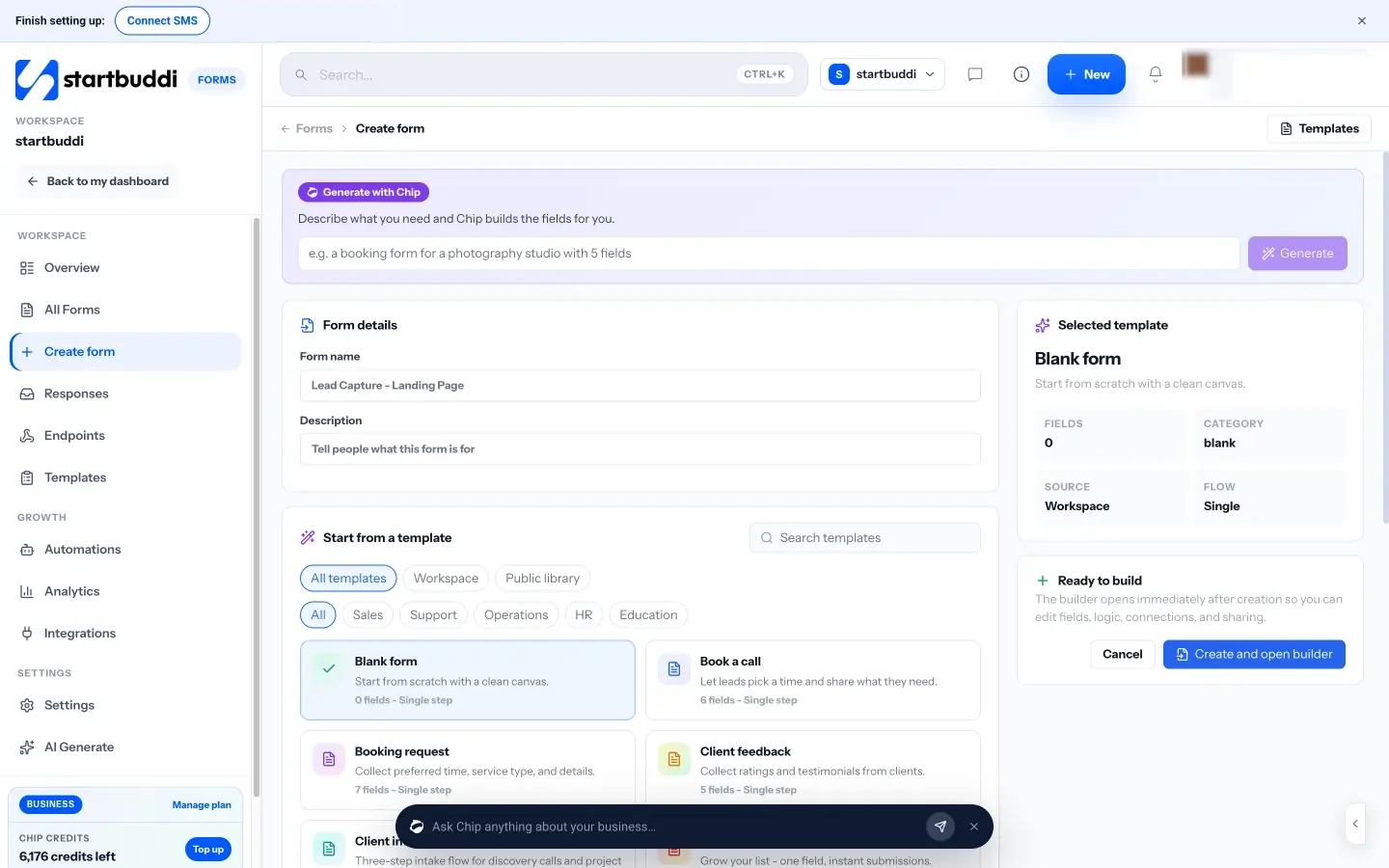
Build it quickly. Start blank, pick a template (there are 12, including Event Registration, Catering Inquiry and Vendor Registration), or describe what you need and Chip, the AI assistant, drafts the fields for you to edit. Field types include short and long text, email, phone number, dropdowns, checkboxes, date and time, file upload, signature, rating, payment and a consent block. The Logic tab shows, hides or skips questions based on earlier answers, and multi-step mode shows one question per screen. Our help article shows how to build a form step by step.
Take payment. Add a Payment field, set the amount to collect or let people choose it, and pick the currency. Connect Paystack or Stripe (which ones you see depends on your country), and people go to checkout after they submit. The money collected shows in Forms analytics. See how to collect payment via Paystack.
Share it anywhere. Copy the direct link for WhatsApp, download a QR code, embed it on your website, or add an “Open form” popup button. After someone submits, show a message or send them to a link, such as your WhatsApp click-to-chat link.
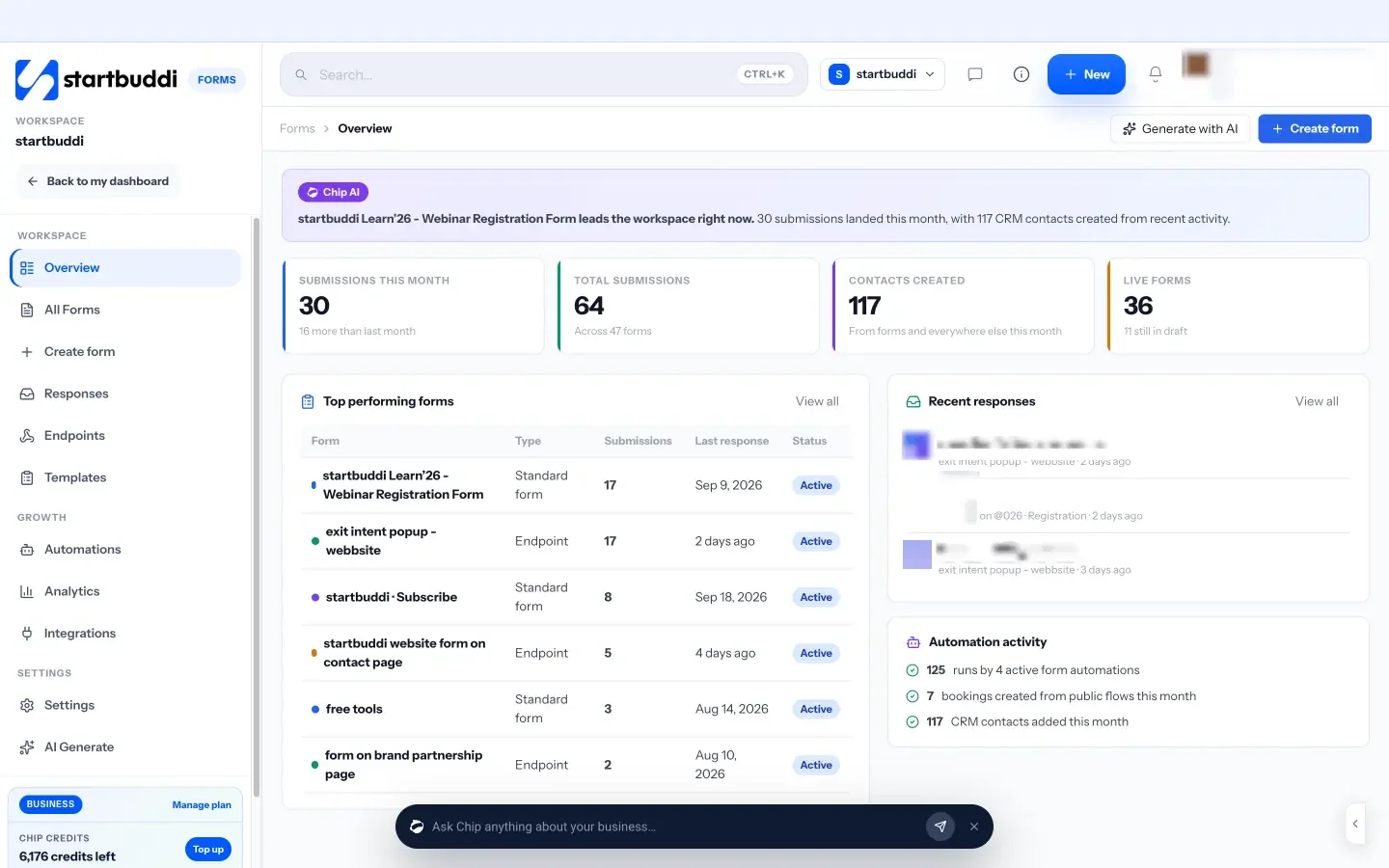
Every answer, organised. Responses are saved in Forms, and you can choose to add or update each person in your contacts. A consent block can be set to count as marketing consent, so you know who agreed to hear from you. Email alerts tell you when a new response arrives, and you can export responses to CSV.
Follow up. On Starter and above, you can reply to respondents by email, SMS or WhatsApp from the customer inbox, and use Automations to send a message or create a task whenever a form is submitted.

Plans. The Free plan includes 1 live form, with responses not limited, and 250 contacts. Starter gives you 20 forms plus WhatsApp, SMS and 10 active automations; Growth gives unlimited forms. Prices are on the pricing page and are charged in your local currency where available, and every paid plan comes with a 30-day trial. Hosted forms show a small “Powered by startbuddi” footer on every plan.
Your next step
Pick the one form that would save you the most time this week, probably your order or enquiry form. Build in the five questions you always ask in DMs, add a payment field if you sell something, test it on your phone, and post the link on your WhatsApp status. If you want to try it in startbuddi, you can start on the Free plan and compare plans on the pricing page.
Sources
- DataReportal: Digital 2026 Nigeria
- Nigeria Data Protection Commission: Nigeria Data Protection Act 2023
- Nigeria Data Protection Commission: FAQs
- WhatsApp Help Center: how to use click to chat
- Flutterwave: pricing for Nigeria
- Paystack: pricing
- Google Docs Editors Help: choose where to save form responses
- Jotform pricing, Tally pricing, Typeform pricing
Frequently asked questions
Is there a free online form builder in Nigeria that takes payment?
Yes. Several form tools have free plans, and some let you add a payment field. In startbuddi the Free plan includes 1 live form, and a Payment field can take payment through Paystack or Stripe when you connect one.
How do I collect payments with a form in Nigeria?
Add a payment field, set a fixed amount or let people choose, and connect a processor such as Paystack. People pay at checkout straight after submitting, so their order and payment stay together.
What is the best Google Forms alternative in Nigeria?
It depends on what you need. If you want payments on the form and each response saved as a customer, compare tools such as Jotform, Tally, Typeform and startbuddi on their free plan limits first.
Do I need an NDPA consent form?
If you want to send marketing, ask with a clear, unticked consent box and tell people how to opt out. For orders and enquiries, explain why you collect the details in a short privacy notice. This is general information, not legal advice.
Can form responses go straight to WhatsApp?
You can send people to your WhatsApp click-to-chat link after they submit, so they land in a chat with you. In startbuddi you can also reply by WhatsApp from the customer inbox on Starter and above.
Tiwalade Joanna Okedara-Kalu is the founder, CEO and CTO of startbuddi, the business system that brings clients, bookings, invoices, projects, marketing and the Chip AI assistant into one place. Tiwalade builds software around how service businesses really work day to day, and writes about client management, getting paid on time and why small businesses outgrow the tools they start with.
Founded startbuddi and leads its product and engineering