How to move your business off spreadsheets (without losing anything)
Outgrown your spreadsheets? How to spot the signs, clean your data and move customers, invoices and projects into one system, one sheet at a time.



- Keep spreadsheets for quick sums and one-off analysis, and move the jobs they do badly (customers, invoices, projects) into one connected system. List every sheet, clean the data, then move one sheet a week, starting with your customer list.
Spreadsheets are where most businesses start, and that is fine. The trouble begins when one sheet becomes six: a customer list, an invoice tracker, a job board, a price list and a “money in, money out” tab that nobody trusts. The best business spreadsheet alternative is not one magic app. It is moving each job a spreadsheet is doing badly (remembering customers, chasing payments, tracking work) into a tool built for that job, one sheet at a time, while keeping spreadsheets for what they do well: quick sums and one-off analysis.
This guide shows you how to spot when you have outgrown spreadsheets, how to plan the move so nothing gets lost, and how to migrate customers, invoices and projects over a few weeks of evenings.
Signs you have outgrown your spreadsheets
Spreadsheets don’t fail all at once. They fail quietly, in ways that cost you money before you notice. These are the most common warning signs:
- You have more than one “final” version. “Clients FINAL”, “Clients FINAL v2” and a copy on your phone. Nobody knows which one is right.
- Follow-ups slip. A lead filled in your form last Tuesday and you only noticed today, because the sheet doesn’t remind you of anything.
- You can’t answer simple questions fast. “Who owes me money right now?” should take five seconds, not twenty minutes of filtering.
- Two people edited the same cell. Once a second person works in the sheet, overwrites and accidental deletions start.
- Customer history lives everywhere. The customer is in the sheet, the conversation is in WhatsApp, the invoice is a PDF in email, and the job notes are in your head.
- You are scared to touch a formula. If one broken cell could change your totals, you are running the business on hope.
That last one is more common than it sounds. Research on spreadsheet errors by Raymond Panko at the University of Hawai’i found that errors are rare cell by cell but pile up in bigger sheets. As his paper puts it, “at least one incorrect bottom-line value is very likely to be present.” The European Spreadsheet Risks Interest Group keeps a public list of real, costly spreadsheet mistakes if you want to see how far it can go.
If three or more of those signs sound familiar, it is time to move. If only one does, you may just need a tidier sheet.
What spreadsheets are still good for
Moving off spreadsheets doesn’t mean deleting them. A spreadsheet is a blank grid, which makes it brilliant for some things and poor for others.
| Keep in a spreadsheet | Move to a proper tool |
|---|---|
| One-off calculations and “what if” pricing models | Your customer list and their history |
| Budgets you rebuild once a year | Invoices, payments and who owes you |
| Data you are analysing once and throwing away | Tasks, deadlines and who is doing what |
| Lists you share with an accountant at year end | Bookings, appointments and reminders |
| Quick price comparisons | Anything that needs a reminder, a message or a notification |
A simple test: if the sheet needs to do something (remind you, email someone, update when a payment lands), it belongs in a tool. If it just needs to hold numbers for you to look at, a spreadsheet is fine.
Step 1: list every sheet and the job it does
Before you move anything, spend 30 minutes making an inventory. Open a blank page and write down every spreadsheet the business uses, including the ones on your phone and in shared drives. For each, note four things:
- What job it does. For example, “tracks leads”, “lists unpaid invoices” or “plans this month’s jobs”.
- Who uses it. Just you, or the team too?
- How often it changes. Daily, weekly or rarely.
- What goes wrong with it. Be honest: missed follow-ups, wrong totals, out-of-date rows.
Most small businesses end up with a list like this: customers and leads, invoices and payments, jobs or projects, bookings, expenses, and a price list. Circle the sheets that change daily and cause the most pain. Those move first.
Step 2: pick a business spreadsheet alternative that connects everything
The mistake many founders make is replacing each spreadsheet with a separate app: one for contacts, one for invoices, one for tasks, one for bookings. You end up with the same scattered information, just in more logins. A study published in Harvard Business Review tracked workers at three large companies and found they switched between apps and websites about 1,200 times a day, losing just under four hours a week to refocusing.
When you compare options, ask these questions:
- Does one customer record connect to their invoices, bookings and messages? This is the thing spreadsheets can’t do.
- Can I import a CSV? You will want to bring your existing lists across, not retype them.
- Can I export my data again? You should always be able to leave with your data.
- Does it work on my phone? Many small businesses run from a phone.
- Does it fit my money? Check how customers pay you and in which currency.
- Can I start free and grow into it? You shouldn’t need a big commitment before you know it works.
If you are weighing a customer tool against your current sheet, our comparison of a CRM vs a spreadsheet goes deeper into that one decision.
Step 3: clean the data before you move it
Moving messy data into a new tool just gives you a messy new tool. Cleaning takes an evening and saves weeks of confusion. Work on a copy of each sheet, never the original.
A cleaning checklist
- One row per person or company. Delete blank rows and merge obvious duplicates (the same phone number twice is a clue).
- One column per piece of information. Split “Name and phone” into separate columns. Put first and last names in their own columns if you can.
- Consistent formats. Write phone numbers in one format, ideally with the country code (for example, +234 for Nigeria). Use one date format throughout.
- Clear headers in the first row. “Email”, “Phone”, “Company”, “Status”. No merged cells, no notes above the header.
- Fix the status column. If you have “paid”, “Paid”, “PAID” and “pd”, pick one.
- Archive the dead rows. Customers you haven’t spoken to in years can go into a separate “old” file, not your new system.
- Save as CSV. Most tools import CSV files. In Excel or Google Sheets, use “Save as” or “Download” and choose CSV.
A word on customer data: names, phone numbers and emails are personal data. If you work in Nigeria, the Nigeria Data Protection Commission oversees how businesses collect and store it. A shared spreadsheet link that anyone can open is exactly the kind of risk to close off during the move.
Step 4: move one sheet at a time, in this order
Don’t try to switch everything in a weekend. Move in the order that gives you the biggest win first, and run the old sheet alongside for a week or two before you stop using it.
Week 1: customers and leads
Your customer list is the heart of the business, and everything else (invoices, bookings, messages) hangs off it. Import it first. Then add every new enquiry to the new system, not the sheet. If most of your customers currently live in chat history, our guide on turning WhatsApp chats into a customer database shows how to pull them out.
Week 2: invoices and payments
Start sending new invoices from the new tool. You don’t need to recreate every old paid invoice. Just add the ones that are still unpaid, so your “who owes me” list is complete from day one.
Week 3: jobs, projects and tasks
Move active projects only. Finished work can stay in the old sheet as an archive. Add the tasks and due dates for what is happening now.
Week 4: the rest
Bookings, expenses and your price list can follow. By now you will know the new system well enough to set these up quickly.
An example: a cleaning company’s four sheets
Picture a cleaning company with three staff. It runs on four sheets: “Clients” (names, addresses, phone numbers), “Jobs this week”, “Invoices” and “Supplies”. Here is how the move might look.
- Clients becomes the customer list, with each client’s address, notes and cleaning schedule on their record.
- Jobs this week becomes a project or task list, with each job assigned to a cleaner and given a due date.
- Invoices becomes real invoices sent from the new system, linked to each client, with a clear view of who has paid.
- Supplies stays a spreadsheet for now, because it is a simple list that only the owner updates once a month.
Three sheets move, one stays. That is a normal, healthy result.
Make the switch stick
- Set a “last day” for each sheet and rename it “ARCHIVE, do not edit” after that date.
- Tell your team the rule: if it isn’t in the new system, it didn’t happen.
- Check in after two weeks. Ask what people are still doing in the old sheet, and why. That tells you what you haven’t set up yet.
Common mistakes to avoid
- Rebuilding your spreadsheet inside the new tool. Use the tool’s own way of working, such as pipeline stages or invoice statuses, instead of copying your old columns one for one.
- Importing everything. Ten years of old rows make the new system feel cluttered. Bring what you use.
- Skipping the export test. Before you commit, export a small list back out, so you know you can leave if you need to.
- Going it alone in a team. If three people used the sheet, all three need to agree on the new home, or someone will quietly keep the old sheet alive.
- Waiting for the perfect moment. There isn’t one. A quiet week is good enough.
How startbuddi helps you move off spreadsheets
startbuddi is built to replace the handful of sheets a small business runs on, with one customer record in the middle. Here is how each sheet maps across.
Your customer sheet becomes Contacts
In Contacts, choose Import and drop in your CSV file, with up to 10,000 contacts at a time. You map each column in your file to a field, choose whether to update or leave alone anyone who is already there, and can tag everyone in the import or add them to a group. You can check past imports later, and export your contacts to CSV or Excel whenever you like. The step-by-step version is in our help article on how to import contacts.

From then on, new contacts can arrive from your forms, bookings and chats, so the list stays current without retyping.
Your invoice tracker becomes Money Manager
In Money Manager, you create invoices for existing contacts or one-off recipients, and customers can pay online through Paystack or Stripe. Each invoice shows its status (draft, sent, viewed, partially paid, paid or overdue), and Receivables shows who owes you, what is due soon and the average number of days customers take to pay. That is the “who owes me money?” answer in one screen.
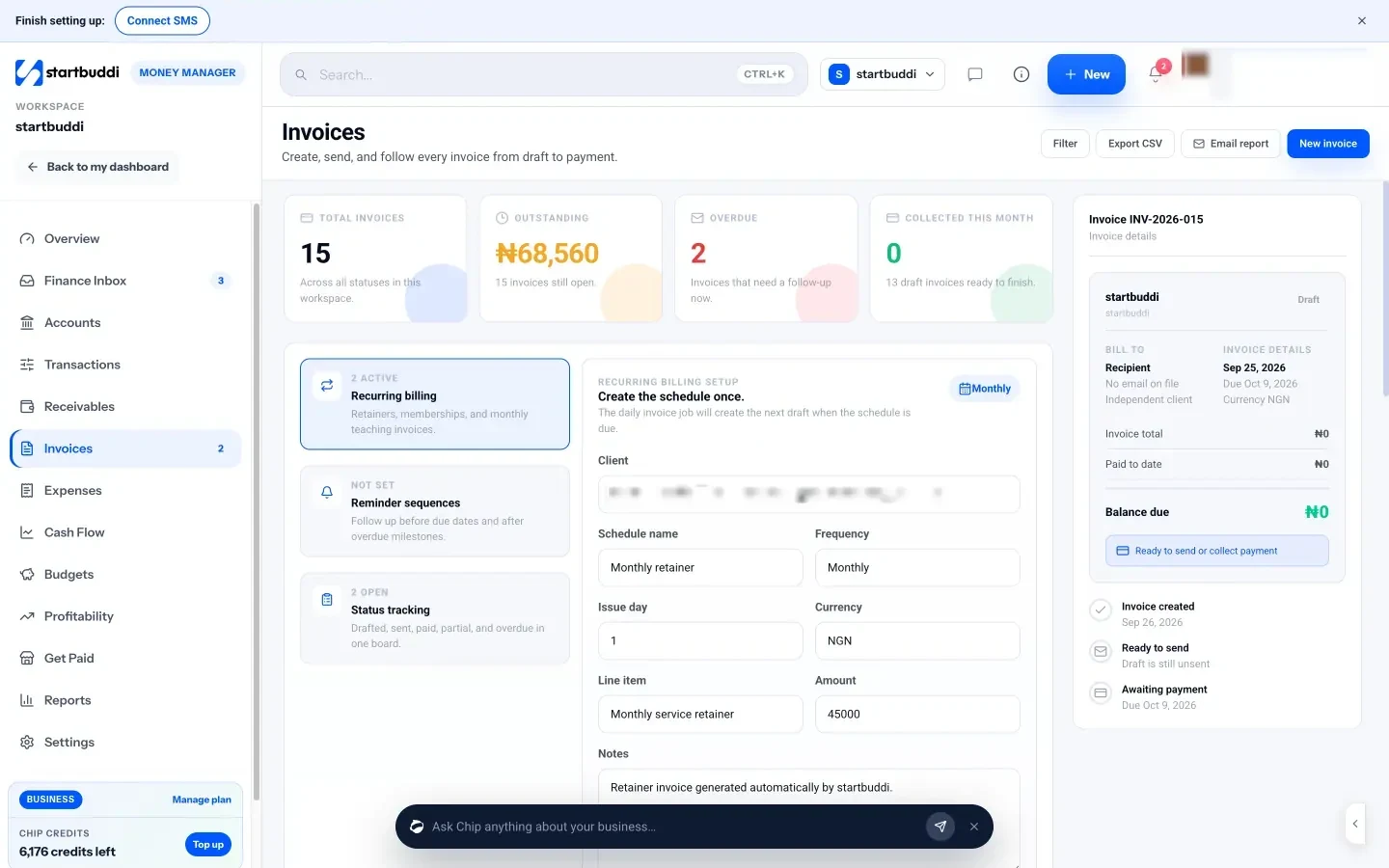
Your job sheet becomes Work
In Work, each project has its tasks, owners and due dates, and you can start from a template for common jobs such as client delivery or a website project. Everyone sees the same, current list instead of their own copy.
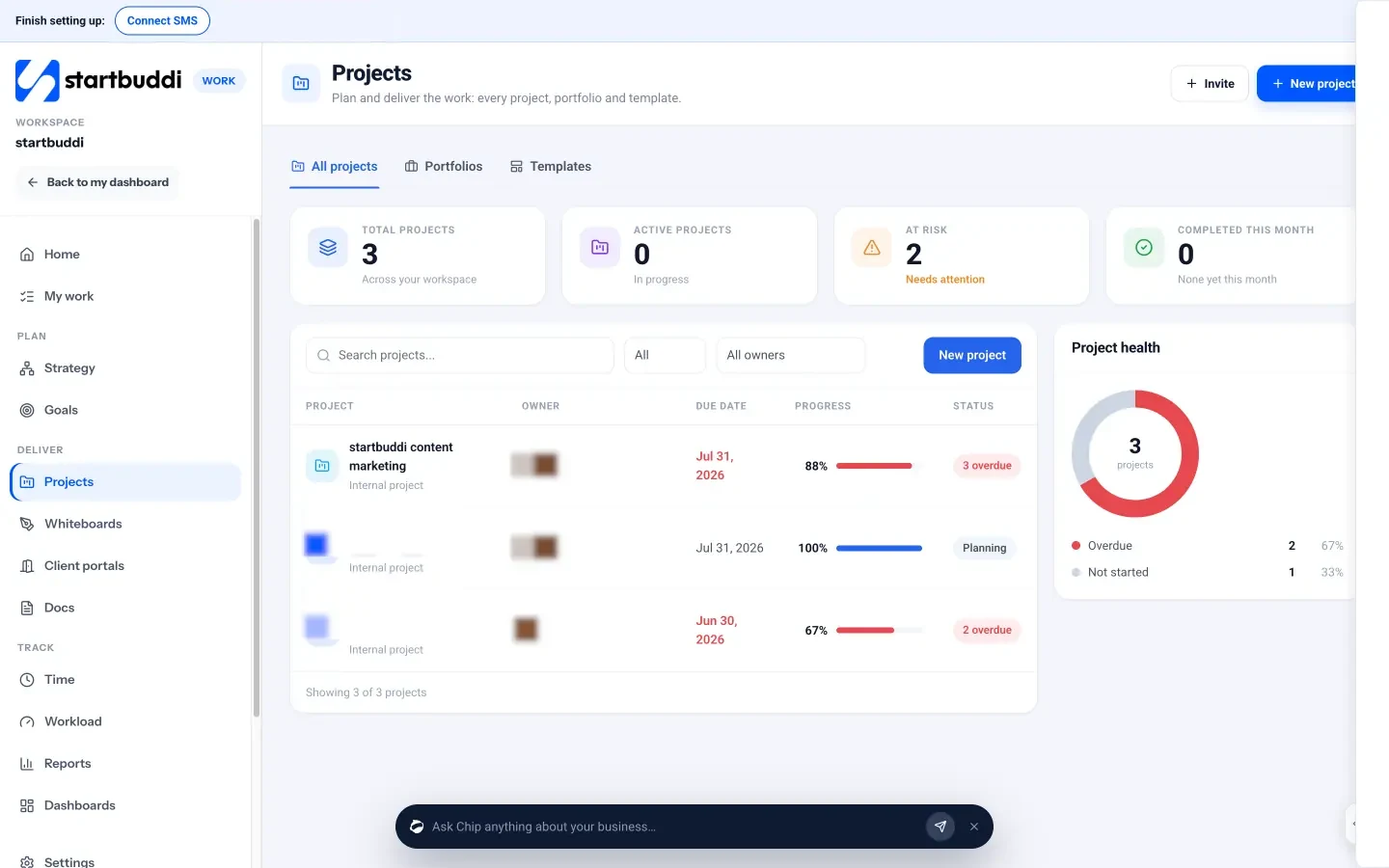
And when you still need a grid
Documents includes a startbuddi Sheet with formulas, number formats and multiple tabs, for the calculations and models that genuinely belong in a spreadsheet. It sits next to your proposals and contracts, linked to the client or project it is about.
The Free plan covers 1 seat and 250 contacts, which is enough to test the move with your most active customers. Starter adds room for 2,500 contacts and unlimited invoices.
Your next step
Tonight, list every spreadsheet you use and circle the one that causes the most trouble. For most businesses, that is the customer list. Clean it using the checklist above, save it as a CSV and import it. Once your customers live in one place, the rest of the move gets easier. You can start with Customers on the Free plan, or see what each plan includes on the pricing page.
Sources
- Raymond R. Panko, What we don’t know about spreadsheet errors today (arXiv)
- European Spreadsheet Risks Interest Group: spreadsheet horror stories
- Harvard Business Review: How much time and energy do we waste toggling between applications? (2022)
- Nigeria Data Protection Commission
Frequently asked questions
Should I stop using spreadsheets completely?
No. Keep them for quick calculations, pricing models and one-off analysis. Move anything that needs reminders, history or teamwork into a proper tool.
How long does it take to move off spreadsheets?
Most small businesses can move their customer list in an evening and the rest over three or four weeks, one sheet at a time.
What file format do I need to import my data?
CSV is the most widely accepted. Excel and Google Sheets can both save or download a sheet as a CSV file.
Can I get my data out of startbuddi again?
Yes. You can export your contacts to CSV or Excel, and export Money Manager data to CSV.
Tiwalade Joanna Okedara-Kalu is the founder, CEO and CTO of startbuddi, the business system that brings clients, bookings, invoices, projects, marketing and the Chip AI assistant into one place. Tiwalade builds software around how service businesses really work day to day, and writes about client management, getting paid on time and why small businesses outgrow the tools they start with.
Founded startbuddi and leads its product and engineering