Business finance manager software: what it is and why you need it
What business finance manager software does, how it differs from accounting software and spreadsheets, what to look for, and how to set one up in a week.


- Business finance manager software puts invoices, payments, expenses and cash flow in one place so you can see what came in, what went out and what is still owed. It sits between a spreadsheet and full accounting software. Many small businesses use one alongside an accountant or bookkeeping tool rather than instead of it.
Business finance manager software is an app that keeps a small business’s day-to-day money in one place: the invoices you send, the payments you receive, the expenses you pay and the cash you’ll have next month. It answers the questions owners actually ask, such as “who owes me?”, “where did the money go?” and “can I afford to hire?”, without needing an accounting background. It is not the same as accounting software, which keeps the formal books your accountant files from. Many small businesses use both, or start with a finance manager and add accounting later.
This guide explains what business finance manager software does, when a spreadsheet stops being enough, the features worth paying for, the questions to ask before you choose, and how to set one up in a week. It’s written for freelancers, agencies and service businesses anywhere, whether you bill in dollars, pounds, naira, shillings or rand.
What business finance manager software does
Think of it as the control room for your money. A good one brings together five jobs that usually live in five different places:
- Getting paid. Creating invoices, sharing payment links and taking card or bank payments online.
- Chasing what’s owed. Showing unpaid and overdue invoices and sending reminders.
- Recording spending. Logging expenses and receipts, and tracking regular costs such as rent and software.
- Seeing cash ahead. Projecting your balance over the next few weeks from invoices due and bills coming up.
- Reporting. A simple profit and loss, spending by category and income by source.
The US Small Business Administration’s guide to managing your business finances puts proper bookkeeping first, because it lets you track revenue, expenses and cash flow. Finance manager software is one practical way to keep that habit without living in spreadsheets.
Why small businesses need a finance manager
Most small businesses don’t fail to track money because they’re careless. They fail because the information is scattered: invoices in Word, payments in a banking app, receipts in a drawer, and the “real” numbers in the owner’s head.
The cost of that shows up as cash stress. In the Federal Reserve’s 2025 Report on Employer Firms, based on a 2024 survey of US small businesses, 56% cited paying operating expenses and 51% cited uneven cash flows as financial challenges. Those are problems you can see coming if your invoices, bills and bank activity sit in one view.
You probably need business finance manager software if any of these sound familiar:
- You’ve found an invoice you forgot to send, or one a client forgot to pay, weeks later.
- You can’t say, without checking three places, how much you’re owed right now.
- Month end means a weekend of matching bank transfers to invoices.
- You’ve been surprised by a bill you knew was coming.
- Your accountant asks for receipts every quarter and you start hunting.
Finance manager vs accounting software vs spreadsheet
These tools overlap, which is why the words get used loosely. Here’s how they differ in practice.
| Spreadsheet | Finance manager software | Accounting software | |
|---|---|---|---|
| Main job | Whatever you build | Run day-to-day money: invoices, payments, expenses, cash flow | Keep formal books: ledger, reconciliation, tax returns |
| Who uses it | Owner | Owner and team | Accountant or bookkeeper, often with the owner |
| Takes payments | No | Usually, through providers such as Stripe or Paystack | Often, through add-ons |
| Bank feeds and reconciliation | Manual | Varies, often limited | Core feature |
| Tax filing | No | Usually not | Often, depending on country |
| Learning curve | Low at first, high later | Low | Medium to high |
Accounting tools such as QuickBooks, Xero, Zoho Books and Wave are built around double-entry books and bank reconciliation. A finance manager is built around the owner’s daily questions. If you want a deeper comparison of those accounting tools, see our list of QuickBooks alternatives.
Do you need both?
Often, yes, once you have an accountant. A simple pattern many small businesses follow: invoices, payments and expenses live in the finance manager, and your accountant either works from its exports or keeps the formal books in their own software. If you’re a sole trader with a handful of clients, a finance manager plus a good accountant at year end may be all you need for now.
Features that matter in business finance manager software
Feature lists are long. These are the ones that save time every week.
Invoices that can be paid on the spot
An invoice should carry a pay button, not just bank details. Look for card payments, local options (bank transfer and USSD in Nigeria, mobile money in Kenya or Ghana, Apple Pay and Google Pay elsewhere) and automatic marking as paid when money arrives.
A clear view of who owes you
You want a list of open invoices by due date, with overdue ones highlighted, one-click reminders and ideally a reminder schedule that runs itself. Our post on how to ask a client for payment politely has wording for those reminders.
Expenses with receipts attached
Snap or upload the receipt when you log the expense, pick a category, and link it to a client or project if you can. That last step is what lets you see whether a project actually made money.
Cash flow forecast
A forecast built from invoices due, recurring costs and bills tells you about a tight month before it arrives. Look for one that shows its inputs, so you can trust the number.
Simple reports
A profit and loss for the month, spending by category and income by source. Exports to CSV so your accountant can use the data.
Multi-currency, done honestly
If you invoice in dollars but spend in naira or pounds, check how the tool handles it. Some convert everything at a daily rate. Others keep currencies separate. Neither is wrong, but you should know which one you’re looking at.
An example: one month with and without a finance manager
Picture a three-person design studio billing about $12,000 a month across eight clients, some in the US and some in Nigeria.
Without one: invoices are made from a Word template and emailed as PDFs. Two clients pay by transfer with no reference, so the owner spends an evening working out which invoices they cover. A software renewal nobody remembered takes the account close to zero in the last week of the month. At the quarter’s end, the accountant asks for receipts and the team rebuilds them from email.
With one: each invoice goes out with a pay button, and card payments mark themselves paid. Transfers are recorded against the right invoice the day they land. The renewal was logged as a recurring cost, so it showed up in the 30-day forecast three weeks early. Receipts were attached when each expense was logged, and the accountant gets a CSV export in two minutes.
Nothing about the business changed. What changed is that the owner could see the month coming.
How to choose business finance manager software
Ask these questions before you commit:
- Does it work with how my customers pay? A tool that only takes US cards is no use if most of your clients pay by bank transfer in Lagos.
- Who holds the money? Prefer tools where payments go straight to your own account through a provider, rather than into a wallet you have to withdraw from.
- What does it not do? Ask directly about bank feeds, payroll, tax filing and accounting-software sync. Knowing the gaps now avoids a painful switch later.
- Can my accountant use it? At minimum you need clean exports. Better still, invite them in.
- Does it connect to the rest of my business? Invoices that know about your clients, projects and bookings save typing and give you profit per client.
- What’s the real cost? Add the subscription to payment processing fees, and compare with the tools it replaces.
For a researched shortlist, see our guide to the best money manager for small business.
Set it up in a week
You don’t need a big migration. Try this over five working days.
- Day 1: connect how you get paid. Link your payment provider and add your bank details for transfers.
- Day 2: bring in open invoices. Recreate anything unpaid, so the “owed to me” number is real from day one.
- Day 3: set up regular costs. Rent, software, retainers you pay. These feed the cash forecast.
- Day 4: log last month’s expenses with receipts. Use a short list of categories and stick to it.
- Day 5: read your first report. Look at money in, money out and what’s owed, and set a 15-minute weekly slot to review it.
Keep records for as long as the rules require
General information, not tax advice. Tax authorities set how long you must keep records. In the UK, HMRC says the self-employed must keep records for at least 5 years after the 31 January submission deadline. In the US, the IRS says records supporting a return should generally be kept until the period of limitations runs out, usually 3 years. In Canada, the CRA generally asks for six years from the end of the tax year. In Nigeria, check with the Nigeria Revenue Service, which replaced FIRS in January 2026. Whichever applies, make sure your software keeps records and receipts for at least that long, or export them regularly.
Common mistakes to avoid
- Mixing personal and business money. Use a separate account, or every report becomes guesswork.
- Too many categories. Ten is plenty. Forty means nobody picks the right one.
- Recording only income. Profit needs both sides.
- Ignoring small overdue invoices. Ten small debts add up to a big one.
- Expecting the software to replace advice. It shows you the numbers. An accountant helps you decide what to do about tax.
If you’d like to go deeper on the numbers themselves, our guides on tracking profit and loss and managing agency finances without an accountant pick up from here.
How startbuddi helps as your business finance manager
In startbuddi, the Money Manager is available on every plan, including Free, and sits in the same place as your clients, projects and bookings. Here’s what it covers.
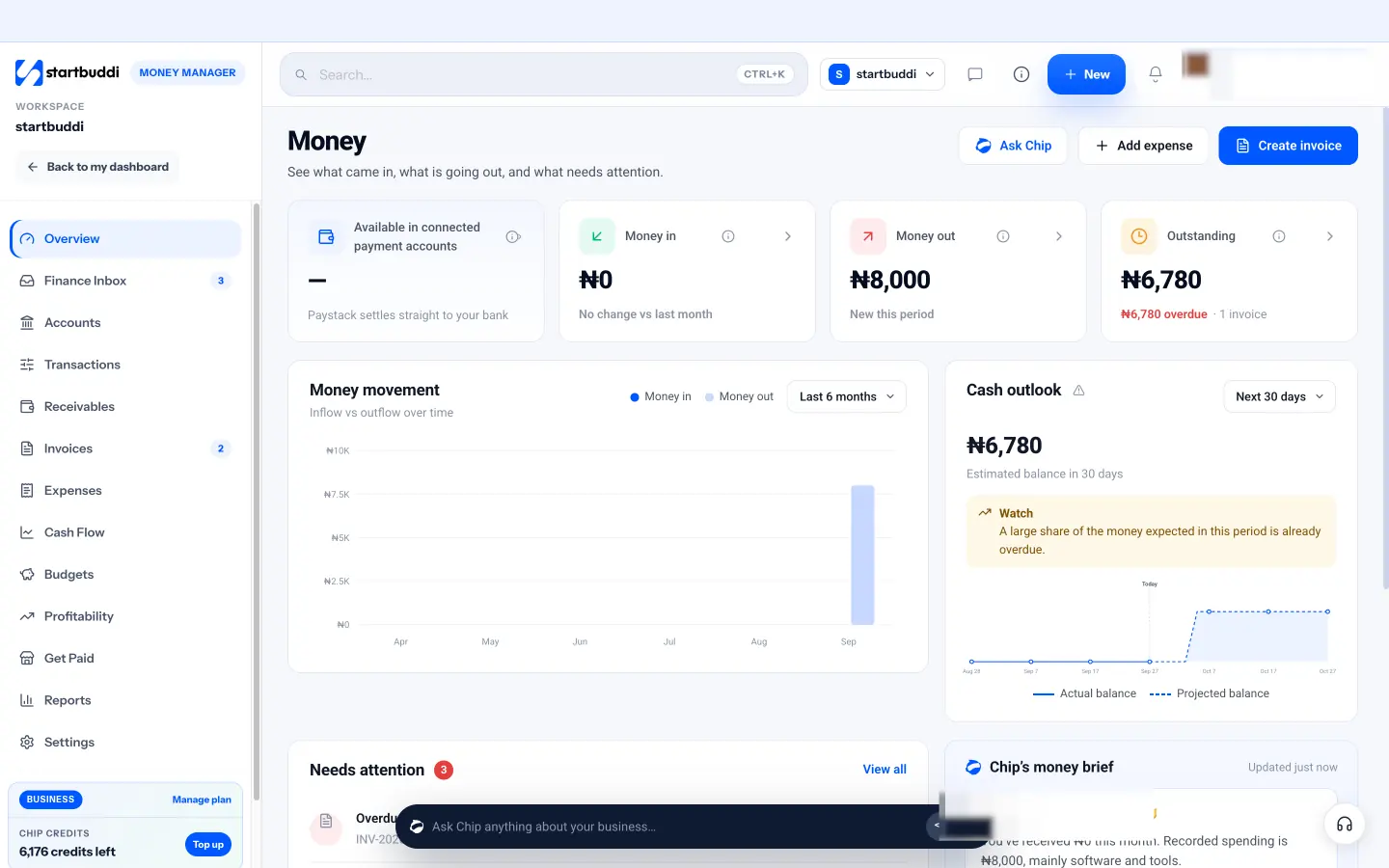
- An overview that answers the daily questions: money in and money out this month, what’s outstanding (with the overdue part in red), a six-month chart of money in against money out, and an estimated balance in 30 days.
- Invoices with online payment. Customers pay with Paystack (cards, bank transfer, USSD, mobile money in Nigeria, Ghana, Kenya and South Africa) or Stripe (cards). Paid invoices are marked automatically. Payments go to your own account: startbuddi never holds your money. See invoicing for details.
- Receivables and reminders. A Receivables view shows who owes you and what’s due soon, with a Remind button per invoice and a reminder sequence you can set once.
- Expenses, bills and reimbursements. Log expenses with receipts, add recurring costs, record bills you owe and pay back teammates. Expenses link to projects and customers.
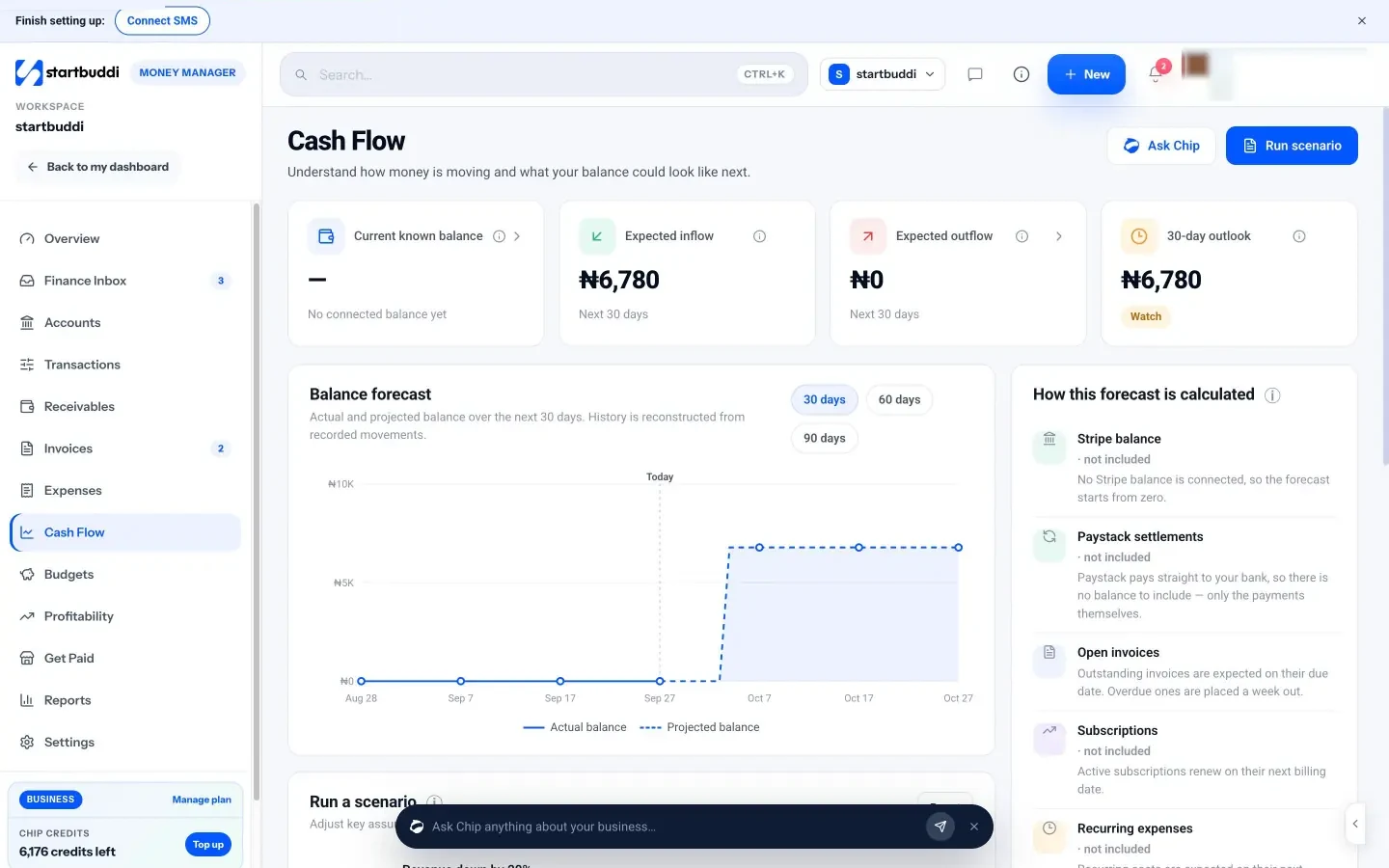
- Cash flow, budgets and profitability. The forecast lists every input it used, and you can run a scenario such as “overdue invoices paid this week”. Profitability shows revenue minus attributed expenses per project, customer or campaign.
- A Finance Inbox and Chip. Overdue invoices, unmatched payments and budget warnings appear in one list. You can ask Chip, the built-in AI assistant, to summarise your month or draft a reminder.
The cash flow forecast is built from open invoices, subscriptions, recurring expenses and bills, and shows which of them it included.
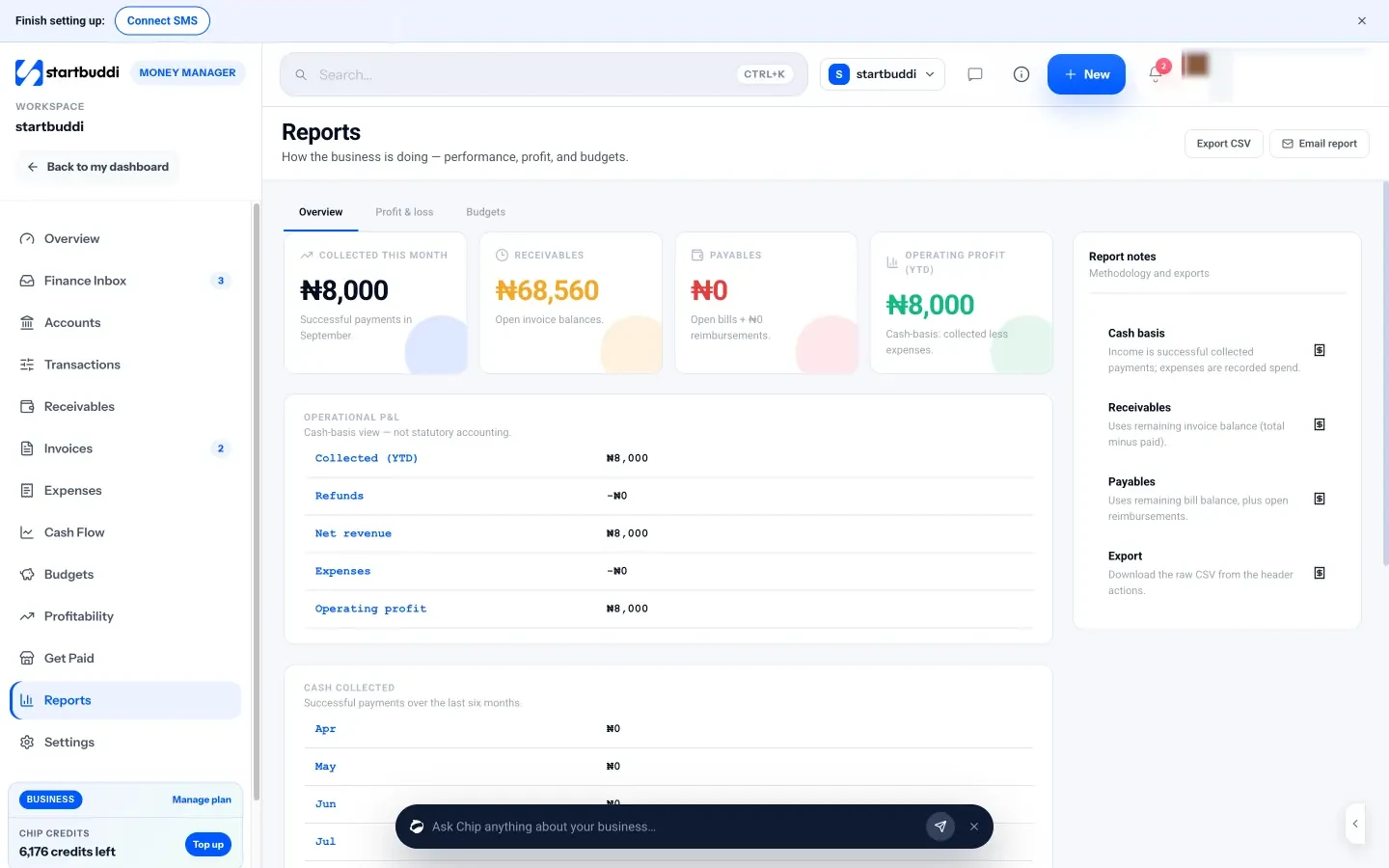
Where it stops. Money Manager is not accounting software. It has no bank feeds, no QuickBooks or Xero sync, no payroll, no general ledger and no tax filing. Balances come from your connected Stripe account; Paystack settles straight to your bank, so there’s no balance to show from it. The profit and loss in Reports is a cash-basis view, not statutory accounts, and the tax summary is a running total of tax on your invoices, not a return. Bank transfers and PayPal payments are recorded by you when the money lands. The Free plan includes 5 invoices a month; Starter and above are unlimited.
Your next step
Write down the three money questions you struggle to answer today, such as “who owes me?” or “what will I have in the bank on the 30th?”. Then try a finance manager against those three questions for a week. You can start on startbuddi’s Free plan, or compare everything on the pricing page.
Sources
- US Small Business Administration: Manage your finances
- Federal Reserve Banks: 2025 Report on Employer Firms (Small Business Credit Survey)
- GOV.UK: How long to keep your records (self-employed)
- IRS: How long should I keep records?
- Canada Revenue Agency: Where to keep your records and for how long
- Nigeria Revenue Service
Frequently asked questions
Is business finance manager software the same as accounting software?
No. A finance manager runs day-to-day money: invoices, payments, expenses and cash flow. Accounting software keeps formal books with a ledger and bank reconciliation for tax and statutory reporting.
Can a small business use a finance manager without an accountant?
For daily money, yes. For tax returns, company accounts and advice on what to claim, most businesses still benefit from an accountant, at least once a year.
What should I look for first in business finance manager software?
Check that it takes payments the way your customers pay, sends payments straight to your own account, and shows clearly who owes you. Then ask what it doesn't do, such as bank feeds or payroll.
Is startbuddi's Money Manager free?
Yes, it's on every plan. The Free plan includes 5 invoices a month, and Starter and above include unlimited invoices.
Chinedu Kalu is the co-founder and chief operating officer of startbuddi, responsible for how the company runs day to day. Chinedu writes about the operational side of a small business: registering and running the company, money, hiring and the routines that keep a team on track.
Co-founded startbuddi and runs its operations