How to keep track of clients when everything is scattered across chats and notes
How to keep track of clients when details live in WhatsApp, email, notes and memory: a one-hour clean-up, a client record template, channel rules and a weekly review.



- Give every client one record in one place, and move decisions, dates and payments out of chats into it the same day. Keep the record short, always include a dated next step, and spend ten minutes a week reviewing it.
The simplest way to keep track of clients is to give every client one record in one place, and to make a habit of moving anything important out of chats, notes and inboxes into that record the same day. The record needs only a few things: contact details, what they bought or asked for, where things stand, your last conversation, and the next step with a date. A spreadsheet can do this for a handful of clients; a CRM does it better once messages arrive on several channels or more than one person serves clients.
This guide is for freelancers, small agencies and service businesses whose client details are spread across WhatsApp, email, Instagram DMs, voice notes, a notebook and memory. You’ll get a one-hour clean-up plan, a client record template, rules for each channel, and a ten-minute weekly routine that keeps it all current.
Why keeping track of clients gets harder as you grow
With three clients, memory works. You know who’s waiting for what. With ten, you start scrolling through WhatsApp to find the address someone sent in March. With twenty, you promise a client something on a call, forget, and hear about it a week later.
The cause isn’t laziness. It’s that client information arrives in too many places:
- Chats: WhatsApp, Instagram and Facebook messages, often mixed with personal conversations.
- Email: briefs, approvals and invoices spread across threads.
- Calls and voice notes: decisions that were never written down.
- Files: briefs in Google Drive, photos on your phone, contracts in downloads.
- Payments: in your bank app, with no link to the job.
Each channel works fine alone. The trouble is that no single place tells you the whole story of a client. When you need it (an unexpected call, a colleague covering for you, a dispute about what was agreed) you’re searching instead of answering.
What you need to keep track of for each client
Resist the urge to record everything. A short record you keep up to date beats a detailed one you abandon. Here’s a client card that works for most service businesses:
| Section | What to record |
|---|---|
| Who | Name, company, best phone and email, preferred channel |
| How they found you | Referral, Instagram, Google, repeat client |
| What they want | The job or service, in their words |
| Status | Enquiry, quoted, active, finished, paused |
| Key facts | Deadlines, budget, preferences, anything you promised |
| Last contact | Date and a one-line summary |
| Next step | What happens next, who does it, by when |
| Money | Quoted, invoiced, paid, outstanding |
| Files | Links to the brief, contract and deliverables |
If you want a deeper look at database fields and structure, see how to create a customer database. For a first pass, the table above is plenty.
Step 1: pick one home for client information
Decide where the client card lives. The options, from simplest to most capable:
- A notes app or document: fine for a few clients, but hard to sort or search by status.
- A spreadsheet: sortable and free, but no reminders or message history. Good for up to a few dozen clients with one person managing them. Our comparison of CRM vs Excel explains when it stops working.
- A CRM: a contact list with a memory, reminders and, in many tools, messages from several channels on the same record.
Which home suits you?
| Your situation | Good fit |
|---|---|
| Under 10 active clients, one person, mostly one channel | A spreadsheet or a well-kept notes document |
| 10 to 30 active clients, several channels, one person | A spreadsheet with a strict weekly review, or a simple CRM |
| More than 30 clients, or two or more people serving clients | A CRM with a shared inbox and reminders |
| Clients book appointments or pay online | A CRM connected to your booking page and invoices, so those records appear automatically |
Whatever you choose, the client record should be the first place you look and the last place you update.
The rule that matters more than the tool: if it isn’t in the home, it didn’t happen. Agree that with yourself, and with your team if you have one.
Step 2: a one-hour clean-up to get everything in one place
You don’t need to migrate years of history. Aim for a useful record of every active client and open enquiry.
- List active clients and open enquiries (10 minutes). Scroll your WhatsApp chats, inbox and DMs from the last 60 days and write down every name that’s still live.
- Create a record for each (20 minutes). Name, contact details, status and what they want. Nothing more yet.
- Add the one line that matters (15 minutes). For each client, the last thing that happened and the next step with a date.
- Link the files (10 minutes). Paste the link to each brief or contract into the record.
- Park the rest (5 minutes). Old clients can be added later, when they get in touch again.
After an hour you have something you didn’t have before: one list that answers “who needs what from me this week?”
Step 3: set a rule for each channel
New information will keep arriving in chats and inboxes. The trick is to decide in advance what gets moved into the client record, and when.
| Channel | What to capture | When |
|---|---|---|
| WhatsApp and DMs | Decisions, addresses, dates, approvals | Same day, as a one-line note |
| Briefs, approvals, changes to scope | When you reply, add a note or link | |
| Phone and video calls | What was agreed and who does what next | Straight after the call, two or three lines |
| Voice notes | The request, in writing | Before you act on it |
| Payments | Amount, date and what it was for | When you see it in your bank or payment app |
A good test: if you were ill tomorrow, could someone else read the record and carry on? If not, the missing piece is what you should be capturing. For more on bringing conversations together, see our guide to organising client communication in one place, and if WhatsApp is your main channel, managing clients on WhatsApp.
Step 4: use an intake form for new clients
Most of the scatter starts at the beginning, when details arrive in bits over several messages. A short intake form fixes that. Ask for the same things every time: contact details, what they need, deadline, budget range, and how they heard about you. When the form sends answers straight into your client list, the record starts complete.
Keep it to six or eight questions. Our client intake form template is a good starting point, and how to onboard a new client covers what happens after the form.
Step 5: a ten-minute weekly review
Tracking clients isn’t a one-off tidy-up. It’s a short weekly habit. Every Monday or Friday:
- Sort your list by next step date. Anything overdue? Do it or reschedule it.
- Check anyone with no next step. Every active client needs one.
- Look for clients you haven’t contacted in two weeks. Send a short update or check-in.
- Check money: who has an unpaid invoice, whose deposit hasn’t arrived.
- Close finished jobs: mark them done and set a reminder to check in a few months later.
Ten minutes a week is the difference between a list that stays useful and one that quietly goes out of date.
An example: the same Tuesday, with and without tracking
Take Zanele, who runs a small interior design studio in Cape Town. A client, Mr Botha, calls at 9am asking whether the fabric samples he approved “last week” have been ordered, and what he still owes.
Without a system, Zanele searches WhatsApp for “fabric”, finds three threads, isn’t sure which approval was final, checks her email for the invoice, opens her banking app to see if the deposit arrived, and promises to call back. Twenty minutes gone, and the client has heard “I’ll get back to you”.
With a client record, she opens one page. The note from Thursday says “Approved linen option B, order Monday”. The task “Order fabric” is ticked with Monday’s date. The money summary shows the deposit paid and the balance due on delivery. She answers in thirty seconds, and the client hangs up confident that someone is in control.
Nothing about the second version needed clever software. It needed the habit of writing one line after each decision, in one place.
Keeping track of clients as a team
When two or more people deal with clients, tracking stops being about memory and becomes about hand-offs. A few extra rules help:
- Every client has an owner. Others can help, but one name is responsible for the next step.
- Notes are written for someone else. “Spoke to J, fine” helps nobody. “Jane approved the draft; wants the final by the 20th; invoice after sign-off” does.
- Conversations happen where the team can see them. Client messages on a personal phone disappear when that person is on leave. A shared business number or inbox keeps them visible.
- Hand-overs are written, not verbal. When a client moves from sales to delivery, the person selling updates the record before the kick-off.
What to track after the job ends
Finished clients are where repeat work and referrals come from, so don’t archive them and forget. Record the date the job ended, what you delivered, whether they were happy, and whether they’d make a good referral source. Then set a reminder to check in: three months later for most services, sooner for anything seasonal. A simple “How is the new website working for you?” message often turns into the next project.
Mistakes that make client tracking fall apart
- Tracking in two places. A spreadsheet plus a notebook plus a CRM means none of them is complete. Pick one.
- Too many fields. If a new record takes five minutes, you’ll stop creating them.
- No next step. A record without a dated next step is an archive, not a tracker.
- Relying on chat search. Search finds a message; it doesn’t tell you the current status.
- Personal and business mixed together. A separate business number or WhatsApp Business account makes it easier to keep client conversations apart.
- Keeping sensitive details in chats. General information, not legal advice: client data is personal data under laws such as the UK and EU GDPR and Nigeria’s data protection law. Keeping it in one secure place makes it easier to protect and to find if a client asks what you hold.
How to keep track of clients in startbuddi
If you’d rather not stitch the steps above together yourself, here’s how they work in startbuddi.
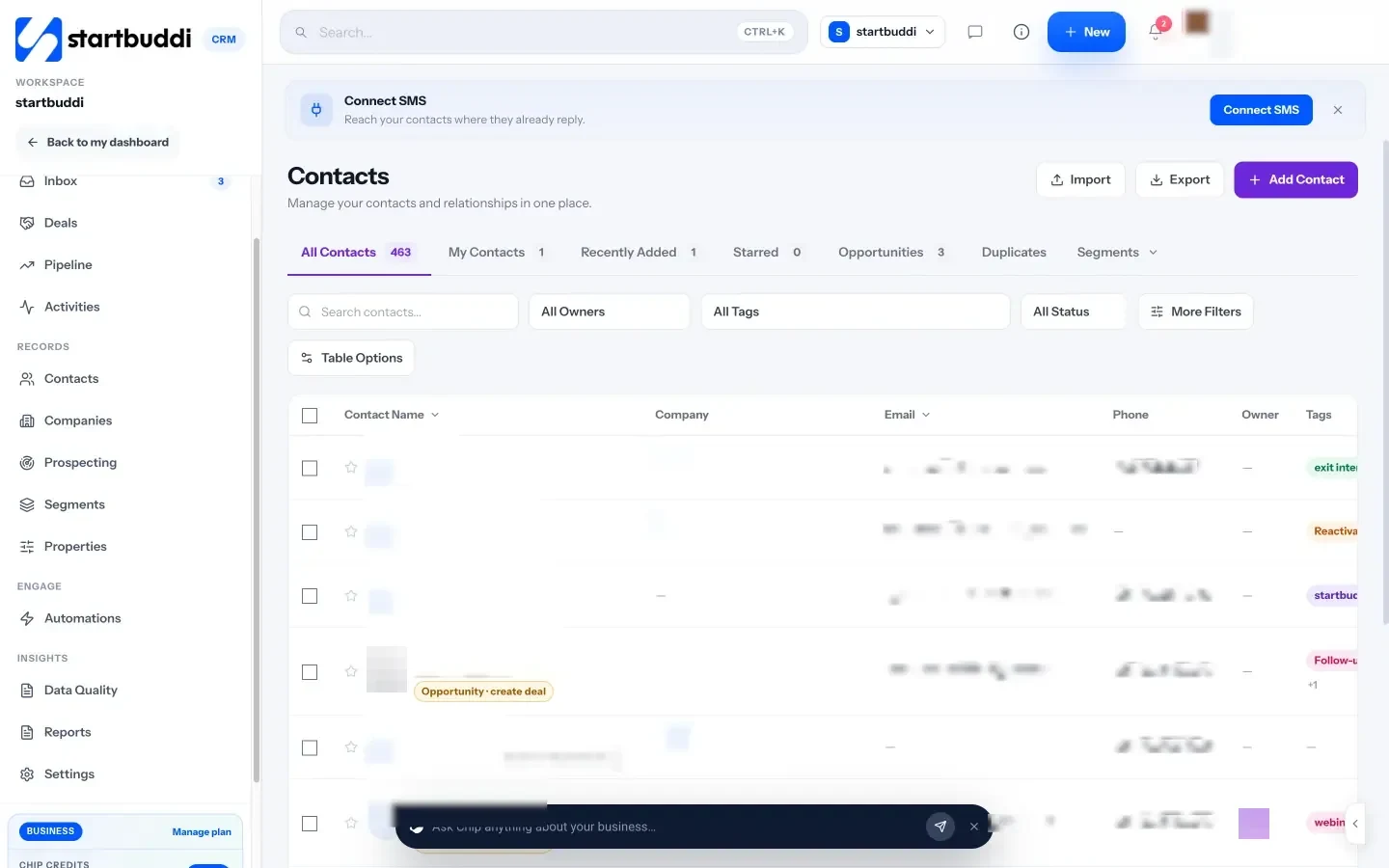
One record per client. In Contacts, each client has a page with their details, notes, tasks, deals, files and messages, plus a money summary showing what’s been invoiced, paid and outstanding. A name, an email or a phone number is enough to create one.
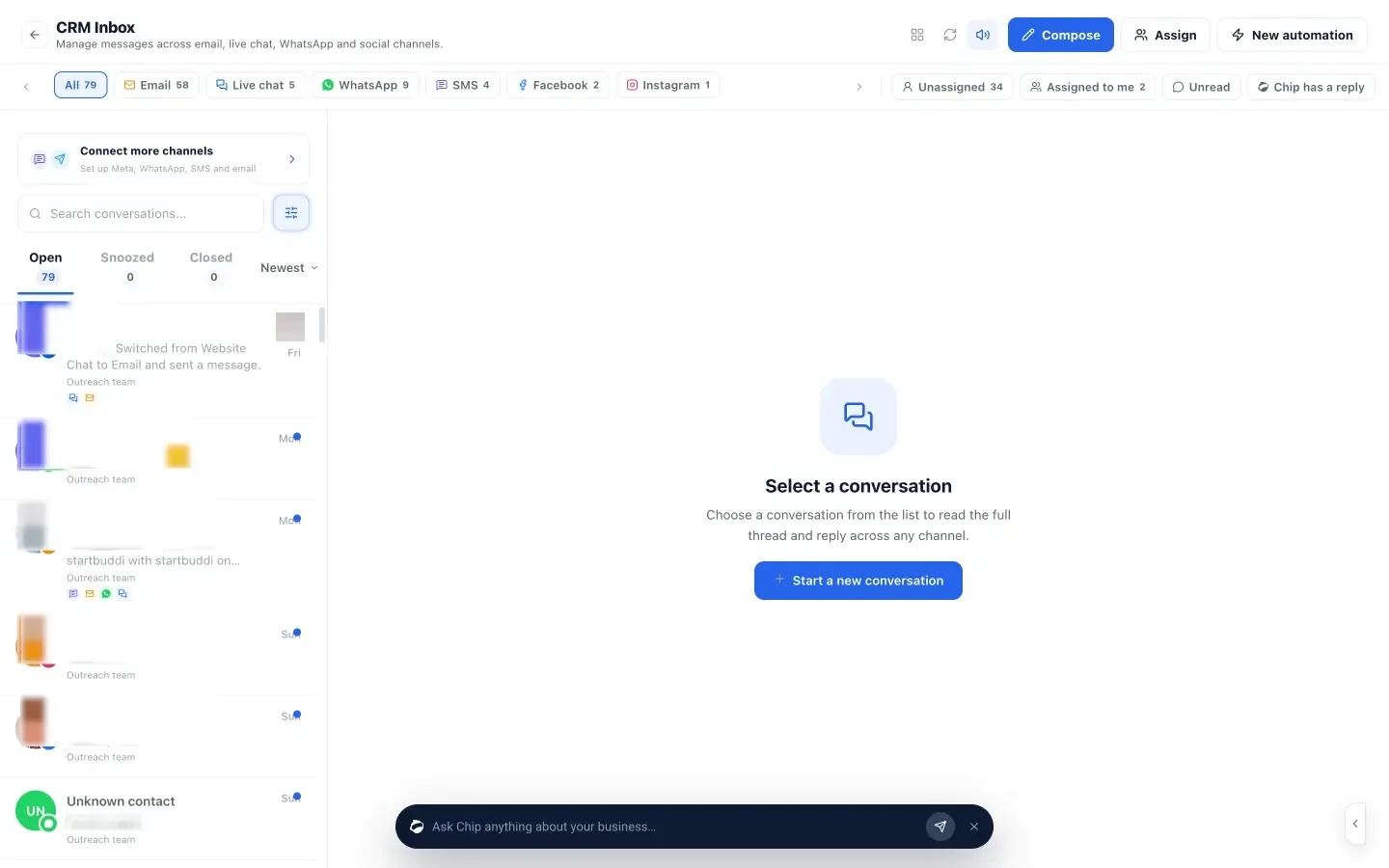
Messages in one inbox. The shared inbox brings email, website chat, WhatsApp, SMS, Instagram and Facebook messages into one list. Notes you add in the inbox appear on the contact too, and the other way round. WhatsApp and SMS need the Starter plan or above.
Records that fill themselves. Forms, bookings and website chat create or update contacts, so the intake step doesn’t need retyping.
Next steps you can’t miss. Activities list every follow-up with a due date and owner, and show what’s overdue. Filters such as “last contacted” find clients who’ve gone quiet. Chip, the AI assistant, can answer “Who needs a reply?” from your real data.
Clients who can check for themselves. On the Starter plan and above, client portals give a client a private page with the projects, files, approvals and invoices you choose to share. They sign in with an email link, so fewer “where are we?” messages land in your chats in the first place.
The Free plan includes up to 250 contacts, and every paid plan has a 30-day trial (see pricing). See pricing for details.
Your next step
Block one hour this week for the clean-up in step 2. By the end of it, every active client will have one record with a next step and a date. Then put the ten-minute review in your calendar for every Friday. Once that habit sticks, decide whether a spreadsheet is still enough or whether it’s time for a CRM.
Frequently asked questions
What is the easiest way to keep track of clients?
One record per client in one place, with contact details, status, last contact and a dated next step. Start in a spreadsheet if you have few clients, and move to a CRM when messages come from several channels or several people serve clients.
How do I keep track of clients on WhatsApp?
Use WhatsApp for conversation but copy decisions, dates and approvals into the client record the same day. A shared inbox that pulls WhatsApp messages onto the client record removes that copying step.
How often should I update client records?
After every meaningful interaction, such as a call, a decision or a payment, plus a ten-minute weekly review to catch anything overdue or missing a next step.
What should a client record include?
Name and contact details, how they found you, what they want, status, key facts and promises, last contact, next step with a date, money owed or paid, and links to files.
Tiwalade Joanna Okedara-Kalu is the founder, CEO and CTO of startbuddi, the business system that brings clients, bookings, invoices, projects, marketing and the Chip AI assistant into one place. Tiwalade builds software around how service businesses really work day to day, and writes about client management, getting paid on time and why small businesses outgrow the tools they start with.
Founded startbuddi and leads its product and engineering