Client management for freelancers: how to run every client without the chaos
A simple client management system for freelancers: written scope, one record per client, a weekly update rhythm and a close-out routine that brings clients back.


Chinonye wrote this while on the startbuddi team. The product has changed since, so the team updated it on .

- Client management for freelancers means always knowing what each client is waiting on, what you are waiting on, what is due and what they owe. Set scope and terms in writing, keep one record per client, update on a fixed rhythm and close every project with a feedback and referral step.
Client management for freelancers is the simple system you use to run every client relationship from the first message to the final payment: what you agreed, what is due, what you are waiting on, and whether you have been paid. Done well, it means you never rely on memory, clients always know what is happening, and good clients come back and refer you.
Most freelancers don’t lose clients because the work is bad. They lose them because of small, avoidable gaps: a reply that took three days, a deadline nobody flagged, an invoice that went out late. This guide shows you how to close those gaps with a written scope, a steady update rhythm, one place for client details, and a follow-up habit that doesn’t feel like chasing.
What client management for freelancers actually covers
Think of it as four things you need to know about every client at any moment:
- What they are waiting on from you: the next deliverable, a reply, a quote.
- What you are waiting on from them: feedback, content, an approval, a deposit.
- When things are due: deadlines for both sides, not just yours.
- Where the money is: what you have invoiced, what has been paid and what is late.
If you can answer those four questions for every client in under a minute, your client management works. If the answers are spread across WhatsApp, email, a notebook and your head, it doesn’t, even if it has held together so far.
A client management system is not the same thing as a big CRM. For a freelancer it can be a short list of clients, a record for each one with notes and files, a task list with dates, and a way to invoice. What matters is that it lives in one place and that you actually open it every day.
Why freelance client relationships break down
When you look back at a client relationship that went sour, the cause is rarely personality. It is almost always a process gap. These are the common ones:
- No written scope. The client assumed something was included, you assumed it wasn’t, and nobody wrote it down.
- Silence. You were working hard, but the client heard nothing for a week and started to worry.
- Unlimited revisions. Round four turns into round seven because nobody said how many rounds the price covered.
- Late or missing invoices. You forgot to bill, or billed weeks after delivery, which makes payment feel optional.
- Too many channels. Feedback arrives by voice note, email and a comment on a shared document, and something gets missed.
Every one of these is fixable with a small habit set up once. You don’t need to become a project manager. You need a few rules and one place to keep them.
Set expectations on day one
The best time to manage a client relationship is before the work starts. Put these five things in writing, in your proposal or a short agreement, and ask the client to confirm them:
- Scope: exactly what is included, and a line saying what isn’t. “Five-page website, copy supplied by the client, two rounds of design changes” is a scope. “A website” is not.
- Timeline: the dates you can realistically hit, with a little buffer. Add a line that your dates depend on the client sending feedback and content on time.
- Revisions: how many rounds are included and what an extra round costs.
- Communication: how and when you reply. For example, “I reply to messages within one working day, Monday to Friday, and send a progress update every Friday.”
- Payment terms: deposit, when the balance is due, how to pay and what happens if a payment is late.
If you don’t have an agreement yet, start from our freelance agreement template and adjust it to your work. Payment rules differ by country, so it’s worth checking the basics where you are. In the UK, for example, the government’s guidance says that if you don’t agree a payment date with a business customer, payment is late 30 days after they get the invoice or the work is delivered. This is general information, not legal advice.
Clients rarely push back on this. Stating your terms clearly reads as confidence. The freelancers who skip the conversation are usually the ones resenting a project three weeks later because it grew past the quote.
Keep one record per client
Every client should have one home where you can find everything about them. Whatever tool you use, each client record should hold:
| What to keep | Why it matters |
|---|---|
| Name, company, email, phone, preferred channel | You reach them the way they like, without searching. |
| The agreed scope and price | You can point back to it when a request is out of scope. |
| Notes from calls and meetings | You remember decisions, preferences and names. |
| Open tasks and due dates | Nothing slips between projects. |
| Files and links | The latest version is always in one place. |
| Invoices and payments | You know who owes what before you start more work. |
| Where they came from | You learn which channels bring good clients. |
The rule that makes this work: if something important happens in a chat, copy the decision into the client’s record the same day. A one-line note (“Agreed to move launch to 14 March, client sends photos by Friday”) saves an argument later.
How to manage tasks and deadlines across clients
Juggling several clients is where freelancers burn out. The ones who stay calm aren’t working fewer hours. They are tracking better. Four habits do most of the work:
Break every project into milestones
“Deliver the website in three weeks” becomes “design approved by day 5, pages built by day 12, changes done by day 18, launch day 21”. Clients see progress, and you see early if something is slipping. Our guide to managing client projects goes deeper on this.
Add buffer to every estimate
If a task looks like three days, plan four. Feedback delays, sick days and revision rounds always eat time somewhere. A date you beat builds trust. A date you miss costs it.
Look at one list, not five
Keep every task for every client in one list, sorted by due date. Each morning, check what is due today and this week across all clients before you open your inbox. That single habit prevents most missed deadlines.
Block time per client
Switching between clients every hour is tiring and slow. Give each client a block, such as Tuesday morning for client A and Tuesday afternoon for client B, and protect it.
Communicate on a rhythm so clients never wonder
Silence is what makes clients anxious, not slow progress. A short, regular update replaces a stream of “any news?” messages. Send one every week, or at each milestone, even when there’s little to report. A simple format works:
Hi Amara, quick update on the rebrand. Done this week: logo options finalised and colour palette drafted. Next week: business card and social templates. Waiting on you: your choice of logo by Wednesday so we stay on schedule. Anything you want to change, just reply here.
Three more habits help:
- Pick one channel per client for decisions. Chat is fine for quick questions, but confirm anything that changes scope, price or dates in writing.
- Reply fast, even if the answer is “I’ll come back to you by Thursday”. An acknowledgement buys you time without leaving the client guessing.
- Share progress where the client can see it. A shared page with the plan, files and approvals means fewer status questions.
Handle scope changes and difficult moments calmly
Extra requests are normal. The problem is saying yes to them silently. When a client asks for something outside the scope, reply the same day with three options: add it for an extra fee, swap it for something already in scope, or add it to a later phase. Put the choice in writing before you start.
When a client has unrealistic expectations, go back to the written scope and timeline, explain what good work needs, and offer a realistic alternative instead of a flat no. If a deadline is going to slip on your side, say so as early as you know, with a new date and a reason. Clients forgive delays they hear about early. They rarely forgive surprises.
For payment problems, send the invoice on the day you deliver, send a friendly reminder a few days before it’s due, and follow up on the due date. Don’t start the next phase while a large invoice is overdue. Our post on collecting payment from clients has message templates you can reuse.
Follow up and keep clients coming back
Finishing the project is not the end of client management. The period right after delivery is when clients decide whether to hire you again and whether to recommend you. Build a simple close-out routine:
- Handover: send final files, logins and a short note on what you delivered.
- Feedback: ask two questions: what went well, and what would have made it better.
- Review or referral: if they are happy, ask if they would leave a review or introduce you to one person who could use your help.
- Check-in: set a reminder to get in touch in 60 to 90 days with something useful, such as an idea for their next step.
Keeping a client is usually far cheaper than finding a new one, because you skip the pitching, negotiating and onboarding. For more ideas, see how to retain clients and our checklist for onboarding a new client the right way from the start.
Tools for client management: what you need and when
You can start with a spreadsheet and a calendar. That works for one or two clients. Past three, the gaps above start to appear, because a spreadsheet can’t remind you, can’t show a client their progress and doesn’t know whether an invoice was paid.
| Need | Manual way | With a system |
|---|---|---|
| Client details and history | Spread across chats and email | One record per client with notes and files |
| Deadlines | Memory or sticky notes | One task list across all clients, with due dates |
| Progress updates | Typed from scratch each time | A shared page the client can check |
| Calls | Back-and-forth about times | A booking link |
| Invoices | Word documents and bank checks | Invoices linked to the client, with paid status |
Whatever you choose, pick something you will open every day. A simple tool you use beats a clever one you ignore. If you juggle many clients at once, our post on managing multiple freelance clients covers weekly planning in more detail. To compare tools, see our list of the best client management software, with a source for every price.
How startbuddi helps with client management for freelancers
With startbuddi, your clients, work and money live in one account, so the four questions at the top of this post have one place to live.
- One record per client. In Contacts, a name, an email or a phone number is enough to start. Each contact page has notes, tasks, deals, files and past conversations, plus a money tile showing what you have invoiced, what has been paid and what is overdue.
- Projects with a client view. In Work, start from a template such as Client delivery, add tasks with dates and milestones, and log time. Client portals give each client a private page to follow the work, approve deliverables and message you. Clients sign in with an email link, with no password and no extra seat.
- Invoices tied to the client. Create an invoice from the contact page in Money Manager and see when it’s paid.
- Chip on every screen. Ask Chip questions such as “Who needs a reply?” or “Who haven’t I contacted in 14 days?”, or get help drafting a follow-up message. You review everything before it goes out.

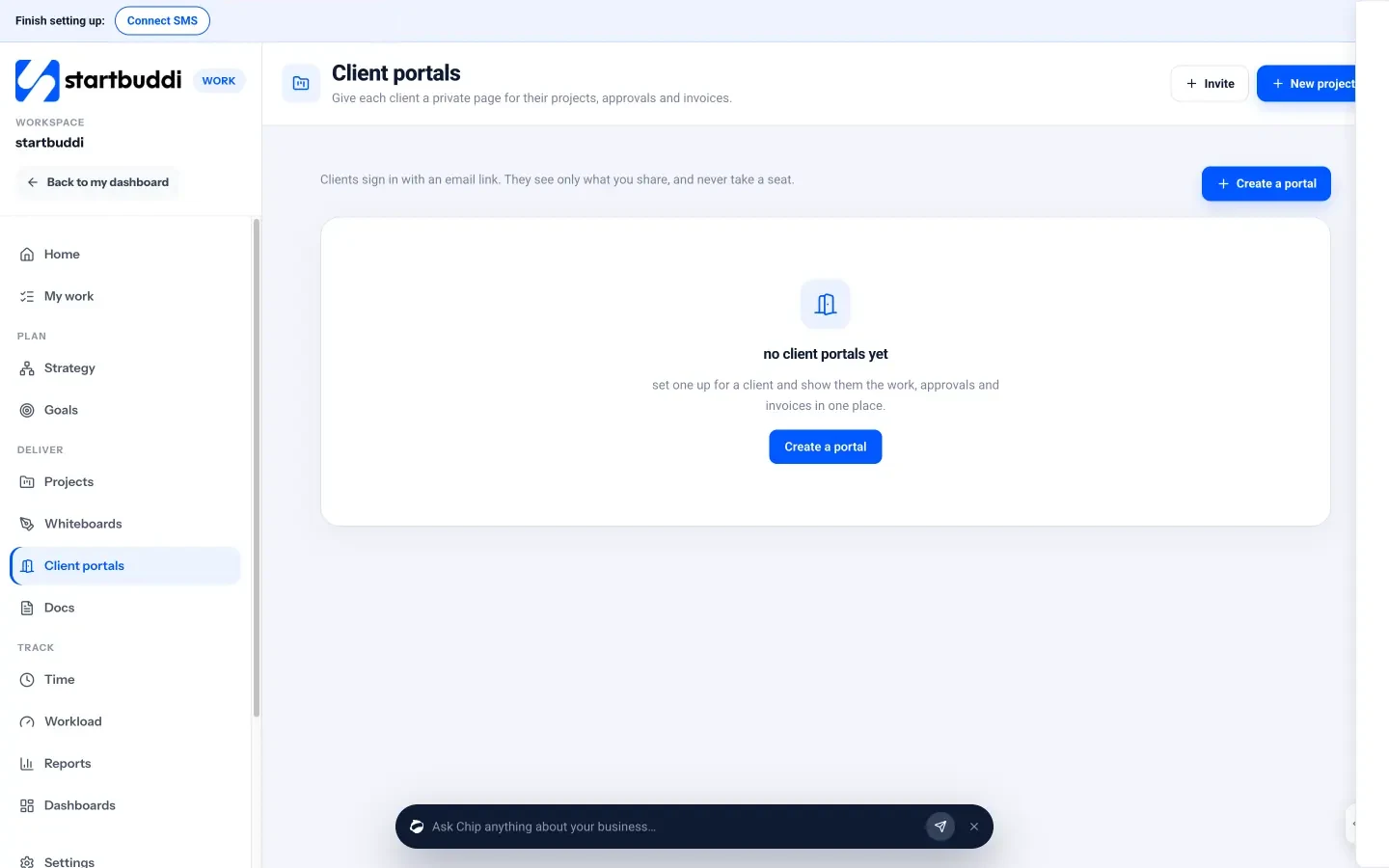
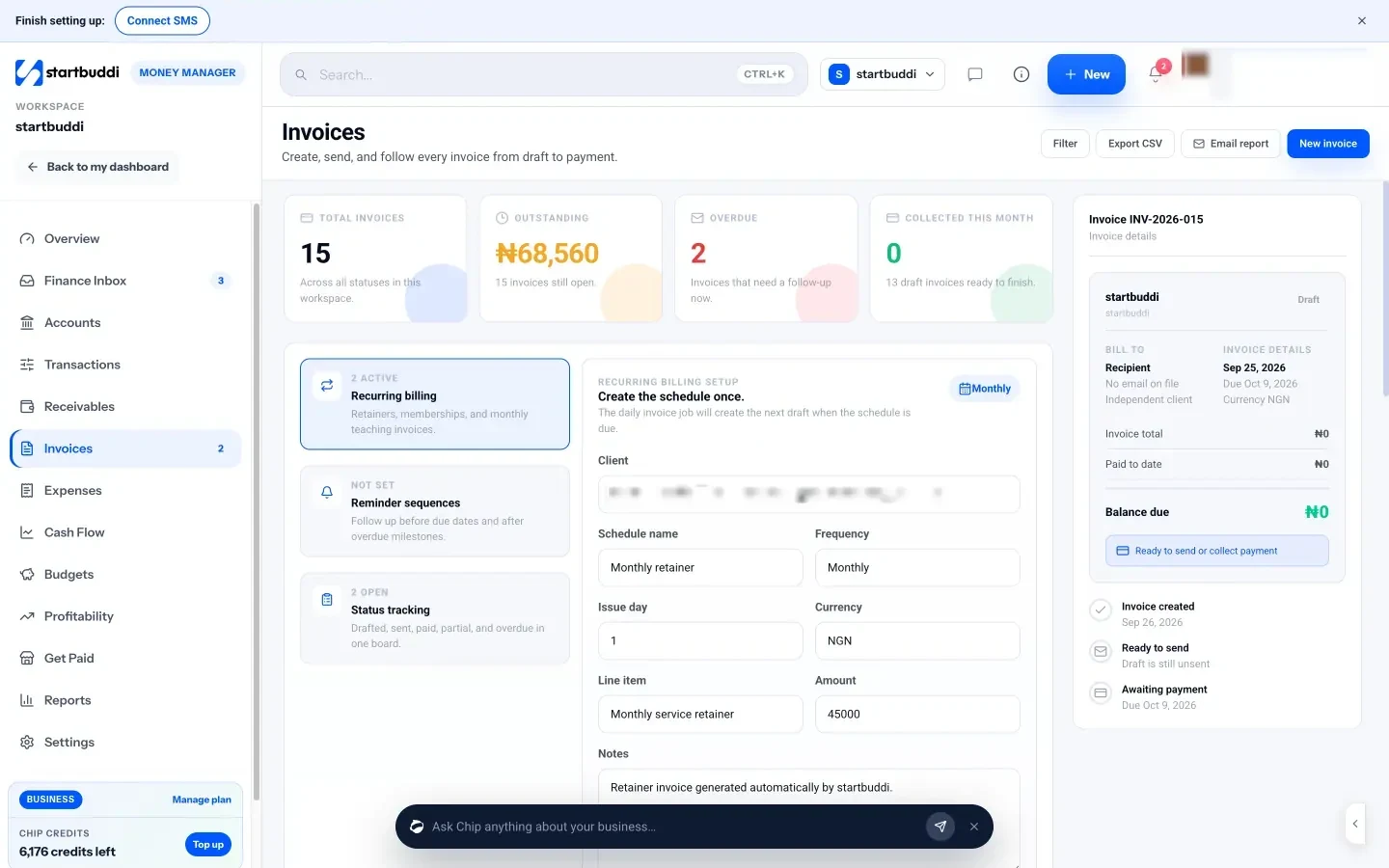
The Free plan covers one person and up to 250 contacts. Client portals can be built and previewed on Free, and inviting clients starts on Starter (see pricing). See our page for freelancers for more.
Your next step
Pick your busiest client and write down the four answers today: what they’re waiting on, what you’re waiting on, what is due and what they owe. Then put that client’s record, tasks and invoice in one place. When it works for one client, move the rest over. If you want that place to be startbuddi, start free and add your first client in a couple of minutes.
Sources
Frequently asked questions
What is the best way to start client management as a freelancer?
Write down the scope, timeline, revisions and payment terms for each client, then keep their details, tasks and invoices in one place you check daily.
Is a spreadsheet enough to manage freelance clients?
For one or two clients, often yes. Once you juggle three or more, you need reminders, shared progress and invoice status, which a spreadsheet can't give you.
How often should I update freelance clients?
Once a week or at each milestone, even when there's little to report. A short, predictable update stops most "any news?" messages.
What is the difference between client management and a CRM?
Client management is the whole routine: scope, communication, deadlines and payments. A CRM is the tool that stores client details and history, usually one part of that routine.
SEO Copywriter| Email growth Specialist| I help businesses increase revenue with strategic SEO content & high-converting email funnels.